What is a CDN?
A content delivery network (CDN) is a network of servers spread across many locations that sits between your visitors and your own server. It keeps copies of files and pages that are the same for everyone and answers visitors from a server near them. Your server, called the origin, only answers when the CDN has no usable copy.
MDN’s glossary sums up the promise: CDNs make for fast service less affected by high traffic. Both halves of that sentence matter in this guide. Fast service comes from distance, which part 10 covered. Being less affected by high traffic comes from caching, and that is the half this article is about.
A few terms are worth fixing now. The servers near visitors are called edge servers. A request the CDN can answer from its own copy is a cache hit; one it has to pass to your server is a cache miss. The cache key is what the CDN uses to decide whether two requests are for the same thing, usually the full address including its query string.
A chain of local depots is a fair picture. Everyday stock sits in a depot near every customer, so most orders never trouble the factory. A made-to-order item still has to come from the factory, however many depots you open. Under load, the question is how much of your traffic is everyday stock.
How does a CDN work?
When a visitor requests a page, the CDN routes them to a nearby edge server. That server checks its cache for a copy matching the request’s cache key. On a hit it answers straight away. On a miss it fetches the response from your origin, stores it if the response’s caching headers allow, and passes it on.
Your server decides what may be cached. A Cache-Control header on each response tells the CDN whether to store it and for how long, and many CDNs add their own defaults on top. Files such as images, scripts and stylesheets are the usual candidates. HTML is less often cached: the 2025 Web Almanac found that HTML content has the lowest CDN usage at 35% of any content type it measured.
Even a miss gains something. The visitor’s connection is opened and secured at the nearby edge, not at your distant origin, which is why the connection phases from part 8 shrink behind a CDN. On the far side, the CDN keeps its own connections to your origin open. Amazon CloudFront’s documentation says that maintaining a persistent connection saves the time required to re-establish the TCP connection and perform another TLS handshake for subsequent requests.
What does a CDN do for your site under load?
Under load a CDN does four useful things. It answers cacheable requests without asking your origin, it merges a rush of identical misses into one, it can add a second layer of cache in front of your origin, and it can keep serving a slightly stale copy while your origin struggles. Each one depends on how you configure it.
It answers requests your origin never sees
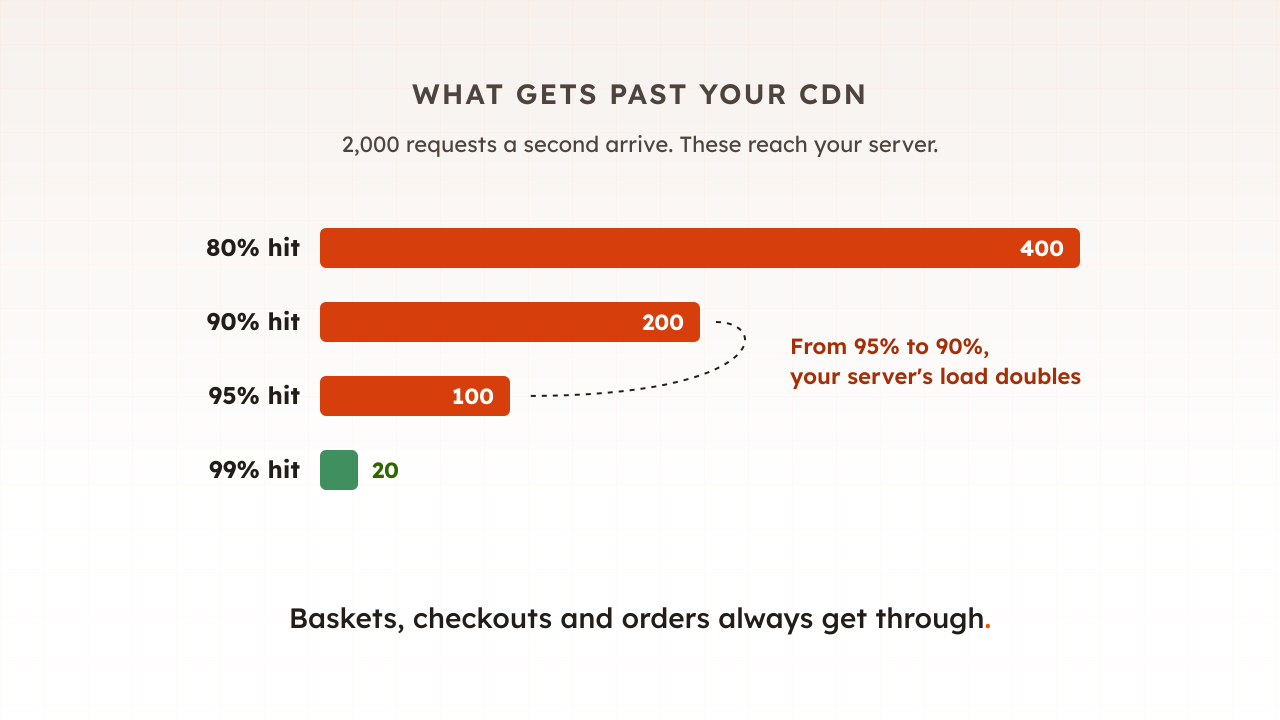
The measure here is the cache hit ratio. Fastly defines it as the percentage of requests a CDN can serve from its cache, rather than fetching from the origin. The arithmetic is less intuitive than it looks. In the same 2024 article Fastly’s engineers point out that if your CHR increases from 90% to 95%, it’s not merely a 5% improvement; it actually halves your origin load.
At the top end the effect is dramatic. Troy Hunt, who runs Have I Been Pwned, reported in 2023 that after tuning his Cloudflare setup it was now only 5k requests per million hitting the origin. That is a hit ratio of 99.5%: his servers saw one request in two hundred.
It merges a rush of identical misses
When a popular item is not in the cache, many visitors can ask for it in the same instant. CloudFront handles this with request collapsing: if more requests for the same object arrive before the first response returns, CloudFront pauses before forwarding the additional requests to the origin and answers them all from the one response. Cloudflare and Fastly do something similar.
There is a limit. CloudFront only collapses requests that share a cache key, so requests that differ by query string, cookie or header each go to your origin.
It can put a second cache in front of your origin
Most large CDNs offer a middle layer, called an origin shield or tiered cache, that sits between the edge servers and your origin, so misses at many edges can become a single request to your origin. AWS says that with Origin Shield, requests for the same uncached object are consolidated, resulting in as few as one request going to your origin, which can preserve the origin’s availability during peak loads. The same page is candid that it may not be a good fit for dynamic content that is proxied to the origin.
It can keep serving while your origin struggles
Two Cache-Control extensions from RFC 5861 let a cache bend the rules. stale-while-revalidate lets it serve an expired copy while it fetches a fresh one in the background. stale-if-error means that when the origin returns an error, a cached stale response may be used to satisfy the request. On a bad afternoon, a product page that is ten minutes old beats an error page. Your origin has to send these directives, and your CDN has to support them.
What still reaches your origin under load?
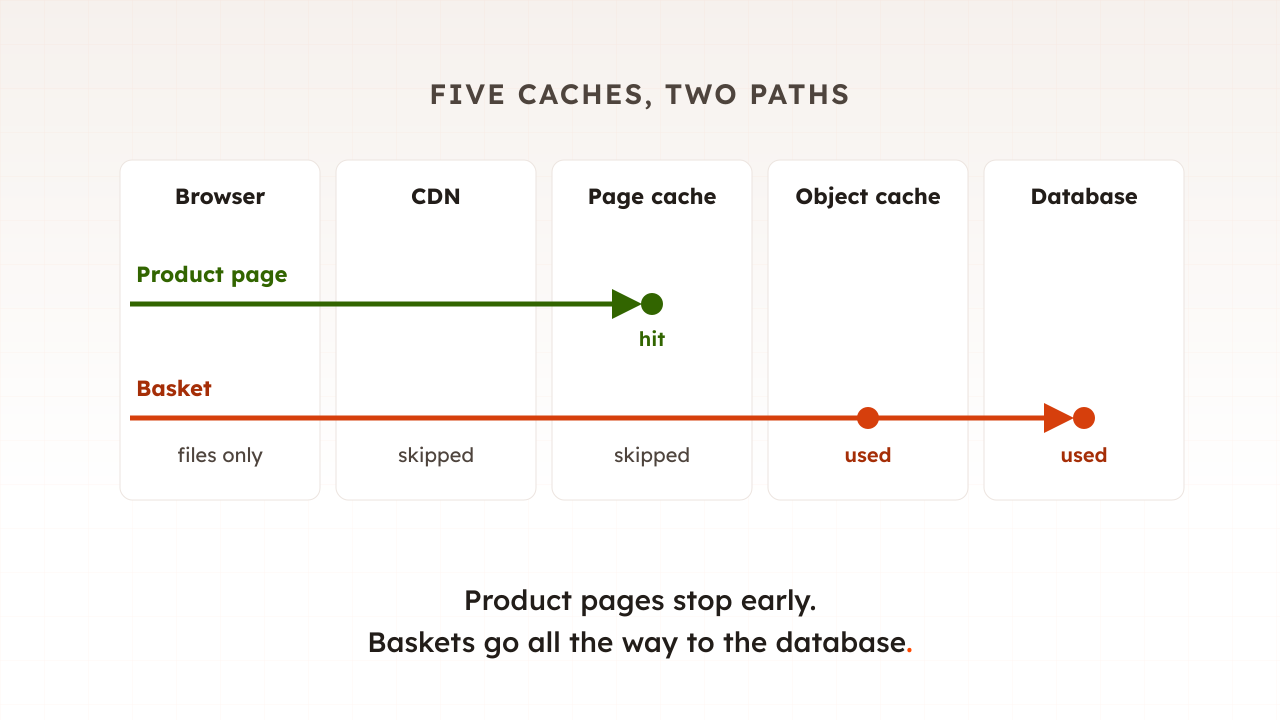
Everything that is personal to one visitor or that changes something. Baskets, checkouts, account pages, many search results and every request that adds to a basket or places an order go to your origin, along with every cache miss. On sale day those are the busiest requests on the site, so they set your real capacity.
CloudFront’s rule is typical: it always caches responses to GET and HEAD requests, can be set to cache OPTIONS, and does not cache responses to requests that use other methods. Adding to a basket and placing an order are POST requests, so no CDN setting can answer them for you.
Cached pages can still call home. On Adobe Commerce (Magento), the personal parts of a cached page, such as the mini-basket, are loaded separately: JavaScript sends an AJAX request to the application server to get the current private content. A product page served entirely from the CDN can still put one request per visitor on your origin.
| Request | Usually answered by the CDN? | Why |
|---|---|---|
| Images, scripts, stylesheets, fonts | Yes | The same for everyone, with long cache lifetimes |
| Product and category pages | Only if your setup allows it | Some CDNs, Cloudflare among them, do not cache HTML by default |
| Personal parts of a cached page | No | Different for every visitor |
| Basket, checkout and account pages | No | Personal, and usually set cookies |
| Add to basket, place order | No | POST requests that change data |
| Search results | Partly | A long tail of unique addresses |
| Addresses with unique tracking parameters | No, unless the parameter is ignored | Each variant is a new cache key |
A CDN also obeys your origin. In 2020 Request Metrics traced a blog outage during an 800% traffic surge to a cache-control header that marked the blog’s pages as uncacheable. As its chief executive, Todd Gardner, put it, Cloudflare is honoring that instruction and passing every request through to the server. The CDN was there. It was told not to help.
How much load does a CDN take off your origin?
The share of requests it answers itself, and that share moves more than people expect. A small drop in hit ratio can double what reaches your origin, and the requests that are left are the expensive ones. Work out both numbers, requests reaching the origin and the work each one costs, before trusting a CDN on sale day.
Take an example store whose CDN receives 2,000 requests a second at its peak, counting pages, files and background calls together.
| Cache hit ratio | Requests reaching the origin each second |
|---|---|
| 80% | 400 |
| 90% | 200 |
| 95% | 100 |
| 99% | 20 |
Now suppose a campaign email adds a unique tracking parameter to every link, and the CDN treats each one as a new address. The hit ratio slips from 95% to 90%. The CDN dashboard still looks healthy, yet the origin’s request rate has doubled from 100 to 200 a second.
The count is only half the story. Fastly warns that if your objects vary greatly in size, CHR won’t accurately represent the origin load, and the same is true of the work behind each request. A missed image costs your server a file read. A checkout page costs database queries, stock checks and calls to a payment provider. On sale day more shoppers reach the basket, so the uncacheable share grows just as traffic peaks.
What happens when the CDN cache is empty?
Every request becomes a miss, and your origin takes the full load until the cache refills. That happens after a full purge, after a release that changes the addresses of files, and when a new parameter splits the cache. At peak, any of these can multiply your origin’s traffic within minutes.
Cloudflare’s documentation is blunt about purging everything: every subsequent request must be served from your origin until the cache is repopulated, and on high-traffic sites that can cause a large spike in origin requests. Purge the pages that changed, not the whole cache, and do not schedule a full purge for the morning of a sale.
Akamai’s Pavel Despot, writing in February 2026 about peak traffic, noted that caching is often the first line of defense. A first line of defence that can be switched off by one button deserves a rule about when that button is pressed. This is one reason the code freeze in part 11 should cover CDN configuration as well as code.
Should you load test through your CDN or around it?
Do both, because they answer different questions. A test through the CDN shows what shoppers will experience, with your real cache rules, edge locations and bot protection in place. A test of the uncached journeys, or with the cache bypassed, shows what your origin can carry when the CDN cannot help.
Testing through the CDN has two traps. A test that loops over a handful of addresses fills the cache in seconds and flatters the hit ratio, while real shoppers spread across thousands of products, search terms and tracking links. And CDNs have their own rules. AWS says traditional load testing methods don’t work well with CloudFront, recommends spreading test clients across locations and DNS answers, and does not allow load testing on origins that have Origin Shield enabled. Other providers have their own terms, and bot protection can challenge test traffic, so agree the plan with whoever runs your CDN before the test.
Testing around the CDN gives you the floor. If your origin cannot serve your forecast basket and checkout traffic on its own, no cache setting will save the day, because that traffic was never going to be cached.
Common mistakes with CDNs and load
Most CDN surprises come from assuming the cache covers more than it does.
- Load testing the homepage and calling it capacity. It is the most cached page on the site. Test the basket and checkout journeys, which part 12 showed are the pages that expose your origin.
- Assuming HTML is cached. Check the response headers on your product pages. Some CDNs pass HTML through unless told otherwise.
- Letting parameters and cookies split the cache. Configure the cache key to ignore tracking parameters that do not change the page.
- Purging everything at peak. Purge only what changed, and keep full purges out of sale days.
- Reading only the hit ratio. Watch requests reaching the origin and the response times of the pages behind them.
How Evaluat shows what your CDN does under load
Every virtual user is a real browser, so an Evaluat test goes through your CDN the way a shopper does: the page, its files, the background calls for personal content, the basket and the checkout. Each session’s network log shows the cache state of every request that reports one: served from the browser’s own cache, or the verdict your CDN or proxy gave in headers such as cf-cache-status and x-cache (hit, miss, bypass and so on).
That lets you see the split this article describes while load is running. You can check which requests your CDN answered and which went to your origin, and watch time to first byte on the uncached pages as virtual users ramp up. Then open a slow session and see which request it was waiting for.
The boundary is worth stating. Evaluat runs from the region closest to your customers, not from every edge location your CDN has, and it shows what its browsers saw under the test conditions you chose. Your CDN’s own analytics remain the place to read hit ratios across all of your real traffic.
A CDN is often the cheapest capacity a site can buy, and it covers less of a shop than it seems to. Know which of your requests it answers, test the ones it cannot, and keep the purge button away from sale day.
Test in real browsers. Debug in real sessions. Book a demo to see your checkout measured through your CDN under load.