What is caching?
Caching is keeping a copy of something that was expensive to produce, such as a finished page or a database result, so the next request for it can be answered from the copy. Answering from the copy is a cache hit. Having to produce it again is a cache miss. The share of hits is the hit rate.
A café is a fair picture. It brews a large pot of the house coffee every half hour and pours from it all morning, because most customers want the same thing. A customer who orders a bespoke drink still waits for the barista. The pot is a cache: fast for the common order, no help with the unusual one, and stale if nobody remembers to brew a fresh pot.
That last part is the hard bit. Martin Fowler quotes Phil Karlton’s well-known line that there are only two hard things in Computer Science: cache invalidation and naming things. A copy is only useful while it is still right. Every cache needs a rule for when its copy expires and a way to be told that the original changed, and most caching problems on real shops are problems with one or the other.
On a website, caching happens at several layers at once, each storing something different for a different audience. Knowing which layer answered a request is the key to reading both your speed tests and your load tests.
What are the layers of cache on a website?
A typical online shop has five layers of cache between a shopper and its database: the browser cache on the shopper’s device, a content delivery network (CDN), a full-page cache in front of the application, an object cache beside it, and the database’s own memory. Each stores something different and serves a different audience.
| Layer | Where it lives | What it stores | Who it serves | How a copy is replaced |
|---|---|---|---|---|
| Browser cache | The shopper’s device | Images, scripts, stylesheets, fonts | One shopper | It expires, or the file’s address changes |
| CDN | Servers near the shopper | Files and shareable pages | Everyone near that server | It expires, or you purge it |
| Full-page cache | In front of your application | Finished HTML pages | Shoppers who would see the same page | A purge when a product, price or page changes |
| Object cache | Beside your application, often Redis | Configuration, layouts, query results, sessions | Every request the application builds | It expires, is evicted, or is flushed |
| Database buffer | Inside the database’s memory | The most-used table and index data | Every query | Least-used data is pushed out |
The browser cache
The browser keeps files it has already downloaded so the next page can reuse them, skipping the downloads part 8 walked through. MDN calls it a private cache, tied to a specific client, and your server controls it with the Cache-Control header. Plenty of sites leave it to chance. The HTTP Archive’s 2024 Web Almanac found that the percentage of sites using neither caching header was about 25%.
The safe pattern is to give files a new address whenever they change, which MDN calls cache busting, and let browsers keep them for a long time. Pages themselves cannot be renamed that way, as MDN notes that main resources cannot be cache busted, so HTML is usually cached briefly or not at all.
The CDN cache
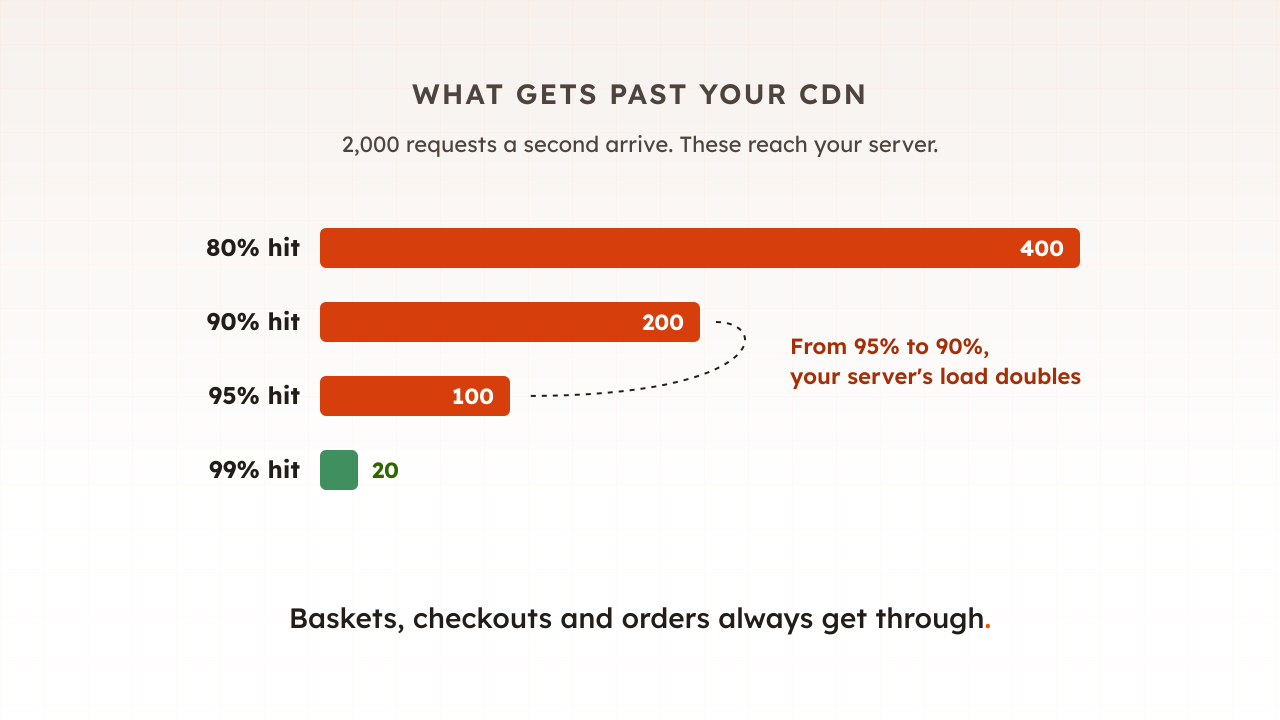
A CDN keeps shared copies on servers near your shoppers and answers for your origin when it can. Part 14 of this guide covered what it takes off your server under load, and what still gets through.
The full-page cache
A full-page cache stores finished HTML pages in front of your application and hands them to the next shopper without running any code. Adobe Commerce (Magento) ships a simple PHP reverse proxy that enables full page caching out of the box, and Adobe recommends Varnish in production. WordPress shops use a page caching plugin; Shopware has its own HTTP cache.
The speed difference is large. Shopware’s engineers describe a cached page versus a built one as the difference between a 500ms response and a 50ms response. DebugHawk’s report on 5.7 million WordPress page views at the end of 2025 found that cached pages had a median TTFB of 106ms versus 723ms for uncached pages.
The object cache
An object cache stores the pieces your application uses to build a page: merged configuration, layouts, product data, query results and often sessions. Redis and Memcached are the usual tools. In WordPress, the object cache is used to save on trips to the database, but by default it only lasts for a single request unless you install a persistent cache plugin.
That default matters. DebugHawk found that sites with a persistent object cache had a median PHP execution time of 508ms versus 1,542ms without. The object cache is what speeds up the pages a full-page cache cannot serve.
The database’s own cache
Databases cache too. In MySQL, the InnoDB buffer pool is an area in main memory where InnoDB caches table and index data as it is accessed, and MySQL notes that on dedicated servers up to 80% of physical memory is often given to it. PostgreSQL has its own equivalent. A query that finds its data in memory avoids a slow read from disk.
Page cache vs object cache: what is the difference?
A page cache stores whole finished pages, so a hit skips your application entirely. An object cache stores the ingredients your application uses to build pages, so it speeds up every page that still has to be built, including basket and checkout. They solve different problems, which is why most busy shops run both.
| Page cache (e.g. Varnish) | Object cache (e.g. Redis) | |
|---|---|---|
| Stores | Finished HTML pages | Configuration, layouts, query results, sessions |
| A hit skips | The application and the database | Some database queries and repeated work |
| Helps | Anonymous browsing: home, category and product pages | Every page the application builds, including basket and checkout |
| Cleared when | A product, price or page changes | Keys expire, memory fills, or someone flushes it |
A worked example shows why you want both. Take an example shop whose product pages take 50 ms from the full-page cache and 500 ms to build, the same gap Shopware describes, and which serves 10 product pages a second. At a 95% hit rate, half a page a second is built, about a quarter of one worker’s time. If the cache is flushed, all 10 are built, which keeps five workers busy on product pages alone, and the basket and checkout traffic still needs workers of its own. A good object cache makes each of those builds cheaper, so the shop survives the flush with room to spare.
Which requests skip which caches?
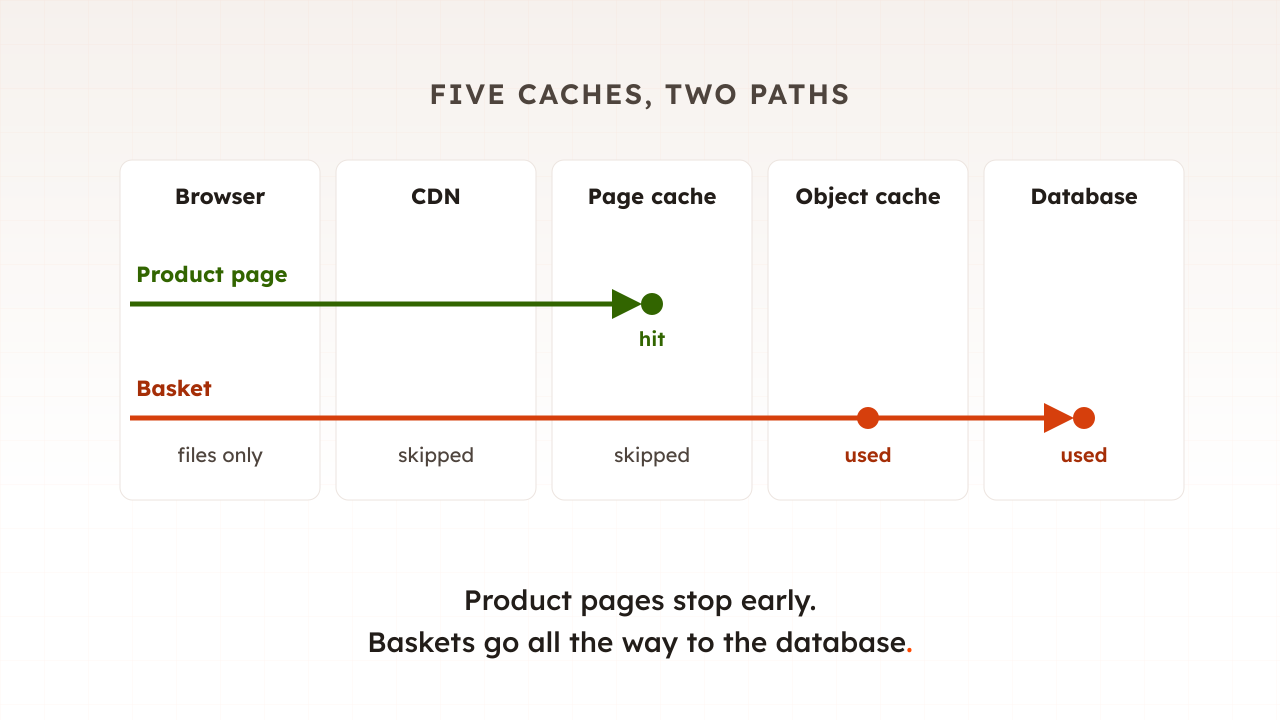
Basket, checkout and account pages, and every request that adds to a basket or places an order, skip the two layers that store whole pages: the CDN’s page cache and the full-page cache. They still use the browser cache for their files, the object cache and the database’s memory. On sale day they are the busiest requests on the site.
The platforms say so plainly. Adobe lists the compare products, cart, checkout pages as examples of uncacheable pages, and only GET and HEAD requests can be cached at all. WooCommerce tells shops to exclude Cart, My Account and Checkout from page caching, because these pages need to stay dynamic. Shopify’s developer documentation states that cart, session, and checkout traffic carries cookies and can’t be served from a shared cache.
| Request | Browser | CDN page cache | Full-page cache | Object cache and database memory |
|---|---|---|---|---|
| Anonymous product page | Files reused | Hit, if HTML caching is on | Hit | Only on a miss |
| Logged-in shopper, product page | Files reused | Usually passed through | Depends on the platform | Used |
| Basket or checkout page | Files reused | Skipped | Skipped | Used |
| Add to basket, place order | Not cached | Skipped | Skipped | Used |
| Search results | Files reused | Varies | Varies by platform | Used on a miss |
Logged-in shoppers are where platforms differ most. Magento varies its cache by context, such as customer group and whether a customer is logged in or not, so a logged-in shopper can still get a cached product page. Shopware, by contrast, says that by default, once a customer logs in or adds something to the cart, Shopware disables the HTTP cache entirely for that user, a behaviour its new caching system changes. Check what yours does before sale day, because more shoppers are logged in with a full basket on a sale day than on any other.
What happens to caches under load?
Caches make a site look bigger than it is, until something empties them. Three things go wrong under load. A flush at peak sends every request to the application at once, a popular item expiring stampedes the database, and the uncacheable share of traffic rises just as traffic peaks, so the hit rate falls when you most need it.
Flushes at peak. Adobe’s documentation warns that clearing cache types during peak demand can increase load on the Admin and cause the site to go down, and advises scheduling flushes for quiet hours. Saving a product or a price rule can trigger targeted purges too, so plan catalogue changes for the morning of a sale as carefully as code.
Stampedes. When a popular cached item expires, every request for it misses at once and goes to the database. Facebook’s engineers measured this on their memcache fleet: without leases, all of the cache misses resulted in a peak database query rate of 17K/s. With a mechanism that let one request refill the cache while the rest waited, the peak was 1.3K/s.
A falling hit rate. For a Magento full-page cache, Adobe says a hit rate above 0.90 or 90% indicates that the full-page cache is working. On sale day more shoppers log in and fill baskets, so more requests skip the page caches. Shopify’s documentation puts the risk well: a high hit rate on collection and product HTML can coexist with slow cart interactions.
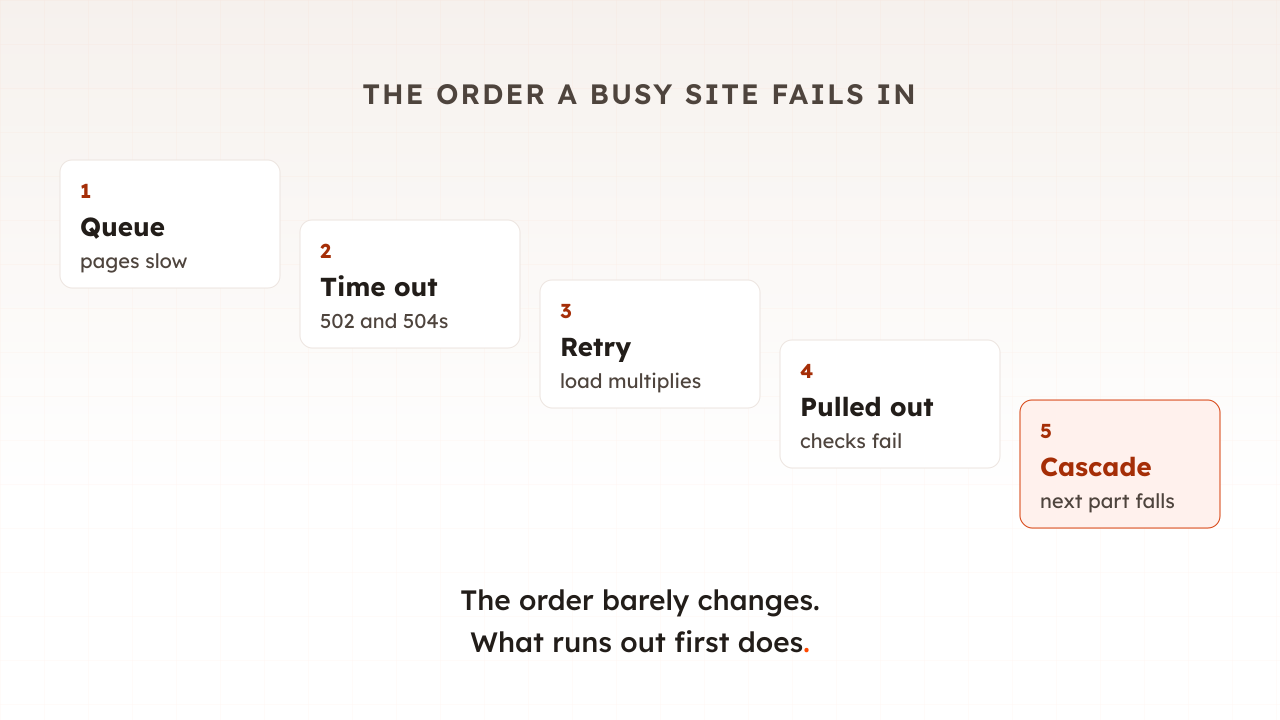
This is why part 15 found that caches can spread a failure as easily as they prevent one.
How should caches change the way you load test?
A load test that visits the same few cached pages measures your cache, not your shop. Build the test around what shoppers really do: many different products and search terms, logged-in sessions, items added to the basket and checkouts completed. Then run it with the cache warm and again straight after a flush, because both happen in real life.
- Spread the requests. Use a list of real product addresses and search terms, so the test does not keep hitting the handful of pages that are always cached.
- Include the uncached journeys. Add to basket, log in and check out. Those requests set your real capacity.
- Test a cold start. Run once straight after a deploy or a flush, which is when the application does the most work.
- Watch hit rates during the test. A test that ends with a 99% hit rate on a site that sees 85% in real life has flattered you.
Common mistakes with caching
Most caching mistakes come from trusting a cache to cover more traffic than it can.
- Flushing everything at peak. Clear only what changed, and keep full flushes for quiet hours.
- One uncacheable block on every page. In Magento, if any block in a layout is designated as uncacheable, the entire page is uncacheable. One careless block in a header can switch the cache off site-wide.
- No persistent object cache. Without one, WordPress rebuilds the same data on every request.
- Tracking parameters that split the cache. Make sure campaign parameters are ignored in the cache key.
- Load testing warm, cached pages only. The result describes your cache on a quiet day.
How Evaluat shows which cache answered
Every virtual user in an Evaluat test is a real browser, so it requests pages, files and background calls the way a shopper does, including the basket and checkout. Each session’s network log shows the cache state of every request that reports one: served from the browser’s own cache, or the hit, miss or bypass your CDN or reverse proxy reported in headers such as cf-cache-status and x-cache.
That turns the tables in this article into evidence from your own site. As virtual users ramp up, you can see cached product pages hold their time to first byte while the basket and checkout climb, and confirm which requests your caches answered. Datasets give each virtual user its own search terms, logins and form inputs, so the test does not simply warm the same few pages. What users see, not what scripts pretend.
The boundary is worth stating. A browser can see the layers in front of your application, the browser cache, the CDN and a reverse proxy that reports itself, but not the object cache or the database’s memory. Read those from your server monitoring, such as Redis’s hit and miss counters, while the test runs.
Caching is the cheapest speed most shops have, and it covers the pages that matter least on sale day. Know which layer serves each of your journeys, and load test the ones no cache can serve.
Test in real browsers. Debug in real sessions. Book a demo to see which of your pages your caches really serve under load.