What does “Core Web Vitals at load” mean?
Core Web Vitals at load means measuring the three Vitals while many people use the site at once, not during a single-user audit. Core Web Vitals are Google’s page-experience metrics: Largest Contentful Paint (LCP) for loading, Interaction to Next Paint (INP) for responsiveness, and Cumulative Layout Shift (CLS) for visual stability. If visual stability is the failing metric, use the step-by-step guide to improve CLS. Measuring at load adds the shared-infrastructure concurrency that a single-user audit leaves out.
Each Vital has a published “good” threshold, assessed at the 75th percentile of real visits: 2.5 seconds for LCP, 200 milliseconds for INP, and 0.1 for CLS. The 75th percentile means three of every four visits are at least this good, a deliberate choice so a handful of fast loads cannot flatter the score. The metric set is current as of 2024: Interaction to Next Paint replaced First Input Delay on March 12, 2024, so INP is now the responsiveness Vital Google scores.
These are not vanity numbers. They map to revenue: when redBus improved INP on its search page by 72%, it recorded a 7% increase in sales. And peak traffic, when the most users are watching, is exactly when the Vitals are most likely to slip.
Most articles about Core Web Vitals stop at a single page load. That is the lab view, and it is useful for catching obvious problems. It is also missing the load on shared infrastructure. Real traffic is many users hitting the same backends, CDNs, and third parties at the same time, and that is when some numbers move. Measuring Vitals at load shows what controlled browsers saw at peak under the selected test conditions. It does not replace field data across customers’ devices and networks.
Why do Core Web Vitals change under load?
Core Web Vitals change under load because the bottleneck shifts from the browser to the shared infrastructure. Under concurrency the server takes longer to respond, assets queue, and interactions wait on a busier backend. A single browser on an idle server measures none of that contention, so its numbers describe the best case, not the peak your users meet.
This is not a fringe effect. Google’s own documentation on the Search Console report notes that if many pages change status without a code change, “your site traffic dramatically increased or the service that serves your image files experienced a latency change, either of which could slow your site down”, pushing borderline pages over a threshold. Load is exactly that kind of event. Here is how it reaches each Vital.
LCP rises when the server slows
Largest Contentful Paint measures how long the biggest element in the viewport, usually a hero image, video, or block of text, takes to render. It breaks into four parts, and the first is time to first byte (TTFB), the wait for the server’s first byte of HTML. web.dev recommends TTFB stay under roughly 40% of LCP, which makes it one of the largest budgets in a well-tuned page.
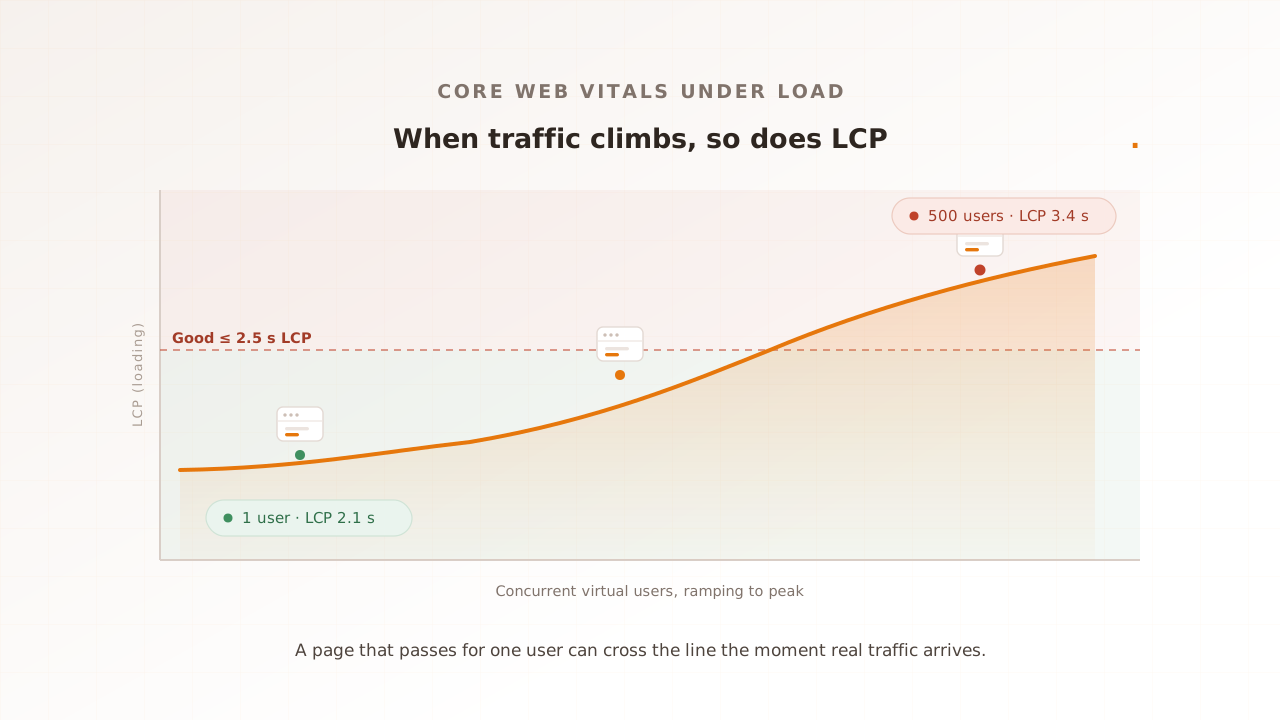
TTFB is also the part load attacks first. When hundreds of requests arrive at once, the server queues them, database calls slow, and the first byte takes longer to send. Because TTFB sits at the front of LCP, every millisecond it gains is added straight to LCP. The LCP resource itself can slow too, if the origin or CDN serving that hero image is under the same pressure. A page with a 2.0-second LCP for one user can cross the 2.5-second line well before the server reaches its capacity limit.
INP degrades as interactions wait on a busy backend
Interaction to Next Paint measures the delay between a user action (a click, tap, or keypress) and the next frame the browser paints in response. Under load it degrades for two reasons, and neither is the browser running out of room. First, any interaction that has to wait on a server response before it can paint, a search, an add-to-cart, a filter, inherits the backend’s degraded latency directly. Second, a page that loads more slowly hydrates more slowly (hydration is when JavaScript wires up the interactive parts of a server-rendered page), so a user who taps early waits behind JavaScript that has not finished running.
A purely client-side interaction, like opening a menu that needs no network call, does not slow down just because the server is busy. The INP regressions load creates are the ones tied to the backend and to load timing, which is why they only appear when you actually generate concurrency.
CLS is usually the steadiest, but not immune
Cumulative Layout Shift measures how much visible content moves around unexpectedly while the page loads. It is typically the least load-sensitive Vital, because shifts are mostly a property of page structure rather than server speed: an image without dimensions, an ad slot that fills in late, a banner injected above content. Those happen at one user or a thousand.
It is not immune, though. Under load, resources arrive more slowly, and a hero image or a block of data that lands a beat later than usual can still shove content down after the reader’s eyes are on it. If your layout already depends on things arriving quickly, load can expose the shift.
To put numbers on it, take a hypothetical storefront, example.shop. Its product page holds LCP at 2.1 seconds for a single user, comfortably inside the threshold. Run the same journey at 500 concurrent virtual users (a virtual user is one simulated visitor the test drives through the page) and LCP climbs to 3.4 seconds while INP reaches 410 milliseconds, both past Google’s limits. Nothing in the code changed. The only new variable was traffic, and a single-user audit would have called the page healthy right up to launch.
Why single-user lab tools miss it
Single-user lab tools miss load-driven regressions because they only ever run one user. A lab audit, the synthetic measurement a tool like Lighthouse produces, loads one page, once, against a server with no other traffic. It is repeatable and fast, which makes it ideal for catching coding mistakes, and blind by construction to anything that only appears under concurrency.
PageSpeed Insights softens this a little: alongside its Lighthouse lab run it shows field data from the Chrome User Experience Report, the Vitals real Chrome users recorded over the prior 28 days. Field data does reflect real concurrency, but it has its own gap, which is that it is reactive. It reports what already happened, so a regression that shipped this morning will not surface cleanly until enough customers have hit the affected pages. By then it is live.
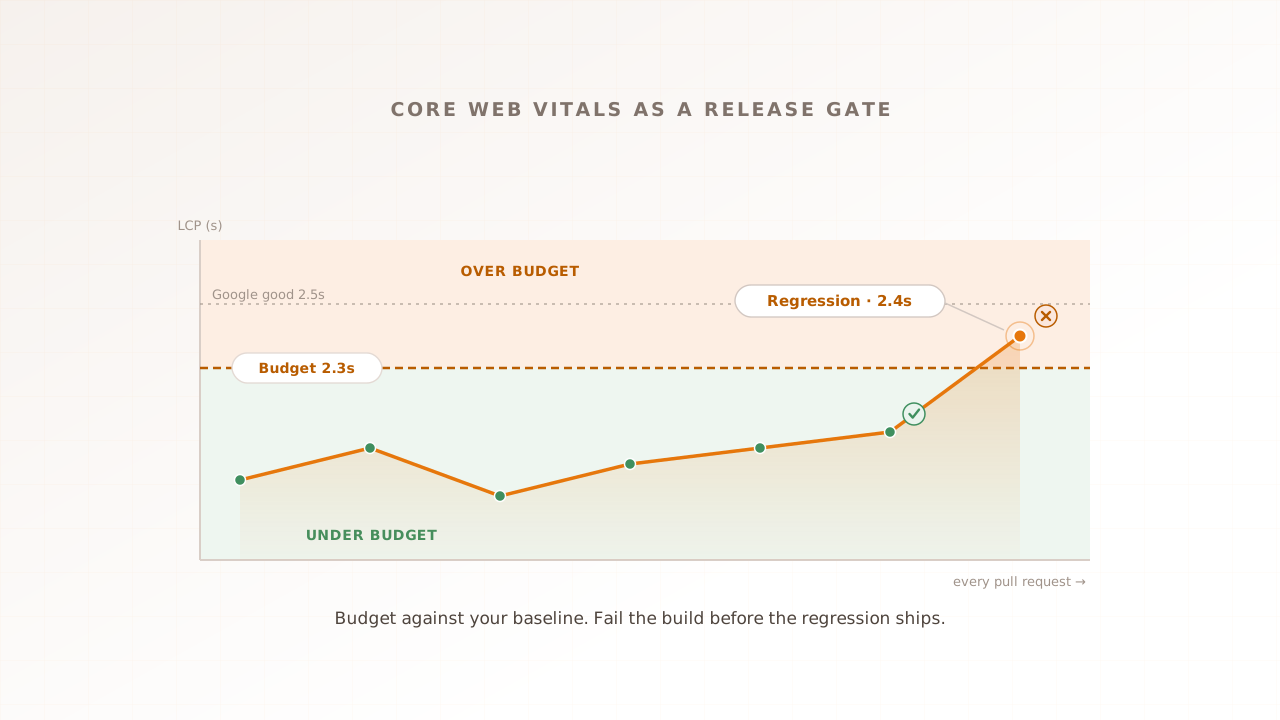
That leaves a hole between the two. Lab is proactive but single-user; field is real but late. Load testing is the missing third view: synthetic, so you can run it before release, and concurrent, so it sees what lab cannot. For wiring all three into a release gate, see performance regression testing; this article is about the measurement underneath that.
If you do not have the lab baseline yet, that is the place to start, and it takes a minute: our free website speed test, Evaluat Pulse, loads your page once in a real browser, returns LCP, CLS, FCP, and TTFB with Evaluat’s A to F composite grade. A single cold load does not produce a representative INP. Record those controlled conditions before measuring the same page at concurrency.
The gap is not hypothetical. In 2024, 43% of mobile sites and 54% of desktop sites passed all three Core Web Vitals, with a good LCP on 59% of mobile pages. Close to half the web ships an experience Google rates as needing improvement, and peak traffic is when a borderline page tips over.
How do you measure Core Web Vitals at load?
You measure Core Web Vitals at load by running a real browser for every virtual user and capturing the Vitals in-browser while concurrency builds. Vitals are defined by the browser; without one there is no native LCP or INP. The result describes controlled browsers under selected conditions, not the full field distribution. The test needs four things to produce useful, repeatable numbers.
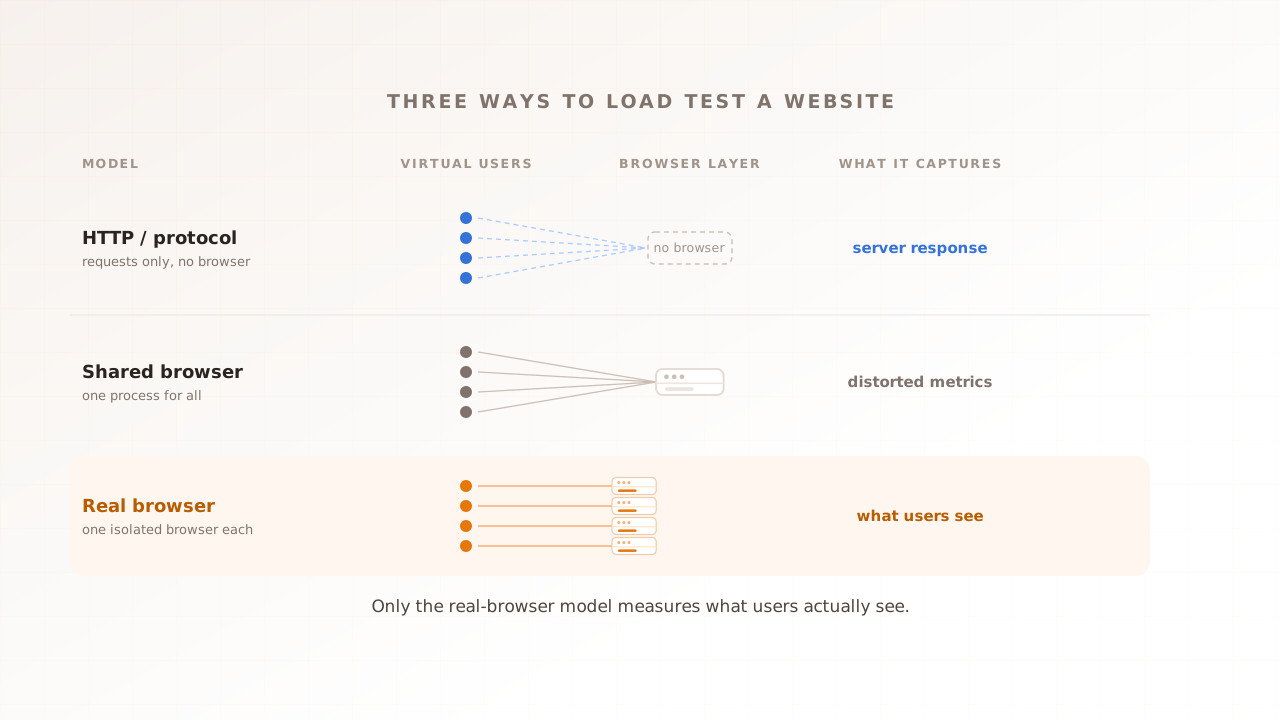
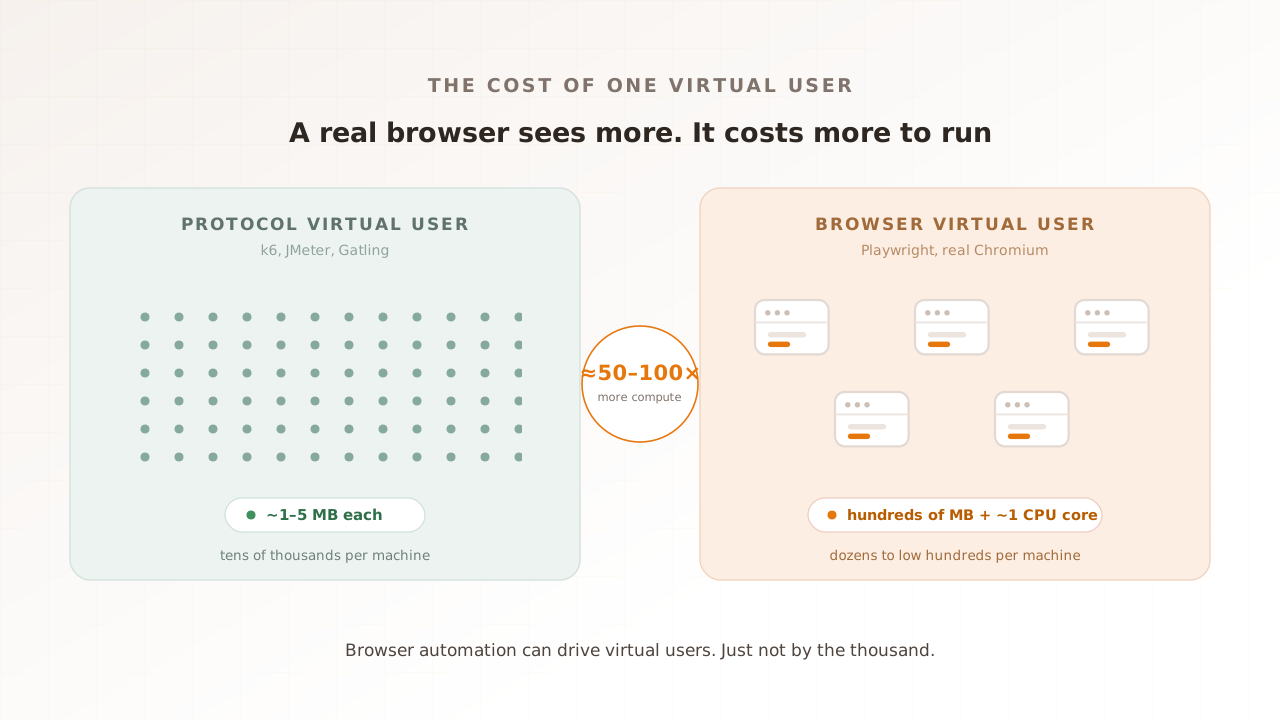
- One real browser per virtual user. Each virtual user runs an actual browser that renders the page, executes JavaScript, and reports LCP, INP, and CLS, plus adjacent metrics such as First Contentful Paint. This is the difference between real-browser load testing and protocol-level tools that send HTTP requests and time the response without rendering anything.
- Isolated instances. Memory, CPU, cache, and cookies must not cross between virtual users, or you measure contention inside your test harness instead of on your server.
- A realistic origin. Run from regions that match your customers; Vitals are sensitive to round-trip time, and a test run far from where your users sit measures the wrong latency. Throttle the network where your users are not on fast connections.
- Per-session capture. Every virtual user needs an addressable session: its Vitals, plus video, network log, and console output. Aggregates alone cannot answer which users hit a 4-second LCP, and why.
The shape of the run matters too. Ramp virtual users up to your target concurrency, hold there, then ramp down, and read the Vitals across the whole curve. One rule is specific to INP: the scenario has to perform the real interactions you care about, because a page that only loads has nothing for INP to measure. Build the journey once in a scenario, then reuse it across runs and regions.
Which Vital is most sensitive to load?
Largest Contentful Paint is usually the most load-sensitive Vital, followed by Interaction to Next Paint, while Cumulative Layout Shift moves least. The reason is where each metric’s bottleneck lives. LCP and INP both depend on the shared backend, which is what load contends for, while CLS depends mostly on page structure, which load leaves largely untouched.
The table below maps what to expect from each Vital under load, and how to catch it.
| Vital | What load does to it | Why | How to catch it |
|---|---|---|---|
| LCP (loading) | Rises, often first | TTFB, its leading component, grows as the server queues requests; the LCP image can slow on a contended CDN | Measure LCP per URL at target concurrency, against the single-user baseline |
| INP (responsiveness) | Degrades at peak | Interactions that wait on the backend inherit its latency; late hydration makes early taps queue | Script the real interactions into the scenario; a load-only test cannot measure INP |
| CLS (visual stability) | Usually steady | Shifts are mostly structural, not server-bound | Watch for slow resources or late data that still move content under load |
| TTFB (server response) | Rises directly | The server takes longer to send the first byte under concurrency | Track it as the leading indicator; it moves before LCP does |
TTFB is not itself a Core Web Vital, but it is the early-warning signal. Because it feeds LCP, a rising TTFB under load is the first sign that page experience is about to follow.
Common mistakes when testing Vitals at load
- Trusting a single-user lab score as a peak prediction. A green Lighthouse run on an idle server says nothing about 1,000 concurrent users. It is a code-quality check, not a capacity check.
- Aggregating Vitals across every page. A site-wide LCP of 2.6 seconds can hide one revenue-critical page sitting at 4.2. Budget and report Vitals per URL.
- Reporting the mean. Google’s thresholds are set at the 75th percentile; the mean is structurally optimistic and hides the slow tail where the regression lives.
- Never scripting interactions. A load test that only navigates pages will never produce an INP number, because INP needs a real click or tap. If INP matters, the interaction has to be in the scenario.
- Treating Vitals as a one-time audit. A new third-party tag, a CDN change, or a framework upgrade shifts the numbers, and the metric set itself moved when INP replaced FID. Vitals drift, so the test has to run repeatedly.
How Evaluat measures Vitals at load
Evaluat is a real-browser performance testing platform: it runs each virtual user in its own isolated browser and captures the three Core Web Vitals (Largest Contentful Paint, Interaction to Next Paint, and Cumulative Layout Shift), plus First Contentful Paint, for every user under load. These are what the controlled browsers recorded under the selected test conditions, not a server-side estimate or a substitute for field CrUX.
When a page busts its target at peak, the report ties the number to evidence. Each session carries video, a network log, and a console log, so a 3.4-second LCP at 500 users is not a bare statistic; you can open the worst session and see exactly when it slowed. Reports break Vitals down per URL and across the load curve, with percentile views and an Apdex score, so the page that tips over is the one you see.
It is worth being clear about where this stops. If you are load-testing a pure API, a non-HTTP protocol, or chasing extreme request-per-second numbers, a protocol-level tool like k6 or JMeter is the better fit, and our comparison with JMeter says so plainly. Those tools measure server response, which is necessary but not the same as page experience. When the question is what Core Web Vitals your users get at peak, that takes a real browser, because a fast server response can still render a slow LCP. For the metrics themselves, see Largest Contentful Paint and Interaction to Next Paint.
Core Web Vitals are not a fixed property of your code. They are what your users experience, and that changes with traffic. Measure them at the concurrency you actually serve, per URL and per session, and you catch the regression while it is still a test result instead of a support ticket. The regression you catch this way is a session you can open, not an average you have to trust.
Book a demo to measure a critical journey at your forecast peak.