What is volume testing?
Volume testing is a type of performance testing that checks how a system behaves when it holds large amounts of data, as much as production holds now or will at its next peak. Traffic stays at a normal level. The data grows instead: more products, more orders, a bigger search index. The question is whether size alone slows things down.
The international software testing standard puts it formally. The 2013 edition of ISO/IEC/IEEE 29119-1 describes volume testing as testing to evaluate the capability of the test item to process specified volumes of data (usually at or near maximum specified capacity), in terms of throughput capacity, storage capacity or both. This guide uses the narrower, practical meaning most web teams need: hold the traffic steady, scale the stored data.
A library is a fair picture. Finding one book on a shelf of 200 takes seconds, with or without a catalogue. Finding it among 400,000 takes seconds with a good catalogue and days without one. The librarian has not got slower. The collection has got bigger, and every shortcut that did not matter at 200 books suddenly matters a great deal.
Part 3 of this guide introduced volume testing as one of the supporting types. This part takes it apart: why data size changes performance, what to grow, and how to run the test.
Why does volume testing matter?
Because test environments are usually much smaller than production, so the problems that come with size stay hidden until real data meets them. A page that is instant in staging can crawl in production with the same code, the same servers and the same traffic. The only difference is the number of rows behind it.
The gap is common, even at engineering-led companies. GitLab’s own design document for database testing noted that its staging database was less than 5% of the production database size as of January 2021, and that the team often saw migrations succeed in staging but then fail in production due to query timeouts.
How teams fill their test environments varies widely. In Redgate’s 2024 survey of 3,849 database professionals, asked which data they supply to development and test environments, 47% use synthetic data, 43% use a full-size production backup and 28% use a subset of production data, with many using more than one. Synthetic data and subsets are fine, as long as someone checks that they are big enough.
Large catalogues are not rare either. Store Leads’ October 2026 count of live Shopify stores shows 136,495 stores selling 1,000 to 4,999 products, and more than 25,000 selling 10,000 or more. Per-record size counts too: in October 2025 Shopify raised its limit to 2,048 variants per product, warning that apps not on its current product APIs may have a downgraded or broken experience with more than 100 variants. The same app, twenty times the data, a different result.
Volume testing vs load testing: what is the difference?
A load test changes the amount of traffic and keeps the data the same. A volume test changes the amount of data and keeps traffic at a normal level. They answer different questions: whether the site copes with more people, and whether it copes with being bigger. A load test is only as trustworthy as the data behind it.
| Type | What grows | What stays fixed | The question it answers |
|---|---|---|---|
| Load testing | Users and requests, up to the expected peak | Data | Does it hold at expected traffic? |
| Stress testing | Traffic past the peak | Data | Where does it break, and how? |
| Soak testing | Time | Traffic | Does it degrade over hours? |
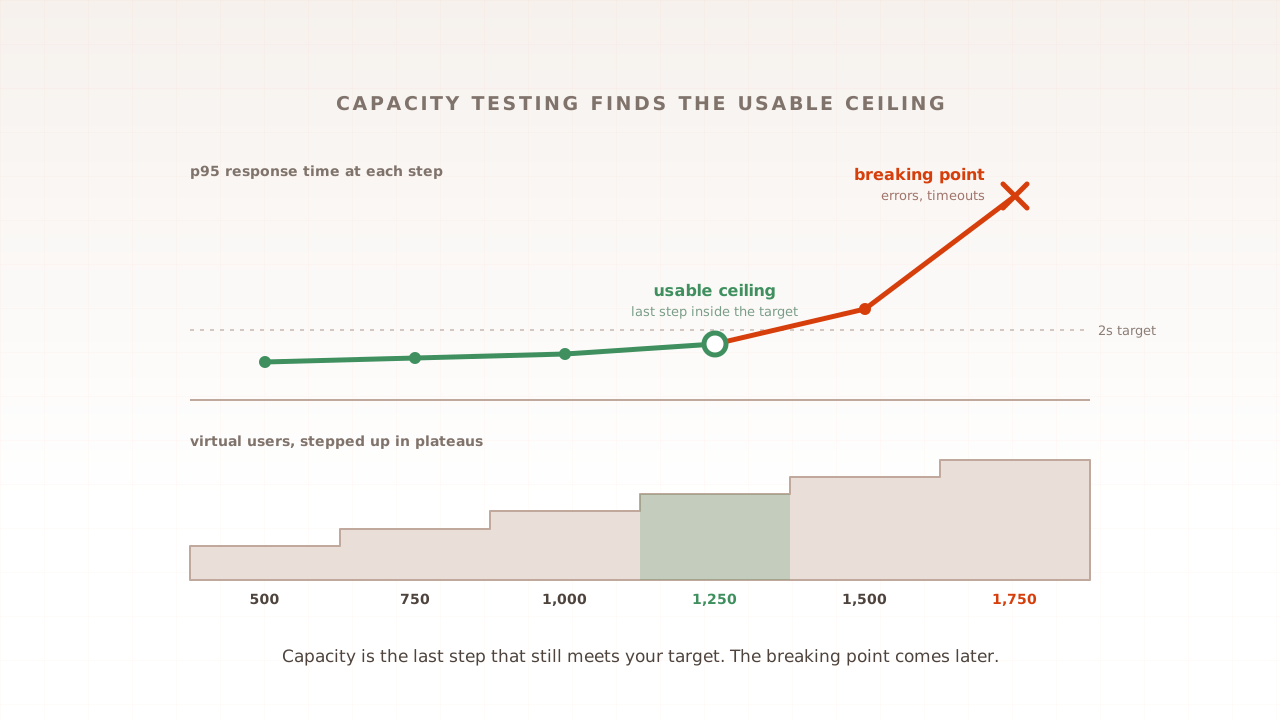
| Capacity testing | Traffic in steps | Targets | What is the usable ceiling? |
| Volume testing | Stored data, to production size or beyond | Traffic | Does size alone slow it down? |
The types blur in practice. A capacity test run on a small database gives you a capacity that production will never reach, and a soak test can be partly a volume test, because logs and tables grow during the run. The ISTQB performance testing syllabus lists growth of the file repository, and unexpected database growth among the causes of response times that degrade over time. Volume testing is the habit of treating data size as a variable you control, not an accident of whichever environment you test in.
Why does more data make a website slower?
Because much of the work behind a page grows with the data. Queries that read whole tables read more rows, databases change their plans as tables grow, pages deep in a long list cost more to find, and background jobs that touch every product take longer. None of it shows on a small database.
Queries that read whole tables
A query without a suitable index reads every row. MySQL’s documentation is direct about it: the larger the table, the more this costs. On a table of 2,000 products a full read is cheap enough that nobody notices the missing index. On 400,000 it is two hundred times the work, on every page view that runs it.
The database changes its plan
Databases choose how to run each query based on the size of the tables. PostgreSQL’s documentation warns that results on a toy-sized table cannot be assumed to apply to large tables, because the planner’s cost estimates are not linear and it may choose a different plan. A query that looked efficient in staging may run a different way in production. You only find out by testing at production size.
Deep pages and long lists
Category pages, search results and admin grids show one page of results at a time, and the common way to fetch page 50 is to skip the first 49 pages. Markus Winand, author of Use The Index, Luke, explains the cost: the database must count all rows from the beginning until it reaches the requested page. A category with 40 products never goes deep. One with 40,000 does.
Background jobs and batch windows
Some of the work is not on any page. Adobe notes that reindexing all indexers can take a long time for stores with large numbers of products, customers and categories. Sitemaps hit hard limits: Google says all formats limit a single sitemap to 50MB (uncompressed) or 50,000 URLs, so 400,000 product pages need at least eight files where 2,000 needed one. The ISTQB syllabus names the failure plainly: batch processing is unable to complete before online processing is needed.
Tables that were designed small
Some designs are fine until the data grows. Moshe Tsur, a principal software engineer at Harness, wrote in 2026 that when you have thousands of rows, queries are fast, and the duplication barely matters, and that at millions of rows the team’s queries were roughly ten times slower than they needed to be. WooCommerce rebuilt its order storage for the same reason. On a test store with about 400,000 orders, its benchmark found that with the new tables this query to get all orders for a customer is now 40x faster.
What data should a volume test grow?
Every table that grows in real life, not just the catalogue. Products and variants are the obvious ones, but order history, customers, baskets left behind, search indexes and logs grow too, and each slows different pages. Size each one to what production will hold at your next peak, not to what is easy to generate.
Adobe’s performance toolkit for Magento is a useful yardstick, because its standard profiles span the range from a test store to a large catalogue.
| Toolkit profile | Simple products | Categories | Customers | Orders |
|---|---|---|---|---|
| Small | 800 | 30 | 200 | 80 |
| Medium | 24,000 | 300 | 2,000 | 50,000 |
| Large | 300,000 | 3,000 | 5,000 | 100,000 |
| Extra large | 600,000 | 6,000 | 10,000 | 150,000 |
Source: Adobe Commerce performance toolkit profiles. A store testing on something like the small profile while production looks like the large one is testing a different shop.
Beyond row counts, check the shape of the data:
- Catalogue: products, variants per product, attributes and options, and products per category.
- Customers and orders: years of history, not a few weeks, and customers with many orders.
- Search: an index built from the full catalogue, searched with many different terms.
- Leftovers: abandoned baskets, sessions, logs and queue tables that nobody cleans.
- Prices and rules: customer groups, price rules and stores, which multiply some indexes.
How do you run a volume test?
Measure production, decide the size you are testing for, build an environment at that size, and run the same customer journeys at normal traffic against small and full-size data. The difference between the two runs is what your data costs you. Then time the back-office jobs on the full-size data as well.
- Measure production. Count the rows in your largest tables and note how fast each grows per month.
- Pick the target size. Today’s size plus growth to your next peak, with a margin for known plans such as a new range or a marketplace feed.
- Build the dataset. Generate it, for example with Adobe’s
bin/magento setup:perf:generate-fixturesor a Faker library, or mask a production copy. The ISTQB syllabus warns that masking may not have the same data characteristics as seen in real-world use, so check the result looks like production. - Run the same journeys twice. Use identical traffic against the small and the full-size data, and compare response times page by page.
- Time the jobs. Reindexing, imports, exports, sitemap generation and backups, on the full-size data.
- Read the query plans. Run
EXPLAINon the slowest queries at full size, where the planner may choose differently.
Be careful with real customer data. The UK Information Commissioner’s Office states that pseudonymised personal data is in scope of data protection law, so a copy with names swapped out is still personal data. Synthetic data at production size avoids the question.
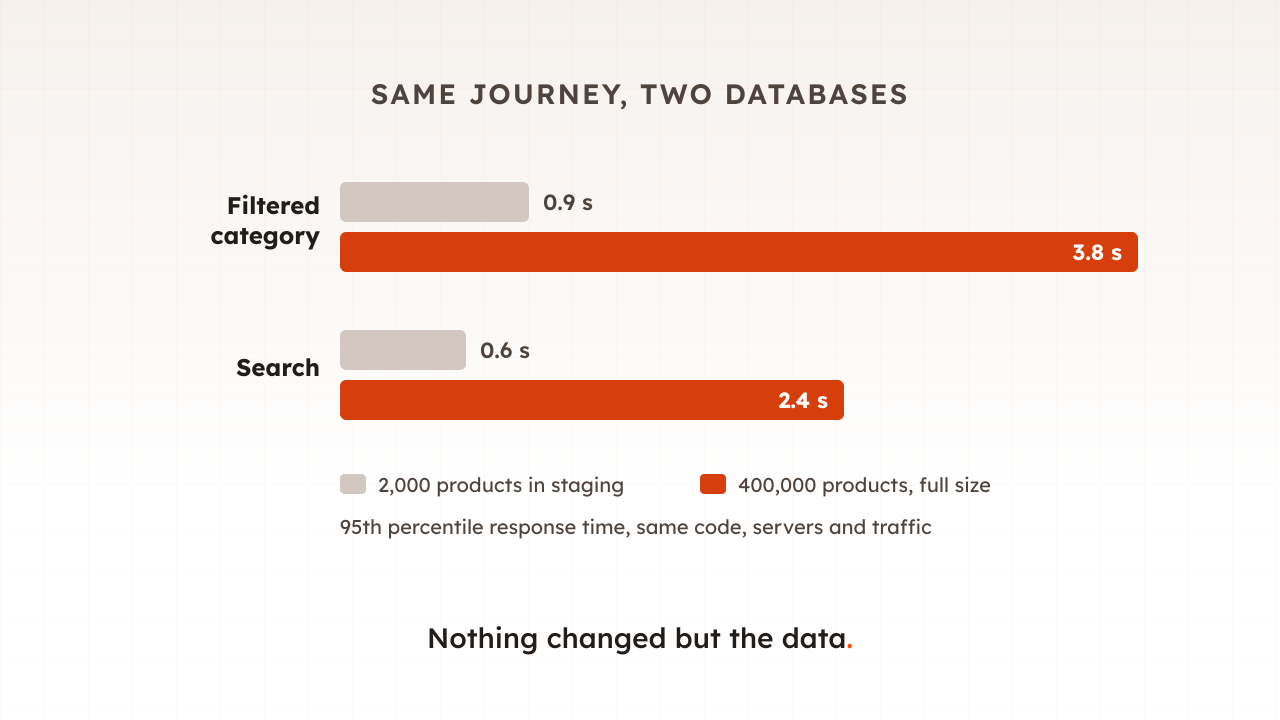
Here is a worked example. An example shop has 2,000 products in staging and 400,000 in production. It runs the same journey, home, category, filter, search, product, basket, with 100 virtual users against both. Most pages barely move. The filtered category page goes from a 95th percentile of 0.9 seconds to 3.8 seconds, and search from 0.6 to 2.4. EXPLAIN on the full-size data shows the filter query reading every product, because one attribute used in filters has no index. On 2,000 rows nobody could have seen it.
Common mistakes with volume testing
Most volume testing mistakes come from growing the wrong thing, or growing it once.
- Testing on sample data. Demo catalogues are tiny. They prove the code runs, not that it runs at your size.
- Growing products but not orders. Order history, customers and logs slow checkout, accounts and the admin.
- Copying production without care. Masked or not, a production copy carries personal data and needs the same protection.
- Forgetting the back office. Reindexes and imports that overrun into trading hours hurt customers too.
- Testing once. Data grows every month. Re-run the test before each peak.
How Evaluat handles volume testing
Evaluat does not create your data. The volume lives in the environment you test, so you build the full-size store and Evaluat measures what shoppers would experience in it. Build a scenario once. Use it everywhere. Run the same journey against the small staging store and the full-size one, then compare the two reports’ response times, time to first byte and Core Web Vitals per URL.
Datasets give each virtual user its own search terms, logins and form inputs, so searches reach the long tail of a big catalogue rather than repeating one term the cache already holds. When a page slows only on the large store, open a session from the slow period: the network log shows which request took the time, such as a filter call or a search request, and the session video shows what the shopper was looking at while it waited.
The boundary is worth stating. Evaluat measures pages and journeys from the outside, from the region closest to your customers. It cannot time your reindexes and imports or read your query plans; your database tools do that. Together they tell you whether your shop is fast at the size it really is.
Data grows quietly, a few thousand rows a week, until a page that was always fine is not. Test at the size you will be at your next peak, not the size your staging store happens to be.
Test in real browsers. Debug in real sessions. Book a demo to run your journeys against production-sized data.