What is a code freeze?
A code freeze is an agreed period when changes to a live system stop, or face a much higher bar, because a failure would be unusually expensive. Before Black Friday it means no deployments to the store except approved fixes. Its purpose is to keep the site you tested identical to the site customers use on the day.
The term has two meanings, and search results mix them up. In software release work, a freeze marks the stage of a project after which changes to the code need more justification, so that a release branch can settle before launch. Before a peak trading event, a freeze is about production: the live store stops changing.
A few neighbouring terms are worth knowing:
- Feature freeze: no new features, but bug fixes and improvements are still allowed.
- Change freeze, or blackout window: the operations term for a period when no changes are scheduled, covering infrastructure and configuration as well as code.
- Code slush: a softer freeze that raises the bar in stages rather than stopping changes outright.
The rest of this article uses code freeze in the second sense, the pre-peak freeze, and argues that it should cover more than code.
Why do retailers freeze code before Black Friday?
Because changes cause most outages, and a change made after your last load test has never been proved against peak traffic. Google’s Site Reliability Engineering book puts it plainly: roughly 70% of outages are due to changes in a live system. A freeze removes most of those changes from the riskiest days of the year.
The same pattern shows up in industry surveys. Uptime Institute’s 2026 outage analysis found that network-related issues remain the largest share of IT service outages and that these are driven primarily by configuration and change management failures, although that share fell compared with 2025.
For a retailer there is a second reason, which is specific to load testing. A load test proves how one particular build behaves at your forecast peak. The Black Friday plan in part 1 of this guide finds the ceiling, fixes what breaks and tests again, all on the code that exists at the time. Every deployment after the last test replaces proven capacity with unproven capacity. A feature merged on 20 November has never seen your peak-hour crowd, however well its unit tests pass.
That is what the freeze protects: the match between the site you tested and the site customers use. It is worth being precise about that, because it explains both what a freeze does well and what it cannot do.
What does a code freeze not protect you from?
A freeze protects the site you last tested, nothing more. It does not protect you from problems that are already live, and a freeze that covers only code leaves several other routes to production wide open, from tag managers to configuration changes and your vendors’ own releases.
The release you shipped in September. A freeze stops new changes. It locks in everything already deployed, including the release that went out last month and has not yet met peak traffic. If that release added a slow database query, the freeze guarantees it will still be there on Black Friday. The only protection is to load test the build you will freeze, before you freeze it.
Configuration and content changes. Some of the largest recent outages came from changes that were not code releases. Cloudflare’s outage of 18 November 2025, ten days before Black Friday, was triggered by a change to one of its database systems’ permissions, which doubled the size of a file its network depended on. CrowdStrike’s update in July 2024 was content, the kind its systems used to augment detections without requiring sensor code changes. Had either company been in a code freeze, it would have stopped neither change.
Tags and third-party scripts. When you publish a tag manager container, Tag Manager makes your changes active for the environment specified, with no code release involved. Third parties also matter for speed: Paul Calvano’s analysis of the December 2025 HTTP Archive data found that 67.7% of 15.78 million websites request at least one render-blocking third party, a script the page must wait for before it can show anything.
Your vendors’ own changes. A script loaded from someone else’s server can change without anything happening on yours. In 2024, after the domain behind a popular script library changed hands, Sansec reported that the polyfill supply chain attack hit more than 100,000 sites. Ask your important vendors for their own freeze dates.
What should you freeze, and what should you leave open?
Freeze anything that can change how the site behaves under load, whoever makes the change and whichever tool they use. Leave open only the routes for genuine fixes and the routine content the business cannot pause, and route those through the same review.
| Change | During the freeze | Why |
|---|---|---|
| New features and redesigns | Frozen | Unproven at peak by definition |
| Bug fixes that are costing money | Exceptions process | Worth the risk only with review, rollback and re-test |
| Security fixes | Exceptions process, fast track | Leaving a known hole open is the bigger risk |
| Infrastructure and server configuration | Frozen | Configuration changes cause outages without any release |
| Tag manager containers and new pixels | Frozen | They reach every visitor without a code release |
| New third-party scripts or vendors | Frozen | New dependencies on the critical path |
| CMS templates and page layouts | Frozen | Templates can add requests, scripts and slow queries |
| Product content, prices and promotions | Open, through an agreed process | The business has to trade; keep structural changes out |
| Feature flags | Set before the freeze; flip only as exceptions | Flipping a flag changes behaviour without going through a release |
The product content row is the one teams argue about. Merchandising has to keep working through Black Friday, so new copy, images and prices are normal. What should wait is anything that changes the structure of a page: a new widget, a new recommendation engine, a carousel that loads twenty more images.
Write the list down, give it a start date and an owner, and share it with everyone who can change the site, including marketing and any agencies.
When should a code freeze start and end?
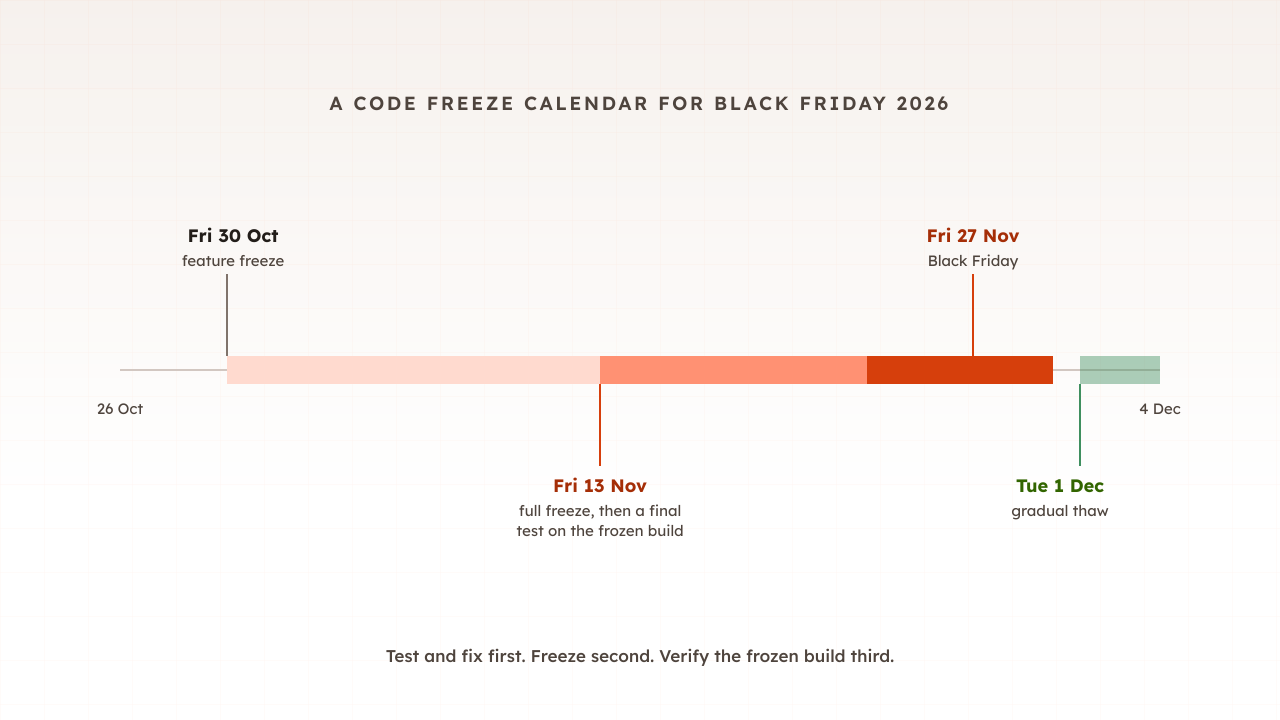
For Black Friday on Friday 27 November 2026, a full freeze from Friday 13 November gives two weeks to verify the frozen build, with a lighter feature freeze from about four weeks out. End it gradually after Cyber Monday on 30 November, releasing what queued up in small batches.
Published practice varies around that middle. Salesforce’s holiday preparation guide advises retailers to institute a code freeze by November 1st as a safe rule of thumb, and to minimise change through the beginning of January. Shopify described a two-stage approach in 2018, with a feature freeze several weeks before Black Friday Cyber Monday, then an actual code freeze a few days before in which only critical fixes could be deployed.
Etsy’s mobile team uses a slush rather than a freeze. As described in a September 2026 write-up, it starts by asking engineers to merge mindfully in mid-October, and by peak week nothing ships without very senior sign-off.
| Date in 2026 | Stage | What happens |
|---|---|---|
| Friday 30 October | Feature freeze | No new customer-facing features; finish the fixes from load testing |
| Friday 13 November | Full freeze | Code, configuration, tags and templates; run the final verification test |
| 23 to 30 November | Peak week | Exceptions only, with senior sign-off |
| From Tuesday 1 December | Gradual thaw | Release the queue in small batches |
The start date matters less than the order of events. Finish testing and fixing first, freeze second, verify the frozen build third.
Is a code freeze always a good idea?
No, and the critics deserve a fair hearing. A freeze trades the risk of changing things for the risk of not changing them, and it can make the releases either side of it riskier. Most retailers still freeze before peak, but the best freezes are short, specific and designed with those costs in mind.
The strongest argument against comes from research on software delivery. DORA, the long-running research programme on how software teams perform, states that its research has repeatedly demonstrated that speed and stability are not trade-offs, and its guidance on trunk-based development lists not having code freezes among the practices of high-performing teams.
Practitioners make the point more bluntly. Charity Majors, co-founder of Honeycomb, wrote in 2019 that the worst outages of her career all happened after holiday code freezes, and argued that batching up or pausing deploys makes your overall state worse. Changes do not disappear during a freeze. They queue, and the queue ships together afterwards.
Exceptions carry their own danger. On 5 December 2025, Cloudflare was rushing a protection against a newly disclosed vulnerability, and the change went through a system that does not perform gradual rollouts but propagates changes within seconds to every server. About 28% of the HTTP traffic it serves was affected for roughly 25 minutes. An urgent fix through a fast path is exactly the shape of change a freeze exceptions process produces.
So the useful question is not freeze or no freeze. It is how to make the freeze short, how to make exceptions safe, and how to thaw without a pile-up.
How do you handle exceptions during a freeze?
Treat every exception as a small release with extra checks, not a shortcut. Each one needs a reason, a named approver, a way back and a way to limit the damage, and a re-test if it touches pages that carry peak traffic.
A workable exceptions process has five parts:
- A clear bar. Security fixes and bugs that are actively costing sales qualify. Improvements and nice-to-haves wait.
- One named approver, senior enough to say no on Black Friday morning.
- A rollback plan written before the change ships, with the person who will run it.
- A staged rollout where your platform allows it, to a small share of traffic first. Google’s SRE book lists progressive rollouts, quick detection and safe rollback as the core practices for managing change, and CrowdStrike’s own review concluded that each new content template should be deployed in a staged rollout.
- A re-test. If the change touches checkout, search, the basket or anything else on the busy path, run the load test again on the changed build before peak day.
Log every exception. The list is also your plan for the thaw, because each item was important enough to break the freeze for.
Common mistakes with code freezes
Most freeze mistakes come from treating the freeze as the protection, rather than as the thing that keeps a tested site tested.
- Freezing before testing. A freeze on an untested build locks in whatever is wrong with it. Test and fix first.
- Freezing only the code repository. Tags, configuration, templates and feature flags all reach customers without a release.
- No final verification test. If you never test the frozen build itself, you are trusting that nothing changed since the last test.
- Exceptions without re-tests. One rushed fix to checkout can undo weeks of capacity work.
- Ending the freeze with a big bang. Releasing a month of queued changes in one go creates the risky batch the critics warn about.
- Forgetting the vendors. Payment providers, search, reviews and chat each run their own freeze calendar. Know their dates.
How Evaluat fits around a freeze
Evaluat is built for the two tests a freeze depends on: the final verification run on the frozen build, and the re-test after any exception. A scenario such as browse, add to basket and check out is built once in the scenario editor and run unchanged each time. Build a scenario once. Use it everywhere. That keeps runs comparable, so a difference between two reports is a difference in the site, not in the test.
Each run records Core Web Vitals per URL, response time percentiles and error rates, with a video, network log and console log for every virtual user. If an exception made checkout slower, you compare the run before it with the run after it, then open a slow session to see which request changed. The test sizes come from your peak traffic estimate, and the method for running them is in how to load test a website.
The boundary is honest: a test proves the build it ran against, at the load you chose. It cannot vouch for a change made after it, which is the whole reason the freeze exists.
A code freeze, then, is a promise that the site you tested is the site your customers get. Keep that promise short and complete: test and fix first, freeze everything that can change the site, verify the frozen build, and make every exception earn its re-test.
Test in real browsers. Debug in real sessions. Book a demo and plan your final verification run before 13 November.