What happens when a website gets too much traffic?
Every part of a website can only do a fixed amount of work at once: a set number of worker processes, a set number of database connections, a fixed amount of CPU. When requests arrive faster than that work can be done, the extra ones wait in a queue. The waiting shows up as slow pages long before anything crashes.
The limits are real numbers in configuration files. PHP-FPM, which runs many PHP shops, has a pm.max_children setting that, in its own documentation’s words, sets the limit on the number of simultaneous requests that will be served. PostgreSQL’s max_connections determines the maximum number of concurrent connections to the database server, and its default is typically 100.
A restaurant kitchen is a fair picture. Eight cooks can make so many plates an hour. When the room fills faster than that, tickets pile up on the pass and diners wait. Nothing is broken yet. The kitchen is simply full, and the wait is the first symptom.
That is why the common explanation, that the site “ran out of bandwidth”, is usually wrong. The network is rarely the first thing to fill. A product page needs code to run, queries to be answered and other services to reply, and the queue forms in front of whichever of those is slowest. Customers see a slow page, then an error page, and the headline says the site crashed due to high traffic.
What does “the website crashed” usually mean?
When people say a website crashed, they rarely mean the server switched off. Usually visitors saw error pages, pages that never finished loading, or a queue the site put them in on purpose. Each of those has a different cause, and the error code on the page is the first clue to which part ran out.
The standard HTTP status codes tell you a surprising amount. Their definitions come from RFC 9110, the HTTP specification.
| Code | What the specification says | What it usually means on a busy site |
|---|---|---|
| 502 Bad Gateway | A server acting as a gateway received an invalid response from the server behind it | The application behind the web server failed or refused the connection |
| 503 Service Unavailable | The server is unable to handle the request due to a temporary overload or maintenance | Something is refusing extra work to protect itself |
| 504 Gateway Timeout | A gateway did not receive a timely response from the server behind it | The request waited longer than the timeout and was abandoned |
| Endless loading | No code at all | Requests are queued and nobody has given up yet |
Sometimes the “crash” is a choice. When Oasis reunion tickets went on sale in August 2024, City AM reported that Ticketmaster said its website has not crashed, and that fans had been placed in a queue because millions were trying to buy at once. A queue is a site admitting its capacity and choosing to protect it.
In what order does a busy website fail?
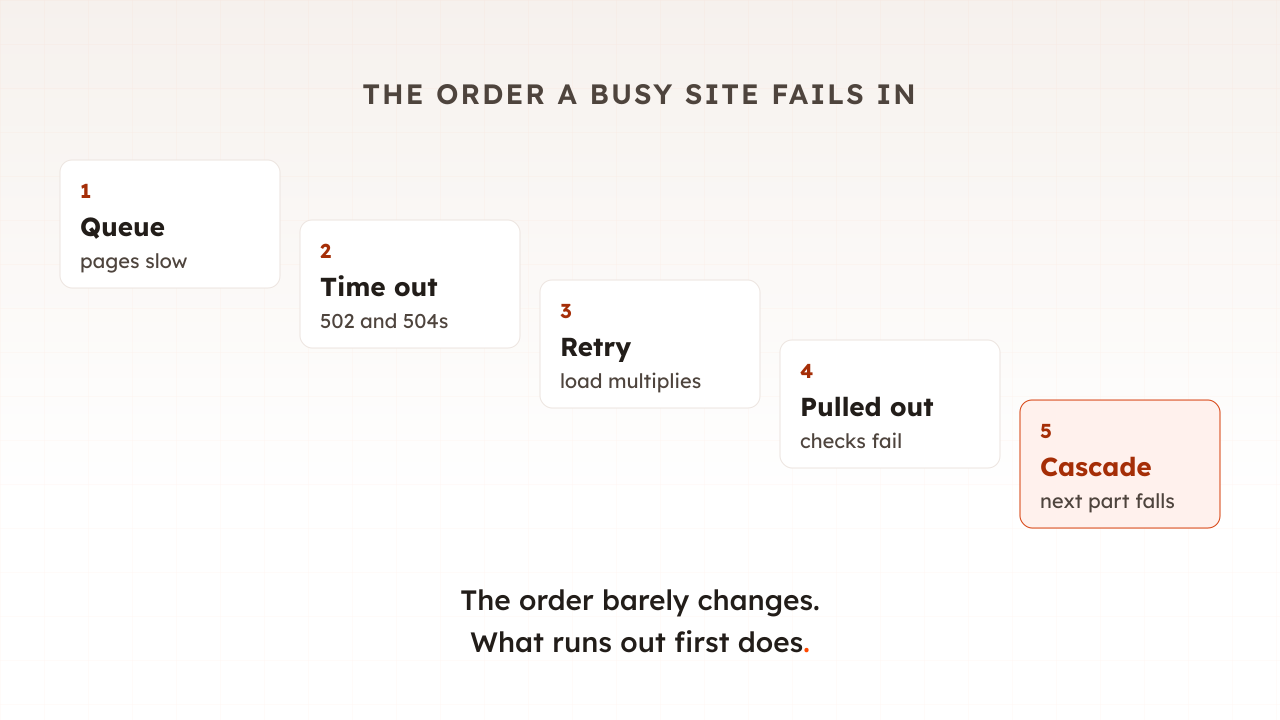
In roughly the same five stages almost every time. Requests queue and pages slow. Timeouts turn slow requests into failed ones. Retries and refreshes multiply the load. Overloaded servers are pulled out of service. Then the failure spreads to the next part of the system. The order of the symptoms is predictable; what fails first is not.
1. Requests queue and pages slow
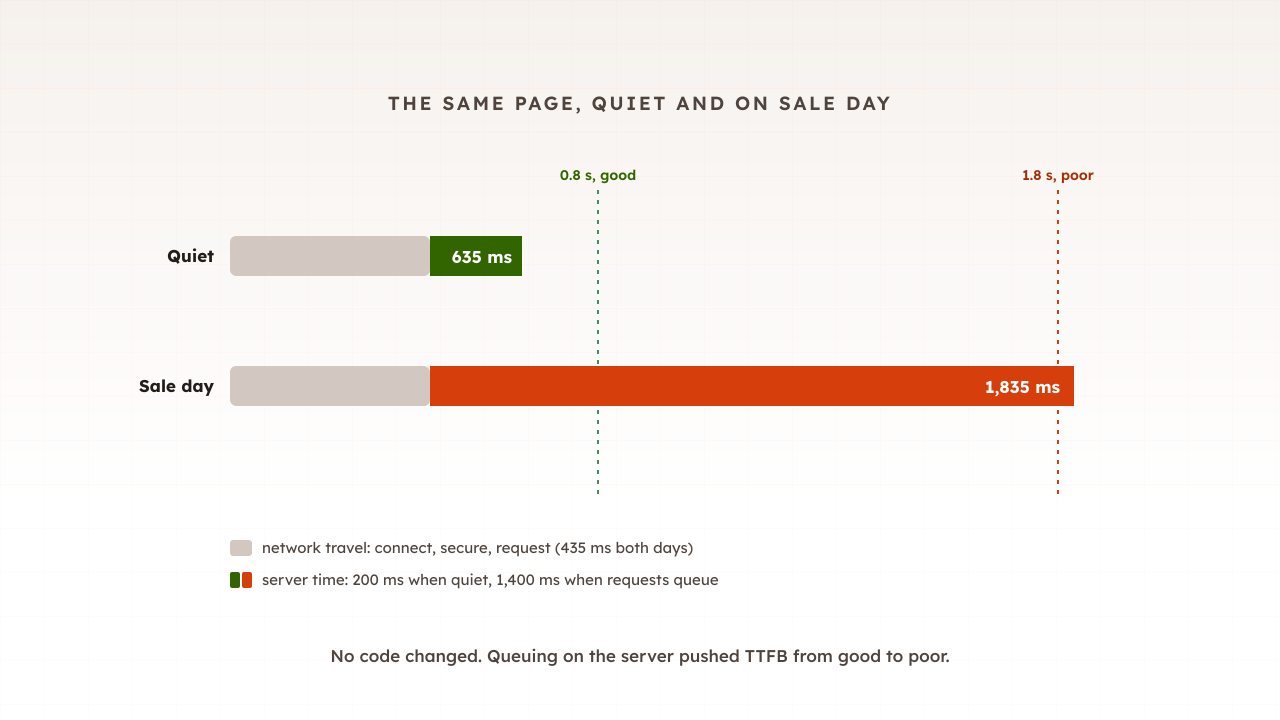
At first a busy server simply gets slower, because each request waits its turn. David Yanacek, a senior principal engineer at Amazon Web Services, describes how services reach an inflection point where their performance starts degrading even more rapidly. Part 12 of this guide showed this as time to first byte climbing before anything else moves.
2. Timeouts turn slow into failed
Every part of a site waits only so long for the part behind it. nginx, for example, closes the connection if the server behind it sends nothing for 60 seconds by default. Yanacek puts it simply: when a server gets so overloaded that its latency exceeds its client’s timeout, requests start to fail. Worse, the server often finishes the abandoned work anyway, spending capacity on answers nobody receives.
3. Retries multiply the load
Failed requests are tried again, by software and by people. Marc Brooker of AWS warns that when failures are caused by overload, retries that increase load can make matters significantly worse. His example is a request that passes through five layers of services, each retrying three times, so the load on the database will increase 243x. Shoppers do the same by hand. Google’s Site Reliability Engineering book notes that by the time a slow reply arrives, there’s a good chance the user has given up and refreshed their browser, issuing another request.
4. Overloaded servers are pulled from service
Load balancers check that each server answers a simple health check and stop sending traffic to any that do not. Under overload, healthy but busy servers miss those checks. In another AWS article Yanacek warns that taking servers out of service during an overload can cause a downward spiral, because the remaining servers inherit the load. Slack’s outage on 4 January 2021 shows the pattern: some of our instances were marked unhealthy by our automation, and then its autoscaling system downscaled the web tier, wrote Laura Nolan, a senior staff engineer there.
5. The failure spreads
Overload rarely stays in one place. Google’s SRE book observes that once a couple of servers crash on overload, the load on the remaining servers can increase, causing them to crash as well. Caches spread it too. A 2022 study of real incidents gives the example of a database that handles 300 requests a second behind a cache with a 90% hit rate serving 3,000, where a cache failure can overwhelm the database. The same study found retries kept the system down in more than half of the incidents it examined, even after the original trigger had gone.
What does overload look like in numbers?
One sale email is enough to show every stage. Take an example shop whose web servers run 40 PHP workers, each taking 250 milliseconds per request. Together they can finish 160 requests a second. On a normal afternoon the shop sees 90 a second, so there is room to spare and no queue.
At 10:00 a sale email lands and traffic jumps to 200 requests a second. Now 40 more requests arrive every second than the workers can finish, and they wait.
- After 10 seconds, 400 requests are queued. A new visitor waits about 2.5 seconds before a worker even starts on their page. The site is up, and slow.
- After 13 seconds, the queue is full. PHP-FPM’s default listen backlog, its waiting queue, is 511 connections on Linux. From here, one request in five is turned away and the shopper sees an error page, typically a 502.
- Within a minute, shoppers who saw errors press refresh, and the basket page’s background calls retry. Arrivals climb past 250 a second, so more than a third are now refused.
- If a health check sits in that same queue, the load balancer may decide a server is down and move its share onto the others, which fill faster still.
No code changed and nothing is broken. The shop had a limit of 160 requests a second and the email asked for 200. A queue with a limit turns waiting into errors; a queue without one turns waiting into timeouts. Either way the shopper sees a failure.
Which part of a website runs out first?
It differs from site to site, and that is the most useful thing to find out. On a typical online shop the candidates are the web workers, the database, the cache, a third-party service such as payments or search, or a connection limit somewhere in front. Whichever saturates first sets your capacity, and everything behind it never gets busy.
| Resource | Example limit | What you see first |
|---|---|---|
| Web or PHP workers | A fixed number of processes | Rising response times, then 502 or 504 errors |
| Database connections | 100 by default on PostgreSQL | Connection errors and slow pages everywhere |
| Database work | Locks and slow queries on stock and orders | Checkout slows before browsing does |
| Cache | Memory, or a cache purged at peak | A sudden jump in database load |
| Third-party services | A payment, tax or search provider’s own limits | One step hangs while workers wait on it |
| Front-door limits | Connection caps at a CDN or load balancer | Instant 503 errors with no slowdown first |
Even well-prepared teams guess wrong about demand. Google’s account of the Pokémon GO launch in 2016 says the teams planned for a worst case of five times their target, and player traffic surged to 50X the initial target, ten times the worst-case estimate. Planning numbers are guesses until a test checks them against the real system.
Why do websites crash during sales and launches?
Because demand arrives in minutes, not spread across a day, and it lands on the pages that cannot be cached. Across Fastly’s retail customers, Black Friday 2025 was only 10.8% above the November daily average. The danger is not the day. It is the hour after the email, the minute a drop opens.
Adobe’s figures for Cyber Monday 2025 show how concentrated that is: in the peak hours of 8 pm to 10 pm, consumers spent $16 million every minute. Those shoppers are in baskets and checkouts, which go to your servers, not your CDN, as part 14 explained.
Traffic is not the only cause of sale-day outages. In New Relic’s 2026 survey of 2,575 engineering and IT leaders, third-party and cloud provider failures is the top cited cause of outages, ahead of network failures and software deployments. That is why the code freeze from part 11 matters as much as the capacity plan.
How do you stop a website crashing under high traffic?
Find the first limit before your customers do, then raise it or protect it. A load test that ramps traffic past your forecast shows which part saturates first and at what level. The fixes then follow from the stage you want to stop: queueing, timeouts, retries or the spread.
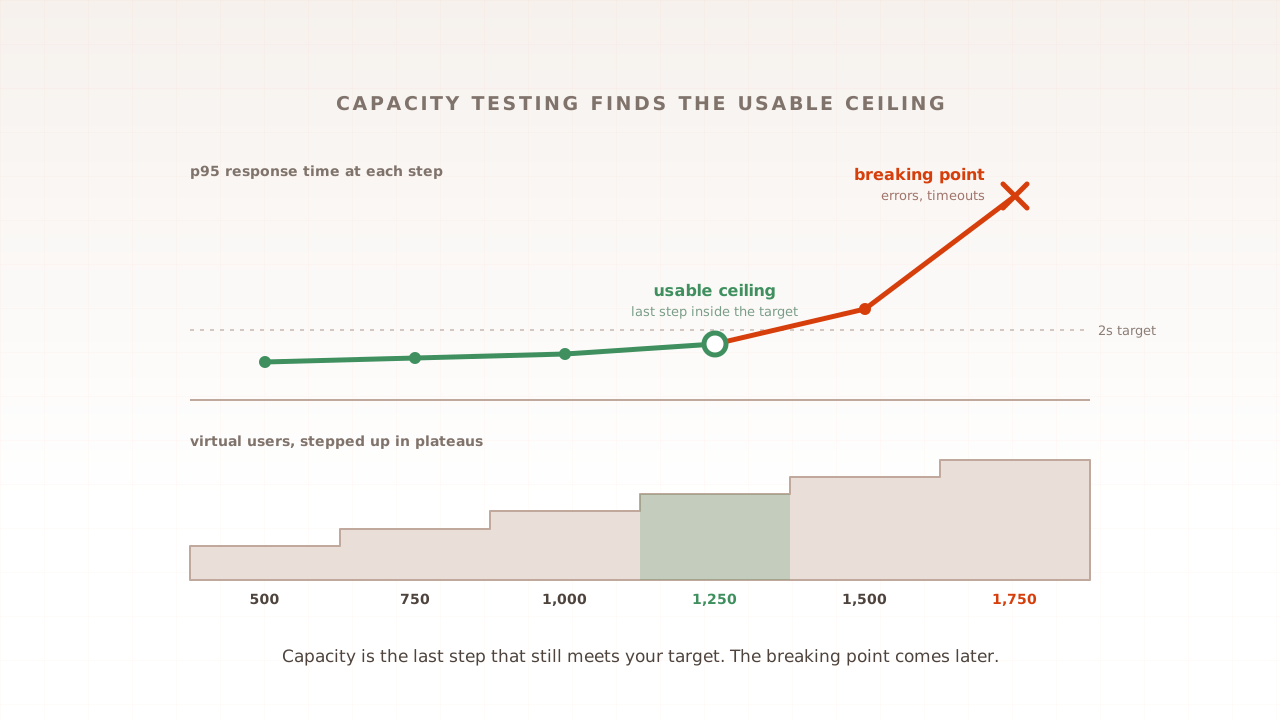
- Measure your ceiling. A capacity test finds the most traffic your site serves while still meeting its targets. Know that number for checkout, not just the homepage.
- Set timeouts on purpose. A request nobody will wait for should be abandoned early, not hold a worker for a minute.
- Retry once, in one place. Brooker’s advice is to retry at a single point in the stack, with a growing, randomised delay between attempts.
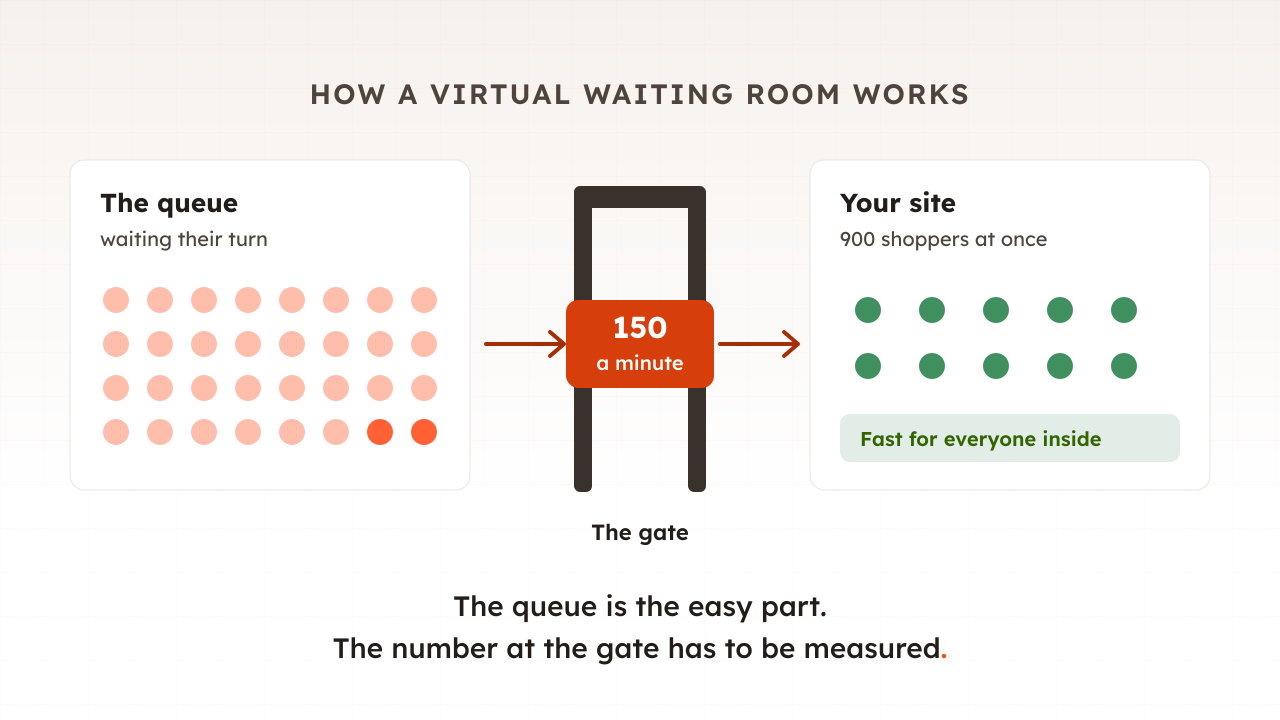
- Shed load rather than serve everyone slowly. Google’s SRE book says a server should accept only the requests that it can process and reject the rest gracefully. A virtual waiting room does this for whole visitors; part 17 of this guide covers it.
- Cache what is the same for everyone, and never purge it at peak.
- Treat autoscaling as help, not a plan. AWS notes that new instances need time to stabilize after they come into service, while an email multiplies traffic in seconds.
Common mistakes when planning for high traffic
Most of them come from planning for the average instead of the peak minute.
- Blaming bandwidth. The queue is almost always in front of server work, not the network.
- Sizing for daily or hourly averages. The failure happens in the minutes after an email or a launch time.
- Load testing only cached pages. The homepage tests your CDN. Test search, basket and checkout.
- Retrying at every layer. Each layer’s retries multiply the ones beneath it.
- Trusting autoscaling to catch a spike. It reacts in minutes, and it does not add database connections.
How Evaluat shows where your site fails first
Evaluat runs each virtual user in an isolated real browser and ramps them up to the level you choose, so you can watch the stages in order: response times and time to first byte climbing per URL, then HTTP errors appearing, with Core Web Vitals showing what shoppers saw at each point. The page that degrades first points at the resource that runs out first.
A failure at peak isn’t a percentile. It’s a session. When errors start, open a session from that moment. The session video shows what the shopper saw, the network log shows which request returned a 504 and how long it waited first, and the console log shows what broke in the page. Open the session. Watch the moment it broke.
The boundary is worth stating. Evaluat measures the site from the outside, the way customers reach it, from the region closest to them. It does not see your worker pools or database connections directly, so pair it with your server monitoring to confirm which limit was hit. And because virtual users ramp up over minutes, it rehearses rising peaks, not every visitor arriving in the same second.
Websites under too much traffic queue, time out, retry and then fall over, in that order. Find out which part of yours runs out first while there are still weeks to fix it.
Test in real browsers. Debug in real sessions. Book a demo to find your site’s first limit before Black Friday.