What are the main types of performance testing?
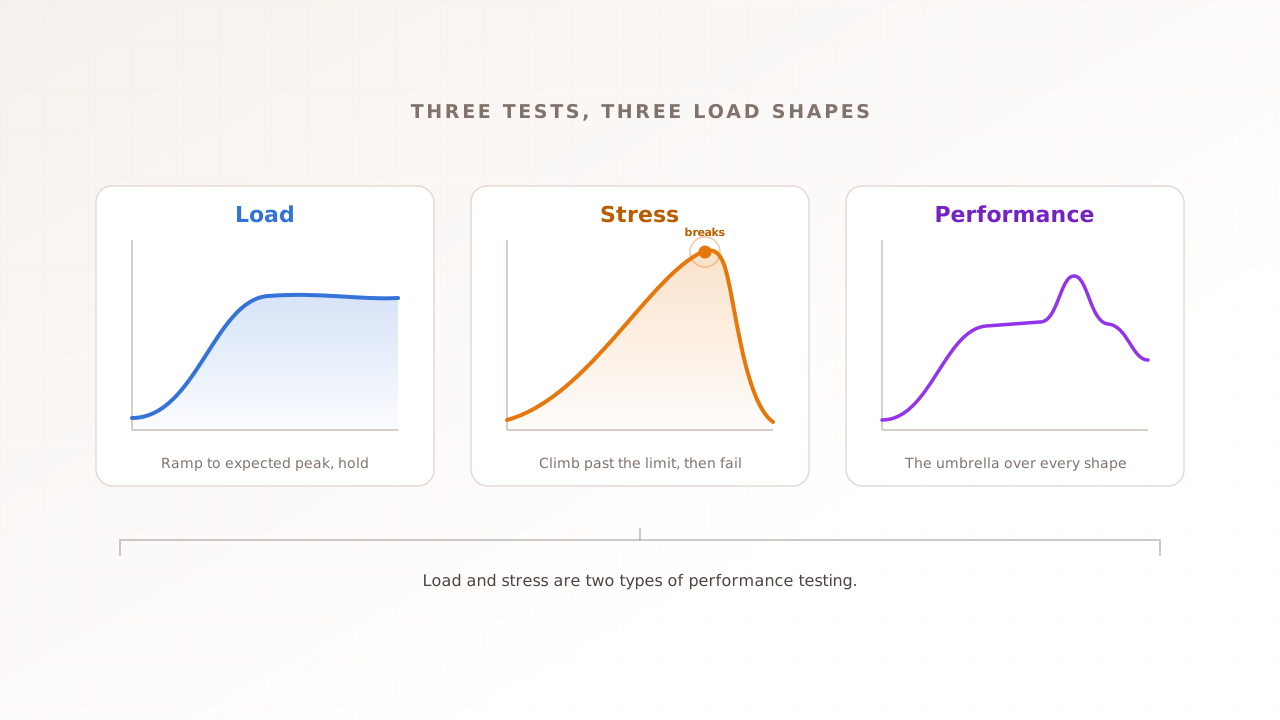
Performance testing is the family name for every test that measures how a system behaves under conditions you define. The members differ in one thing only: the shape of the traffic they apply. Change the shape, and the test answers a different question about the same site.
The four main types of load testing are load testing, stress testing, spike testing, and soak testing. Load testing checks how the system behaves at expected traffic. Stress testing pushes past expected traffic to find the breaking point. Spike testing applies a sudden surge and an equally sudden drop. Soak testing holds a realistic load for hours to expose slow degradation.
That is the answer to the question this page most often gets asked, and it is worth keeping crisp. The rest of the family, smoke, capacity, volume, and scalability testing, supports those four rather than competing with them; Wikipedia’s taxonomy adds further variants like breakpoint and configuration testing, and Grafana’s k6 guide teaches six with a recommended running order. Frameworks differ at the edges; some, like RadView’s, swap spike for capacity in their top four. The questions stay the same, which is why this guide organises everything around them.
Load testing: will it hold at expected traffic?
A load test simulates the number of visitors you realistically expect, at their realistic pace, and watches whether pages stay fast and requests keep succeeding. It is the workhorse of the family and the first real answer most teams need, because most sites do not fail at some exotic extreme. They fail at a peak that was entirely foreseeable.
The traffic shape is a ramp up to the target, a steady plateau long enough to trust the reading, and a ramp down. The output is a curve of response times against concurrent users, and the useful number is where that curve begins to bend relative to your target. If the term is new territory, the full explainer covers scenarios, sizing, and reading results: what load testing is.
Stress testing: where does it break, and how?
A stress test deliberately exceeds expected traffic and keeps climbing until the system degrades or fails. The point is not cruelty; it is knowledge. You learn the ceiling’s real number, which failure arrives first, timeouts, errors, a crashed dependency, and whether the system recovers gracefully once load drops.
Stress results turn vague confidence into a margin: if peak forecast is 1,500 concurrent users and degradation starts at 2,100, you know your headroom is 40 percent, and you know what Monday morning looks like if you are wrong. A breakpoint test is a disciplined variant of the same idea, ramping steadily until a predefined failure condition trips. The walkthrough lives in how to stress test a website.
Spike testing: what happens when everyone arrives at once?
A spike test jumps from quiet to very busy in seconds or a couple of minutes, holds briefly, and drops back. It exists because arrival rate is its own risk: infrastructure that comfortably serves a level of traffic can still fail while getting there, when autoscaling needs minutes that a stampede does not grant and cold caches all miss at once.
Spike shapes match real moments: a sale opening, an email blast landing, a TV or social mention. If your calendar contains any of those, the spike question is your question. The explainer, including what a realistic spike profile looks like, is at what spike testing is.
Soak testing: does it survive hours, not minutes?
A soak test, also called endurance testing, runs a realistic load steadily for an extended period, hours rather than minutes, and watches for slow decay: memory climbing run after run, connections leaking, queues quietly building, disk filling with logs. Short tests structurally cannot catch these, because the whole failure mode is time.
Soak testing earns its slot before long unattended commitments, a weekend sale, an overnight batch window, any period where nobody is watching dashboards. The deep dive, with duration guidance, is at soak testing explained.
The supporting types: smoke, capacity, volume, scalability
Smoke testing is the tiny run that comes first: a handful of virtual users proving the scenario works, the environment responds, and nothing is obviously broken. It costs minutes and prevents the embarrassing failure mode of debugging your own test at full load. Where it fits next to full performance tests is covered in smoke testing vs performance testing.
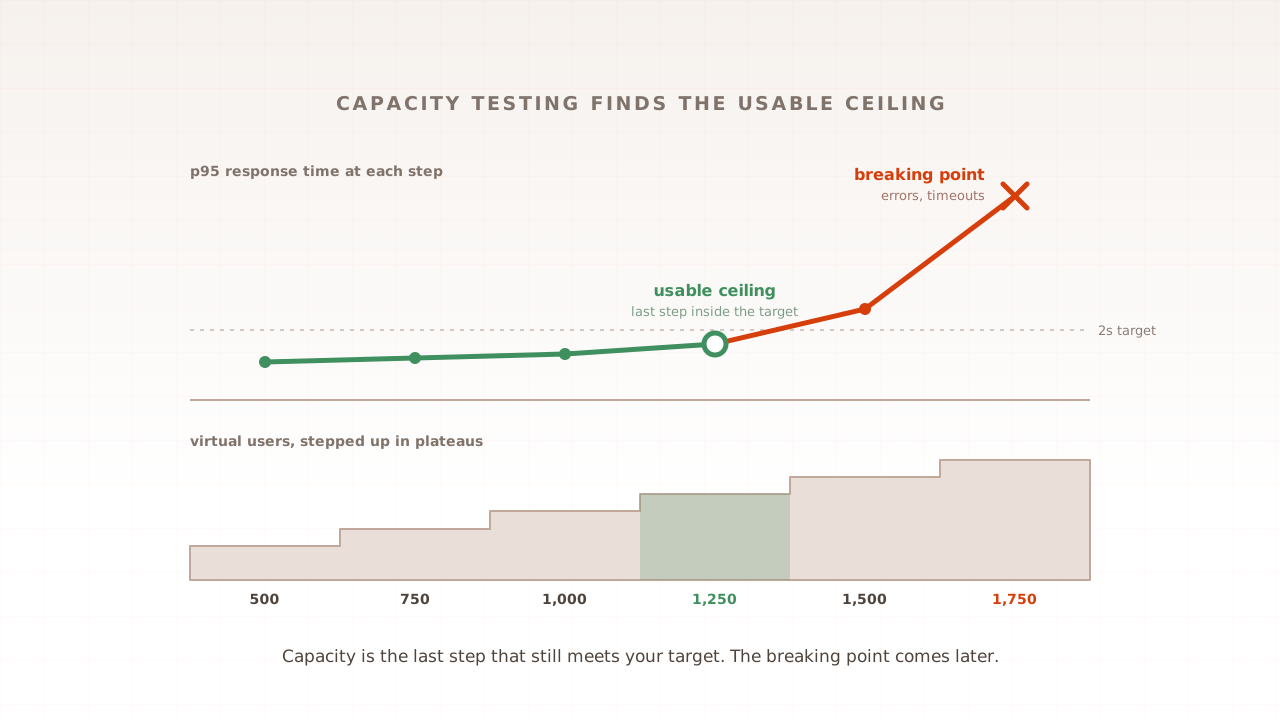
Capacity testing measures the maximum load you can serve while still meeting your targets, the usable ceiling rather than the breaking point. It produces the number planning conversations need. Part 5 of this guide covers it in full.
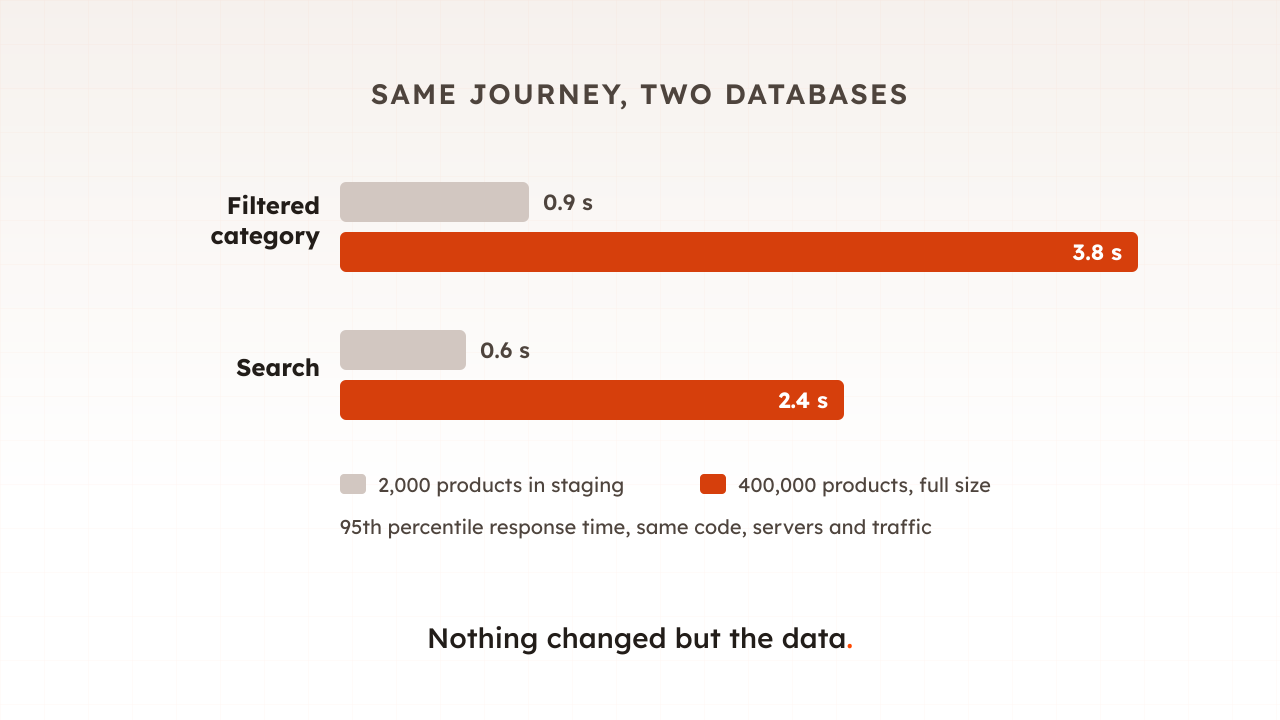
Volume testing holds traffic steady and scales the data instead: the 400,000-product catalogue, the years of order history, the search index at production size. Systems that fly on a seeded test database can crawl on real data. Part 13 takes it apart.
Scalability testing asks whether adding resources actually adds capacity: double the servers, and does the ceiling double, or does a shared bottleneck flatten the gain? It is how you learn whether “we will just scale up” is a plan or a hope. Part 53 covers it later in this guide.
How do the types compare?
The types compare most usefully on three axes: the question each answers, the traffic shape it applies, and the moment on your calendar that calls for it. The table below is the whole taxonomy in one view; if you keep only one artifact from this page, keep this and let each row’s deep link carry the detail.
| Type | Question it answers | Traffic shape | Run it when |
|---|---|---|---|
| Load | Does it hold at expected traffic? | Ramp, hold, ramp down | Before releases, launches, and events |
| Stress | Where does it break, and how? | Climb past the target until failure | After a load baseline exists |
| Spike | Does it survive a sudden surge? | Jump, brief hold, drop | Before sales, drops, and campaigns |
| Soak | Does it degrade over hours? | Steady realistic load, extended | Before long or unattended periods |
| Smoke | Does anything work at all? | Minimal users, minutes | First, always, and after changes |
| Capacity | What is the usable ceiling? | Step up in plateaus, measure at each | For planning and growth decisions |
| Volume | Does real-sized data hurt? | Normal load, production-scale data | Before data grows past the test set |
| Scalability | Does adding resources add capacity? | Same test across resource levels | Before trusting a scale-up plan |
Which test should you run first?
Run them in the order that spends effort where the risk is: smoke, then load, then the event shapes. A smoke test first, always, because it is nearly free and catches broken setups. Then a load test at expected traffic, because that is the question with money on it. Only then do stress, spike, and soak earn their slots, chosen by the risk on your actual calendar, a sale coming means spike, a long quiet period means soak, an architecture change means stress. Grafana’s k6 documentation recommends essentially this progression, and it matches what we see in practice.
Two practical notes soften all of this. First, the types share their ingredients: the same user journey, the same environment, the same metrics, with only the load profile changing. Build a scenario once. Use it everywhere. That is also how Evaluat treats them, one scenario driven through different traffic shapes, measured in real browsers so each shape shows what visitors would actually see. Second, the names matter less than the questions. If your tool calls capacity testing “stress testing”, nothing bad happens as long as you know which question you asked.
Common mistakes when choosing a test type
- Running stress before load. Finding the breaking point is exciting, but the question with revenue attached is expected traffic. Baseline first, extremes second.
- Treating a passed load test as spike readiness. Steady-state capacity says nothing about arrival rate. If traffic comes in bursts, rehearse bursts.
- Skipping smoke tests. Debugging a broken scenario at 1,000 virtual users costs an afternoon; at 5 users it costs a coffee.
- Confusing the ceiling with the breaking point. The load you can serve within targets (capacity) is lower than the load at which you fail (stress). Plan with the first, learn from the second.
- Collecting types like stamps. Eight passing tests of the wrong shapes protect nothing. One load test on the journeys that earn money beats them all.
The family, then: four main types answering four questions, four supporting types for the questions behind them, and an order that starts cheap and ends thorough. Pick the question that matches the risk on your calendar this quarter, and the right test picks itself.
Test in real browsers. Debug in real sessions. Book a demo and we will run your first scenario through the shapes that match your calendar.