How load, stress, and performance testing relate
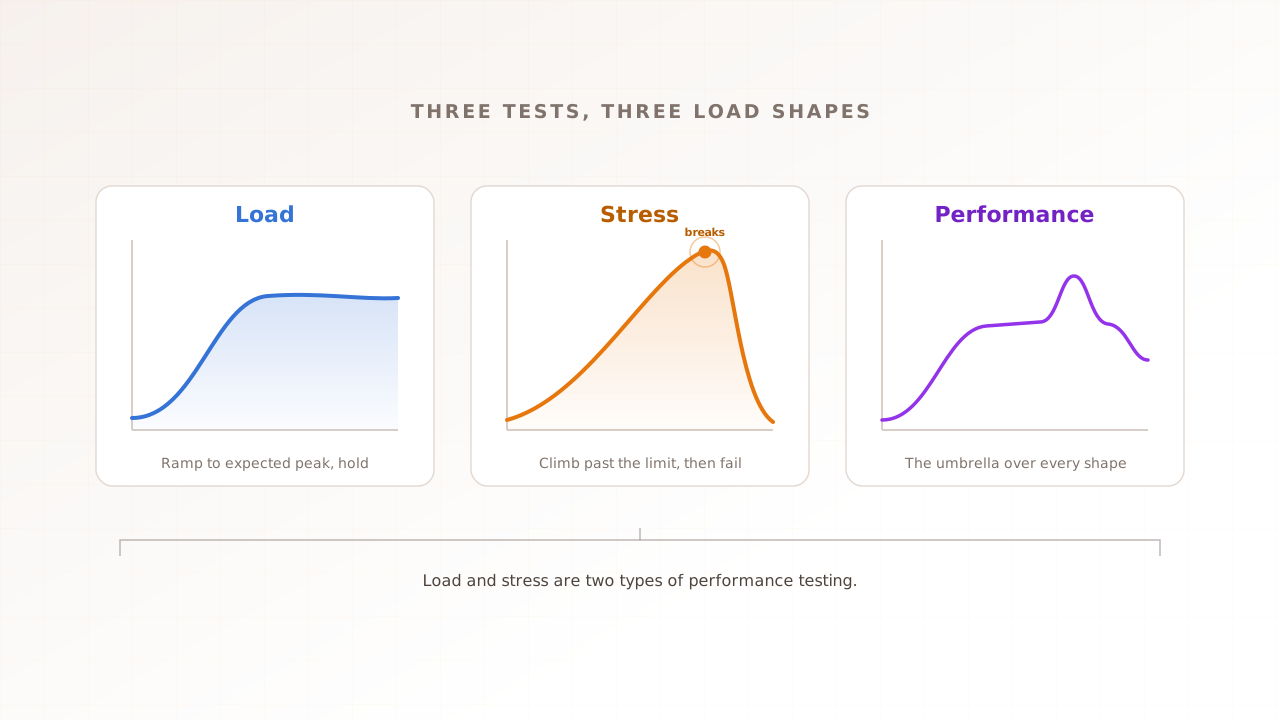
Performance testing is the umbrella term; load and stress testing are two types within it that ask opposite questions. Load testing asks whether the system survives the traffic you expect. Stress testing asks where and how it breaks when you push past that. You run them together, not instead of each other.
The confusion is understandable, because people use “performance testing” and “load testing” interchangeably in everyday conversation. But they sit at different levels. Performance testing is the strategy: the whole practice of measuring how a system behaves under load. Load and stress testing are tactics within that strategy, each isolating a different question. Keep that hierarchy in mind and the rest falls into place. The cost of getting it wrong is not just vocabulary: a team that thinks a passing load test means they are covered will skip stress testing, and then learn the difference the hard way during the one surge they never rehearsed.
The three at a glance
The fastest way to see the difference is side by side. Load testing validates expected peak, stress testing finds the breaking point, and performance testing is the umbrella that frames both. The table below maps each one by goal, load shape, what you learn, and when to run it.
| Load testing | Stress testing | Performance testing | |
|---|---|---|---|
| Goal | Confirm you handle expected peak | Find the breaking point and recovery | Evaluate speed, stability, and scale overall |
| Load shape | Ramp to expected peak, then hold | Ramp past the limit until it fails | Any shape: ramp, spike, soak, plateau |
| What you learn | Whether you meet the target at peak | Where and how the system breaks | Where the bottlenecks are |
| Key metric | Response time, throughput, error rate | Failure point, degradation, recovery time | All of the above plus resource use |
| When to run | Before releases and known events | After load passes; before high-risk events | Continuously, as the frame for both |
Two things stand out. Load and stress testing are not alternatives: they answer different questions, and most teams run both. And performance testing does not belong in the same row as the other two. It is the category they sit inside, which is why its column is broader than the rest.
In practice the three form a progression. Performance testing is the standing commitment to measure under load at all. Load testing is the routine check you run on every release. Stress testing is the deeper probe you run when the stakes are high. Teams that treat performance as a one-off miss this: the umbrella is continuous, and the individual types are the specific questions you ask within it.
What is performance testing?
Performance testing is the umbrella: any testing that measures how a system behaves under load, including its speed, stability, and ability to scale. Load and stress testing are two types within it, alongside spike, soak, scalability, and volume testing. Think of it as the strategy, and the individual types as the tactics.
Functional testing asks one question: does the feature work. Performance testing asks a different one: does the system stay fast and stable when real traffic arrives. We cover the full definition and the six common types in our complete performance testing guide. For this comparison, the point is simply that performance testing is the parent category, and load and stress testing are two of its children.
What is load testing?
Load testing checks whether your system handles the traffic you actually expect. You simulate a realistic number of concurrent virtual users, ramp up to your expected peak, hold it, and confirm the system stays within its targets. It is the dress rehearsal for a normal busy day.
The traffic is not real people. It is virtual users: scripted or recorded sessions that each behave like one visitor. The load shape is a ramp up to expected peak, then a hold. The metrics that matter are response time read as percentiles, throughput, and error rate. You run a load test before releases, as a gate in continuous integration, and before a known event like a sale. It passes when the system meets its target and errors stay near zero.
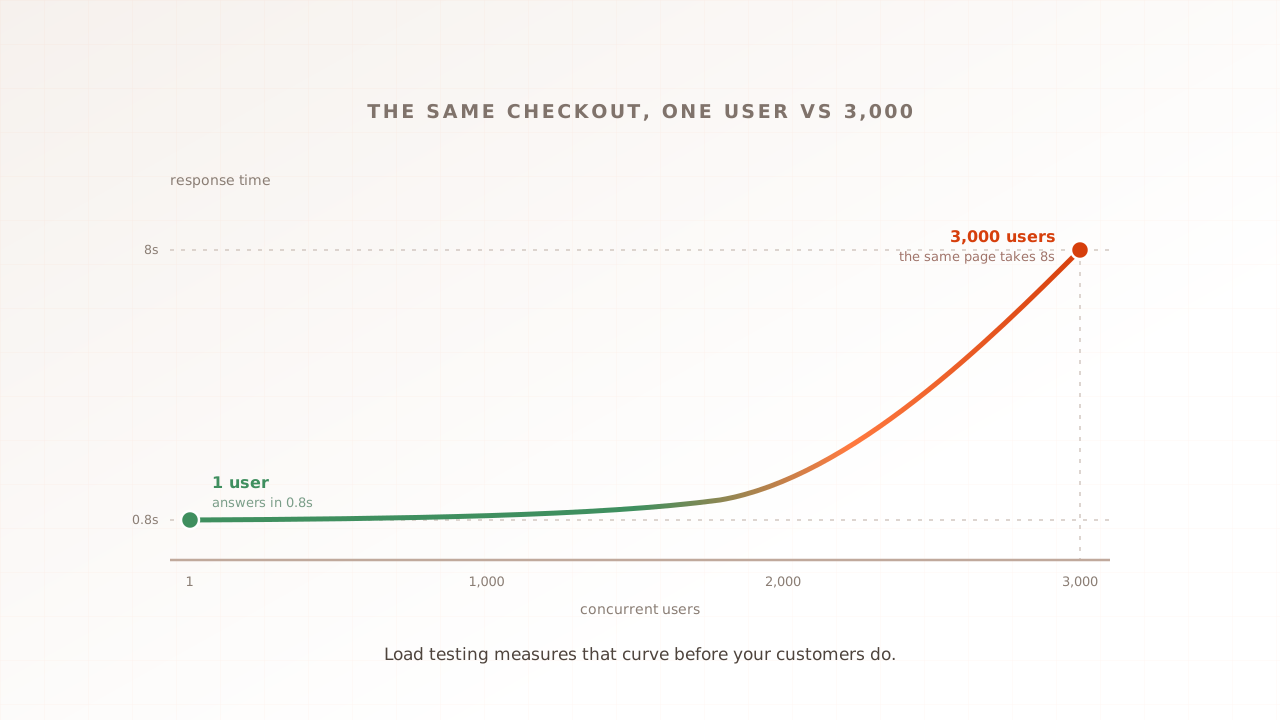
A concrete target makes that real. If your budget is a p95 response time under one second on checkout, with an error rate below 0.5%, a load test at expected peak either clears the bar or it does not. The value is the clear answer it gives you: ship, or fix the checkout path first.
What is stress testing?
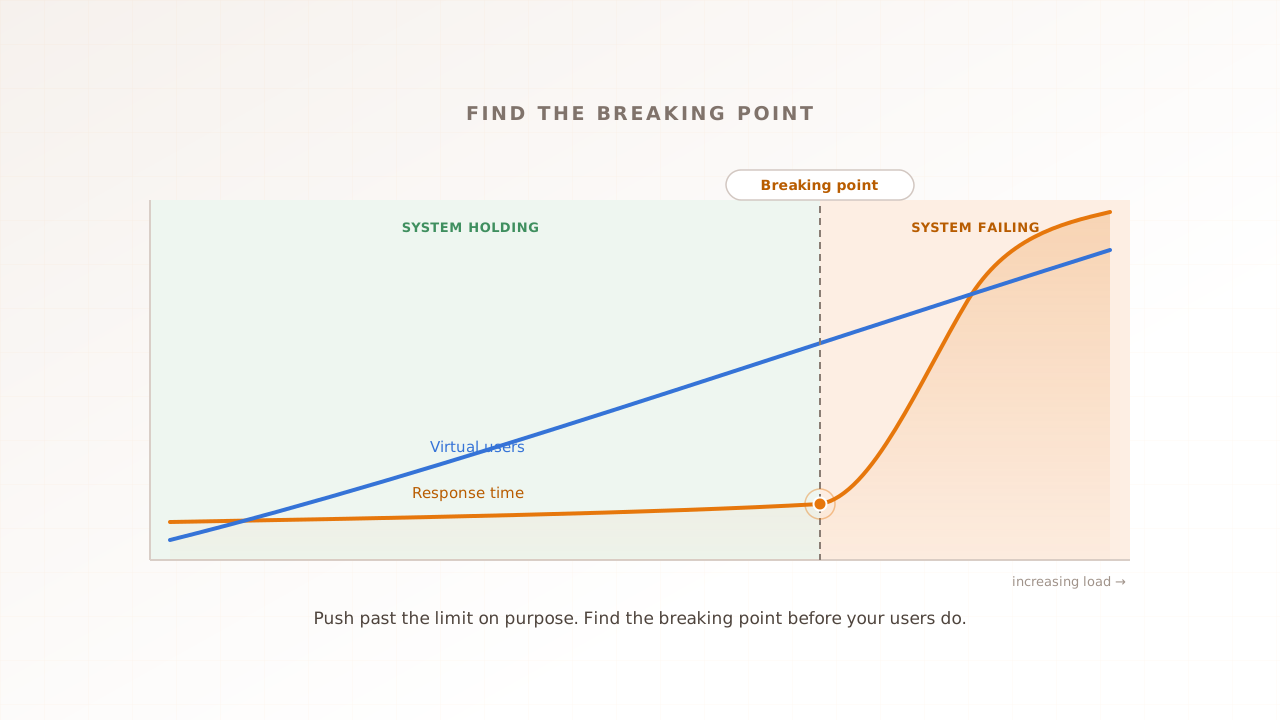
Stress testing deliberately pushes the system past its limits to find the breaking point. Instead of stopping at expected peak, you keep increasing the load until something fails, then watch how it fails and how it recovers. It is the emergency drill, not the dress rehearsal.
The load shape keeps climbing past the limit. What you learn is the ceiling, the failure mode, and the recovery behavior. Does the system degrade gracefully, shedding load and staying up, or does it crash hard and stay down. There is no pass line: the goal is not to survive but to learn exactly where the edge is, so a real surge does not find it for you. You run a stress test after a load test passes, and before any event where a surge is plausible.
The interesting part of a stress test is not the moment of failure but the shape of it. A system that degrades gracefully sheds load, queues requests, or serves a fallback, and recovers on its own once the surge passes. A system that fails badly returns errors to everyone, corrupts data, or stays down until someone restarts it by hand. Stress testing tells you which kind you have built. Recovery time, how long the system takes to return to normal after the load drops, is often the most useful number it produces.
Load testing vs stress testing: the difference that trips people up
The cleanest way to keep them apart: load testing confirms you can handle the expected, stress testing finds the unexpected. Load testing has a pass or fail target and stops at peak. Stress testing has no pass line; its job is to break the system on purpose and measure what happens next.
Run load testing first to establish the baseline, then stress testing to find the ceiling. The two are a sequence, not a choice. A system can pass every load test and still collapse the moment real traffic spikes to three times your plan, and that gap between “handles the expected” and “survives the unexpected” is exactly what stress testing exists to measure. And that failure is never just a number on a chart, it is a real person who arrived during the surge you never rehearsed.
Put differently, a load test has a number you are trying to beat, and a stress test has a number you are trying to find. One protects the plan; the other questions it. Both are worth running, because the plan is sometimes wrong.
Where do spike and soak testing fit?
Spike and soak testing are two more types under the performance-testing umbrella, each isolating a different failure mode. Spike testing throws a sudden surge at the system to test shock and recovery. Soak, or endurance, testing holds a moderate load for hours to surface slow leaks. They complement load and stress testing rather than replacing them.
Spike testing matters when your traffic arrives in bursts: a flash sale, a viral post, a breaking-news moment. Soak testing matters when your service runs for days without a restart, where a small memory leak compounds into a slow crash. Both are types of performance testing, the same way load and stress are. Our complete performance testing guide covers the full taxonomy, including scalability and volume testing.
The thread connecting spike and soak testing is time. Spike testing compresses the risk into seconds and asks whether the system absorbs a shock. Soak testing stretches it across hours and asks whether the system holds steady or quietly drifts. Both surface failures that a standard load test, which ramps and holds for a few minutes, will never reach.
Which one should you run?
Most teams should run load testing first, then add the others by risk. Load testing answers the everyday question and gives you a baseline; stress testing matters when a surge would be costly; spike and soak matter for burst events and long-running services. Match the test to the risk you actually carry, not to a checklist.
- Run load testing if you ship to real users at all. It is the baseline every other type builds on.
- Add stress testing if a traffic surge would hurt: a launch, a sale, a press hit where demand could jump well past plan.
- Add spike testing if your traffic arrives in sudden bursts rather than a gentle ramp.
- Add soak testing if your service runs for days between restarts.
- Run them as smoke gates in CI and on a schedule, not once the week before launch.
A concrete example ties it together. An online retailer preparing for a seasonal sale starts with a load test at its measured peak of 2,000 concurrent users, and it passes comfortably. A stress test then ramps past that until the checkout service starts timing out at around 6,000 users, which is the ceiling. Because the sale is expected to triple normal traffic in the first minute, the team adds a spike test of a sudden jump to 6,000, and finds recovery takes four minutes, too long to sit behind a spinning checkout. Now they have a specific problem to fix, found in a test, with weeks to spare, instead of during the sale.
The same tests belong in your pipeline, not just in a pre-launch checklist. A trimmed load test can run as a smoke gate on every release, failing the build when a key page busts its budget, the same way a broken unit test fails it. Stress and soak tests are heavier, so most teams run them on a schedule or before named events rather than on every commit. Either way, the earlier a regression is caught, the cheaper it is to fix.
The reason any of this matters is that speed is a feature users feel. A 2020 study by Google and Deloitte, Milliseconds Make Millions, found a 0.1 second improvement in mobile speed lifted retail conversions by 8.4% and travel conversions by 10.1%. Portent’s 2022 analysis of more than 100 million page views found pages loading in one second convert at 3.05%, falling to 1.12% by three seconds. Google and SOASTA’s 2017 benchmarks showed the probability of a bounce rises 32% as load time grows from one to three seconds. The right test, run at the right time, is what keeps those numbers on your side.
What all three miss: server response vs real user experience
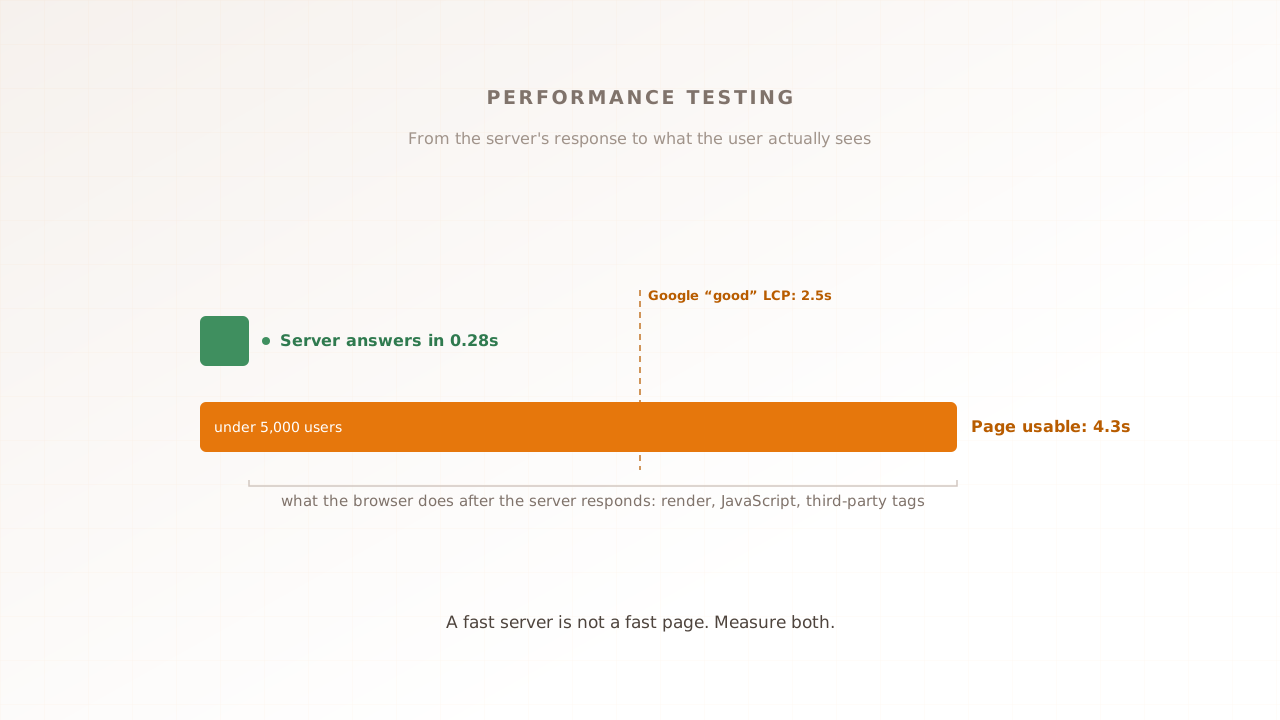
Whichever of the three you run, the same blind spot applies: most tools measure how fast the server answers, not what the user sees. A load or stress test built on raw HTTP requests never renders the page, executes your JavaScript, or loads your third-party tags, so it misses the experience the conversion numbers above actually turn on.
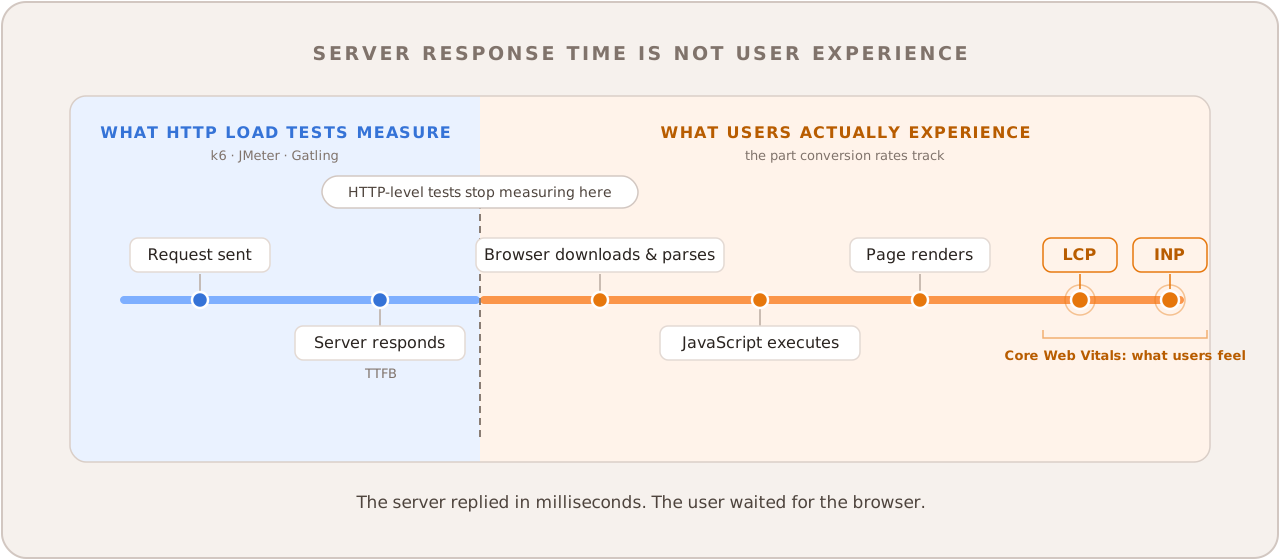
Two layers, two instruments. Protocol-level tools like k6 and JMeter drive requests straight at the server, which is why they scale so cheaply and suit APIs and very high concurrency. Because nothing renders, they report response time and throughput, not Core Web Vitals, the loading, interactivity, and visual-stability metrics Google uses to define page experience. (k6’s browser mode can capture Web Vitals, but it is a bolt-on rather than the tool’s core, and it keeps no per-session record.) The server can reply in 50 milliseconds and the Largest Contentful Paint can still arrive four seconds later, held up by render-blocking tags.
None of that is hypothetical. The HTTP Archive’s 2025 Web Almanac found just 48% of mobile sites passing Core Web Vitals, a median mobile Total Blocking Time of 1,916 milliseconds (up 58% year over year), and only 77% of mobile sites scoring well on Interaction to Next Paint. The bulk of that cost is browser work no request-level load or stress test can see.
Real-browser testing removes the blind spot by running each virtual user in a genuine browser, so a load or stress run records what the customer’s own browser would. Evaluat is built that way: every virtual user gets an isolated browser, and each report keeps Core Web Vitals, session video, network logs, and console output per user. Protocol tools stay the right call for pure API load or stress work; for the customer-facing journey, you need the browser in the loop. The three load-testing models and measuring Web Vitals under load cover the how.
Common mistakes
The mistakes that blur these three are mostly about treating them as interchangeable. They are not. Watch for these four.
- Treating load and stress as the same test. They answer opposite questions, “can we cope” versus “where do we break.” You need both.
- Stopping at load testing. Passing at expected peak says nothing about a surge to three times that. If a spike would be costly, stress test for it.
- Reading averages instead of percentiles. The average hides the slow tail where users actually suffer. Read p95 and p99.
- Stress testing against a toy environment. A breaking point you find on an undersized staging box tells you nothing about production. Match the infrastructure and data volume, or the ceiling you measure is fiction.
- Measuring servers, not users. Request-level timings miss rendering, JavaScript, and third-party tags. If the experience matters, test in a real browser.
Run the right test, in a real browser
Load, stress, and performance testing are not competing options. Performance testing is the umbrella; load testing confirms you handle the expected; stress testing finds where you break. Run load first for the baseline, add stress and the others by risk, and read the percentiles rather than the averages. Most teams need both load and stress testing, not one instead of the other.
Whichever you run, test the experience your users actually get, not just the response your servers send. Evaluat puts each virtual user in its own real browser and keeps the Core Web Vitals, session video, and network and console logs for all of them, so a failure at peak comes with the exact session you can replay.
Test in real browsers. Debug in real sessions. Book a demo.