What is spike testing?
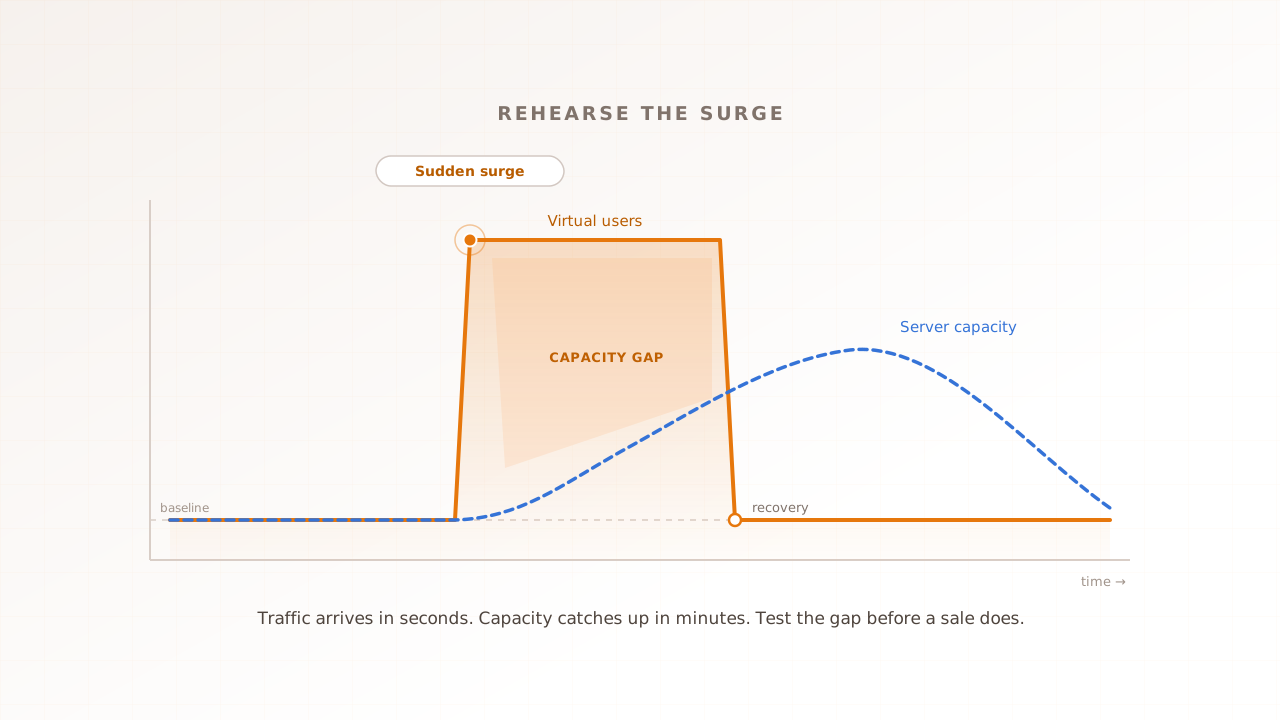
Spike testing is a type of performance testing that hits a system with a sudden, extreme jump in traffic, holds it briefly, then drops it just as sharply. It measures two things at once: whether the system survives the surge, and how fast it recovers afterward. What defines it is not how much load arrives, but how abruptly.
A quick vocabulary check, because the rest of the guide leans on it. A virtual user is a scripted session that behaves like one real visitor moving through your site. A spike is a steep, short-lived jump in the number of those users active at the same time. A spike test ramps virtual users from a normal baseline to many times that number in seconds rather than minutes, keeps them there briefly, then pulls them away.
Picture a venue. A load test is a steady queue at the doors all evening. A stress test is that queue growing until the doors jam. A spike test is the whole crowd arriving in the same sixty seconds, then leaving just as fast. The doors might hold for a slow trickle and still buckle when everyone pushes through together, which is exactly the failure a spike test is built to find.
That sixty-second crowd is not hypothetical. On Black Friday 2025, United States shoppers spent around $12.5 million online every minute during the midday peak, according to Adobe Analytics. Traffic like that does not build politely over the afternoon; it lands when the deal goes live. Spike testing is one of the types of performance testing, and it is the one that rehearses that exact moment. If that is your peak too, the 12-week Black Friday plan puts the rehearsal on a calendar.
Spike testing vs stress testing vs load testing
The three tests are siblings that put a system under pressure in different shapes. Load testing applies the traffic you expect, ramped up gradually. Stress testing keeps raising the load past that point to find where the system breaks. Spike testing applies a sudden surge and an equally sudden drop, to test shock and recovery rather than the steady-state ceiling.
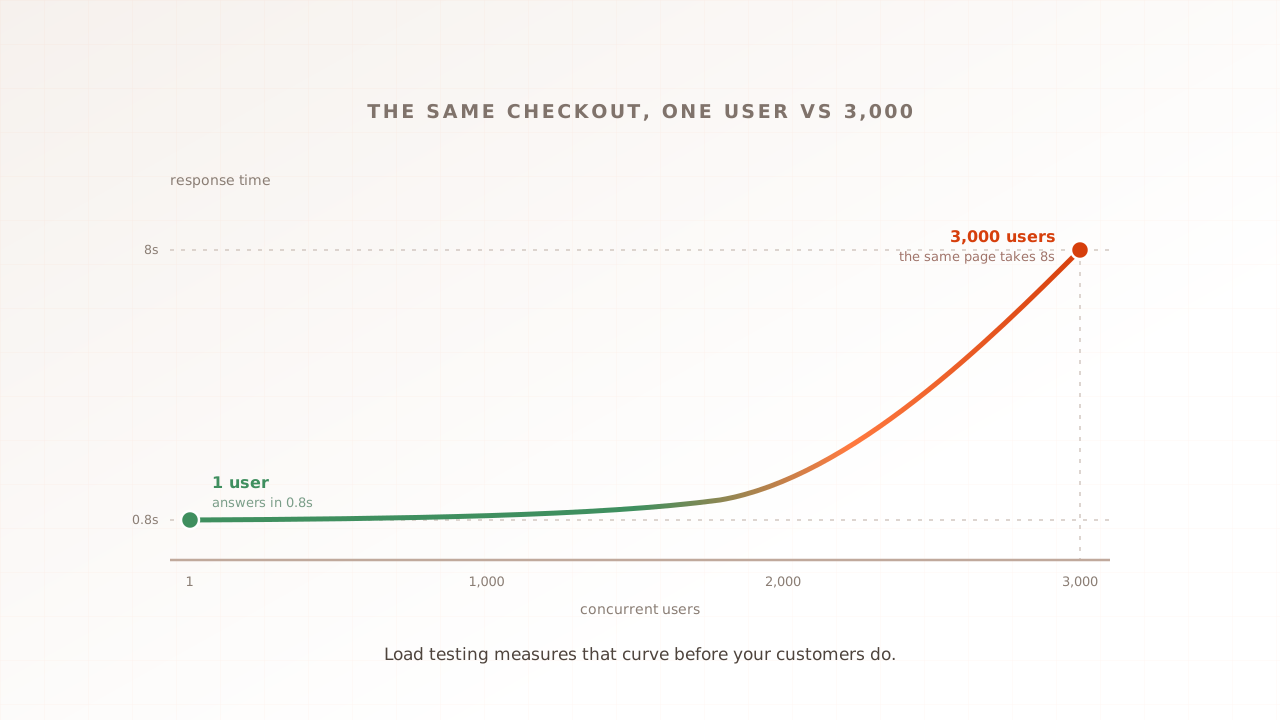
The difference that trips people up is the shape of the load over time, not the peak number. A stress test and a spike test might both reach 5,000 virtual users, but the stress test climbs there over twenty minutes while the spike test arrives in one. Systems that cope with gradual growth often stumble on the sudden version, because autoscaling, caches, and connection pools all need a moment to catch up that a spike does not give them.
| Test type | Load shape | What it answers |
|---|---|---|
| Load testing | Expected peak, ramped up gradually | Do we handle a normal busy day? |
| Stress testing | Rising past the limit until it breaks | Where is the ceiling, and how does it fail? |
| Spike testing | A sudden surge, then a sudden drop | Do we survive a shock and recover? |
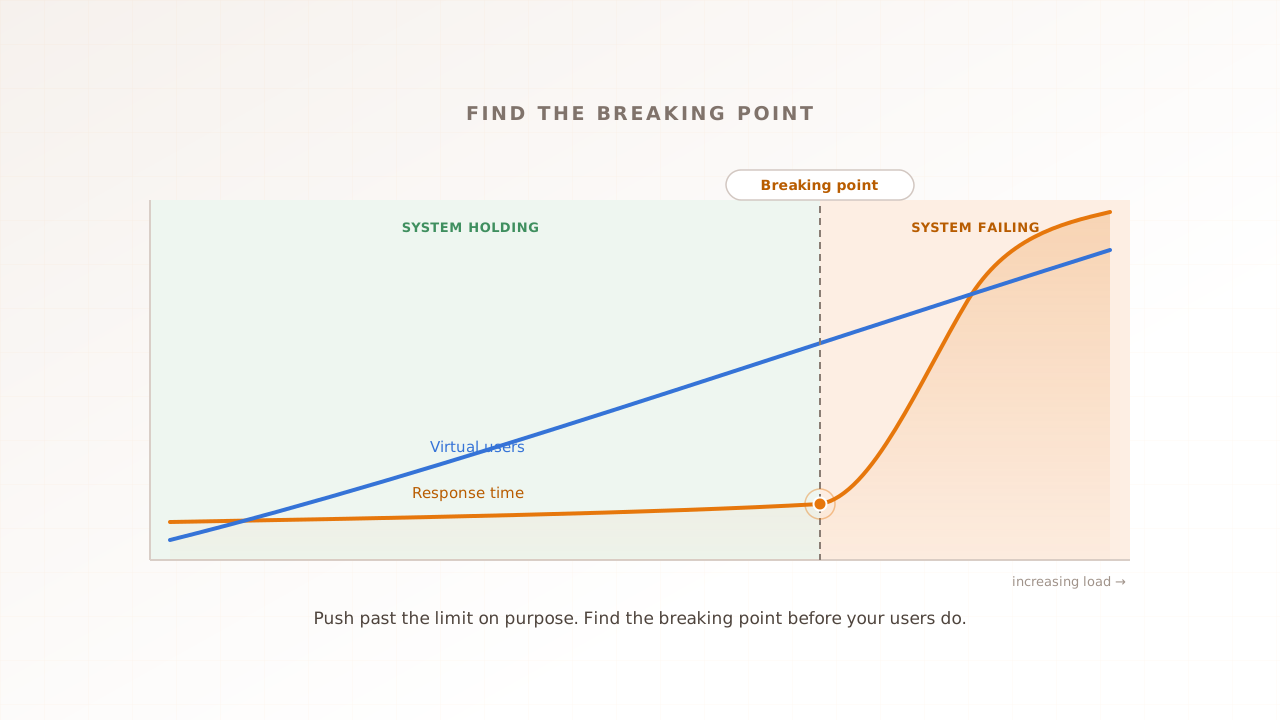
One practical consequence: a spike test does not have to break your environment to be a success, which sets it apart from a stress test whose whole job is to find the breaking point. For the gradual version, and for how to find a breaking point cleanly, see our guides to load vs stress vs performance testing and stress testing a website.
Why does spike testing matter?
Spike testing matters because the traffic that breaks a site usually arrives all at once, at the moment it is worth the most. A flash sale, a product drop, a ticket on-sale, or a post that goes viral can multiply traffic in minutes, and a site that crawls or crashes during that window loses the sale and the goodwill together.
The scale of these events is easy to underestimate. Adobe Analytics reported that Black Friday 2025 drove a record $11.8 billion in United States online sales, up 9.1% on the year. The surges also come from new directions: traffic to retail sites from generative AI tools rose 693% year over year across the 2025 holiday season, a referral channel that barely registered two years earlier. Demand spikes are getting larger and harder to predict.
The cost of being slow at that moment is well documented. Google and Deloitte’s 2020 Milliseconds Make Millions study found that a 0.1 second improvement in mobile load time lifted retail conversions by 8.4%. Google and SOASTA’s 2017 mobile page speed benchmarks found the probability of a bounce rises 32% as a page goes from one to three seconds to load. Under a spike, pages get slower, not faster, so those penalties land precisely when traffic is highest.
An outright outage is more expensive still. In ITIC’s 2024 survey of more than 1,000 organizations, over 90% of mid-size and large enterprises said a single hour of downtime now costs them more than $300,000, and 44% put it above $1 million. A failure at peak isn’t a percentile. It’s a session. Behind it is a real person who came to buy during your biggest hour and could not.
How does a spike test work?
A spike test follows a simple arc: establish a normal baseline, jump the load to many times that level almost instantly, hold the surge briefly, then drop it and watch the system recover. The setup mirrors any performance test, a realistic user journey run against a production-like environment, but the load profile is what makes it a spike.
The spike profile
The load profile is the plan for how many virtual users run and how fast they arrive. A spike profile is deliberately steep. A worked example: hold a baseline of 200 virtual users, jump to 3,000 in under a minute, hold there for three minutes, then drop back to 200. The jump is the test. Where a load test might take ten minutes to reach 3,000 users, the spike gets there before any gradual safeguard can respond.
The drop matters as much as the jump. Pulling the load away suddenly is how you test recovery, and recovery is where spikes hide their worst surprises. A system can survive the surge itself and then fail to return to normal, holding a backlog of queued work long after the crowd has gone.
Why the cloud does not save you
The common objection is that autoscaling handles this automatically. It helps, but reactive autoscaling is not instant, and that gap is the whole problem. When load climbs, a scaler notices, then launches new machines, which then have to boot and warm up before they serve traffic. Amazon Web Services offers warm pools, pools of pre-initialized instances, specifically to cut that launch latency; when the pool is empty, the system falls back to a slower cold start. A surge that arrives in seconds can outrun a scaler that reacts in minutes.
Several things pile up in that gap. Caches start cold and miss until they fill. Database connection pools hit their limit. Clients that time out retry, which adds even more load at the worst moment. None of this means the cloud is useless; predictive scaling, pre-warming, content delivery networks, and waiting rooms all exist to close the gap. A spike test is how you confirm those defenses actually hold, instead of assuming they will on the day.
What to measure during and after the spike
Watch four signals together. Error rate is the share of requests that fail. Response time, read as percentiles, shows the pain: p95 means 95% of requests were at least this fast and the slowest 5% were worse, and p99 narrows that to the slowest 1 in 100. Throughput is the requests served per second. Recovery time is the gap between the load dropping and those numbers returning to baseline.
The surge and the recovery tell different stories. During the spike, a climbing error rate and a p99 that balloons show the system straining. After the drop, a fast return to baseline means the system shed the load cleanly; errors or slow responses that linger for minutes point to a queue backlog or a leak that a calmer test would never reveal.
How big should a spike test be, and when should you run one?
Size the spike to a real event, not a round number. Start from your real peak traffic, the busiest your analytics have actually seen, then model the multiple a sale or launch could bring, arriving in a minute or two. The aim is to match the shock you actually face, so the test tells you something you can act on.
Real surges are steeper than most teams guess. The vendor Queue-it documented a Rakuten France sale where traffic climbed from 500 to 6,000 visitors a minute in two minutes, more than a tenfold jump, and a ticket on-sale during Rock in Rio that hit roughly 20,000 users a minute. If your test ramps gently to a big number, it is a load test wearing a spike’s name; the steepness is the point.
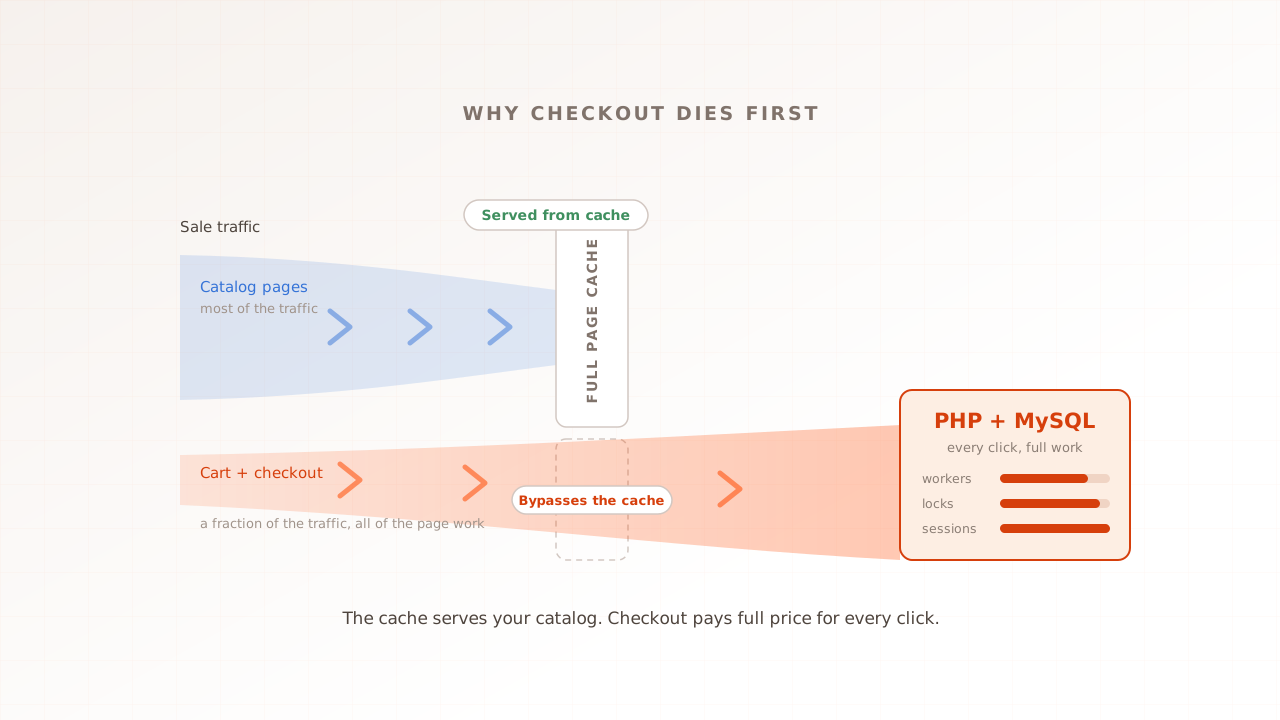
Two design choices keep the test honest. Drive a realistic journey, not the homepage: a flash-sale crowd heads for product pages and checkout, which is where the contention actually shows. And size the surge to a genuine event, because a spike calibrated to a real sale is a rehearsal, while an arbitrary one is just noise.
As for timing, run a spike test at three moments:
- Before a known event. A flash sale, product drop, campaign, or ticket on-sale that you can see coming on the calendar.
- After infrastructure changes. Anything that touches scaling rules, caching, rate limits, or capacity can change how the system absorbs a shock.
- On a schedule, for recurring sales. Teams that run regular drops or seasonal peaks spike-test routinely, so a regression surfaces in a test rather than during the next event.
What spike tests miss: the experience during the surge
Pass a spike test at the request layer and you have proved one thing: the servers stayed up. Whether anyone could use the site while they did is a separate question. During a surge, a page can return a 200 status while the browser sits on a white screen, because rendering, JavaScript, and third-party tags all compete for a busy network and a cold cache at the worst possible moment. The server held; the experience did not.
That is the blind spot of protocol-level tools. k6 and JMeter pace HTTP requests in protocol mode, which lets them generate a large surge cheaply, but that mode reports server response, not what renders. k6 also ships a separate browser mode that can read Core Web Vitals.
Real-browser performance testing closes that gap. Every virtual user is a real browser. The run records what those controlled browsers rendered under the selected surge conditions. Evaluat keeps Core Web Vitals, session video, network logs, and console logs per user. Field data remains the source for the full spread of customer devices. For a pure API spike, a protocol tool is the lighter instrument; for the user-facing journey, use a browser.
Common spike testing mistakes
Most failed spike tests share a handful of mistakes, and all of them are avoidable.
- Ramping when you should jump. A gentle climb to a big number is a load test. If the load does not arrive almost instantly, you are not testing a spike.
- Never measuring recovery. The surge is half the test. A system that survives the spike but stays degraded after the drop has a queue backlog or a leak you have not found.
- Assuming autoscaling has it covered. Reactive scaling lags the surge by the time it takes to launch and warm new capacity. Test that your scaling and fallbacks hold; do not assume.
- Testing only the homepage. A real crowd heads for product pages and checkout. The breaking point of your lightest page tells you nothing about your heaviest.
- Measuring servers, not users. Request-level timings miss rendering, JavaScript, and third-party tags. If the experience matters, run the spike in a real browser.
Rehearse the surge before it arrives
Spike testing turns a nervous guess about your next big day into a rehearsal. Set a baseline, jump the load to the multiple a real event would bring, hold it, drop it, and watch both the surge and the recovery. Build the number into a broader peak-readiness plan before the event.
Evaluat runs every virtual user in a real browser and captures Core Web Vitals, session video, and network and console logs for each one, so when a surge strains the page you can open the session and watch exactly what the user saw.
Test in real browsers. Debug in real sessions. Book a demo.