What is smoke testing?
Smoke testing is a fast, shallow check that a new software build is not fundamentally broken before anyone spends time on deeper testing. It runs the handful of critical paths, login, checkout, the core workflow, and confirms they work at all. TechTarget calls it build verification testing or confidence testing: a method used to decide whether a new build is ready for the next testing phase.
The name is borrowed from hardware and plumbing: power on a new board, or pump smoke through new pipes, and if smoke escapes you stop before testing anything else. A software smoke test is the same idea: a quick pass over the essentials that either clears the build for real testing or rejects it on the spot. It is broad and shallow by design. It touches many features but tests none of them thoroughly, which is exactly what makes it fast.
One wrinkle sits at the centre of this comparison: “smoke test” means two different things depending on who says it. To a QA engineer it is the functional sanity check above. To a performance engineer it is a tiny load test, a warm-up run at a few virtual users that proves a load script works before the full test. Both are quick pre-release checks, and the rest of this guide keeps them clearly apart, because confusing the two is where most teams go wrong.
What is performance testing?
Performance testing is the umbrella practice of measuring how a system behaves under load: its speed, its stability, and its ability to scale. Where a smoke test asks whether a feature works at all, a performance test asks whether it stays fast and reliable when realistic traffic arrives. It is non-functional testing, concerned with how well the system runs rather than whether it runs.
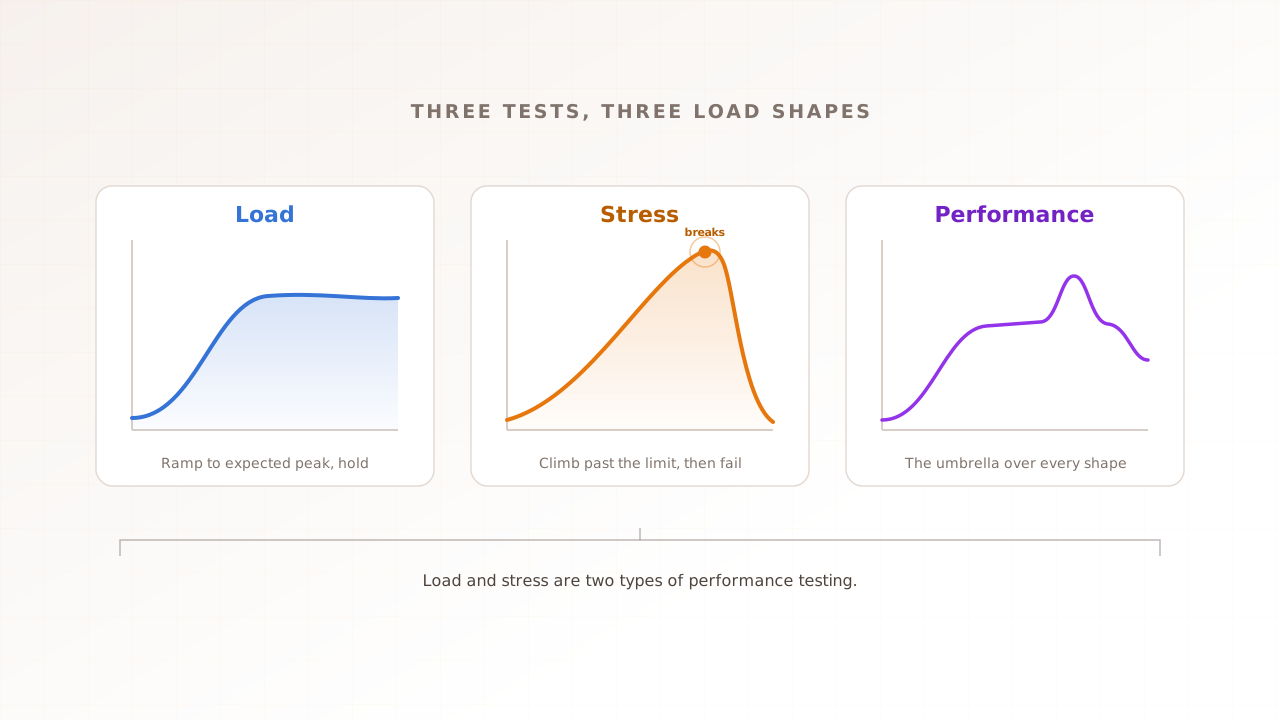
Performance testing is a family, not a single test. Load testing checks behavior at expected peak, stress testing pushes past the limit to find the breaking point, and spike and soak testing probe sudden surges and slow leaks. Our complete performance testing guide covers the full taxonomy. For this comparison, the point is that performance testing is a deliberate, heavier practice that a quick smoke check can precede but never replace.
The stakes are why teams invest in it. The Consortium for Information and Software Quality put the cost of poor software quality in the US at 2.41 trillion dollars in 2022, including roughly 1.52 trillion in accumulated technical debt. A meaningful share of that is systems that worked in a demo and fell over under real conditions, the gap a smoke test is not built to catch.
Smoke testing vs performance testing at a glance
The fastest way to see the difference is side by side. A smoke test is a short functional gate that runs after every build; a performance test is a deliberate measurement of behavior under load that runs before releases and known traffic events. The table maps the two by goal, load, what you measure, and when you run them.
| Smoke testing | Performance testing | |
|---|---|---|
| Question it answers | Is the build broken? | Is it fast and stable under load? |
| Type | Functional sanity check | Non-functional, behavior under load |
| Load applied | Minimal or none | Realistic to extreme, many virtual users |
| What you measure | Whether critical paths work | Response time, throughput, errors, Core Web Vitals |
| Duration | Seconds to minutes | Minutes to hours |
| Pass criteria | Critical paths work, build accepted | Meets speed and stability targets |
| When to run | After every build, before deeper testing | Before releases and known traffic events |
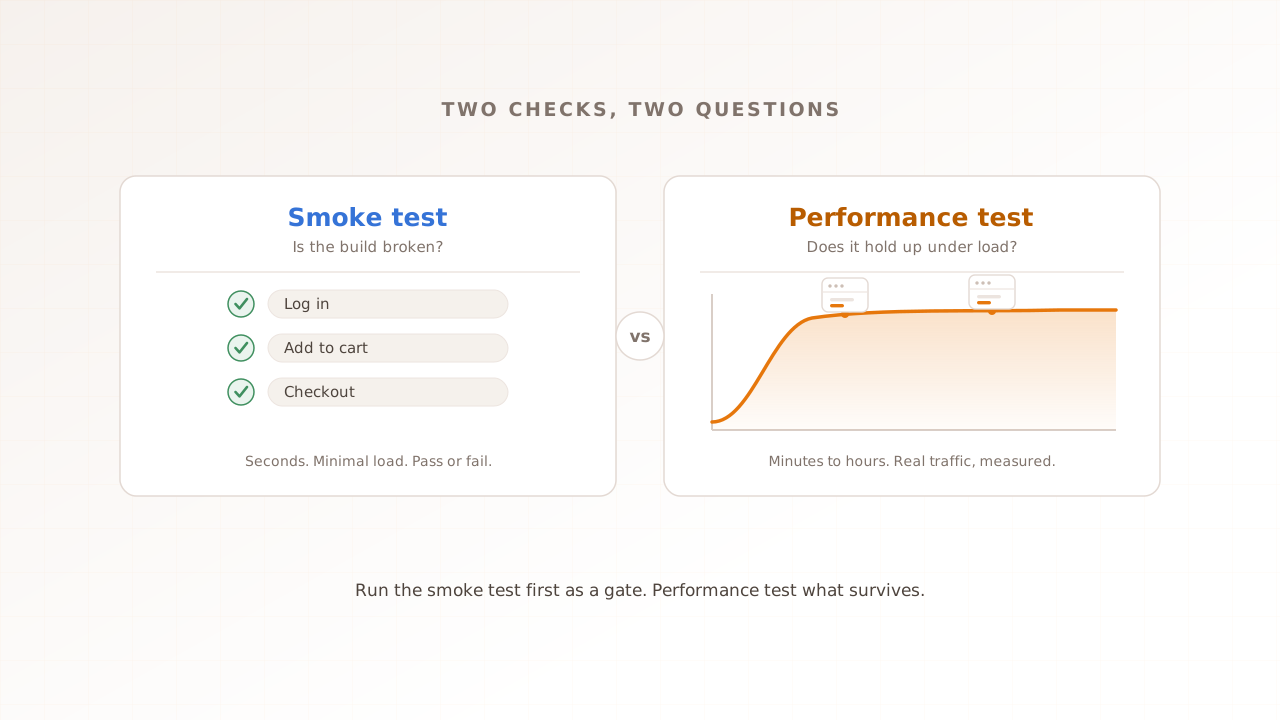
Two things stand out. The two are not alternatives, because they answer different questions: “does it work” versus “does it hold up.” And they sit at different stages. The cost asymmetry sets the order. A smoke test is cheap enough to run on every commit, so it goes first and keeps dead builds out. A performance test is heavier, so you spend it only on builds that have already proven they are not broken. Run the smoke test first to avoid wasting a load-testing run on a build that was never going to work, then performance test what survives.
The two meanings of “smoke test”
“Smoke test” is one phrase for two different checks, and the confusion between them is the single biggest reason teams mix up smoke and performance testing. One is a functional sanity check that lives in QA. The other is a minimal load test that lives in performance engineering. They share a name and a spirit, quick, early, and low-cost, but they measure different things. Here is each one on its own.
The functional smoke test: is the build broken?
The functional smoke test is the QA gate. After a new build, it runs the critical user journeys, can a user log in, add to cart, reach checkout, and confirms each one returns something sane. It does not measure speed and it does not chase edge cases. BrowserStack frames the scope cleanly: smoke testing is broad and shallow, covering the main functionality of the whole application, while sanity testing is narrow and deep on one change. If a critical path fails the smoke test, the build is rejected and nobody wastes time testing the rest.
The performance smoke test: does the load script run?
The performance smoke test is the load-testing world’s warm-up. Before running a full test at thousands of virtual users, each one a simulated visitor the test drives through your site, you run the same script at a handful to confirm it works and to capture baseline numbers. Grafana’s k6 documentation defines it precisely: a smoke test is a minimal load test that verifies the system works well under minimal load and gathers baseline performance values, run at two to five virtual users for seconds to a few minutes. Protocol-level tools like k6 treat it as the first of several load-test types. It is a check on your test, not a test of your system at scale.
When is a quick pre-release check enough?
A quick smoke check is enough when the risk you are retiring is “did we ship something obviously broken,” and never when the risk is “will it hold up under load.” Those are different questions, and a smoke test only answers the first. It is a necessary gate, not a complete one: passing it means the build is worth testing further, not that it is ready for real users.
Here is the honest line between the two:
- A functional smoke test is enough to gate a build into deeper testing, to catch a deploy that broke a critical path, and for low-traffic internal tools where a slow page costs little.
- It is not enough for any user-facing system where speed affects revenue, before a known traffic event like a launch or a sale, or any time the real question is whether the system scales.
- The one quick performance check worth running on every build is the performance smoke gate: a trimmed load test that fails the build when a key page busts its budget. It only means something after a full load test has set the baseline it defends.
A worked example shows the boundary. A team adds a three-virtual-user smoke test to its continuous integration (CI) pipeline that loads checkout, asserts a 200 response, and checks the page renders within budget. It catches a broken cart in thirty seconds, before QA ever opens the build. What it cannot tell them is whether checkout survives two thousand concurrent shoppers on sale day. Getting that wrong is expensive: ITIC’s 2024 survey found a single hour of downtime now costs over 300,000 dollars for more than 90% of mid-size and large enterprises. The smoke test protects the build. Only a load test protects the launch.
What a smoke test cannot tell you
Whichever kind of smoke test you run, it is silent on everything that happens under sustained, realistic load. It will not surface the response-time cliff at peak concurrency, the memory leak that only shows after an hour, the scaling ceiling where the database starts timing out, or the third-party tag that blocks rendering on a real page. A green smoke run means the build is not dead. It says nothing about whether the experience holds up when users arrive.
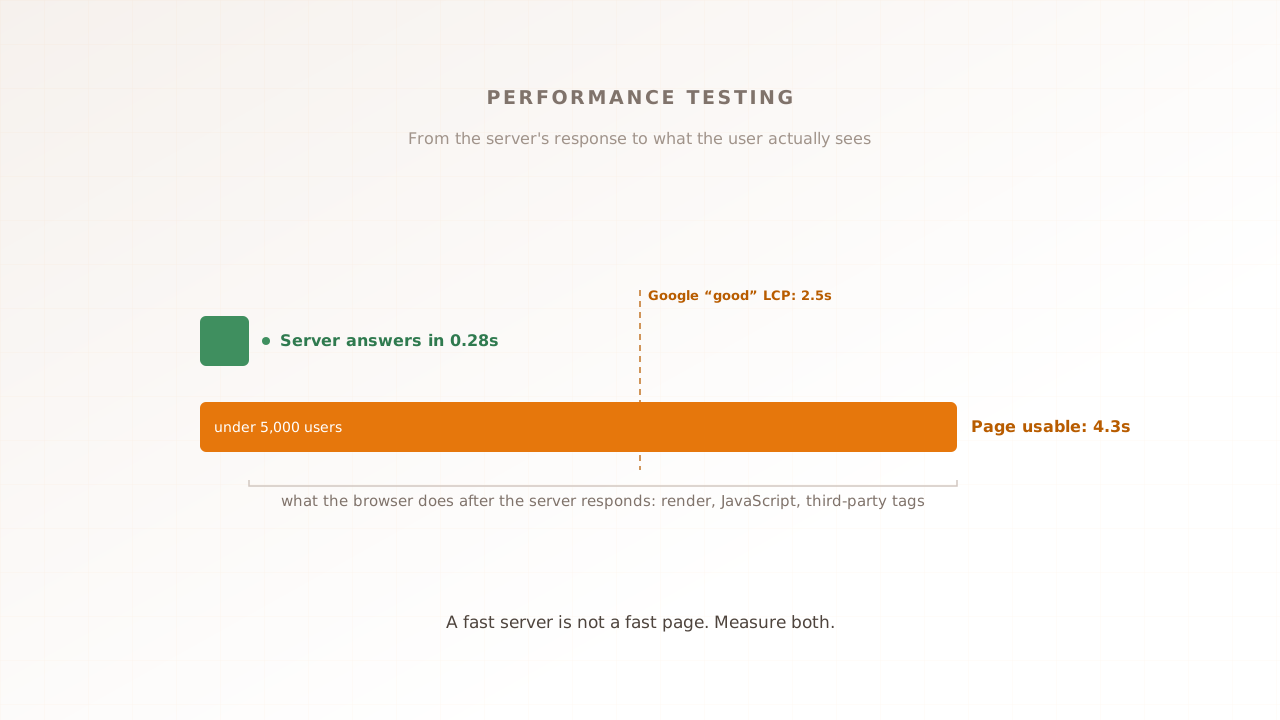
That last gap is the one most tools miss entirely. Most load tests, and every functional smoke test, measure how fast a server responds, not what a person actually sees in the browser. Speed is a feature users feel. Google and Deloitte’s Milliseconds Make Millions study found a 0.1 second mobile speed improvement lifted retail conversions by 8.4% and travel conversions by 10.1%. Portent’s 2022 analysis found e-commerce pages loading in one second convert at 3.05%, falling to 1.12% by three seconds. Google’s research with SOASTA found the probability of a bounce rises 32% as load time grows from one to three seconds. None of that is visible to a smoke test.
It is mostly browser-side work, too. The HTTP Archive’s 2025 Web Almanac found only 48% of mobile sites pass Core Web Vitals, Google’s metrics for loading, interactivity, and visual stability, with a median mobile Total Blocking Time of 1,916 milliseconds, the time the browser spends unable to respond while scripts run. A request-level test never sees it, because it never renders the page.
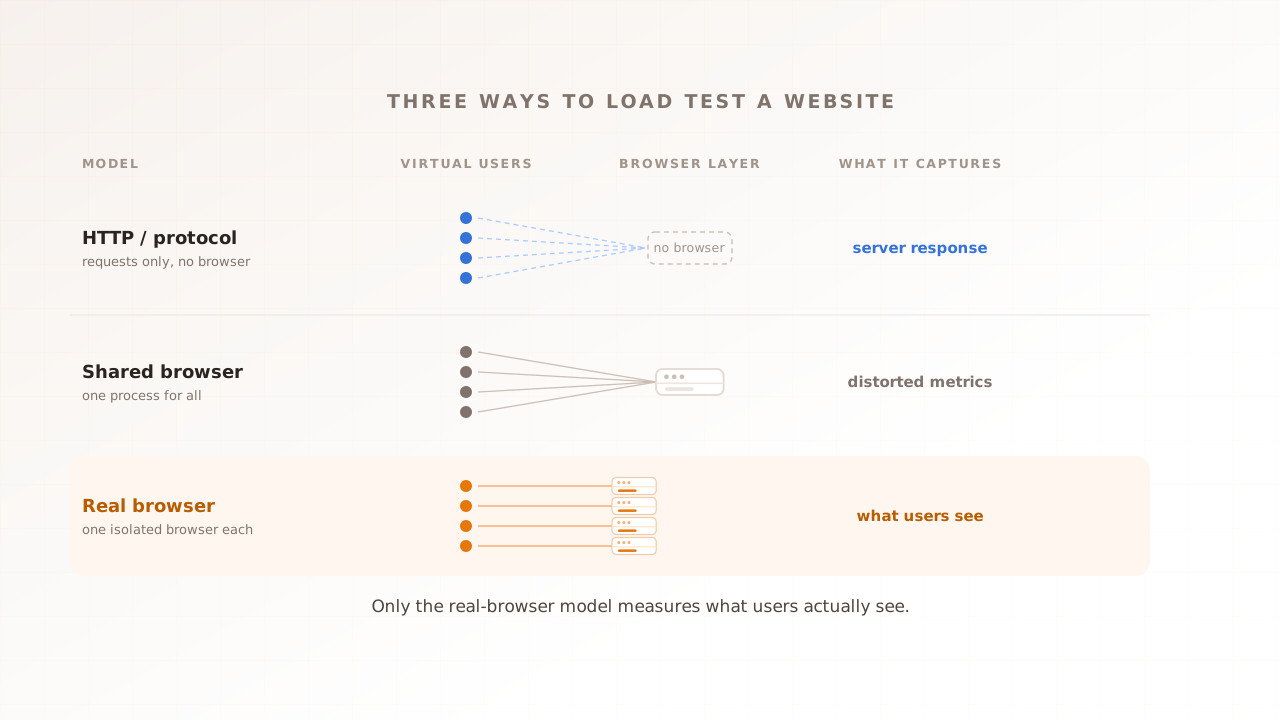
This is where real-browser performance testing closes the gap. Run each virtual user in an actual browser and the test finally sees the rendering, the scripts, and the third-party tags that a smoke test and a protocol-level load test both skip. That is the approach Evaluat takes: each virtual user gets an isolated browser, and every report captures Core Web Vitals, session video, network logs, and console output per user. The scoping is deliberate. For a pure API smoke check or a high-concurrency request test, protocol tools are the better fit; for a user-facing journey, you need a browser, and our guide to the three load-testing models explains why. When the page buckles at peak, you get the session that buckled, not just the number that flagged it.
How smoke and performance testing fit together
Smoke and performance testing are stages in one pipeline, not a choice between two tools. The order is fixed by cost and purpose: the cheap, fast checks run first and gate the expensive ones. A build that fails the smoke test never reaches the load test, and a load test that has run once gives the performance smoke gate a baseline to defend on every build after.
A practical sequence looks like this:
- Functional smoke test on every build: do the critical paths work. Reject broken builds in seconds.
- Performance smoke test when the load script changes: does the script run, and what is the baseline at minimal load.
- Full load test before releases and known events: does the system meet its targets at expected peak.
- Stress and soak testing by risk: where does it break, and does it leak over hours.
Each step assumes the one before it passed. The smoke tests keep the pipeline moving and the bad builds out; the load and stress tests answer the questions that actually decide whether you survive a busy day. For the difference between those heavier types, see our guide to load vs stress vs performance testing. Run them as gates in continuous integration and on a schedule, not as a scramble the week before launch.
Common mistakes
The errors here almost all come from treating a quick check as more than it is. Watch for these five.
- Treating a smoke test as a performance test. A handful of virtual users for a minute measures the best case, not the system under load. Baseline numbers are not load numbers.
- Shipping on a green smoke run. A passing smoke test means the build is not obviously broken. It is necessary, not sufficient, and says nothing about behavior at peak.
- Confusing smoke with sanity testing. Smoke is broad and shallow across the whole build; sanity is narrow and deep on one change. They run at different moments for different reasons.
- Skipping the performance smoke gate. Running a full load test by hand but never wiring a trimmed version into CI lets regressions creep back in between releases, unseen until the next big test.
- Measuring servers, not users. Request-level checks miss rendering, scripts, and third-party tags. If the experience matters, test it in a real browser.
Run the right check at the right stage
Smoke testing and performance testing are not competing options; they are different stages of getting a release ready. A smoke test asks whether the build is broken and answers in seconds. A performance test asks whether it stays fast and stable under load and answers in minutes or hours. Run the smoke test first as a gate, then performance test what survives. A quick pre-release check is enough to keep broken builds out of the pipeline, and never enough to tell you the system will hold up when real traffic arrives.
When you do reach for the performance test, measure the experience your users actually get, not just the response your servers send. Evaluat runs each virtual user in a real browser and records Core Web Vitals, session video, and network and console logs per user, so when something breaks under load you can reopen that user’s session and see what they saw.
Test in real browsers. Debug in real sessions. Book a demo.