What stress testing a website actually means
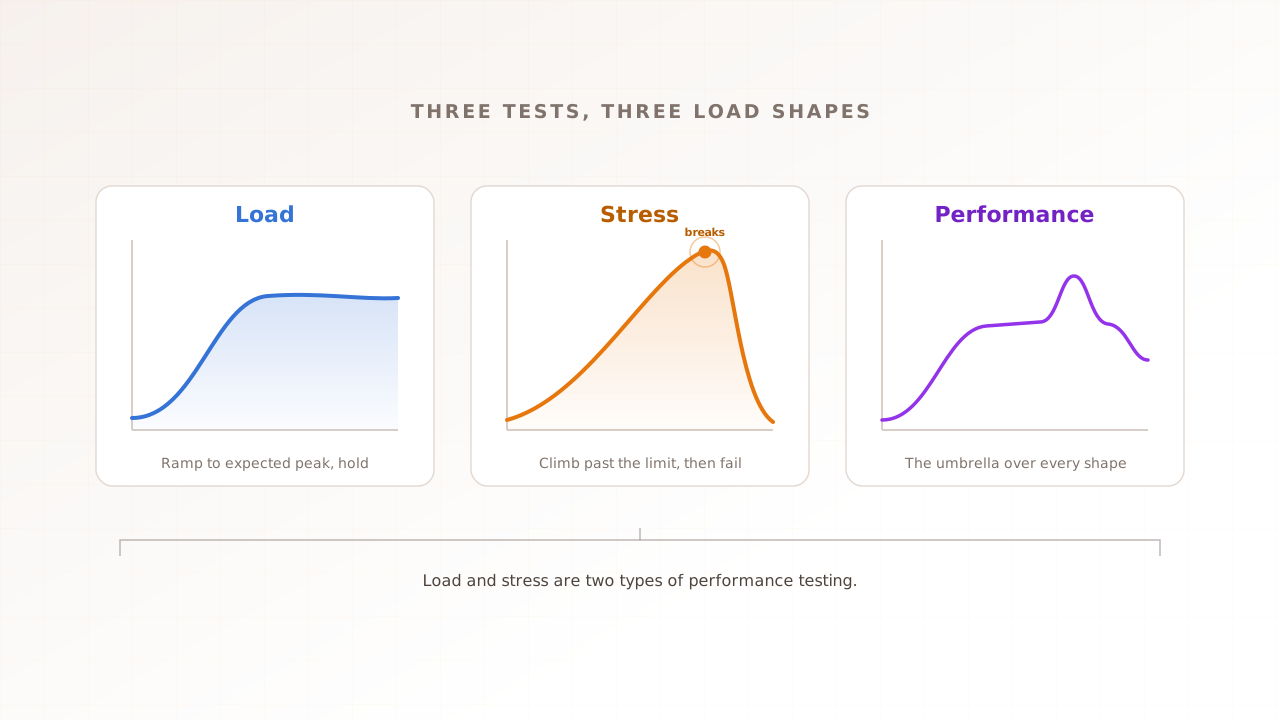
Stress testing a website means deliberately pushing it past the traffic it was built for, to find the point where it breaks and watch how it fails. Unlike a load test, which checks that you handle expected peak, a stress test keeps increasing the load until something gives. The result is a breaking point you own as a number, instead of one your users discover for you during a sale.
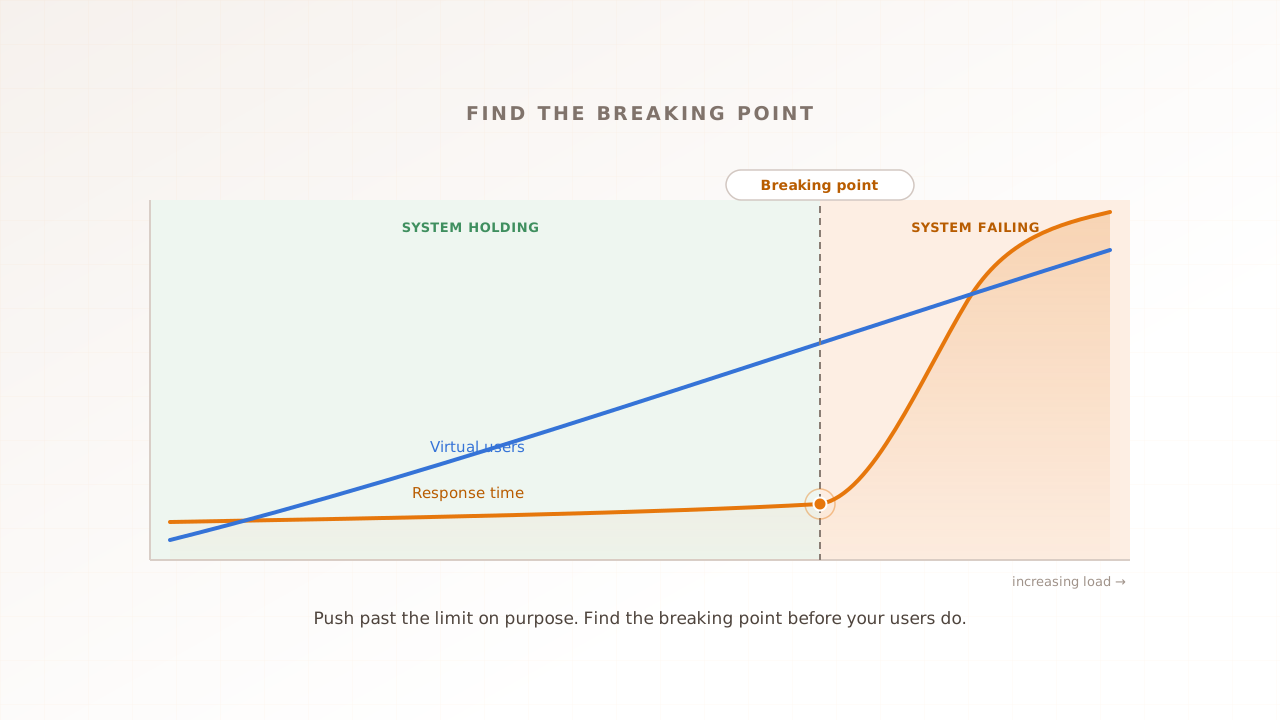
The breaking point is the load at which the system stops meeting its targets and degradation starts to accelerate. Below it, response times are steady and errors stay near zero. Above it, requests queue, timeouts appear, and the experience falls apart quickly. Finding that number, and learning how the system behaves on the way down, is the whole point of this guide. For how stress testing sits alongside load and performance testing, see our guide to load vs stress vs performance testing.
Finding that number first matters because slow and broken pages cost money the moment they appear. Google and SOASTA’s 2017 benchmarks found the probability of a bounce rises 32% as load time grows from one to three seconds, and a system under stress only gets slower from there. A breaking point you find in a test is a fix on your schedule. One your users find is lost revenue on theirs.
What you need before you start
Before you ramp anything, you need four things in place: a test environment that mirrors production, a realistic user journey to drive, your expected peak traffic, and a clear definition of acceptable. Skip any one of them and the breaking point you find will be fiction.
- A production-like environment. Stress test against the same infrastructure size and a realistic data volume. Do not stress test production casually: a real stress test is designed to cause an outage. If you must test in production, do it in an off-peak window with a runbook ready and a way to stop instantly.
- A realistic scenario. Drive the journey that matters, such as login, search, and checkout, not just the homepage. The breaking point of your cheapest page tells you nothing about your checkout. On a storefront the journey choice is the whole game; Magento performance testing shows why.
- Your expected peak. Pull the most simultaneous users your analytics show in a busy window. This anchors the test to real traffic, and it is where the baseline starts.
- SLO targets. Decide what “still working” means before you start: a response-time budget, say p95 under one second, and an error-rate ceiling, say 0.5%. Without a target, you cannot say when the system has actually broken. You also need monitoring switched on across the stack, both the test’s own metrics and the server’s CPU, memory, and database, so that when the breaking point arrives you can see not just that it broke but why.
Step 1: Establish a baseline with a load test
Start by load testing at your expected peak, not by breaking things. A load test at normal peak tells you what healthy looks like: the p95 response time, the throughput, and the error rate the system holds when everything is fine. Without that baseline, you cannot tell degradation from ordinary noise later.
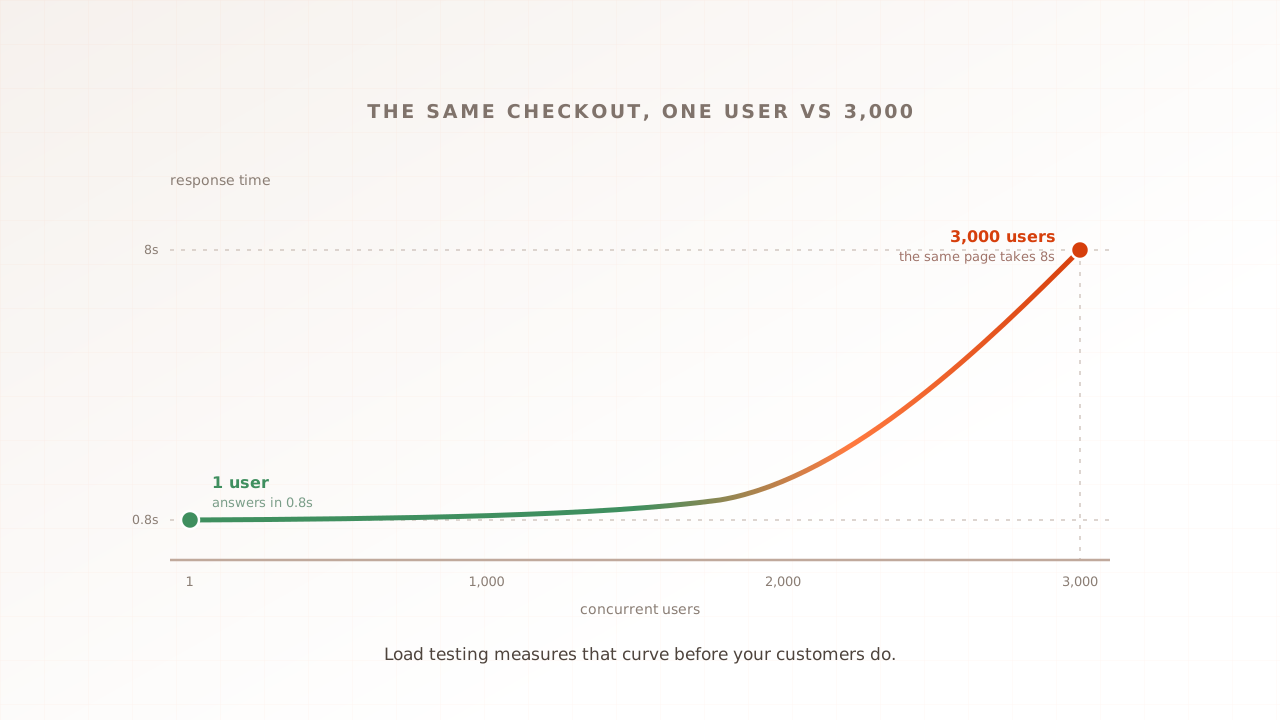
Run the scenario at your expected peak, say 2,000 concurrent virtual users, hold it for a few minutes, and record the numbers. A virtual user is a scripted session that behaves like one real visitor. This run should pass comfortably: that is the point. The metrics it produces are your definition of normal, and every later number is read against them. If the system cannot even hold expected peak, stop here and fix that first, because there is no ceiling to find yet.
It is also worth knowing what one quiet visitor sees before any load arrives. You can test your page speed for free with Evaluat Pulse, which loads the page once in a real browser, measures LCP and CLS plus FCP and TTFB, and grades the result A to F. A single cold load does not produce a representative INP. A quick check like that anchors the single-user end of the curve you are about to bend.
Step 2: Choose how to ramp the load
A stress test increases load until the system breaks, and how you increase it changes what you learn. There are three common shapes, and for finding a breaking point cleanly, a stepped or continuous ramp usually beats a sudden burst.
| Ramp shape | How it works | Best for |
|---|---|---|
| Continuous ramp | Add users steadily, for example +100 a minute, until it breaks | Pinpointing the exact breaking load |
| Stepped ramp | Hold at each tier (2k, 4k, 6k) for five minutes, then step up | Watching degradation tier by tier |
| Burst | Jump to a large number at once, then drop | Flash sales and viral spikes: shock and recovery |
Pick the stepped ramp when you want to find the ceiling and see how the system degrades on the way there. Pick the burst when a sudden surge, not gradual growth, is the risk you actually carry. Whatever the shape, the load has to climb well past expected peak, often two to ten times it, or you will never reach the edge.
A useful approach is to make each step large enough to matter but small enough to read. Doubling from 2,000 to 4,000 to 8,000 users finds the rough region fast, and a finer ramp around the level where things first wobble pinpoints the exact breaking load. Plan to overshoot. If the test ends with the system still healthy, your top tier was too low, and the real ceiling is still unknown.
Step 3: Run the test and watch for the breaking point
The breaking point is the load where the system stops meeting your targets and gets worse fast. You spot it by watching four signals together: error rate climbing, p95 and p99 response times spiking, throughput flattening or dropping, and timeouts appearing. When several move at once, you have found the edge.
Read response time as percentiles, not averages. The p95 is the experience of your slowest one in twenty users, and p99 the slowest one in a hundred, which is where a system under stress hurts first. Throughput, the requests handled per second, tells the other half of the story: when it plateaus or drops while you are still adding users, the system has stopped keeping up and started queueing. Underneath, you will often see why, as CPU pins at 100% or memory saturates.
In a worked example, the system holds clean at 2,000 users. At 4,000 the p95 starts creeping above your one-second budget. At around 6,000 the error rate jumps to 4% and checkout requests begin timing out. That turn, where the curve bends and several signals move together, is the breaking point. It is not the first slow request; it is the point where degradation accelerates.
Step 4: Tell graceful degradation from a hard failure
How a system breaks matters as much as when. A system that degrades gracefully sheds load, queues requests politely, or serves a cached fallback, and stays up for most users. A system that fails hard returns errors to everyone, corrupts data, or goes offline entirely. Stress testing shows you which one you built, and that difference decides whether a surge is a slow afternoon or a full outage.
You want to see graceful degradation: slower responses, a queue, a “we are busy, try again” page, rather than a wall of 500 errors. If the stress test shows a hard failure at the breaking point, that is the most important thing it found, because it means a surge you do not control becomes downtime rather than a manageable slowdown. Designing the fallback, and proving it works under stress, is often more valuable than raising the ceiling itself.
In practice, graceful degradation looks like a checkout that slows from one second to four but still completes, or a queue page that holds users for thirty seconds and then lets them through. A hard failure looks like a 503 on the payment step, or a homepage that returns a blank screen because one overloaded service took the rest down with it. The stress test is what tells you which one your users would have met.
Step 5: Measure recovery
Finding the breaking point is half the test; the other half is what happens after. When you drop the load, a healthy system returns to its baseline response time and zero errors within a minute or two. If errors linger or response times stay high after the surge has passed, you have a deeper problem than a low ceiling.
Recovery time is the gap between the load dropping and the p95 returning to its baseline. A system that recovers in seconds can absorb a spike and move on. A system that stays degraded for minutes, or never recovers without a restart, is hiding a queue backlog, a connection leak, or memory that never freed. That lingering failure is the kind that turns a two-minute spike into a two-hour incident, and most tutorials never mention it.
In the worked example, dropping from 6,000 back to 2,000 users should return the p95 to its baseline within a minute or two. If instead the error rate stays elevated for five minutes after the load is gone, the system did not just slow down under stress, it got stuck. That lingering failure, not the original slowdown, is the bug to chase first.
Step 6: Fix the bottleneck and re-test
A breaking point is only useful if you act on it. Find what gave way first, fix that one thing, and run the same stress test again to confirm the ceiling moved up. The loop, not the single test, is what makes a system resilient.
The usual culprits are concrete: a slow database query that falls apart under concurrency, a connection pool that runs dry, a missing or cold cache, or a single point of failure that everything funnels through. Fix the first bottleneck, re-run the identical test, and watch where the breaking point lands now. Sometimes it jumps; sometimes a second bottleneck appears right behind the first. Either way you are moving the ceiling deliberately, with evidence, rather than guessing at capacity.
Back in the example, the timeouts at 6,000 users trace to a database connection pool that runs dry, so you raise the pool size and add a short query timeout. The same stress test now holds clean to around 9,000 users before the next bottleneck, a slow product query, appears. The ceiling moved from 6,000 to 9,000 with a single fix, and you have the evidence to prove it rather than a hopeful guess.
How do you know the stress test worked?
A stress test succeeds when it produces four things: a breaking point you can name as a number, the failure mode at that point, a recovery time, and a fix that moved the ceiling. A load test passes or fails against a target; a stress test instead earns its keep by what it teaches. If you finished the run without ever reaching a breaking point, you did not push hard enough.
So the rubric is not “did it stay up.” It is: do you now know the load your system breaks at, whether it breaks gracefully or hard, how long it takes to recover, and what to fix first. Answer those four and the test worked, even though, and precisely because, you broke the system on purpose.
What stress tests usually miss: the user’s experience
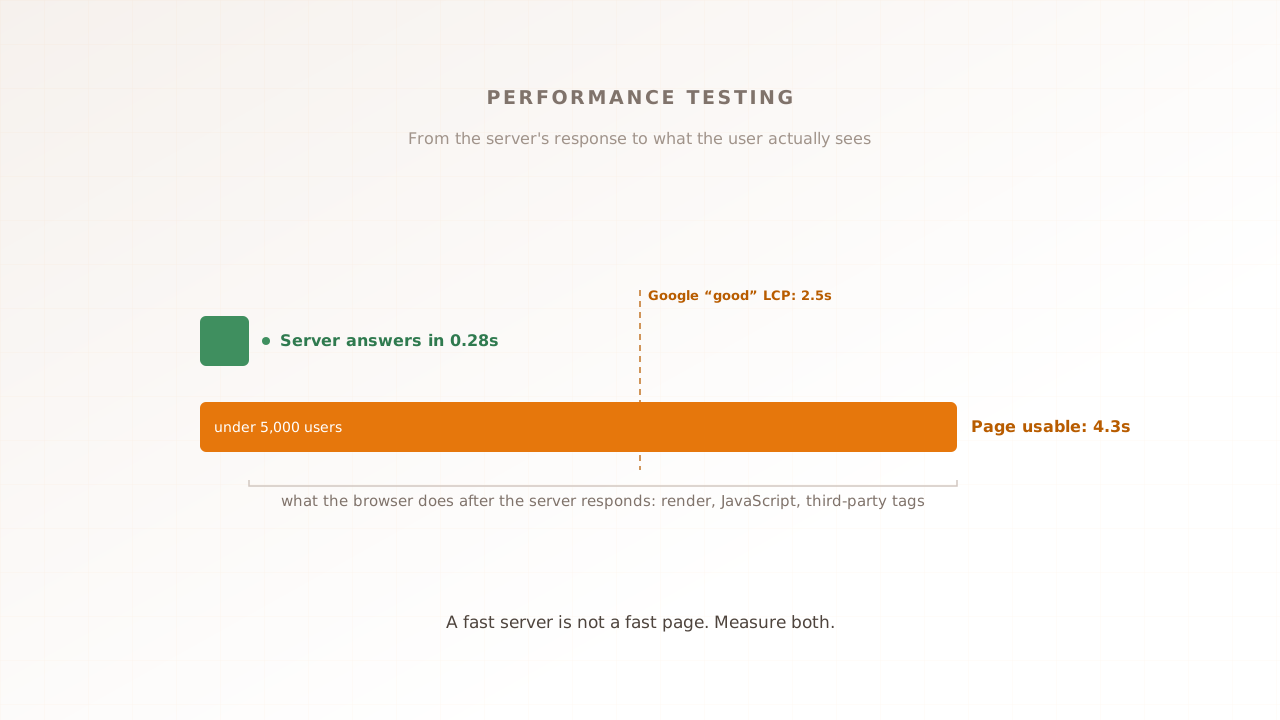
A stress test built on raw HTTP requests can prove the server held at 5,000 users and still tell you nothing about whether anyone could use the page while it did. Requests do not render, run your JavaScript, or load your third-party tags, so the part of the experience that decides whether users stay never enters the measurement.
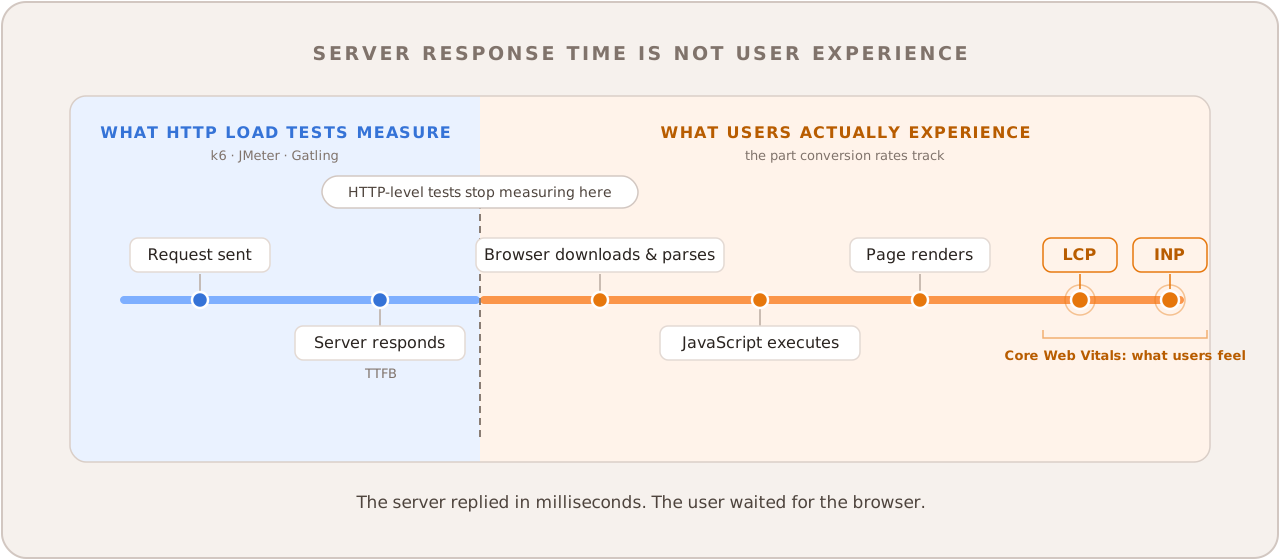
The divide is between layers. Protocol-level tools like k6 and JMeter fire requests at the server, which is exactly what lets them drive the huge concurrency a stress test wants. But with no browser in play they measure server response, not Core Web Vitals, Google’s loading, interactivity, and visual-stability metrics. (k6 has a browser mode for Web Vitals, though it is a separate path from its high-concurrency core and stores no per-session detail.) A backend that survives 5,000 users is no comfort if the page took six seconds to become usable at every step on the climb.
And that cost is measurable. The HTTP Archive’s 2025 Web Almanac found only 48% of mobile sites passing Core Web Vitals, a median mobile Total Blocking Time of 1,916 milliseconds (up 58% in a year), and just 77% of mobile sites scoring well on Interaction to Next Paint; meanwhile Largest Contentful Paint counts the literal seconds a user waits for a stressed page to paint, which no request-level test records. The revenue tracks it: Google and Deloitte’s Milliseconds Make Millions found a 0.1 second mobile speedup lifted retail conversions by 8.4%, and Portent’s 2022 analysis found pages loading in one second convert at 3.05%, against 1.12% at three.
Real-browser performance testing removes that blind spot: every virtual user runs in an actual browser, so a stress run records what the customer’s browser would have rendered the whole way up the curve. That is the model Evaluat uses. Each virtual user gets its own isolated browser, and every report keeps Core Web Vitals, session video, network logs, and console output per user, so when the page falls apart at peak you can replay the exact session that hit the wall instead of inferring it from an average. For a pure API stress test or raw request-per-second numbers, a protocol tool is the lighter instrument; for the user-facing journey, you need the browser. The three load-testing models guide goes deeper.
Common stress testing mistakes
The mistakes that ruin a stress test are mostly about cutting the procedure short. Watch for these four.
- Stress testing production without a plan. A real stress test is built to cause an outage. Use a staging environment, or an off-peak window with a runbook and a kill switch.
- Skipping the baseline. Without a load test at expected peak first, you cannot tell a breaking point from ordinary noise.
- Stopping at the first error. One slow request or a single timeout is not the breaking point. The breaking point is the turn in the curve, where several signals move together.
- Measuring servers, not users. Request-level timings miss rendering, JavaScript, and third-party tags. If the experience matters, run the test in a real browser.
Find the breaking point before your users do
Stress testing is how you replace a guess about capacity with a number. Set a baseline, ramp the load past expected peak, watch for the turn where errors and response times climb together, tell graceful degradation from a hard crash, measure recovery, fix the first bottleneck, and run it again. Every website has a breaking point; the only choice is who finds it first.
Evaluat runs every virtual user in a real browser and captures Core Web Vitals, session video, and network and console logs for each one, so when the system breaks under stress you can watch exactly what the user saw as it happened.
Test in real browsers. Debug in real sessions. Book a demo.