What is soak testing?
Soak testing, also called endurance testing, runs a steady, realistic load against a system for hours or days to see how it holds up over time. It looks for problems that build up slowly under continuous use: memory leaks, resource exhaustion, and gradual performance decline that a short test ends too soon to catch.
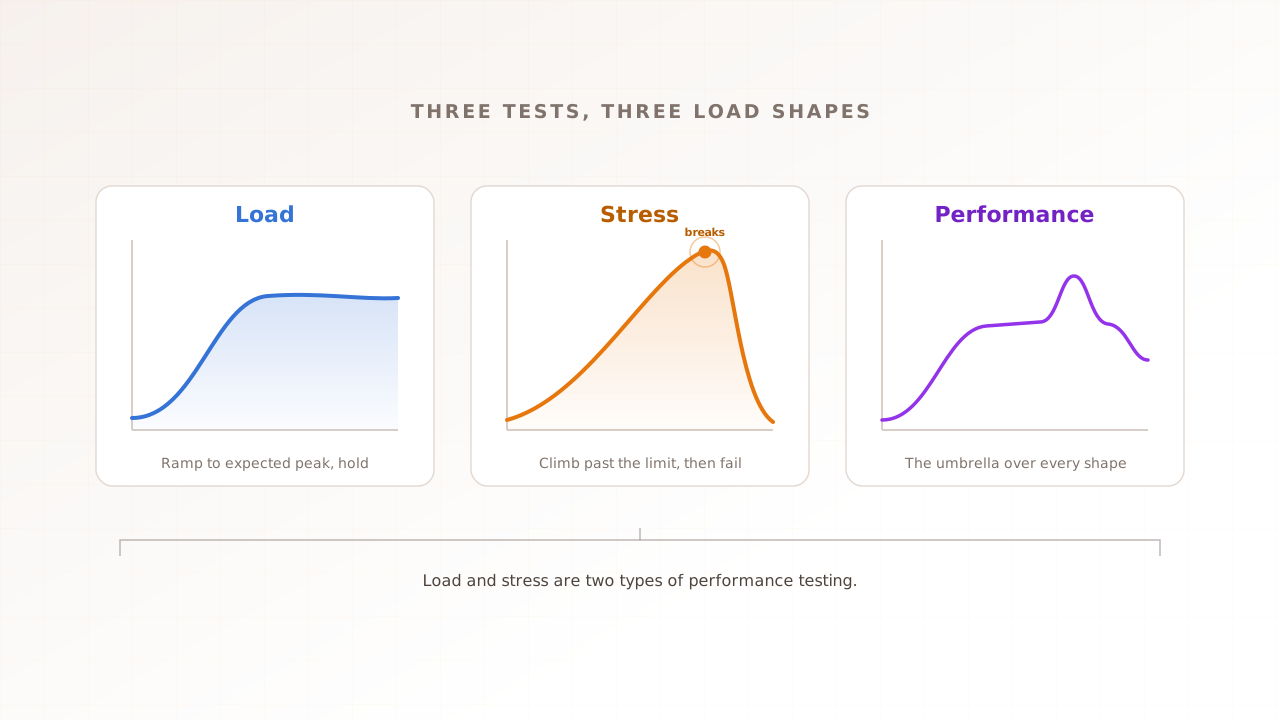
Most performance tests are sprints. A load test ramps traffic to your expected peak, holds it for a few minutes, confirms the system copes, and stops. A soak test is a marathon: you pick a load the system will realistically see, often its average day, and hold it there for hours or days while you watch memory, connections, and response time as the clock runs.
The name is the analogy. You leave the system soaking in load the way you might idle an engine for hours to see whether it overheats, rather than flooring it once to see how fast it goes. The failures a soak test is built to find need time to accumulate; nothing dramatic happens in the first ten minutes.
Like other performance tests, a soak test is driven by virtual users, each one a simulated visitor following a scripted journey. The difference is duration. Grafana’s k6 documentation describes a soak test as holding average load for “several hours or even days” while you watch performance and resource use for signs of decline. That long hold is the method. Drop it to fifteen minutes and you are running a load test again.
Soak testing vs load and stress testing
Soak testing, load testing, and stress testing answer different questions. Load testing checks that you handle expected peak briefly. Stress testing pushes past that peak to find the breaking point. Soak testing holds a realistic load for a long time to find what degrades over hours. The first two are about intensity; soak testing is about duration.
The distinction matters, because the three catch different bugs. A system can pass a load test and a stress test and still fail a soak test, because the thing that breaks it only appears after the eighth hour.
| Load testing | Stress testing | Soak testing | |
|---|---|---|---|
| Question it answers | Can we handle expected peak? | Where is the breaking point? | Does it stay healthy over time? |
| Load level | Expected peak | Beyond peak, until it breaks | Average, realistic everyday load |
| Duration | Minutes to about 2 hours | Until it breaks, then recovery | Hours to days (often 8 to 72) |
| Typical finding | Slow queries, capacity gaps | Failure mode, recovery time | Memory leaks, resource exhaustion, drift |
For the full picture of how these fit together, see load vs stress vs performance testing. The short version: run a load test to prove you handle the traffic, a stress test to find the ceiling, and a soak test to prove the system survives a long shift at the traffic you actually get. Most teams run all three, because each answers a question the others cannot.
Why does soak testing matter?
Soak testing matters because the failures it catches reach production quietly, then take the whole system down at the worst time. A slow memory leak does not trip a short test. It waits until hour twenty, or the third day of a long weekend, then the process runs out of memory while the on-call engineer is asleep.
The pattern is familiar to anyone who has run a service for a while: the app works fine, but only if it is restarted every night. That nightly restart is not a fix. It is a workaround for a leak nobody has found yet, and it hides the problem until the uptime is long enough that a restart no longer comes in time.
The cost of getting this wrong is concrete. In ITIC’s 2024 Hourly Cost of Downtime survey, which polled over 1,000 organisations between November 2023 and March 2024, more than 90% of mid-size and large enterprises said a single hour of downtime now costs them over $300,000, and 41% put the figure between $1 million and $5 million or more. A leak you find in a soak test is a bug ticket. The same leak found in production is an outage on that scale, on a schedule you do not control.
Soak testing matters most for systems expected to run continuously without hands-on support: a payment service over a holiday weekend, an API behind a mobile app around the clock, a checkout in a multi-day sale. Those are the ones that have to stay up for days without a safety net.
What does a soak test find?
A soak test finds the problems that grow slowly under continuous load and never appear in a short run. The headline ones are memory leaks and the resource leaks around them: database connections that are never returned, threads that pile up, file handles left open, logs and temporary data filling a disk, and caches that grow without ever evicting anything.
It helps to separate two things that look identical on a graph. A true memory leak is memory the program allocates and then loses track of, so it can never be reclaimed; it accumulates until there is none left. Unbounded growth is different: resources that grow by design but were never given a limit, like a cache with no eviction policy or a list that only gets appended to. The cause differs, but the soak-test signature is the same: a resource that climbs and never comes back down, which is why one long test catches both.
A real example shows the shape. In November 2025, Freshworks engineers published a postmortem of a leak in a Java service: a refactor had started creating a fresh HTTP client and thread pool on every request instead of reusing one, and none were ever closed. The result was roughly 5,754 abandoned client objects holding about 63% of the heap, and pods killed for running out of memory even under light load. The lesson is in their own finding: the leak evaded short functional tests because it needed hours of continuous traffic to grow large enough to matter. That is the gap a soak test exists to close.
The front end is a long-running process too, and it degrades the same way. A single-page application a support agent keeps open all day can accumulate memory in the browser tab until the page slows to a crawl or the browser kills it. Kustomer’s engineering team documented exactly this in 2023: their web app got gradually slower as the work day went on, with per-session browser memory climbing from a few hundred megabytes in the morning to over a gigabyte by evening, until some users hit Chrome’s “page unresponsive” dialog. Refactoring the offending code dropped daily crashes from the hundreds to under fifty. None of that lives on the server, a point we will come back to.
How does a soak test work?
A soak test works by holding a steady, realistic load for a long time and watching resource trends, not just pass-or-fail results. You ramp virtual users up to an average production level, hold them there for hours or days, then ramp down. Throughout the hold, you record memory, connections, threads, and response time, watching for any line that climbs and never returns to baseline.
The method is deliberately boring: no spike to catch, no breaking point to find. The steady state is the test, and the data that matters is the slope of each resource over time.
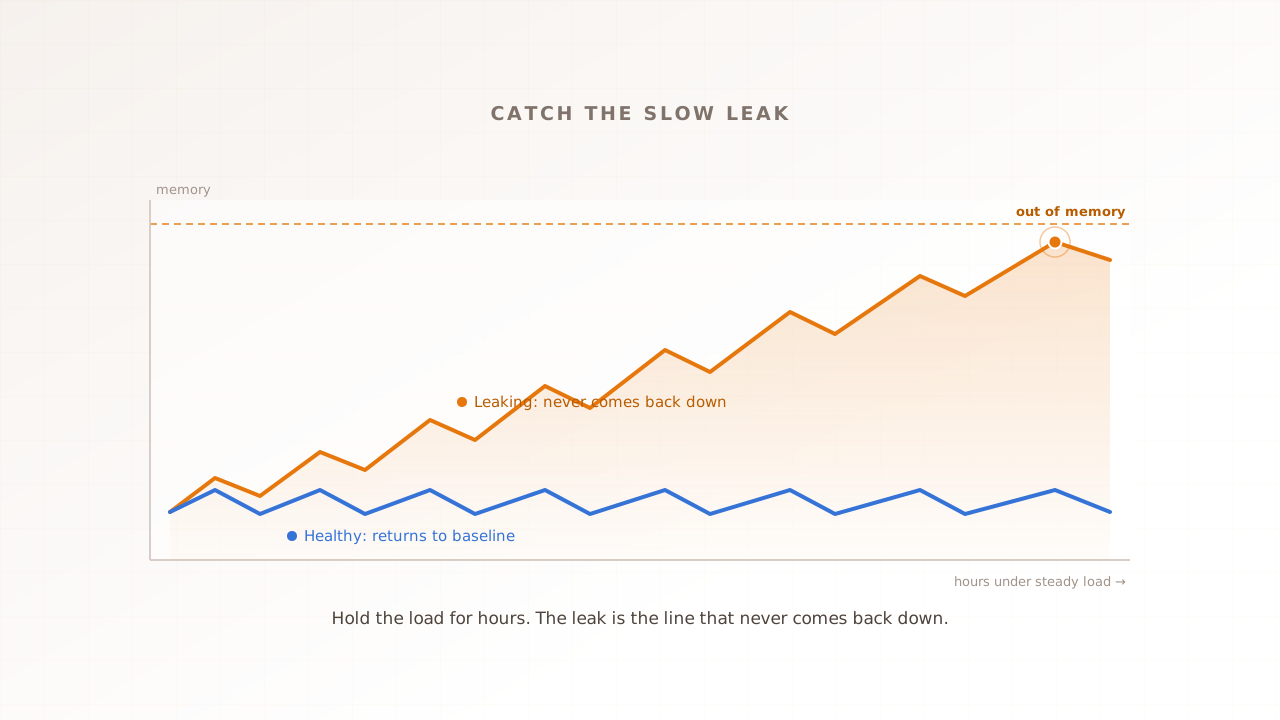
The single most useful thing to watch is the shape of memory over the run. Healthy memory is a sawtooth: it rises as the application does work, then drops back as the garbage collector reclaims what is no longer needed, settling around a stable baseline. A leak breaks that pattern. The low points of the sawtooth creep upward, the baseline drifts higher hour after hour, and the line never fully recovers. That upward drift, the line that never comes back down, is the signature every soak test is hunting for.
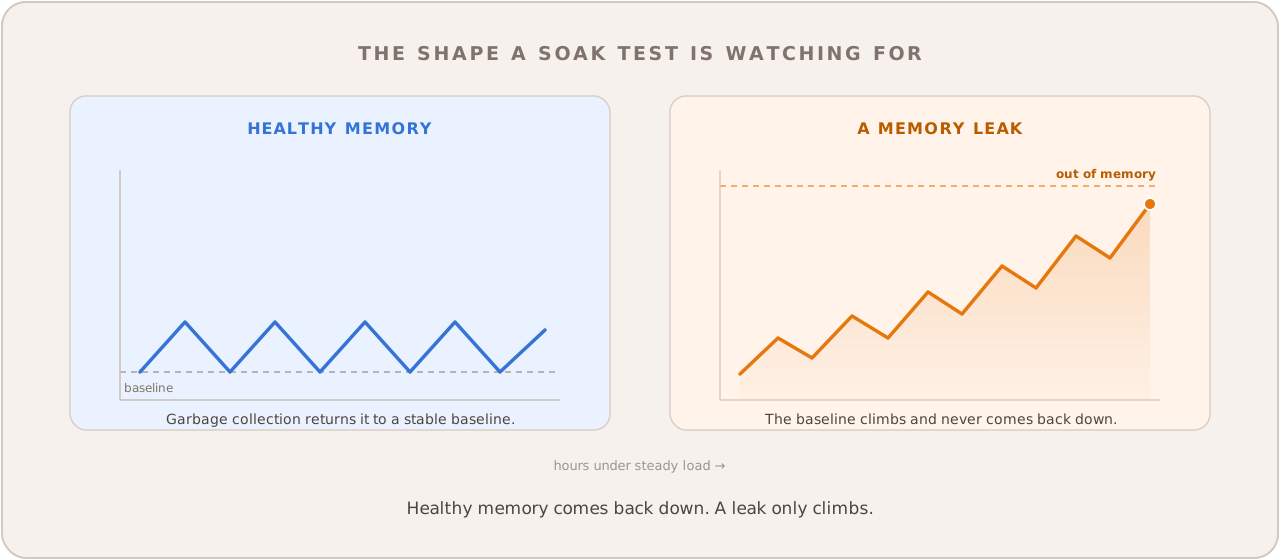
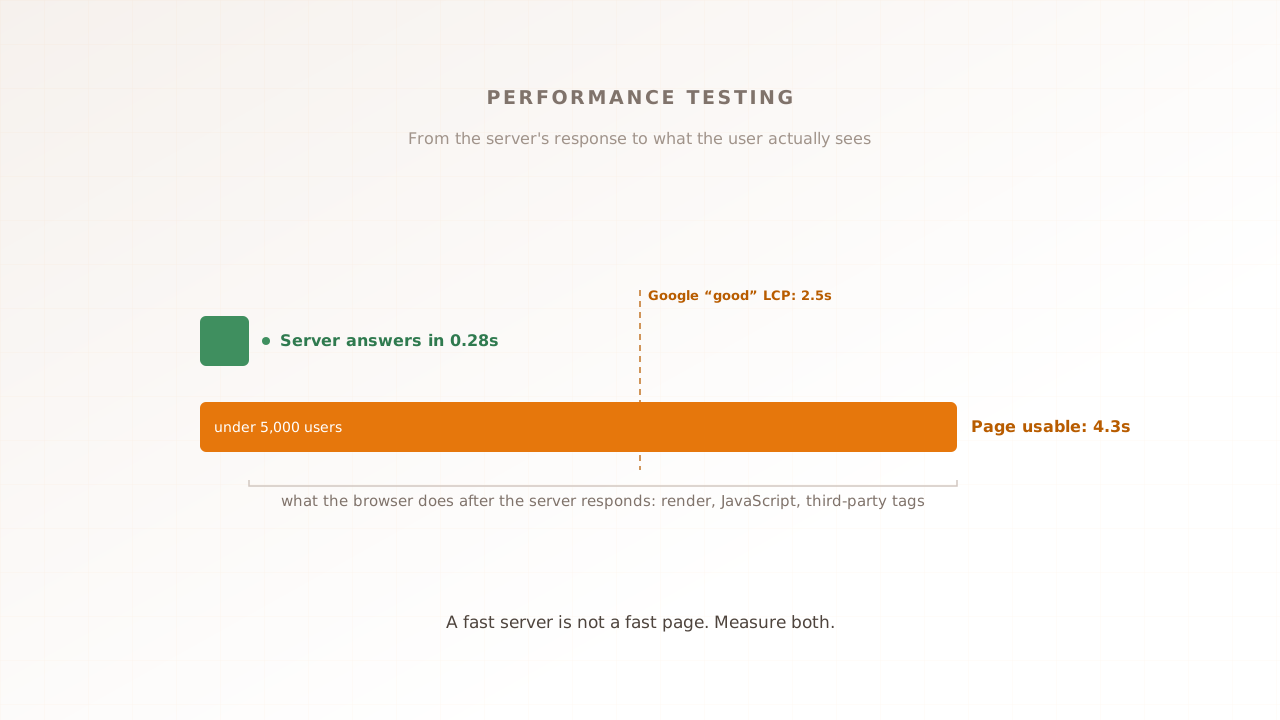
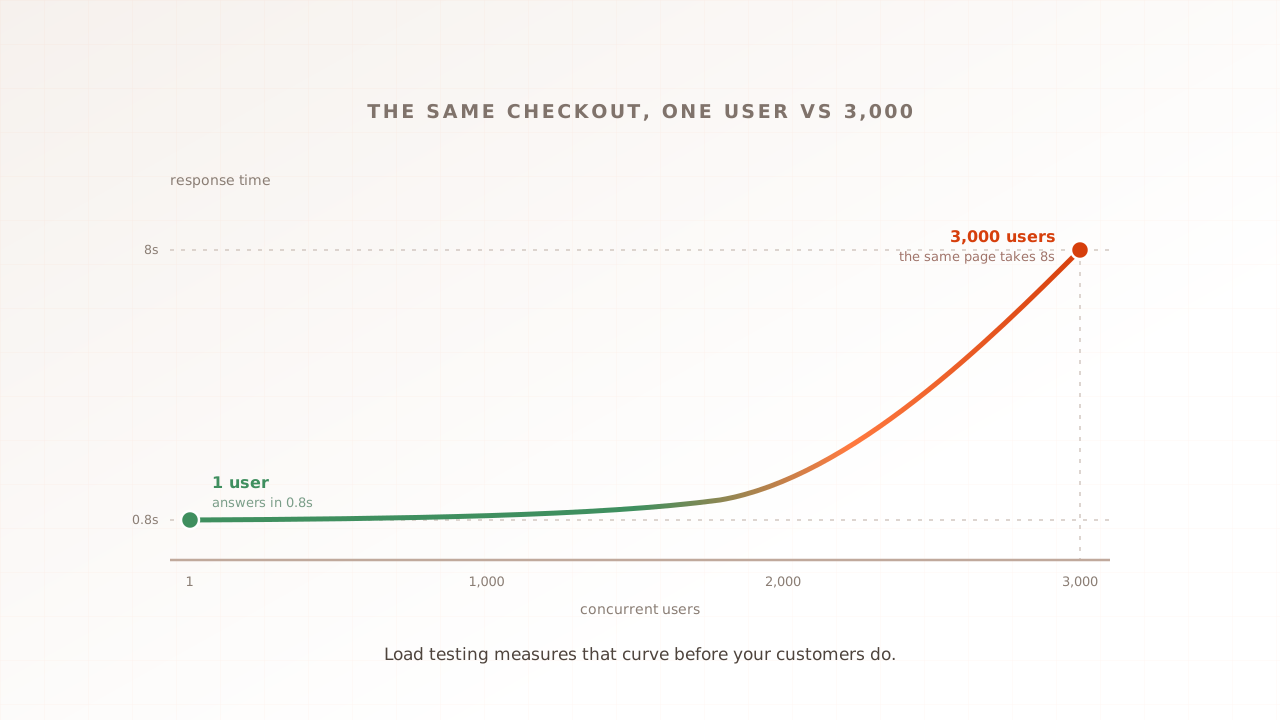
A worked example makes it concrete. Run 200 virtual users through a checkout journey for eight hours at the average rate your site sees on a normal day. For the first hour it looks like a clean load test: response times flat, memory sawtoothing around 2 GB. By hour four the baseline has crept to 4 GB and the 95th percentile response time, the experience of your slowest one in twenty users, is higher than it started. By hour seven memory is at 6 GB and climbing, the garbage collector is working harder, and response times are visibly worse. Nothing has crashed, and a fifteen-minute test would have passed, yet the slope tells you there is a leak that would have taken the service down on day two. That slope only appears under sustained load, where a server-side metric and a user-facing one can drift apart over a long run.
How long should a soak test run?
How long a soak test should run depends on how long your system has to stay up in production, but the practical range is hours to days. Four hours is a reasonable first test, eight to twenty-four hours is the common band, and systems that must run around the clock are often soaked for seventy-two hours to cover a full weekend without a restart.
The principle is simple: the test should run at least as long as the longest stretch your system runs untouched in production. If you deploy daily and restart in the process, a leak that takes thirty-six hours to bite may never matter. If your service runs for weeks between deploys, a four-hour test proves very little.
Start short and extend as you build confidence. A four-hour soak surfaces fast-growing leaks cheaply; once that is clean, stretch to an overnight run, then to the duration that matches your real uptime requirement. BrowserStack’s endurance-testing guide recommends seventy-two hours for systems that must run around the clock, because that span covers an unattended weekend, when thin staffing and long uptime combine to turn a slow leak into an outage.
| System type | Suggested first soak | Load level |
|---|---|---|
| Deploys daily, restarts often | 4 to 8 hours | Average daily traffic |
| Always-on API or SaaS | 24 hours | Average daily traffic |
| Must run unattended over a weekend | 72 hours | Average, including the quiet hours |
Two things stay fixed regardless of duration. The load level is average production traffic, not peak; soak testing is about time, not intensity. And the monitoring has to run for the whole test, sampling memory, connections, and response time continuously, because a soak test you do not watch is just an expensive way to keep a server busy.
Common soak testing mistakes
The mistakes that ruin a soak test mostly come down to running it too short, at the wrong load, or without watching the right things. A soak test earns its keep only if it runs long enough for slow problems to surface, holds a realistic load, and records resource trends across the whole run, not a single pass-or-fail result at the end.
- Running it too short. A two-hour soak will miss a leak that takes six hours to show. Match the duration to your real uptime requirement, and when in doubt, run it longer.
- Testing at peak instead of average. Soak testing is about duration, not intensity. Holding peak load for days tests the wrong thing and costs far more; use the average traffic the system actually sees. Pushing to the limit is stress testing, a different test for a different question.
- Only checking pass or fail. The result of a soak test is the slope of each resource over time, not a green tick at the end. If you are not sampling memory, connections, and response time throughout, you cannot see the drift that is the whole point.
- Resetting state between iterations. If every virtual user starts a brand-new process or clears all state each loop, leaks never get the chance to accumulate. The run has to let resources build the way they would in a long-lived production process.
- Ignoring the front end. Most soak testing watches the server and stops there. A long-lived browser session degrades too, and that decline is invisible to any test that never opens a browser. More on that next.
- Soaking production without a plan. A days-long test against live infrastructure can affect real users and real data. Use a production-like staging environment, or a controlled window with monitoring and a way to stop instantly.
How Evaluat fits into a soak test
Evaluat is the real-browser layer of a soak test: it runs each virtual user in its own isolated browser and holds that load over time, so the test sees whether the experience stays fast as the system runs hot, not just whether the server survived. It does not replace the server-side half, and the honest boundary matters, so this section draws it plainly.
A soak test built entirely on HTTP requests can watch a server’s memory and connection pools closely and still tell you nothing about what the page felt like at hour eight, because no browser ever ran. The front end is a long-running process with its own slow degradation, and the only way to measure it is to render the page under load, the whole time.
Evaluat is built on the real-browser model. Every virtual user is a real browser with isolated session state, and a ramp, steady hold, and ramp down define the load profile. Across the hold, it captures Core Web Vitals for sessions that perform the required page loads and interactions, plus video, network logs, and console logs. The result describes what those controlled browsers saw; server heap, connection, and thread telemetry still comes from your own monitoring.
That per-session record is what makes drift legible. If the experience degrades over a long run, the later sessions show it: their Vitals are worse than the first hour’s, and you can open the worst one, watch the video of the page going sluggish, and read the console for the warning that came with it. A failure at peak isn’t a percentile. It’s a session. Comparing early-run sessions against late ones turns “the site felt slow by the afternoon” into specific, addressable evidence.
The boundary is the honest part. Evaluat is not an application performance monitor. Monitoring is a planned Evaluat product, not a live APM. For the server side of a soak test, use your existing APM and a protocol-level load tool like k6 for heap graphs, connection-pool counters, and thread dumps. The real-browser layer adds what an HTTP request never sees: what controlled browsers rendered as the shared system ran for hours.
Run the test that watches the clock
Soak testing is the test that asks the question the others skip: not can the system handle the traffic, but can it keep handling it. Set a realistic load, hold it for hours or days, watch every resource for the line that climbs and never comes back down, and match the duration to how long your system has to run untouched. The leak you find on hour seven of a test is a ticket. The one your users find on hour seven of a long weekend is an outage.
Evaluat runs every virtual user in a real browser and keeps the Core Web Vitals, session video, network logs, and console logs for each one, so a sustained run shows you whether the experience held up over time, not just whether the server did.
Test in real browsers. Debug in real sessions. Book a demo.