What is a virtual user?
A virtual user is a simulated visitor that a load testing tool runs against your site. Each one executes a scripted journey, browse, search, add to cart, check out, independently of every other virtual user, with its own pauses and its own progress. Run 500 at once and you have a stand-in for 500 people using the site simultaneously.
The independence matters more than it first appears. Microsoft’s load testing documentation defines it plainly: a virtual user runs a test case against your application independently of other virtual users, each simulating its own connection. That is what separates a load test from simply hammering one URL in a loop: virtual users are at different steps of the journey at any moment, exactly as a real crowd would be, some browsing, some paying, some abandoning.
Under the hood, tools implement a virtual user as whatever concurrency primitive they have. JMeter calls them threads, configured in thread groups; k6 runs them as goroutines; browser-based platforms run each one as a browser instance. The implementation detail matters less than the promise: one virtual user is meant to stand for one person.
What does a virtual user actually simulate?
A virtual user simulates behaviour, not just traffic, and the difference lives in one setting: think time, the deliberate pause between actions that stands in for a person reading a product page or typing a card number. Realistic think time keeps the load pattern human; deleting it quietly changes what your test measures.
How much pause is realistic? LoadFocus suggests three to ten seconds per step, and notes that a single virtual user with three seconds of think time produces roughly 0.3 requests per second (2026). Real people are slow; that slowness is part of the workload’s shape.
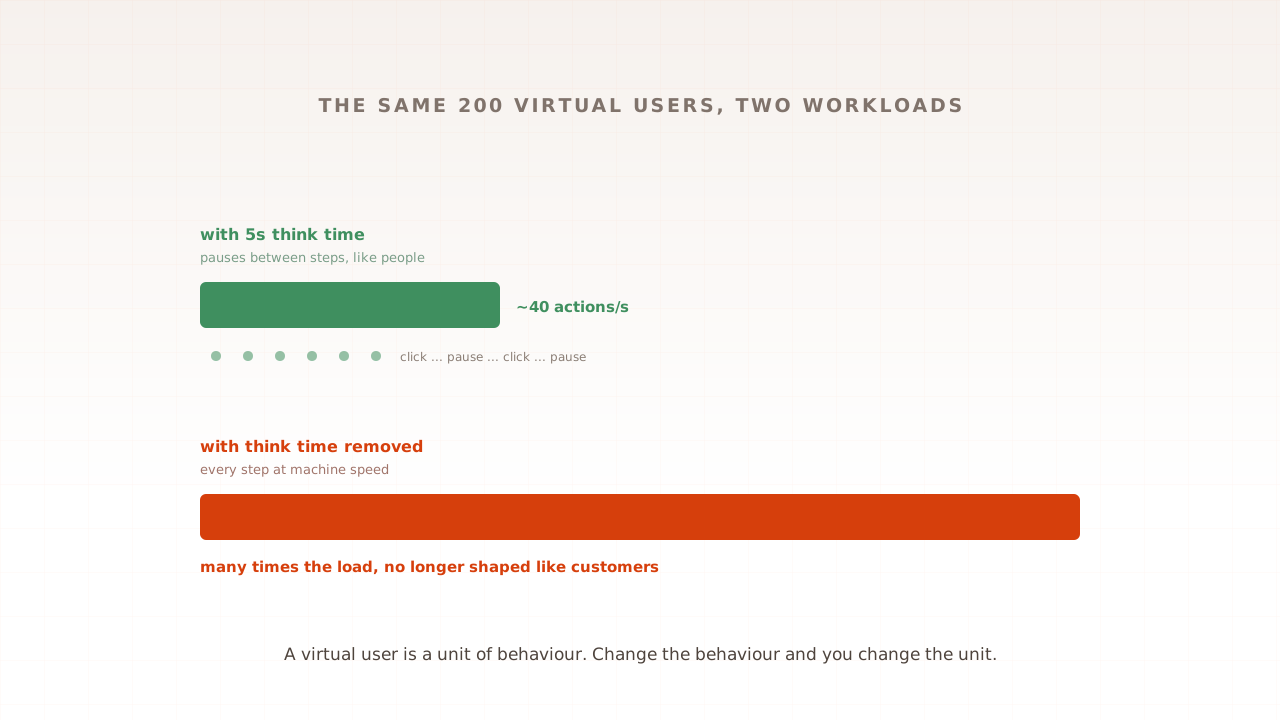
Here is the worked example worth internalising, because it explains most confusing test results. Take 200 virtual users on a journey of ten steps. With five seconds of think time per step, each user completes the journey in under a minute and the group produces a modest, human-shaped load of roughly 40 page actions per second across the site. Remove the think time, and the same 200 virtual users tear through steps as fast as the server can answer, generating many times that load. Same tool, same script, same “200 users”, and one version resembles your customers while the other resembles an attack.
So when someone says “the site failed at 200 users”, the first question is always: 200 users behaving like what? A virtual user is a unit of behaviour. Change the behaviour and you have changed the unit.
Virtual users, concurrent users, sessions: which number is which?
These three get used interchangeably and are not interchangeable. Concurrent users is how many people are active at one moment. A session is one visit, start to finish. A virtual user is the simulated stand-in your test runs, and a well-sized test makes its virtual user count equal the real concurrency you expect.
The trap that follows from blurring them is the most common sizing mistake in load testing: taking a business number like “a thousand daily visitors” and typing it into the tool as a thousand virtual users.
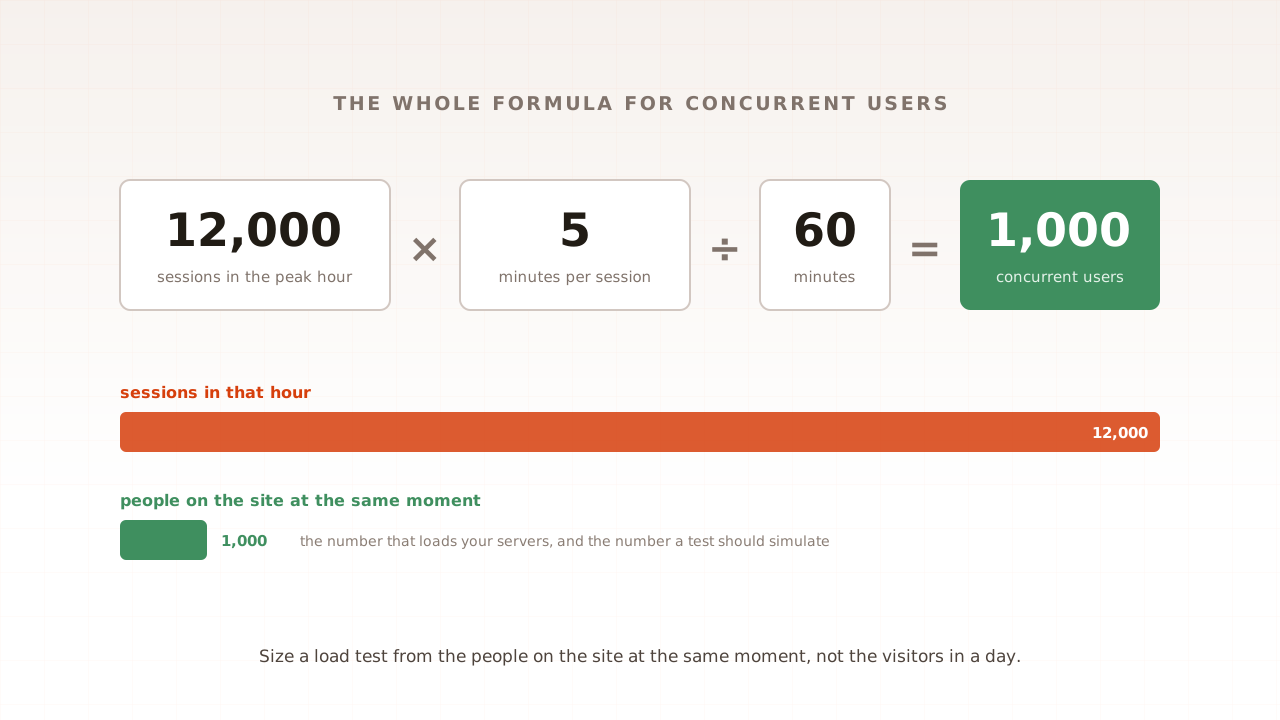
Daily traffic and concurrency are different by an order of magnitude or more. A thousand visits spread over a day, each lasting five minutes, averages under four concurrent visitors; even a sharp lunchtime peak might mean only a few dozen at once. The right conversion runs through your analytics, peak-hour sessions times average session minutes, divided by 60, and it is the same arithmetic the Black Friday sizing step in part 1 walks through with real numbers.
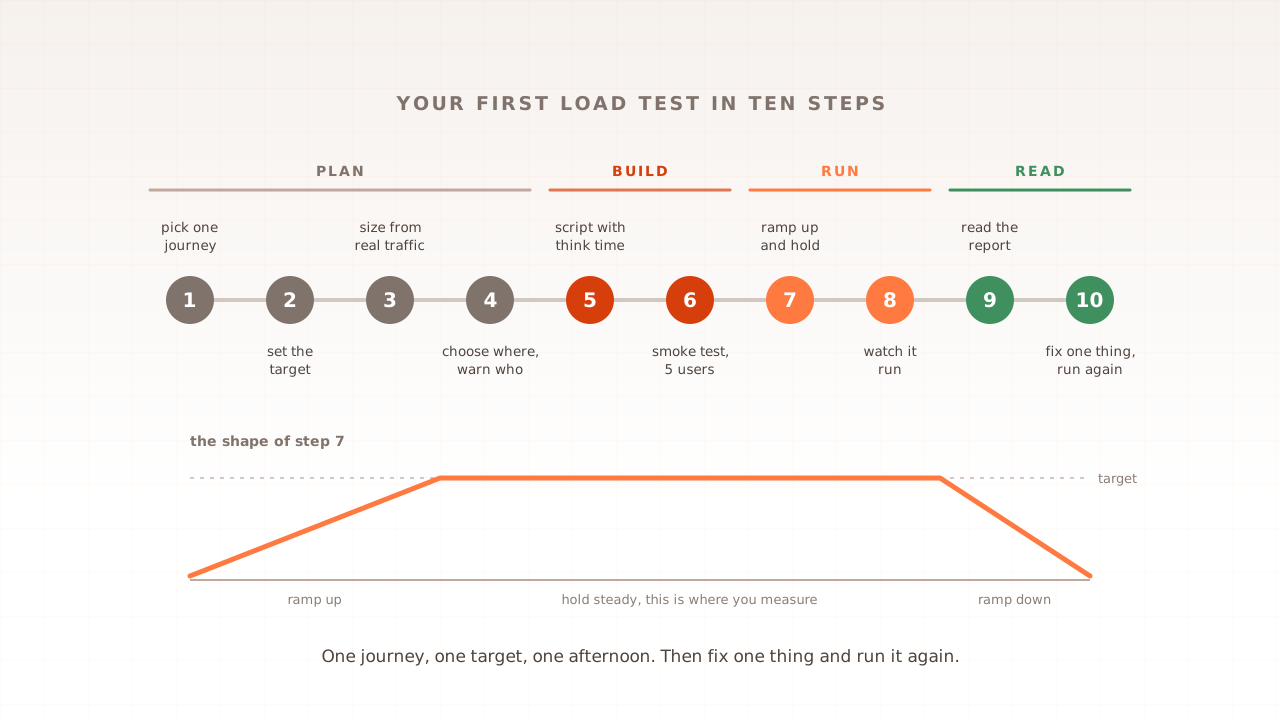
Ramp-up is the other place the units meet. Tests do not start all virtual users at once; they add them over a window so load builds the way real traffic does. Microsoft’s docs give the clean example: 20 virtual users with a 120-second ramp-up means one new user every six seconds. By the end of the ramp you are carrying the full concurrency, and the plateau that follows is where the measurements mean something.
Protocol virtual users vs browser virtual users
Virtual users come in two kinds, and the kind decides what your test can see. A protocol virtual user exchanges HTTP with your server but never builds the page. A browser virtual user drives a real browser instance, executing scripts and rendering layout, so it measures what a visitor would experience rather than only how fast the server answered.
Most tools default to protocol-level, and the boundary is not a competitor’s claim; it is in the vendors’ own documentation. Microsoft’s states it exactly: response time in such tests “doesn’t include the time to render the response. Any client code, such as JavaScript, isn’t processed during the load test.”
| Protocol virtual user | Browser virtual user | |
|---|---|---|
| Simulates | The HTTP a browser would send | A visitor in a real browser |
| Measures | How fast the server answers | What the visitor sees, including render |
| JavaScript | Never runs | Runs, like production |
| Cost per user | Light; thousands per machine | Heavy; roughly 10x the compute |
| Best for | API ceilings, high concurrency on a budget | User experience under load, Core Web Vitals |
The cost line deserves honesty: analyses of the two models put a browser virtual user at roughly ten times the CPU and memory of a protocol one, which is why many teams blend them, protocol users for bulk load, browser users for the journeys where experience matters. This boundary is also where Evaluat lives: every virtual user runs in its own isolated real browser, capturing Core Web Vitals and a session recording per user, because the question we built for is what customers experience at load, not only whether the server answered. Every virtual user is a real browser. The wider taxonomy of models is covered in real-browser load testing, explained.
Neither model is “correct”. They answer different questions, and knowing which question you are asking is the entire game, a theme this series returns to in the types of performance testing.
How many virtual users do you need?
Fewer than you fear, sized from concurrency rather than ambition: peak-hour sessions times average session minutes, divided by 60, plus 20 to 50 percent headroom. A store with 12,000 peak-hour sessions of five minutes carries about 1,000 concurrent shoppers, so a first serious test targets 1,200 to 1,500 virtual users.
Notice what that number is not: it is not the 12,000 the session count suggests, and it is not a memorable round figure chosen in a meeting. Oversized tests waste money and produce failures you will never see in production; undersized ones produce comfort you have not earned. The concurrency arithmetic is the honest middle.
There is also a rate-based way to think about it when your target is requests per second rather than people: the two convert through response time, and Microsoft’s docs carry the worked example of reaching 100,000 requests per second with 2,000 virtual users at 20 milliseconds of latency. The conversion arithmetic, Little’s law, gets its own part later in this guide; for now it is enough to know that user-count and request-rate are two dials connected by one formula, and part 7’s concurrent-users calculator covers the sizing question in full.
Where do virtual users run from?
Virtual users run on load generators: the machines, usually cloud instances, that execute the scenario and send the traffic. Where those machines sit changes the numbers you read. Traffic generated in the same data centre as your servers skips most of the real network journey, so response times look flattering; traffic generated far away carries extra distance in every measurement.
The practical rule for beginners is to generate load from roughly where your customers are, or at least to know where it came from before comparing two test results. A test’s origin is part of its definition, the same way think time is, and results from different origins are different experiments. Why location shifts results, and by how much, gets its own part later in this guide.
Capacity is the other reason generators matter. Protocol virtual users are light, so tools routinely run thousands per machine. Browser virtual users are full browser instances, so the same machine runs far fewer, and serious browser-based tests spread across a fleet. When a report looks odd, slow everywhere, from the first minute, at every step, the generator itself running out of breath is a suspect worth checking before your servers are blamed.
What does it mean when a virtual user fails?
A failed virtual user is a simulated customer who could not finish: a request timed out, an error page came back, a step in the journey broke. Failures are not noise to filter out; they are the most valuable rows in the report, because each one is a rehearsal of a real person not buying.
Two habits make failures useful. First, count them honestly: a test that “passed” with 3 percent of sessions failing means three in every hundred customers hit a wall, which at peak volume is a queue of lost orders with a green tick on it. Second, investigate them individually, not just statistically. This is where per-session evidence earns its place: with a browser virtual user, a failure comes with the visitor’s view of the moment, what loaded, what hung, what the console said. A failure at peak isn’t a percentile. It’s a session.
Common mistakes with virtual users
Virtual user mistakes are unit mistakes: the wrong count, the wrong behaviour, or the wrong kind. These five account for most misleading first tests, and each has a one-line correction.
- Sizing from daily traffic. A thousand daily visitors is not a thousand concurrent users. Convert through peak-hour concurrency or the test answers a question nobody asked.
- Deleting think time to “test harder”. Without pauses, 200 virtual users generate the load of thousands of real people. If you want more load, add users; keep the behaviour human.
- Reading virtual users as requests. One user produces many requests per page and few per second. Mixing the units makes good results look bad and bad results look fine.
- Assuming your tool’s users see the page. Protocol virtual users never run your JavaScript. If the question is what customers experience, the answer needs browser-based users for at least the journeys that matter.
- One identical journey for everyone. Real crowds split across paths, devices, and data. Give virtual users varied journeys and unique accounts, or caches will flatter the result.
When a result confuses you, work backwards through the units. A table helps:
| The result says | You probably confused | Check |
|---|---|---|
| ”Failed at a load far below real traffic” | Requests with users, or think time was removed | Requests per second in the report vs your maths |
| ”Passed easily at our full user count” | Daily visitors with concurrent users | Peak-hour concurrency from analytics |
| ”Server fine, customers still complained” | Server response with visitor experience | Whether any virtual users ran in real browsers |
A virtual user, then: one simulated visitor, behaving at human pace, independent of its peers, standing in for one real person at your busiest moment. It is the atom of load testing, and every later part of this guide, sizing, ramp profiles, reading reports, is built out of it. Get the unit right, the count from concurrency, the behaviour from think time, the type from the question you are asking, and your first load test result will mean what you think it means.
Test in real browsers. Debug in real sessions. Book a demo and watch a test where every virtual user is a session you can replay.