What is a virtual waiting room?
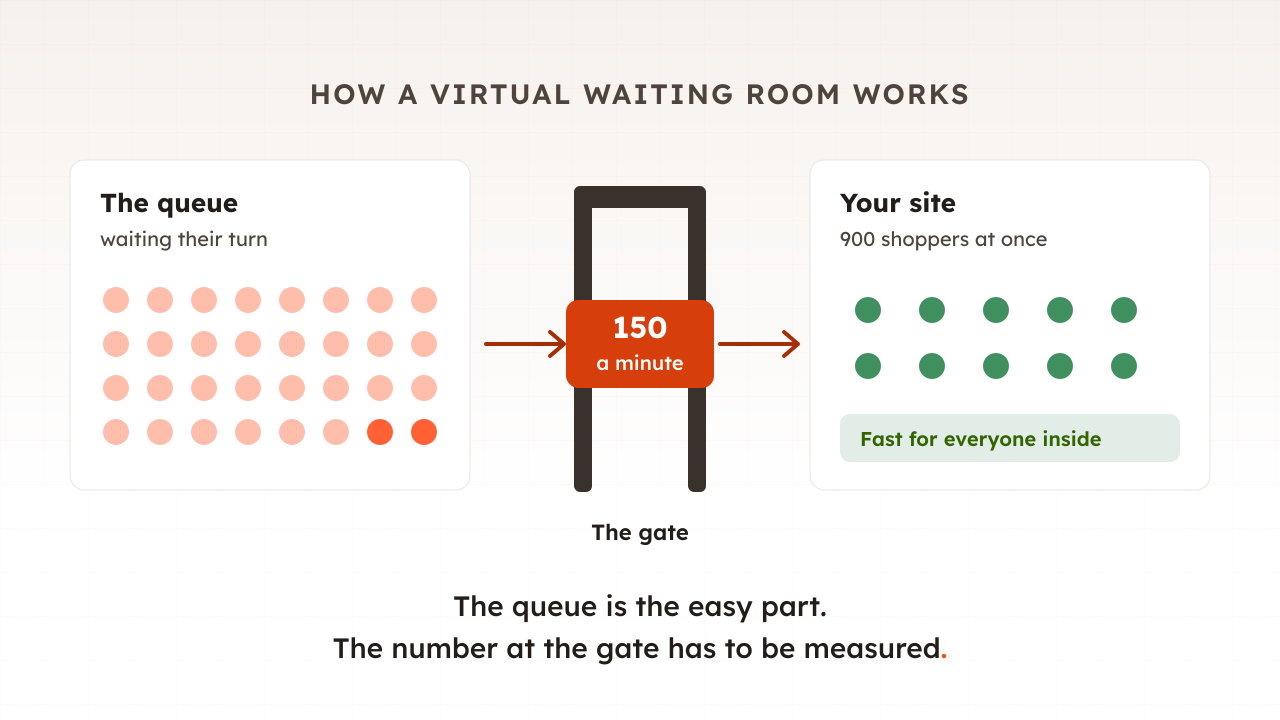
A virtual waiting room is a holding page that sits in front of a website and controls how many visitors reach it. While traffic stays under a limit you set, visitors pass straight through. Above it, new arrivals see a queue page with their place in line and are let in at a steady rate as space frees up.
Think of the door of a busy club. The person on the door has a clicker. When the room is full, new arrivals wait outside and are let in at a pace the bar can keep up with. Nobody inside notices the crowd on the pavement, because the room never gets fuller than the staff can serve.
Cloudflare’s documentation describes the website version in one line: its waiting room queues visitors when your traffic approaches a previously defined threshold. The same idea goes by other names, including website waiting room, online queue and virtual queue. (The phrase also names the lobby of a video appointment with a doctor. This guide is about websites.)
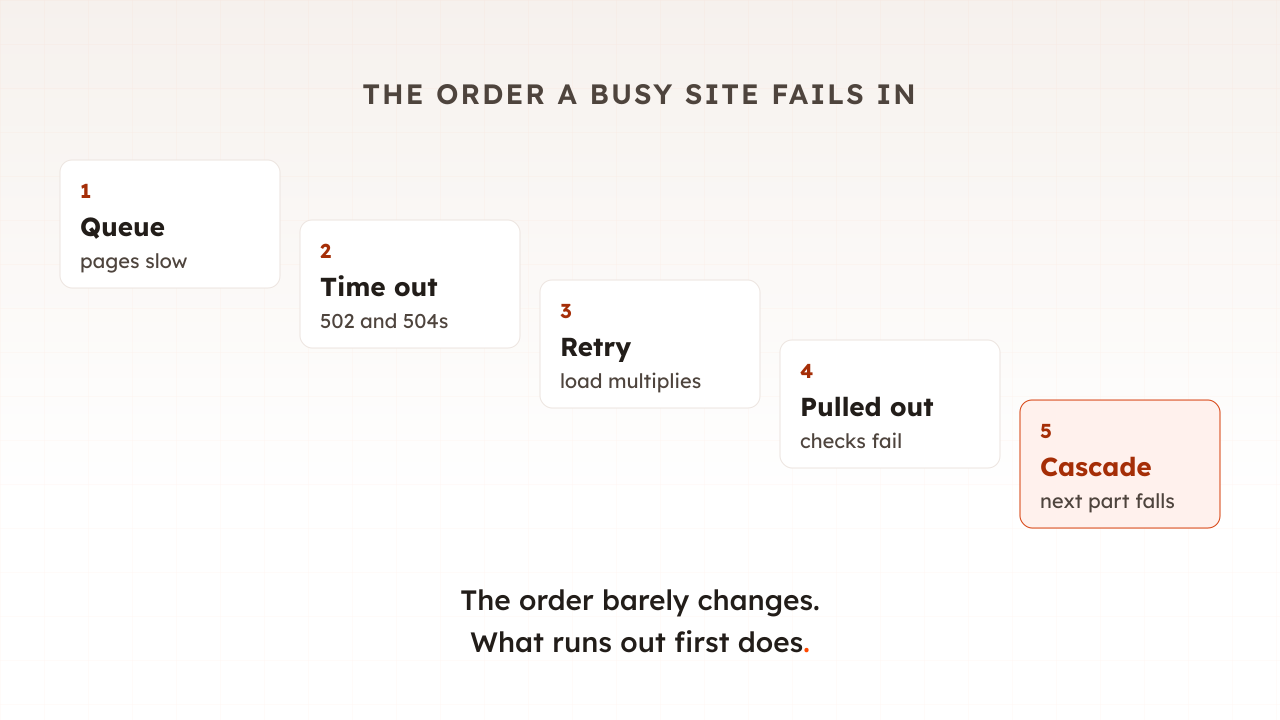
A waiting room is a decision to turn a crash into a wait. Part 15 of this guide showed how a site that receives more requests than it can serve slows down, times out and then falls over. A waiting room stops the extra visitors before they ever become requests.
How does a virtual waiting room work?
A waiting room checks every visitor to the protected pages for a pass, usually a cookie. Those with a valid pass go straight through. Visitors without one get a pass if there is room, or a place in the queue if there is not. The queue is released at a rate you set, and passes expire after a spell of inactivity.
In the order a visitor meets them, the steps are:
- The check. A visitor asks for a protected page. The waiting room, which usually runs at the edge in front of your servers, looks for a valid pass.
- The count. It compares how busy the site is with the limit you set. Under the limit, the visitor gets a pass and never notices anything.
- The queue page. Over the limit, the visitor sees a holding page, usually with a place in line and an estimated wait, and the page checks back on its own.
- The release. Visitors leave the queue as fast as the limit allows.
- The timeout. A visitor counts as active until they have been idle for a while. On Cloudflare that period is the session duration, which defaults to 5 minutes.
People at once, or people per minute
Waiting rooms count traffic in one of two ways. Cloudflare’s total active users setting is a target threshold for how many simultaneous users you want to allow, and a second setting limits how many new users arrive per minute. Queue-it works on a rate: you choose the rate at which visitors flow from the waiting room to your site, measured in visitors per minute. CrowdHandler also uses a rate, which its documentation describes as the number of new users you are happy to invite onto your site every minute.
The two are linked by how long a visit lasts, which is why choosing the number is less obvious than it looks. More on that below.
First come, first served, or a raffle
The other choice is order. A first-in, first-out queue admits people in the order they arrived. For a sale with a start time, some waiting rooms gather early visitors on a countdown page instead and shuffle them when the sale opens. Queue-it explains that while in the pre-queue, visitors do not get a position in line, and that the shuffle removes the speed advantages of bots. Anyone who arrives after the start joins the back of the line.
Glastonbury used the shuffled version for its 2027 tickets. The Press Association reported that fans were randomly assigned a place in a queue, and that general sale tickets sold out in less than 45 minutes.
Always on, or only for events
A waiting room can sit in front of a site all year as a safety net, doing nothing until traffic crosses the limit, or it can be switched on for a scheduled drop. Queue-it describes the safety-net setup as one where customers are redirected to a customizable waiting room only when traffic exceeds the capacity you’ve set.
When do websites use a waiting room?
Websites use waiting rooms when demand will arrive faster than they can serve it, usually at a known moment: ticket sales, limited product drops, the opening minutes of a Black Friday sale, and public services that everyone needs on the same day. The common thread is a crowd that arrives within minutes rather than spread across the day.
Two well-documented examples show the scale.
- NHS vaccine bookings, 2021. The national booking service used Akamai to hold people in a waiting area based on a percentage that we control, wrote Rob Sinclair, a lead architect at NHS Digital. At any one time it allowed approximately 12,000 people to access the bookings, and at its busiest it was taking over 150,000 bookings in an hour.
- The Eras Tour presale, November 2022. Ticketmaster said over 3.5 million people pre-registered for the presale and that the on-sale produced 3.5 billion total system requests, four times its previous peak. It estimated that about 15% of interactions across the site experienced issues.
Shoppers seem to prefer a queue to a broken site, at least when asked. In a survey of more than 1,000 consumers published by Queue-it, which sells waiting rooms, 84% would rather queue than face a crash or error page.
Waiting room, autoscaling or rate limiting: what is the difference?
A waiting room limits whole visitors at the door. The other tools teams reach for during a traffic spike work on servers or on individual requests, and each protects against something different. They are not substitutes for each other, and most busy sites use several.
| Tool | What it does | What it protects | What it cannot do |
|---|---|---|---|
| Virtual waiting room | Holds visitors on a queue page and admits them at a set rate | The whole journey for the people inside | Add capacity, or stop bots on its own |
| Autoscaling | Adds servers as load rises | Gradual growth in traffic | Catch a jump that lands in seconds, or add database connections |
| Rate limiting | Refuses requests over a limit per client or overall | The site from abusive or runaway clients | Keep a journey together; it can refuse a request halfway through checkout |
| CDN | Serves copies of pages and files that are the same for everyone | Cacheable pages and images | Help baskets and checkouts, which are built for each shopper |
The difference between the first and third rows matters most on sale day. Rate limiting refuses requests, so a shopper can be turned away between the basket and the payment page. A waiting room decides at the door, so someone who gets in can finish. Part 14 covered why the CDN cannot carry the checkout for you.
How do you choose the admission rate?
Measure it. Find how many shoppers your slowest journey, usually checkout, can serve at once while staying within your targets. Divide that by the average visit length in minutes to get a rate per minute, then hold some back as headroom. Queue-it’s own guidance is that the best way to determine your rate is a load test.
Guessing is the common alternative, and it usually guesses high. CrowdHandler’s documentation is candid about its customers: most of our customers think they can handle much more traffic than they can in reality. Its advice, when a team has no evidence, is that they might want to start at 10 a minute and raise it from there.
A worked example
Take a shop preparing a trainer drop.
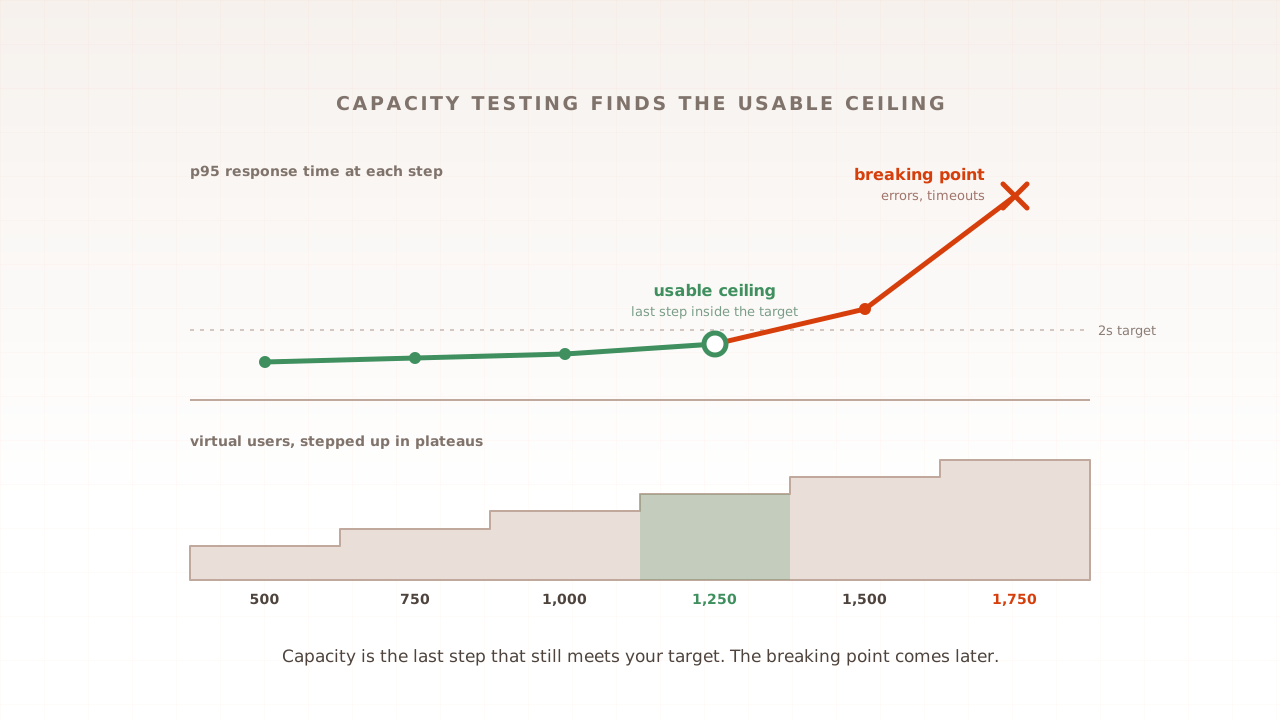
- Measure the ceiling. A capacity test of the drop journey, product page, size, add to basket and checkout up to payment, shows checkout staying within its response-time target up to 1,200 shoppers at once. Above that, response times climb and errors start.
- Find the visit length. Analytics from the last drop show a visit lasting six minutes on average.
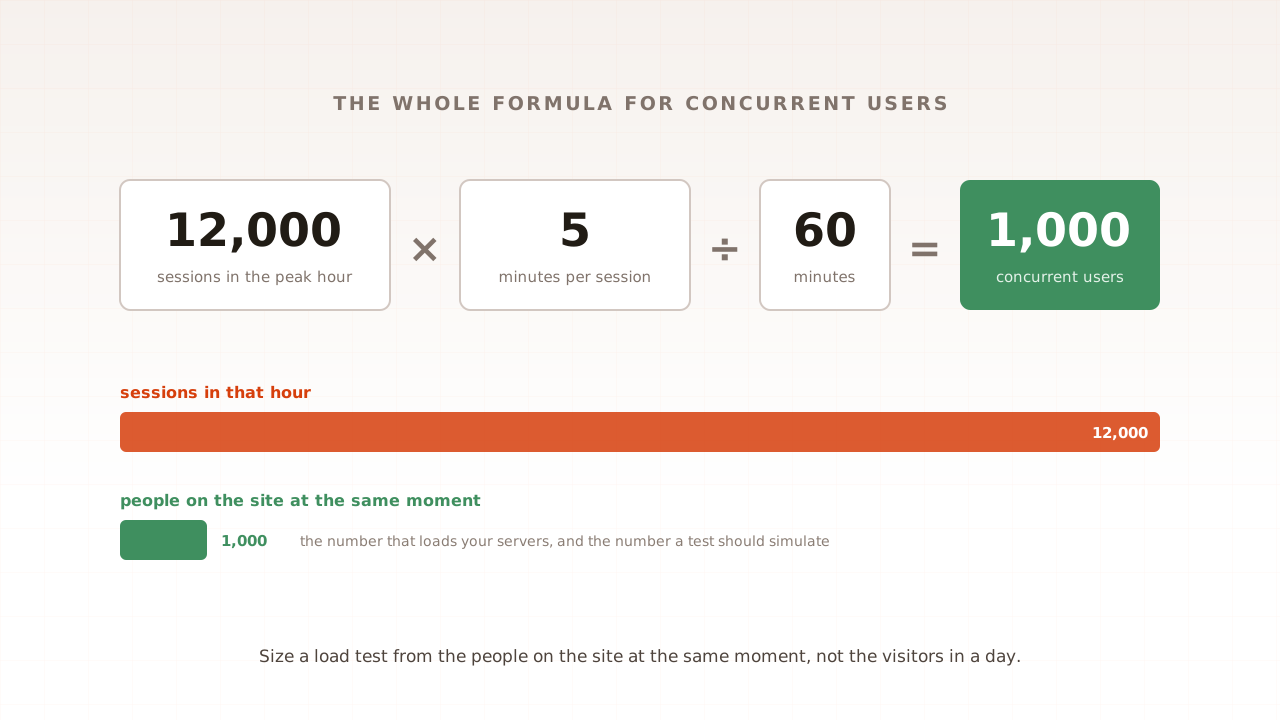
- Convert to a rate. Shoppers on the site at once equal the arrival rate multiplied by the visit length, the same arithmetic part 7 used for concurrent users. So the ceiling is 1,200 divided by 6, or 200 new shoppers a minute.
- Leave headroom. Cloudflare’s guidance for its active-users limit is to set the value to 75% of your origin’s traffic capacity. Three-quarters of the ceiling is 900 shoppers at once, or 150 a minute.
Now the common mistake. Type the concurrency figure of 1,200 into a per-minute setting, and after six minutes 7,200 shoppers are on a site that holds 1,200. Queue-it describes the same error with a ten-minute journey, concluding that you’ve actually overestimated your true capacity tenfold.
Check the slowest dependency
Your own servers may not be the limit. A payment provider, a fraud check or a stock service can run out first. Queue-it flags that checkout processes and payment gateways, for example, are huge bottlenecks for transactional websites. CrowdHandler suggests that working back from peak orders per minute is a good way to set the rate. In the example, if one admitted shopper in four buys, 150 a minute means about 38 orders a minute, and the payment provider has to accept that.
Teams that run the biggest queues work this way. The NHS booking service’s 12,000 figure, Sinclair wrote, was determined through extensive performance testing and monitoring key components within the solution.
What does a waiting room not fix?
A waiting room controls how many people arrive. It does nothing about how well the site serves them once they are in, it does not separate people from bots, and while it is queueing, search engines can be queued too. Plan for each of those separately.
- Capacity. If the rate is wrong, the site still fails behind the queue, and the people who waited longest meet the error page.
- Bots. Queue-it’s own developer guide says that bot and abuse mitigation is a cat-and-mouse game with no single silver bullet, and lists navigating directly to the target URL as a way to skip the line. A waiting room has to be enforced on every protected URL, alongside bot management.
- Search engines. Cloudflare warns that SEO crawlers may end up in a queue during active queueing. Cloudflare’s queue page answers with a normal 200 status by default, so a queued crawler sees the holding page where the product should be. If you switch it to a 429, Google’s documentation says 5xx and 429 server errors prompt Google’s crawlers to temporarily slow down with crawling. Check your provider’s crawler settings before a big event.
- Patience. A queue is still a wait. When Shopify first queued its flash-sale checkouts, its engineers wrote that users were upset about waiting on the queue page for up to 40 minutes.
When demand dwarfs supply, a queue may not be the fairest tool at all. A draw, where people register and winners are picked at random, avoids a race at a fixed time altogether.
Common mistakes with virtual waiting rooms
Most of them come from setting the number once, by feel, and never checking it.
- Guessing the rate. Use a measured ceiling, not last year’s homepage traffic or the server count.
- Mixing up the units. People at once and people per minute differ by the visit length. Convert before you type.
- Testing the wrong journey. A drop sends everyone to one product page and the checkout. Measure that journey, not a general browse.
- Starting high and lowering. CrowdHandler’s documentation warns that starting high and lowering the rate is riskier than the other way round.
- Leaving gaps. A direct link to the product, the checkout URL or an API the page calls can let visitors around the queue.
- Never re-measuring. A new release, a cold cache or a new payment step changes the ceiling. Re-test before each big event.
How Evaluat helps you set the rate
Evaluat runs each virtual user in its own real browser and ramps them up to the level you choose, so a capacity test walks the same drop journey a shopper does: the product page, the basket and the checkout, with every image, script and API call loaded. The report shows response times and errors per URL, p95 and p99 percentiles, and Core Web Vitals, which tells you the level at which checkout stops meeting its target. That level, divided by your visit length, is your starting rate.
A waiting room also changes what the site has to survive. Instead of a spike at the start of a sale, the servers see a steady flow at the rate you chose. Evaluat’s virtual users ramp up over minutes and then hold steady, which is the same shape. When a run starts to fail, open a session from that moment and watch what the shopper saw, with the network log showing which request slowed first. Open the session. Watch the moment it broke.
The boundaries are worth stating. Run the test against the site behind the waiting room, with the room switched off for the test or set to let it through, because a test that is itself queued measures the queue. Evaluat measures from the outside, the way shoppers arrive, so pair it with your server monitoring to see which limit was hit. And it does not test the waiting-room provider’s own capacity, which is theirs to prove.
A waiting room turns a crash into a wait, but only if the number behind it is right. Measure what your checkout can take, convert it to a rate, and leave room to spare.
Test in real browsers. Debug in real sessions. Book a demo to find the number your waiting room needs.