What is performance regression testing?
Performance regression testing compares the performance of a new build against a known-good baseline and fails the build when a change makes things measurably slower. A regression is just a change that moves a metric the wrong way. Functional tests ask whether the code is correct; performance regression tests ask whether it got slower, a question a passing suite never answers.
The term is broad. It also covers backend throughput, query latency, and API response times. This guide covers the front-end slice: the speed your users feel in the browser, measured with Core Web Vitals and enforced as a gate in your CI/CD pipeline (the automated pipeline that builds, tests, and ships your code on every change).
Core Web Vitals are the three metrics Google uses to score page experience. Largest Contentful Paint (LCP) measures loading, Interaction to Next Paint (INP) measures responsiveness, and Cumulative Layout Shift (CLS) measures visual stability. Google’s “good” thresholds, assessed at the 75th percentile of real visits, are 2.5 seconds for LCP, 200 milliseconds for INP, and 0.1 for CLS. The 75th percentile is the point where three of four visits are at least this good, chosen so a handful of outliers cannot flatter the score.
Why gate, rather than audit once and move on? Because speed regresses. Research by Google found that “most performance improvements tend to regress within six months.” A page you tuned in January is slow again by July unless something keeps watching. And the cost is real: in a 2020 study Deloitte ran for Google, brands that improved mobile load time by 0.1 seconds saw retail conversions rise 8.4% and average order value rise 9.2% on average. (The study improved four timing metrics together across the journey, so read it as a correlation between speed and revenue, not a single dial you turn.) The field shows how common the failure is: in 2024, around 43% of mobile sites and 54% of desktop sites passed the Core Web Vitals assessment, which means close to half the web ships an experience Google rates as needing improvement or poor.
The target itself moves too. In March 2024, Interaction to Next Paint replaced First Input Delay as a Core Web Vital. A gate written against last year’s metric set can quietly stop testing the thing Google now measures. New to all of this? Start with the complete performance testing guide.
Lab, field, and load: where a regression hides
A Core Web Vitals regression can appear in three different places, and a release gate that watches only one of them will miss the other two. Knowing which is which is the whole design.
Field data is what real users actually experienced, collected by real user monitoring (RUM) or Google’s Chrome User Experience Report. It is the ground truth, and Google’s guidance is to “always concentrate on field Core Web Vitals over Lighthouse metrics and scores.” The catch is that field data is reactive: it reports yesterday’s traffic, after the regression already shipped.
Lab data is a synthetic measurement under fixed conditions, the kind a tool like Lighthouse produces. It is repeatable and fast, so it can run on a pull request and catch a regression before it reaches a single user. That is what makes lab the natural engine of a CI gate.
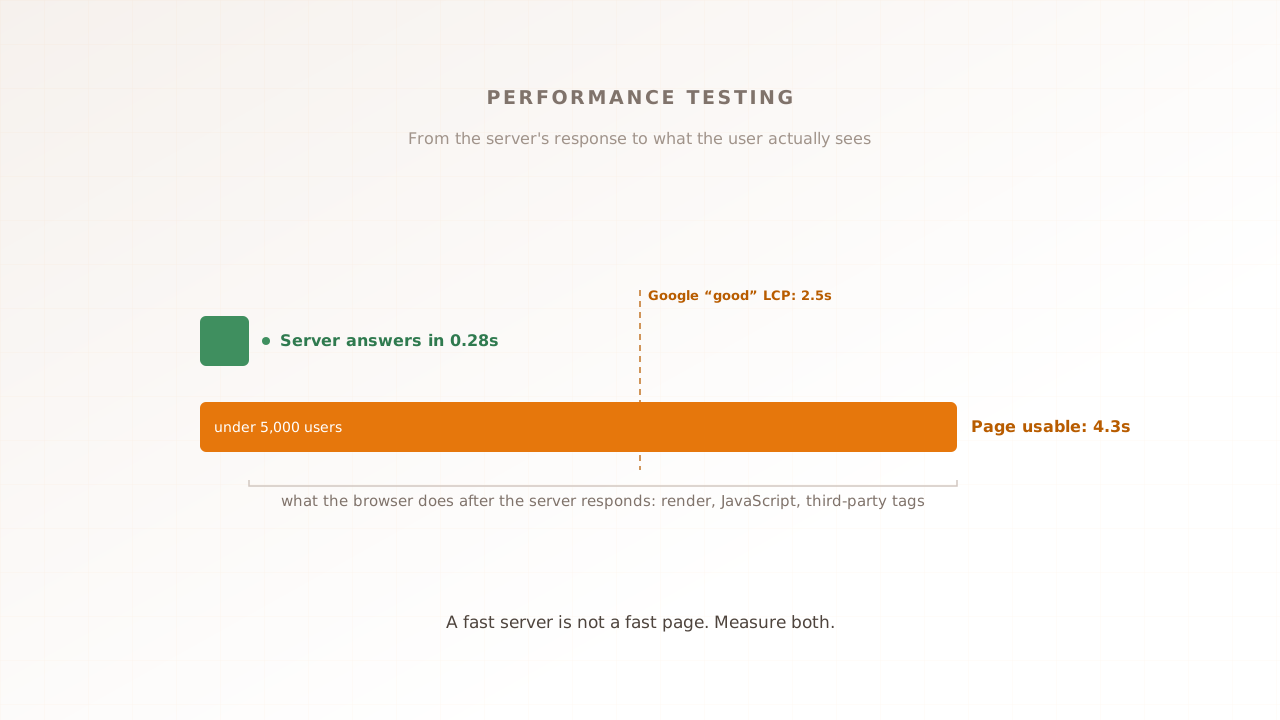
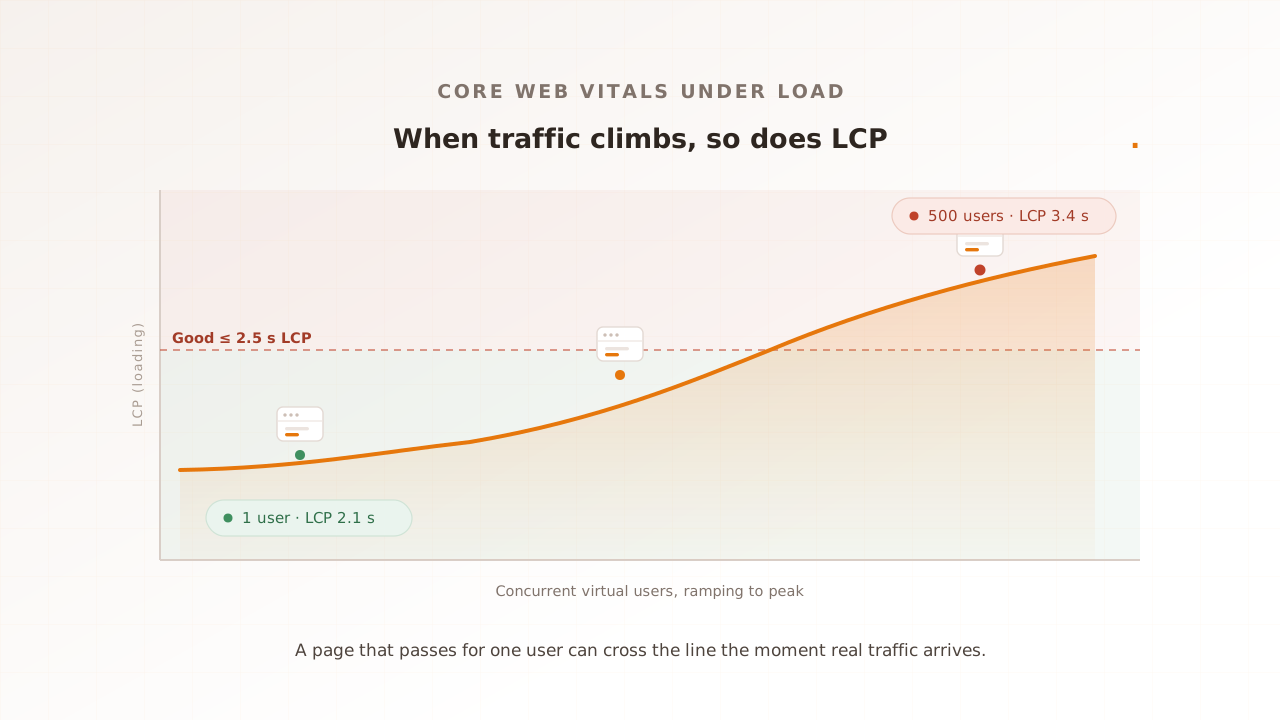
Load is the dimension almost every CI tutorial skips. A lab run is one page, loaded once, by one synthetic user, with no one else loading shared services. Real traffic puts backends, CDNs, and third parties under concurrency. LCP can climb as those services slow, and network-bound interactions can degrade in each independent browser. Customer devices do not share a main thread. For the methodology of measuring Vitals at realistic concurrency, see Core Web Vitals at load.
There is one more wrinkle the table makes explicit: a standard lab page load cannot even measure INP, because INP needs interactions and a cold navigation has none.
| Where it runs | What it answers | Cadence | Which Vitals it can capture | Blind spot |
|---|---|---|---|---|
| Field / RUM | What real users got | Continuous, after release | LCP, INP, CLS (real) | Reactive; cannot test a change before it ships |
| Lab navigation (Lighthouse CI) | Did this build regress in a clean room | Every commit or PR | LCP, CLS, TBT (proxy for INP) | One user, no concurrency, synthetic network |
| Lab interaction (user flows) | Did a specific interaction regress | Per build or pre-release | INP (real), LCP, CLS | Still one user, no concurrency |
| Load (real browsers at concurrency) | Do Vitals hold at peak | Pre-release or scheduled | LCP, INP, CLS, FCP under load | Heavier to run; not per-commit |
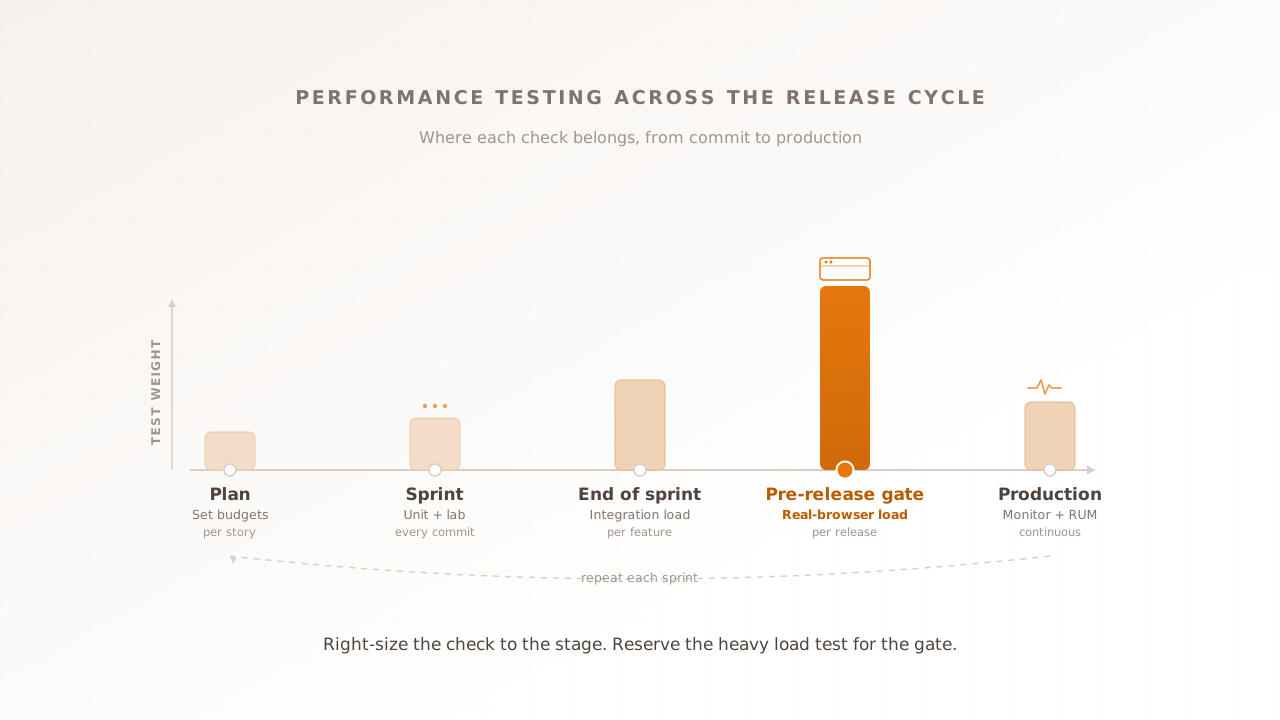
The practical gate uses these as a staircase: lab navigation on every PR for the cheap, fast signal; scripted interaction where INP matters; field as the ground-truth backstop; and a load stage before release for the regressions concurrency hides.
What you need before you start
- A per-build preview URL. CI needs a deployed version of the candidate to measure. A preview deployment per pull request, or a static build served inside the job, both work.
- The journeys that matter. Pick the three to five pages where slowness costs you most, not every route. A bloated gate is a slow, noisy gate.
- A baseline. You cannot detect a regression without a known-good number to compare against. Step 2 captures one.
- A CI runner you control. Shared, burstable runners add measurement noise; Step 4 explains how to fight it.
- A decision: block or warn. Agree up front whether a busted budget fails the build or just comments on the PR. You can start with warn and promote to block later.
Step 1: Choose the pages and journeys to defend
Start narrow. Pick the handful of URLs where a regression has real consequences and leave the rest out of the gate for now. A gate that checks every page is slow, noisy, and quickly ignored.
For our worked example, a storefront at example.shop, the list is three pages: the home page (/), a product page (/product), and checkout (/checkout). These are the steps that carry revenue, and they exercise different code paths: a marketing page, a data-heavy template, and an interaction-heavy form. We carry these same three URLs and their numbers through every step below.
When this works, you have a short, agreed list of URLs, and the team understands why each one is on it.
Step 2: Capture a baseline from your main branch
A budget pinned to Google’s absolute thresholds only catches pages that are already bad. It does nothing for a page that slides from good to slightly-less-good, which is what most regressions actually look like. To catch those, you need a baseline: the current, known-good numbers on your main branch.
Measure each URL on main several times and keep the median. Run-to-run variance is real, so a single measurement is not a baseline. Google notes that the median of five Lighthouse runs is about twice as stable as one run, so collect three to five and take the middle value.
For example.shop, the median LCP on main comes out at 1.8 seconds for the home page, 2.1 seconds for the product page, and 2.4 seconds for checkout, with CLS at 0.05 and Total Blocking Time around 220 milliseconds on the product page. Those numbers are the baseline.
Before you trust the harness, take one manual reading too: run a quick speed test on the same URLs and compare. Evaluat Pulse returns LCP, CLS, FCP, and TTFB from one real-browser load with Evaluat’s A to F composite grade. It does not produce a representative INP on a cold load. Compare like-for-like controlled conditions; a disagreement is a reason to inspect the runner, not proof that either result represents every customer device.
When this works, you have a recorded median per URL that you trust enough to defend. For the metric behind the headline number, see Largest Contentful Paint explained.
Step 3: Turn the baseline into budgets
A budget is the line a metric is not allowed to cross. Set each budget at the baseline plus a small tolerance, so normal noise passes but a genuine slowdown fails. A common starting tolerance is roughly 10%, or a fixed margin such as 150 milliseconds on LCP.
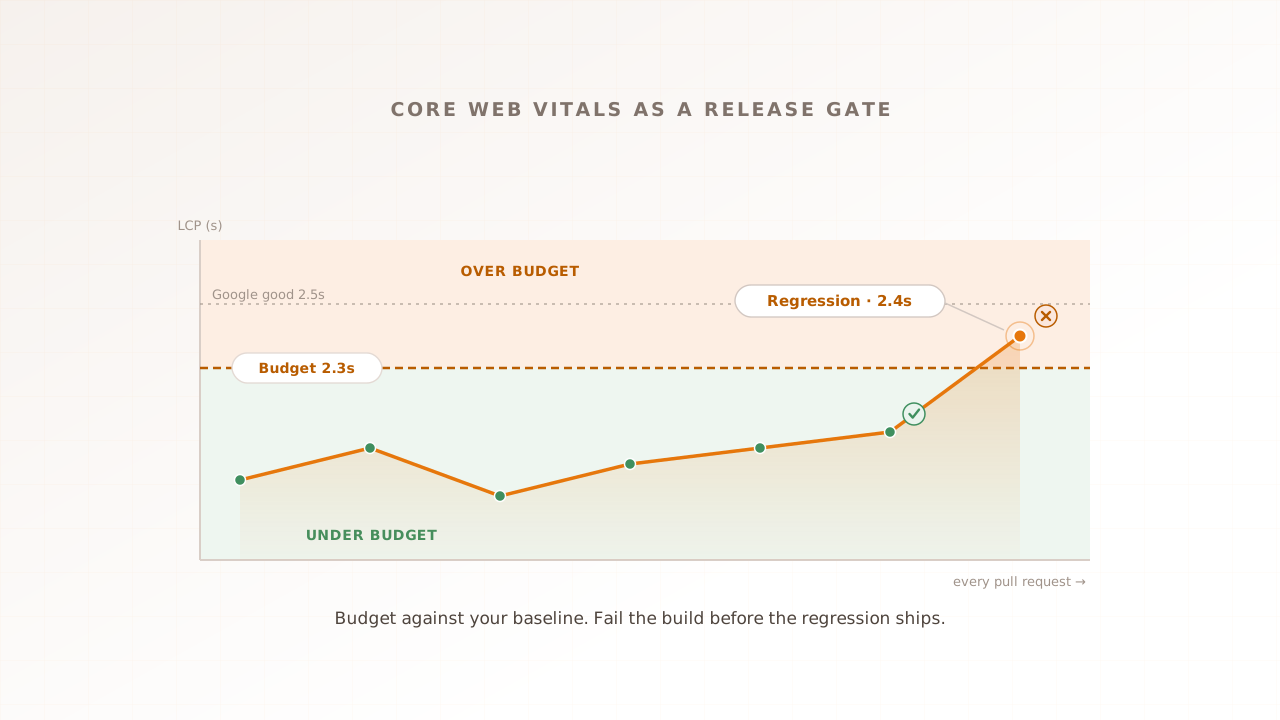
For the product page, a baseline LCP of 2.1 seconds becomes a budget of 2.3 seconds. Now the regression that matters gets caught: a pull request that pushes the product page to 2.4 seconds fails the gate, even though 2.4 seconds is still inside Google’s absolute 2.5-second threshold. A budget anchored to your baseline sees the slide that an absolute threshold sleeps through.
Lighthouse CI reads these as assertions. CLS is unitless, while LCP and TBT are in milliseconds:
{
  "ci": {
    "collect": { "numberOfRuns": 5 },
    "assert": {
      "assertions": {
        "largest-contentful-paint": ["error", { "maxNumericValue": 2300 }],
        "cumulative-layout-shift": ["error", { "maxNumericValue": 0.1 }],
        "total-blocking-time": ["warn", { "maxNumericValue": 300 }]
      }
    }
  }
}
Three notes. To give each URL its own budget, use an assertMatrix with a matchingUrlPattern per page, or a per-path budget.json. To compare against a baseline branch instead of relying only on static budgets, the Lighthouse CI server (@lhci/server) stores historical runs and surfaces regressions against them. And ratchet: when you legitimately make a page faster, lower its budget to lock the win in. A budget should only ever move down.
Step 4: Wire the gate into the pipeline and fail on a real regression
With URLs, a baseline, and budgets in hand, the pipeline job is small. The official GitHub Action runs Lighthouse against your preview URLs, takes the median of the configured runs, and fails the build when a URL exceeds its budget:
# .github/workflows/perf-gate.yml
name: Performance gate
on: pull_request
jobs:
  lighthouse:
    runs-on: ubuntu-latest
    steps:
      - uses: actions/checkout@v4
      - name: Run Lighthouse CI
        uses: treosh/lighthouse-ci-action@v12
        with:
          urls: |
            https://deploy-preview.example.shop/
            https://deploy-preview.example.shop/product
            https://deploy-preview.example.shop/checkout
          configPath: ./lighthouserc.json
          temporaryPublicStorage: true
The level on each assertion decides the consequence. An error fails the job and blocks the merge; a warn reports without blocking. Promote a metric to error once you trust its stability, and keep the rest on warn while you tune.
Stability is the part teams underestimate. Free and burstable CI runners are, in Google’s words, “typically quite volatile,” so a gate on a noisy runner fails on luck rather than on regressions. Defend against it three ways: take the median of three to five runs, use a dedicated runner instead of a shared one, and never run Lighthouse jobs concurrently on the same machine.
One accuracy trap. A default Lighthouse run is a cold navigation with no interactions, so it cannot measure INP; it reports Total Blocking Time as a lab proxy. To gate real INP you have to script the interaction, with Lighthouse user flows or a real-browser test that performs the actual clicks and taps. See Interaction to Next Paint explained for what you are protecting. Finally, keep a documented manual override for regressions you consciously accept; the gate exists to stop accidents, not to overrule engineering judgment.
When this works, a pull request that busts a budget shows a red check naming the URL and the metric, for example “largest-contentful-paint on /product is 2.4 s, budget 2.3 s.”
Step 5: Add a load stage for Vitals under concurrency
Everything so far runs one synthetic user against a quiet server. That is the right engine for a per-commit gate, and Lighthouse CI is genuinely the right tool for it. But it is blind to the regression that only shows up under traffic, and that gap is where most “it was fast in staging” incidents come from.
Run the same journeys at realistic concurrency before release, as a pre-release or nightly stage rather than on every pull request, since load runs cost more than a single audit. Set a separate budget for Vitals at your target concurrency, then compare the load run against the single-user baseline from Step 2. The delta is the regression that traffic creates.
On example.shop, the product page holds LCP at 2.1 seconds for one user. At 500 concurrent virtual users its LCP climbs to 3.4 seconds and INP to 410 milliseconds, both past Google’s absolute thresholds, while the per-PR lab gate stayed green the whole time. The gate passed a build that a single real session would have caught.
Performance Testing can supply the real-browser run and per-session evidence for this stage. Productizing it as a managed CI gate is the planned shape of Evaluat’s Testing Suite, not a live feature today. The methodology lives in Core Web Vitals at load.
How do you know it worked?
You know the gate is working when it changes what reaches your main branch. Four things confirm it: a pull request that busts a budget shows a red check, the failing run names the offending URL and metric, the diff against the baseline is legible to a reviewer, and the load-stage report exposes the worst sessions to open. Inspect each in turn.
Click into a failing run and you should see the measured value next to the budget, for example /product at 2.4 seconds against a 2.3-second budget. The diff against baseline is legible enough that a reviewer can see /product went from 2.1 to 2.4 seconds without reading a log. The load-stage report shows per-URL Vitals at your target concurrency, with the worst sessions addressable so you can open the one that broke. If all four hold, the gate is doing its job: regressions stop at the pull request, not in the field.
Common problems and fixes
| Symptom | Cause | Fix |
|---|---|---|
| The gate fails randomly on unchanged code | A single run on a noisy, shared CI runner | Take the median of three to five runs, use a dedicated runner, and avoid concurrent Lighthouse jobs |
| The build passes but the field still slows down | Lab is one device, one network, no concurrency | Throttle to match your users, keep RUM as the ground truth, and add the load stage |
| The budget never fails | Budgets set at Google’s absolute thresholds, well above your baseline | Set budgets from the baseline plus a small tolerance, and ratchet them down as you improve |
| A new third-party tag tanks the score | Tags add main-thread work and bytes | Budget resource counts and sizes, and test the page with and without the tag |
| INP never appears in the report | A cold navigation has no interactions to measure | Script the interaction with Lighthouse user flows, or measure INP in a real-browser run |
Make the gate routine
The loop is short: measure a baseline on main, set budgets from it, run the lab gate on every pull request, fail only on real regressions, and add a load stage before release for the slowdowns concurrency hides. Then ratchet the budgets down as the site gets faster. The gate turns page speed from a thing you audit once into a property the pipeline defends on every change.
Join the Testing Suite design-partner waitlist to discuss planned CI gates.