What is a third-party script?
A third-party script is JavaScript that your page loads from another company’s server: analytics, advertising, chat, product reviews, A/B testing, personalisation, consent banners and payment widgets. You choose to add it, but another company writes it, hosts it and can change it. It runs inside your page with the same access as your own code.
The HTTP Archive’s 2025 Web Almanac defines it simply: a third party is an entity different from the site owner. The same chapter found that the percentage of pages with one or more third parties remains greater or equal to 90%, and that the median number of third-party requests per page is 83 on desktop and 79 on mobile. Scripts are the largest share of those requests, at 24.8%.
By size, other companies often ship more JavaScript than the site itself. The 2024 Almanac’s JavaScript chapter found that the median mobile page downloads 168 KB of JavaScript from its own host and 375 KB from third-party hosts.
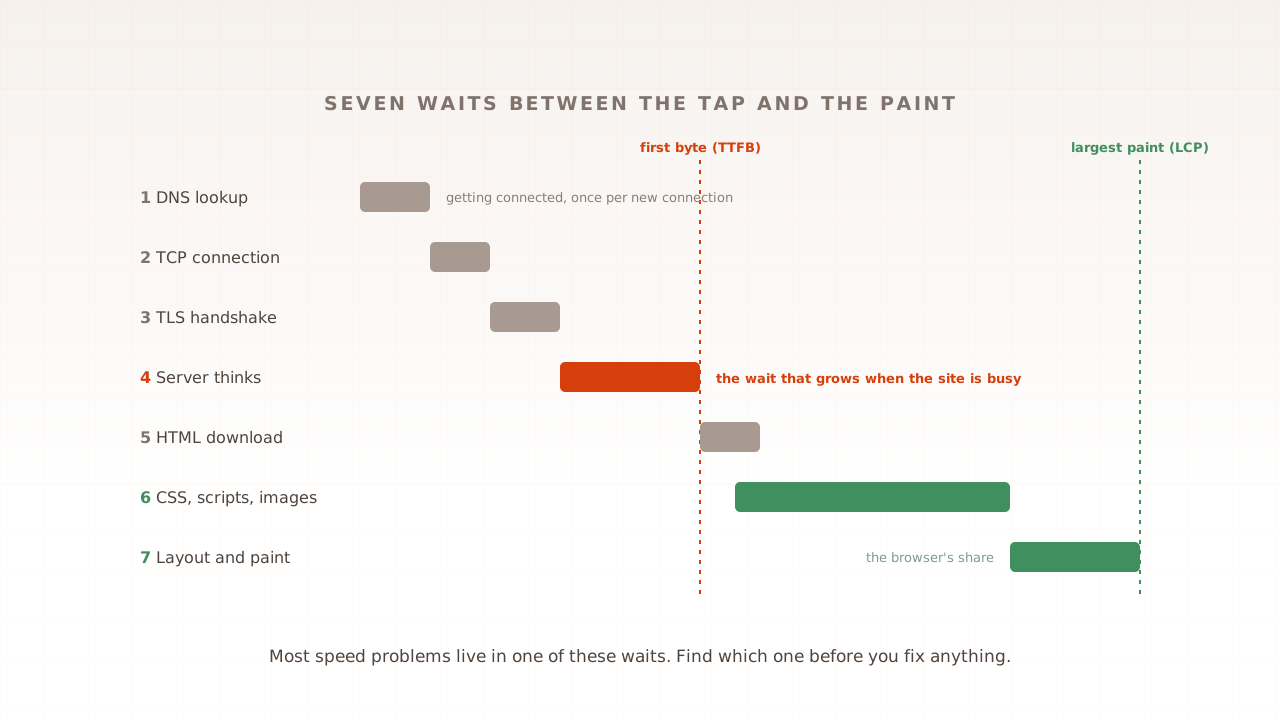
Think of a restaurant that lets several suppliers send their own staff into the kitchen during service. Each brings useful things. Each also needs space at the same hob, and if one is late, whatever they were making waits. Part 8 of this guide walked through the seven waits in a page load; third-party scripts add to almost all of them.
How do third-party scripts slow a page down?
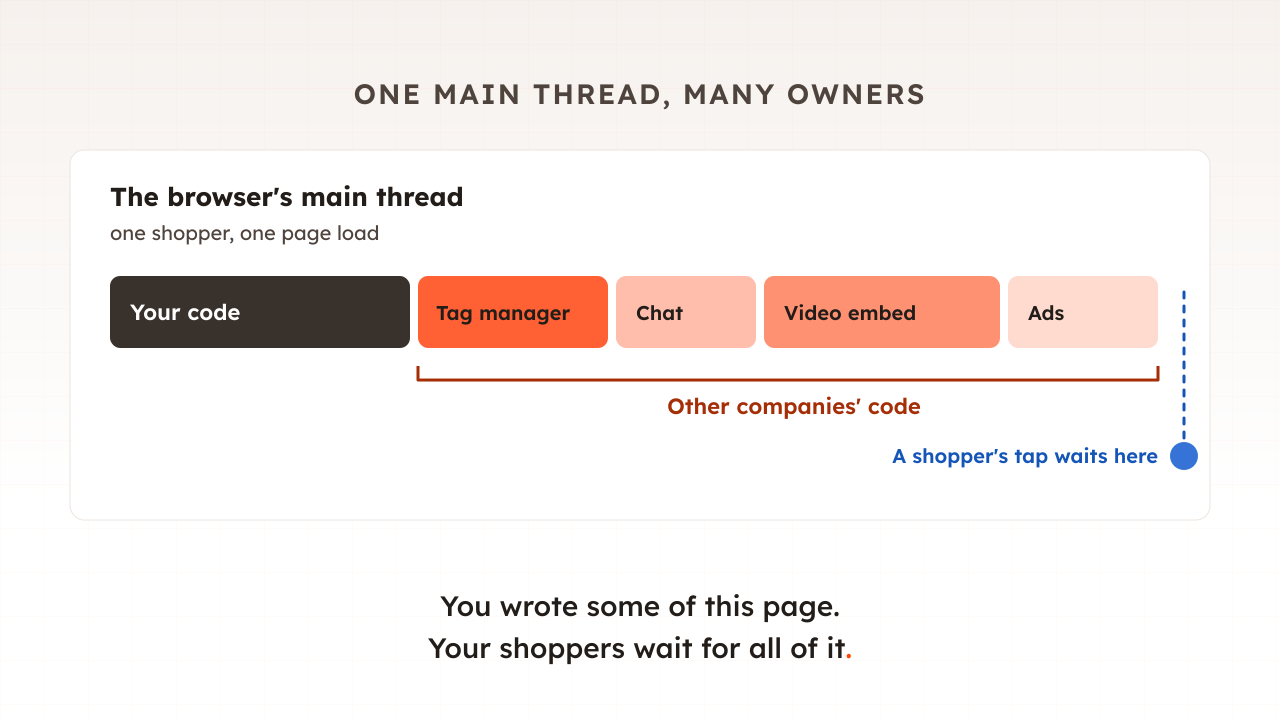
In four ways. They add downloads from extra servers, each needing its own connection. They run on the browser’s main thread, competing with your own code and with the shopper’s taps. Some stop the page being drawn until they arrive. And some insert or move content after the page appears, which shifts the layout.
More servers to connect to
Every new server means a new DNS lookup, connection and secure handshake before the first byte of the script arrives. Scripts also load other scripts: the Almanac found that the median depth of the inclusion chain is 3, so one tag you added can pull in a second company’s code, which pulls in a third.
Time on the main thread
A browser does most of its work on one main thread: running JavaScript, laying out the page and responding to taps and clicks. While a script runs, a shopper’s tap waits. Lighthouse, Google’s page audit tool, used to flag pages that have third-party code that blocks the main thread for 250 ms or longer, in the audit its newer versions have replaced.
The cost varies enormously by script. The open third-party-web project, which analyses Lighthouse runs from the HTTP Archive’s mobile crawl, gives an average main-thread execution time per page for each provider. In its March 2026 data, scripts served from Google Tag Manager’s domain averaged 1,066 ms across 15 million pages, YouTube’s 6,297 ms and Google Analytics 108 ms. These are averages from lab runs on an emulated phone, pulled up by heavy pages, so treat them as a ranking, not a prediction for your site.
This is the cost that shows up in Interaction to Next Paint (INP), the Core Web Vital that measures how quickly a page responds to input. Google’s guidance on tags notes a correlation between the size of tag managers and poorer INP scores.
Blocking the page
A plain script tag in the page head, without async or defer, is fetched and executed immediately before the browser continues to parse the page, in MDN’s words. Nothing below it is built until it has arrived and run. Paul Calvano, writing for the Web Performance Calendar, found in December 2025 that 67.7% (of 15.78 million websites) request at least one render-blocking third party, a figure that includes stylesheets such as web fonts as well as scripts.
Some A/B testing tools block the page on purpose, to stop visitors seeing the original version flicker into the variant. Adobe Target’s anti-flicker snippet, for example, pre-hides the whole HTML BODY by default, with a three-second timeout.
Moving things after the page appears
Banners, chat buttons, review widgets and ads that are inserted after the first paint push content down unless space was reserved for them. That shows up as Cumulative Layout Shift, and as shoppers tapping the wrong thing.
Which third-party scripts cost the most?
Video embeds, advertising and chat widgets usually cost the most, because they load large amounts of code and often their own iframes. Analytics tags are usually lighter. But how a script is loaded and when it runs matter as much as which vendor wrote it, so the categories below are a starting point for measuring, not a verdict.
| Type | Examples of what it does | Where the cost usually lands | First fix to try |
|---|---|---|---|
| Video embeds | Product and brand videos | Large downloads and main-thread time | A placeholder image that loads the player on click |
| Advertising and retargeting | Ad slots, pixels | Main-thread time, more servers, layout shifts | Load after the page; reserve space for ad slots |
| Chat and support widgets | Live chat, help buttons | Main-thread time on every page | Load on interaction or after a delay |
| A/B testing and personalisation | Variant switching | Blocked or hidden page | Server-side testing, or a short anti-flicker timeout |
| Analytics and tag managers | Measurement, event tracking | Main-thread time as tags fire | Fewer tags, fired after load |
| Consent banners | Cookie choices | Early main-thread time and layout shifts | Load early but reserve its space |
| Reviews and social proof | Star ratings, review lists | Layout shifts below the fold | Reserve space, or render reviews on the server |
Does Google Tag Manager slow down your site?
Not much on its own. Google Tag Manager loads asynchronously and its library is small; the cost comes from the tags inside it and from how early they fire. A container full of custom HTML tags firing on page load can cost a lot. The same container with a few tags firing after the page has loaded costs little.
Google’s own guidance puts the library at around 33 KB compressed and the median site’s container at around 50 KB, and describes the relationship well: the tag manager provides a vessel, but what you fill it with and how you use it is mostly up to you. Julius Fedorovicius of Analytics Mania tested it directly, and in an article updated in September 2026 reported that an empty GTM container had a minimal impact on page speed. His summary is blunt: it’s not GTM itself. It’s what you put inside of it.
It matters because tag managers are everywhere. W3Techs reports that Google Tag Manager is used by 44.8% of all the websites it monitors.
Two details trip people up. First, most tools attribute the performance impact of a Custom HTML tag to the tag manager that injected it, so a report that blames Google Tag Manager may really be blaming one of your tags. Second, timing: Google’s guidance is to fire non-essential tags after Window Loaded, because the earlier a tag fires, the more it competes with the page.
The real reason tag managers let costs pile up is that adding a tag no longer needs a release. Shopify’s developer guide describes the pattern exactly: marketing adds a tracking pixel, a developer adds analytics, a merchant installs an app, and later the feature becomes unneeded, but the code still executes.
What happens when a third-party server is slow or down?
It depends on how the script is loaded. A script that blocks rendering can leave shoppers looking at a blank or half-built page until the request times out. An asynchronous script lets the page draw, but the browser still waits for it before declaring the page loaded. Either way, someone else’s bad day becomes yours.
- Blocking scripts. Calvano puts it plainly: the user would essentially see a blank screen until the third party request times out.
- Asynchronous scripts. The page draws, but MDN notes that the load event fires only when the whole page has loaded, including all dependent resources such as stylesheets, scripts (including async, deferred, and module scripts). Anything set to wait for load, including tags set to fire on Window Loaded, waits with it.
- Pre-hiding snippets. The page stays hidden until the script arrives or the snippet’s own timeout runs out.
There is also a quieter failure: the script changes. In February 2024 the polyfill.io domain, used by many sites to patch older browsers, was bought by a new owner, and by June its script was serving malicious code. Even after the attack was exposed, Censys still detects 384,773 hosts embedding a polyfill JS script linking to the malicious domain on 2 July 2024. A third-party script runs with your page’s permissions, so its owner matters as much as its speed.
How do you measure what a third-party script costs?
Compare the page with and without it. List the third parties a page loads, see how much main-thread time each one takes, then block them one at a time, reload, and compare the results over several runs. The difference is what that script costs your shoppers on that page.
- List them. Run Lighthouse or PageSpeed Insights and read the third-parties insight, which replaced the older third-party summary in Lighthouse 13 and groups the page’s requests by provider.
- See where the time goes. In the Chrome DevTools Performance panel, the 3rd parties insight categorizes resources and CPU activity by first and third-party entities.
- Block and compare. In the Network panel, right-click a request and select Block request, then reload. Shopify’s version of the same advice is to block a domain, reload, and compare transfer sizes and scripting time. Run each case several times, because single loads vary.
- Rehearse a slow vendor. The same DevTools drawer can throttle one request with a custom network profile, so you can see what your page does when one vendor takes ten seconds.
- Check checkout, not just the homepage. Payment, fraud and address-lookup scripts often load only there.
How do you reduce the impact of third-party scripts?
Remove what nobody uses, delay what is not needed for the first view, and replace heavy embeds with something lighter until a shopper asks for them. Then give every tag an owner and an end date, so the list does not grow back. Each fix trades something away, so make the trade knowingly.
- Remove. Shopify calls auditing and removing third-party scripts the highest-impact optimization for improving responsiveness and overall performance. Old campaign pixels and trial tools are the usual finds.
- Load later. Use
asyncordeferon script tags, and fire tag-manager tags after the page has loaded. The trade is a little lost data from visitors who leave in the first seconds. - Use placeholders for heavy embeds. Show a still image of the video or the chat button, and load the real thing on click.
- Connect early to the vendors you keep. A
preconnecthint lets the browser open the connection to a critical third party before it is needed. - Move work off the page. Server-side tagging and web-worker tools such as Partytown can take some scripts off the main thread, though Partytown’s own documentation notes it may not be the best fit for every single script out there.
- Freeze tags before peak. A tag added the week before a sale has never been tested at peak. Part 11 of this guide explains why a code freeze should cover tags.
Common mistakes with third-party scripts
Most come from treating tags as marketing’s business and speed as engineering’s, when both teams own the result.
- Blaming the tag manager. The container is rarely the problem; the tags in it are.
- Testing a lighter page than shoppers get. A lab test with an ad blocker, or one that never accepts the consent banner, skips every tag behind it.
- Treating async as free. It removes the blank-page risk, not the main-thread cost.
- Keeping tags forever. Every tag needs an owner and a date to review it.
- Only measuring the homepage. The scripts on product, basket and checkout pages are often different.
How Evaluat shows what your tags cost
Every virtual user is a real browser, so each one loads and runs every tag, pixel and embed your shoppers get, and a scenario can accept the consent banner so the tags behind it fire. Core Web Vitals for every session include their cost. What users see, not what scripts pretend.
The network log for each session lists every request with its timing and size, first-party and third-party alike, and the report’s network view groups requests by URL with a percentile of their duration across all sessions, filterable to scripts. That separates a slow page caused by your servers under load from one held up by a vendor. Console logs show the errors a third-party script throws, and the session video shows the banner that pushed the page down.
The boundaries are worth stating. Evaluat’s browsers run as desktop browsers on cloud machines, without slowing the processor to match a phone, so a script’s main-thread cost on a mid-range phone will be higher than the test shows; use field data from real visitors for that. And test sessions reach your analytics and ad platforms like any other visit, so decide beforehand how you will filter them out.
Third-party scripts are part of the page your shoppers get, whether you wrote them or not. Count them, measure what each one costs, and keep the ones that pay their way.
Test in real browsers. Debug in real sessions. Book a demo to see what your tags cost at peak.