What is Interaction to Next Paint (INP)?
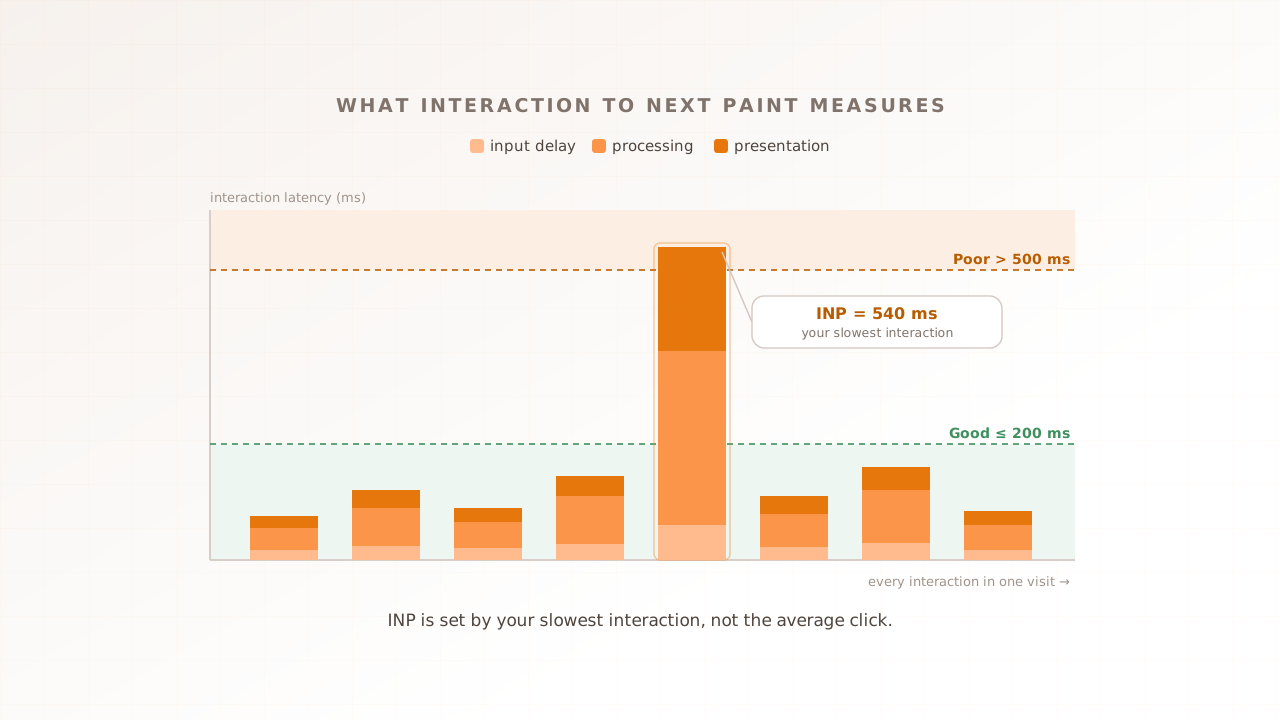
Interaction to Next Paint (INP) is a Core Web Vital that measures how quickly a page responds to user input. For every click, tap, and key press during a visit, the browser times the full delay from the action to the next frame painted on screen, then reports your slowest interaction as the page’s INP. It is the responsiveness metric in Core Web Vitals: Largest Contentful Paint covers loading, INP covers responsiveness, and Cumulative Layout Shift covers visual stability.
Every interaction breaks into three phases, and INP is the sum of all three for the worst one (web.dev):
- Input delay. The time before any event handler starts running, while the main thread finishes whatever it was already doing. (The main thread is the single line where the browser runs your JavaScript, lays out the page, and paints.)
- Processing duration. The time your event handlers take to run: your code, framework re-renders, and any third-party listeners on the same event.
- Presentation delay. The time from when the handlers finish until the browser paints the frame that shows the result.
A worked example. A user taps a filter button. The main thread is busy for 40ms before the handler starts (input delay), the handler runs for 120ms (processing duration), and the new frame paints 60ms later (presentation delay). That interaction took 220ms, just past the good threshold. The “next paint” in the name is that final frame: INP measures latency all the way to the visual feedback, not just to the moment your JavaScript finished.
INP only counts clicks, taps, and key presses; scrolling, hovering, and zooming are not measured (web.dev). On most pages your INP is literally your single worst interaction. On pages with many interactions, the browser discards the worst one for roughly every 50 to keep a freak hiccup from setting the score.
How is INP different from First Input Delay (FID)?
INP replaced First Input Delay (FID) as a Core Web Vital on March 12, 2024. FID measured only the input delay of the very first interaction on a page. INP measures all three phases of nearly every interaction and reports the slowest, so a page now has to stay responsive for the whole visit, not just the first click.
That difference matters because FID was easy to pass and easy to misread. Defer your scripts past the first input and FID looked fine, even if the second tap ran a heavy re-render and the third triggered a layout-thrashing handler. None of that showed up, because FID stopped measuring after interaction one and never timed the handler work or the repaint. When INP took over, FID was officially deprecated and removed from the Core Web Vitals program.
| First Input Delay (FID) | Interaction to Next Paint (INP) | |
|---|---|---|
| What it timed | Input delay only | Input delay + processing + presentation |
| Which interactions | The first one | All clicks, taps, and key presses in the visit |
| What it reported | Delay before the first handler ran | Latency of the slowest interaction |
| Status | Deprecated March 2024 | Active Core Web Vital |
| How hard to pass | Forgiving | Stricter; full handler and paint cost count |
If you tuned a page for FID and never revisited it, your INP may tell a very different story about the same page.
What is a good INP score?
A good INP is 200 milliseconds or less, measured at the 75th percentile of visits. Between 200ms and 500ms needs improvement, and above 500ms is poor (web.dev). The 75th percentile means three of every four visits must be at least this fast, a threshold chosen so a few outliers cannot flatter the score (web.dev).
| INP at the 75th percentile | Rating |
|---|---|
| 200 ms or less | Good |
| 201 ms to 500 ms | Needs improvement |
| Over 500 ms | Poor |
To check your own INP, start with field data: the Chrome User Experience Report, the field section of PageSpeed Insights, and real user monitoring tools all report it at the 75th percentile. To find which interaction is slow, Chrome DevTools’ Performance panel records the input delay, processing, and presentation of each one, so you can see where the time goes.
Two things make INP harder to pass than the number suggests. First, it reports your slowest interaction, not your median, so one janky click can fail an otherwise quick page. Second, the gap between devices is wide. In 2024, 74% of mobile sites and 97% of desktop sites had good INP specifically, and mobile good-INP rose from 55% in 2022 to 74% in 2024 as teams optimized for the new metric. INP is largely a mobile problem, where slower CPUs stretch every phase.
Passing INP on its own is not the same as passing Core Web Vitals. All three Vitals have to clear their thresholds together, and in 2024 only 43% of mobile sites and 54% of desktop sites passed the full assessment. Close to half the web ships an experience Google rates as needing improvement or worse.
Why does INP matter?
INP matters because responsiveness is what makes a page feel usable, and Google has tied it to both ranking and revenue. It is one of the Core Web Vitals that feed Google’s page-experience signals, and Google’s own case studies link interaction latency to business outcomes.
Two are worth knowing. After improving its search page’s INP by 72%, redBus reported a 7% increase in sales (web.dev, 2023). The Economic Times cut INP from over 1,000ms to 257ms and, alongside a migration to Next.js, reported a 50% drop in bounce rate and a 43% rise in pageviews (web.dev, 2023). Read these as responsiveness work paying off in engagement, not as a single dial you turn, since both teams changed several things at once.
The mechanism is intuitive. When a tap takes 500ms to do anything, users tap again, assume the page is broken, or leave. A slow interaction at the wrong moment, on the add-to-cart button, the search box, or the checkout step, costs you the action you most wanted. That is why measuring INP only on a quiet page misses the point: the interactions that hurt are the ones that happen when the page is busiest.
What pushes INP past 200ms?
INP climbs when the main thread is busy at the moment the user acts, when event handlers do too much work, or when the resulting render is heavy. Because INP is the sum of three phases, it helps to map each common cause to the phase it inflates, then fix that phase.
| Cause | Phase it inflates | Fix |
|---|---|---|
| Long tasks already running on the main thread | Input delay | Break work into chunks and yield with scheduler.yield() or requestIdleCallback |
| Heavy click handlers and synchronous framework re-renders | Processing duration | Trim handler work; defer non-urgent updates (for example, React startTransition) |
| Third-party scripts listening on every interaction | Input delay and processing | Audit, defer, or remove analytics, consent, and chat tags |
Layout thrashing: reading offsetWidth, mutating the DOM, then reading again | Presentation delay | Batch DOM reads and writes so the browser lays out once |
| A large or complex DOM, or image decode work after a click | Presentation delay | Simplify the DOM; use decoding="async" on images |
Third parties deserve special attention. The 2024 Web Almanac found that presentation delay is the largest median contributor to slow INP, and that scripts for behavior tracking, consent management, and content delivery are common culprits, doing work while the frame is trying to paint.
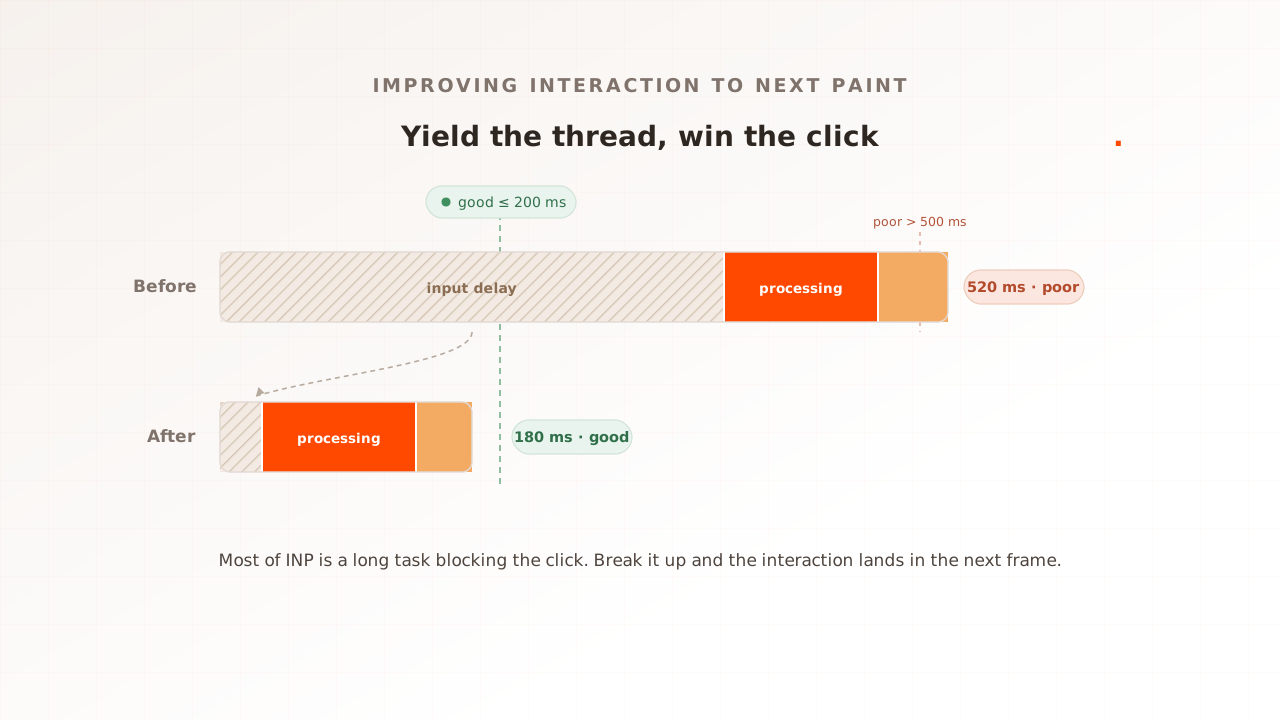
The single most useful fix is yielding to the main thread. A long task holds the thread until it finishes, so a click that arrives mid-task waits for the whole thing. Break the task into smaller pieces and hand control back between them, and the browser can run a waiting handler in the gap. scheduler.yield() is the modern way to do this; older code uses setTimeout or requestIdleCallback. web.dev’s guide to optimizing INP covers the techniques in depth.
Server-rendered and single-page apps have a particular trap: hydration, the step where the framework attaches event listeners and rebuilds state after the HTML arrives. The page looks ready, but the main thread is busy hydrating, so an early tap sits in a long input delay. Animations and timers that keep the thread busy between interactions do the same thing. If your INP is worst in the first few seconds of a visit, suspect hydration.
This explainer maps the causes; for the fixes in priority order, with code for each, see How to improve INP.
How do you measure INP under load?
Field data and a standard lab audit each miss part of INP, and load misses none of it. Field tools like the Chrome User Experience Report and real user monitoring report yesterday’s INP for traffic you have already served. A standard lab page load cannot measure INP at all, because a cold navigation has no interactions to time. To see INP at a concurrency you have not served yet, you need real browsers performing real interactions under load.
Three constraints make that specific. A protocol-level load test sends HTTP requests and measures server response time; with no DOM, no main thread, and no interaction event, it has nothing to time for INP. (Some tools, such as k6, add a separate browser module that does render pages; that is a different mode, closer to real-browser testing.) A single-user lab run does not load shared backends or third parties, so it cannot show interactions delayed by slower responses at peak. And shared-browser models, where many virtual users share one browser process, create main-thread contention that independent customer devices do not experience.
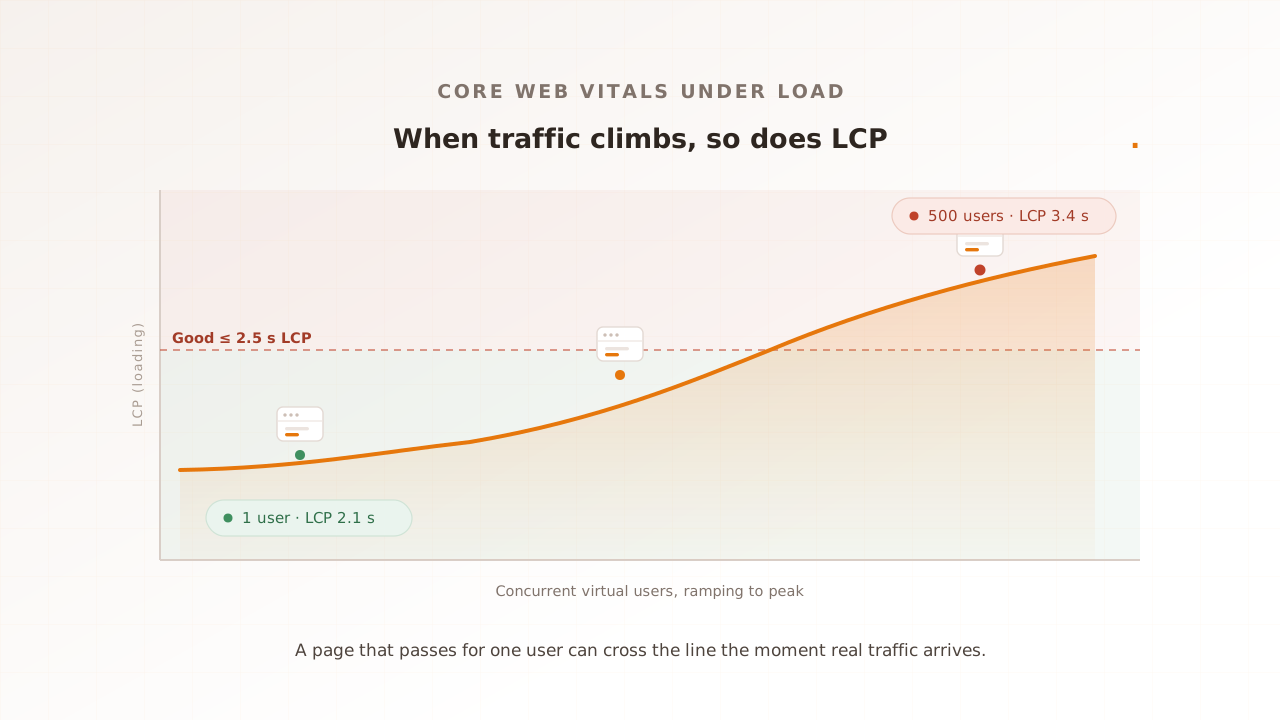
Here is the shape of the problem. On a quiet staging page, a product filter responds in about 180ms, comfortably good. Put 800 virtual users through the same journey and the shared backend begins to queue work. The filter response arrives later, hydration may finish later, and an early interaction in each independent browser can cross 350ms. A single-user gate never loaded the shared system enough to reveal that difference.
Real-browser load testing is the structural fit, because every virtual user is a real browser. Evaluat runs each virtual user in its own isolated browser, performs the clicks, taps, and key presses you script, and captures INP per session under load, alongside LCP, CLS, and First Contentful Paint. When one session’s INP spikes, the per-session video, network log, and console log show which slow handler or third-party request fired on the slow interaction. So when an interaction stalls at peak, you are not staring at a percentile, you are watching the exact session where the tap hung.
For the wider methodology, see Core Web Vitals at load and real-browser load testing; to turn an INP budget into a release gate, see performance regression testing.
Common mistakes when measuring INP
A few habits make INP look fine in testing and bad in the field. Most come from measuring the metric the wrong way rather than from the page itself.
- Reporting the average or the median. The published threshold is the 75th percentile. A p50 hides the slow interactions that actually set your INP.
- Skipping keyboard interactions. Key presses count toward INP, so form-heavy pages can have an INP problem that pointer-only testing never reproduces.
- Testing with a single user. One virtual user creates no backend queueing and does not exercise third parties at peak. Independent devices do not share main-thread contention, but slower shared services can delay the work each browser must complete before painting.
- Treating a long-tasks audit as the measurement. Long tasks are a useful signal, but INP is what Google reports. A page can have long tasks that never overlap an interaction, and slow interactions that no single long task explains.
- Trusting field data alone. Real user monitoring is the ground truth for what shipped, but it is reactive. It cannot tell you what INP will be for a release you have not deployed or a peak you have not served.
INP is the Core Web Vital that measures whether your page keeps responding, click after click, under whatever load it is carrying. You now know what it captures, the 200ms bar it has to clear at the 75th percentile, what drags it past that, and why a quiet single-user test will not catch the interactions that fail at peak. The next step is to measure it the way users feel it: in a real browser, performing real interactions, at the concurrency you expect.
Book a demo to measure a critical interaction under controlled peak conditions.