Why do websites crash during flash sales?
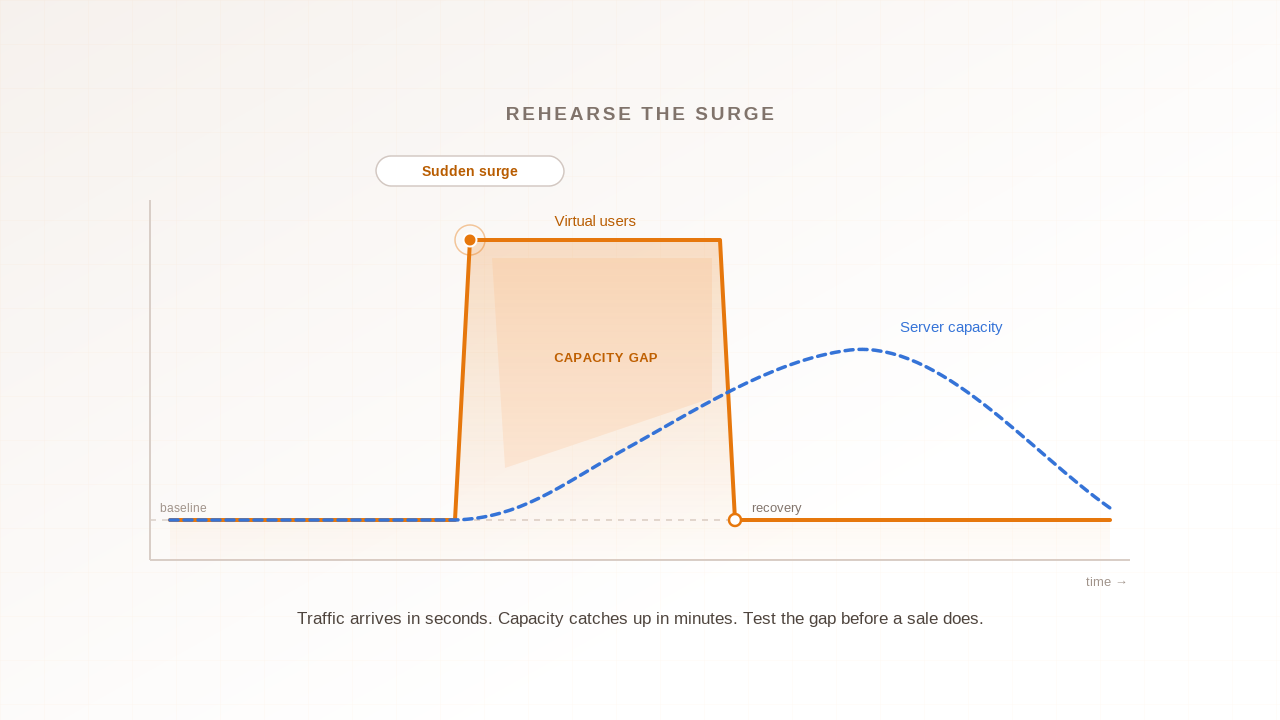
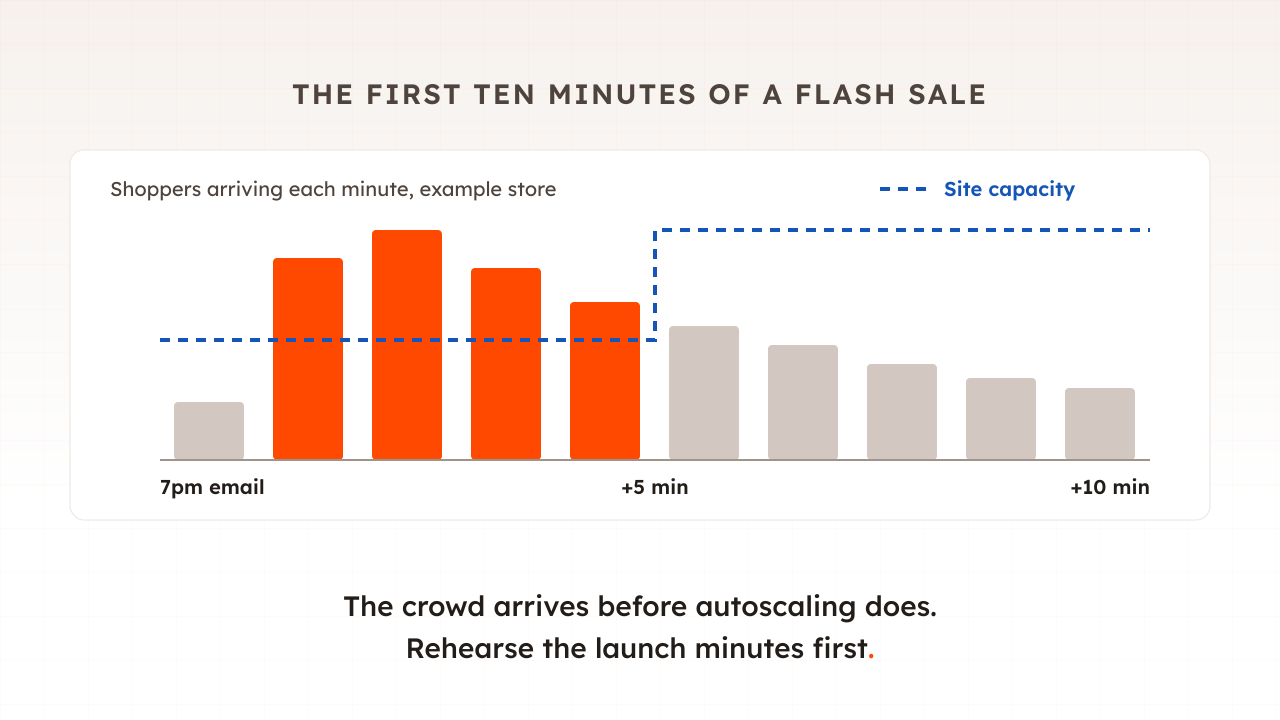
Flash sale websites crash because the crowd arrives in minutes rather than across the day. Shoppers hit the same few products at once, caches are still cold, and autoscaling has not added capacity yet. The first minutes after the email lands carry the most risk, and they are the minutes a load test can rehearse.
A flash sale is a short sale with a fixed start time, often announced by email, text message or an app notification. That fixed start is what makes it dangerous and what makes it testable. Unlike a news story that sends traffic without warning, you choose the minute. A flash sale is a spike test you scheduled yourself; the only question is whether you rehearse it first.
The failures are well documented, even at companies with large engineering teams. When Nintendo Switch 2 pre-orders opened in April 2025, more than 2,000 customers reported trouble reaching Target’s website for the first 45 minutes, and Best Buy received more than 600 outage reports, many linked to failed log-ins. In October 2026, Wizards of the Coast apologised for a limited Secret Lair sale in which the systems supporting the launch experienced an external service disruption early on, leaving thousands of buyers in a waiting room for an extra hour and a half. Its fix for the rerun on 9 December is telling: a 24-hour order window instead of a race to a single minute.
Notice where the trouble sat: failed log-ins, a service the launch depended on, and a backlog of orders for stock that was running out. Not the homepage. That is why the test below follows the whole journey a shopper takes on the day.
What you need before starting
Gather these before you build anything. Each one saves a wasted test run.
- The sale plan. The start time, the products, the prices, how it will be announced and to how many people. The test rehearses this plan, so it has to exist.
- Last sale’s numbers. Server logs or analytics from your last sale or your largest email send, at minute level if you can get it. This is where the arrival rate comes from.
- Test accounts and data. Enough log-ins, addresses and basket contents that each virtual user, a simulated shopper running in its own browser, can behave like a different person.
- A safe way through checkout. A payment sandbox, a test payment method, or a journey that stops before payment is taken.
- A test window and a list of people. A time when a failed test will not hurt real customers, and everyone who needs to know: hosting, content delivery network (CDN), payment provider and whoever watches the alerts.
- Time to fix things. At least one round of fixes and a second run. Two to four weeks before the sale is comfortable; the night before is not.
If your Black Friday sale starts this week, the measuring in step 1 and the checks in step 6 still fit before Friday. The rest is the rehearsal for your next sale, which for many stores is Boxing Day or January.
Step 1: Measure how fast your crowd arrives
Size a flash sale test from how fast shoppers arrive, not from how many come in total. A sale that brings 6,000 people over an hour is a normal busy hour; the same 6,000 in ten minutes is a different site. Find the arrival rate in the launch minutes, then convert it to concurrent shoppers.
Start with your last sale or your largest email send. In your server or CDN logs, count the new sessions starting each minute after the send. For the worked example in this guide, a fashion store’s last flash sale opened at 7pm with an email to its list, and the logs showed about 3,000 new sessions in the first ten minutes: an arrival rate of 300 shoppers a minute.
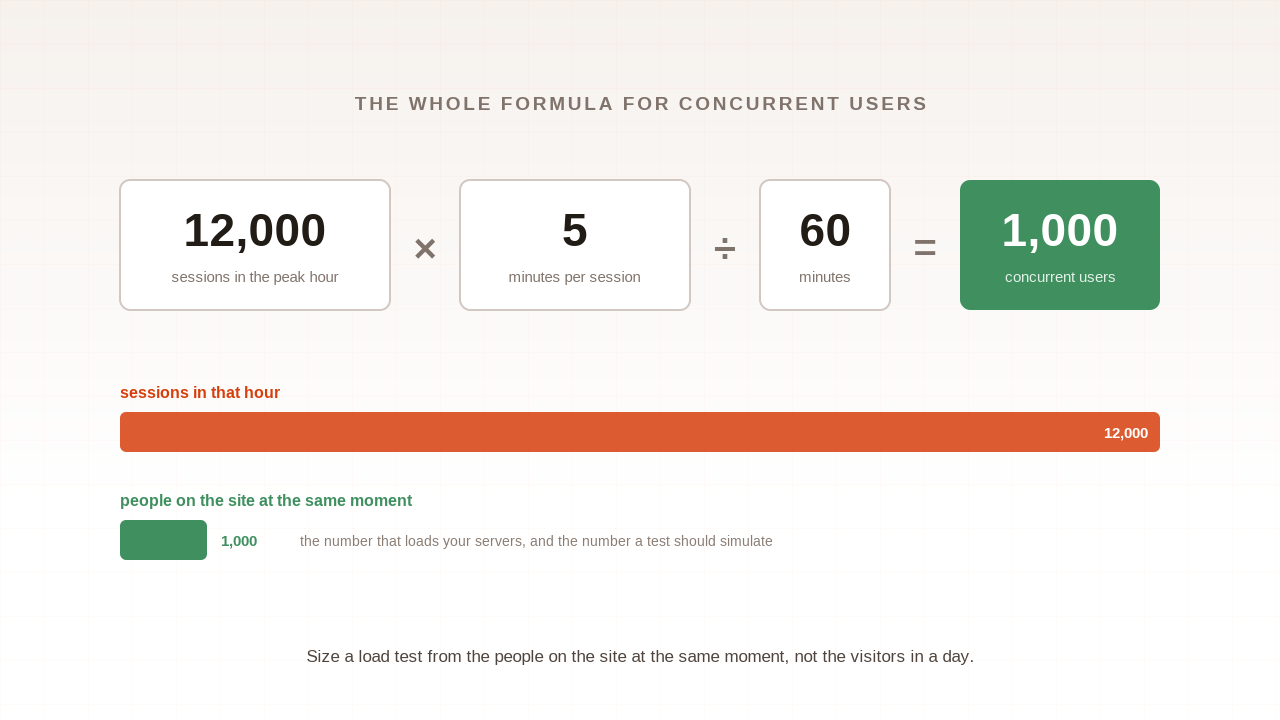
Then turn arrivals into concurrency, the number of shoppers on the site at the same moment. Part 7 of this guide covers the formula: arrivals per minute multiplied by the average session length in minutes. Sale visits in the example last five minutes, so the peak is 300 × 5 = 1,500 shoppers at once. Add headroom for a bigger list and a better offer, 30% here, and the test target is about 2,000 concurrent users.
Two things change the arrival rate, and both are yours to control. The first is how fast the announcement goes out. Email and messaging platforms can throttle a send: Braze offers delivery rate limits for when you anticipate large campaigns driving a spike in user activity and overloading your servers, from as low as 10 to as high as 500,000 messages a minute. Spreading a send over twenty minutes instead of two spreads the arrivals too, and lowers the peak. The second is the start time itself: a sale that opens at an exact minute, with a countdown, concentrates arrivals more than one that opens quietly.
A note on test tools. Shoppers do not wait for your server before they click the email. Grafana’s k6 documentation calls this the difference between a closed model, where slower response times means longer iterations and a lower arrival rate, and an open model, which keeps new arrivals coming regardless. Sizing the target from arrivals, as above, keeps the test honest whichever model your tool uses.
You have finished this step when you can write one line: “About 300 shoppers a minute in the first ten minutes, about 2,000 at once with headroom.”
Step 2: Write the journeys that sell
Rehearse the routes shoppers will take on the day, not a tour of the site. For a flash sale, that starts at the email link, goes to the sale product and ends at checkout. Each journey is a scenario, a scripted path a virtual user follows, and the mix of scenarios should match how real sale traffic splits.
For the example store, three journeys cover the sale:
| Journey | Steps | Share of virtual users |
|---|---|---|
| Lands and browses | Email link with tracking parameters, sale page, two products | 60% |
| Adds to basket | Email link, sale product, choose size, add to basket, view basket | 30% |
| Reaches checkout | Log in, sale product, add to basket, checkout, delivery, stop before payment | 10% |
Start every journey from the real email link, tracking parameters included. CDNs often include the query string in the cache key by default; Cloudflare’s documentation gives /logo.jpg?utm_source=newsletter as an example of a default cache key. If your sale links carry unique parameters and your cache does not ignore them, each click can miss the cache and reach your servers. A test that starts from a clean URL will never show it.
Include logged-in shoppers. Shopify’s engineers added authenticated checkout to their peak tests in 2025 and found that modeling real buyers exposed rate-limit paths that anonymous browsing never touches. Log-ins were also where Best Buy’s Switch 2 trouble sat. Give each virtual user its own account and data, so the test does not hit one cached basket two thousand times.
You have finished this step when each journey passes for a single virtual user, with a different account each time.
Step 3: Set up the site as it will be on launch day
Test the site the shoppers will see when the sale opens, not the one you have today. Load the sale prices, the stock levels, the promotion banners and the discount rules. A sale page is a different page: new banners, new pricing logic and new scripts, each of which can slow under load.
Pay attention to stock. A flash sale points thousands of shoppers at a handful of products, and every add-to-basket checks and reserves the same few stock records. Shopify’s engineering team describes exactly this problem: an early inventory design failed because a single row with a quantity column couldn’t handle the contention, and even the rebuilt system expects that during an extreme flash sale, the pool for a hot item can be temporarily exhausted. Your test should send most shoppers to the same few products, as the real sale will.
Then decide the cache state. On the day, your cache may be warm from browsing before the start, or cold because a price change or deployment cleared it. Test the case you expect, and if you are not sure, test both. A cold-cache run is the harder test and the more honest one if you plan to change prices at the start time.
You have finished this step when the test site shows the sale exactly as shoppers will see it: prices, stock, banners and all.
Step 4: Shape the load like the launch
Ramp the test steeply to your target, hold it there, and then ramp down. The steep ramp rehearses the launch minutes, the hold shows whether the site settles or degrades, and the ramp-down shows whether it recovers. A gentle ramp over half an hour rehearses a normal busy day, not a sale.
For the example store, the plan is: ramp from zero to 2,000 concurrent users in five minutes, hold for fifteen, then ramp down over five. Five minutes to full load is steeper than any ordinary day the store sees, and the hold covers the ten minutes in which last sale’s crowd arrived.
The steep start exists because reactive autoscaling is not instant. In Amazon EC2 Auto Scaling, simple scaling policies wait out a cooldown that is 300 seconds by default, and even policies that scale out at once must wait for new instances to warm up. A scheduled scaling action, on the other hand, can start at a set time without waiting. That is the lesson for a sale: scale before the crowd, not after it. AWS’s own advice for flash sales is that services in the launch path should be prewarmed for steep traffic forecasts, noting that prewarming costs extra while it runs. The test confirms the pre-scaled capacity is actually there.
Run the test at the time of day the sale will open if you can. Background jobs, backups, other campaigns and normal traffic all run on a schedule, and 7pm on a weekday is not 3am on a Sunday.
You have finished this step when the load plan has a target, a ramp time, a hold time and a ramp-down, written next to last sale’s arrival curve.
Step 5: Protect payments, stock and third parties
Make sure the test cannot take real money, sell real stock or overload someone else’s service. Payment providers, search, reviews, address lookup and email all receive test traffic if your journeys call them, and none of them agreed to be load tested.
- Payments. Stop journeys before payment, or use your provider’s sandbox with its test cards. Talk to your provider before the sale itself. Adyen’s peak season guidance advises against implementing new features and doing major upgrades right before peak season, and providers prefer to hear about a large sale in advance.
- Stock. Use test products, or make sure test baskets expire and release their stock, so the rehearsal does not leave the real sale with nothing to sell.
- Third-party services. Use sandboxes, or ask each provider first. Block calls you cannot safely make, and note them as untested.
- Your own protection. Tell whoever runs your firewall, bot protection and CDN. Bot defences that see two thousand browsers arrive from a handful of addresses will block the test within minutes unless they know it is coming.
Bot defences matter on the day too. Imperva measured automated traffic at more than 53% of all web traffic in 2025, and notes that bots can interact with promotional systems at scale. Size the test for real shoppers, then make sure your bot protection is in place before the sale rather than added during it.
You have finished this step when every external call in the journeys is either sandboxed, stopped or approved in writing.
Step 6: Run it, fix it, and run it again
Run the test, watch the launch minutes closely, then fix what broke and run it again. A flash sale test that passes the first time is rare, and the first run is meant to find problems. The value is in the second run, which shows the fixes worked.
Before the full run, do a smoke test: a handful of virtual users through every journey, to prove the scripts, test accounts and sandboxes work. Then run the full test and watch four things as the load climbs:
- Errors. The share of sessions and requests that fail, and which step fails first.
- Checkout completion. How many checkout journeys reach the end of the journey, not just how many pages load.
- Page speed. Largest Contentful Paint and Interaction to Next Paint, the Core Web Vitals for loading and responsiveness, on the sale page and checkout.
- Recovery. How quickly errors and speed return to normal once the load stops climbing, and again after the ramp-down.
The first minutes of the hold tell you the most. That is where the cold cache, the stock contention and the slow scaling all show up together. When something fails, note the time, the step and the error, fix the cause, and book the next run.
You have finished this step when two runs in a row pass your criteria, the second with no changes in between.
How do you know the test passed?
A flash sale test passes when the site holds your target concurrency through the launch minutes with low errors, checkout keeps working, and pages stay fast enough to sell. Set the criteria before the run, so a bad result cannot be argued into a good one afterwards.
The example store wrote down these criteria:
| Criterion | Pass mark for the example store |
|---|---|
| Target held | 2,000 concurrent users reached in five minutes and held for fifteen |
| Failed sessions | Under 1% of sessions, and none stuck on one step |
| Checkout completion | At least 98% of checkout journeys reach the payment step |
| Largest Contentful Paint (p75) | 2.5 seconds or less on the sale page and checkout |
| Interaction to Next Paint (p75) | 200 milliseconds or less on add to basket |
| Recovery | Errors and speed back to baseline within two minutes of the ramp-down |
The thresholds for the two speed measures come from Google’s Core Web Vitals, covered in part 24 of this guide. Read them at the 75th percentile, written p75, the value that three in four sessions beat, rather than as an average.
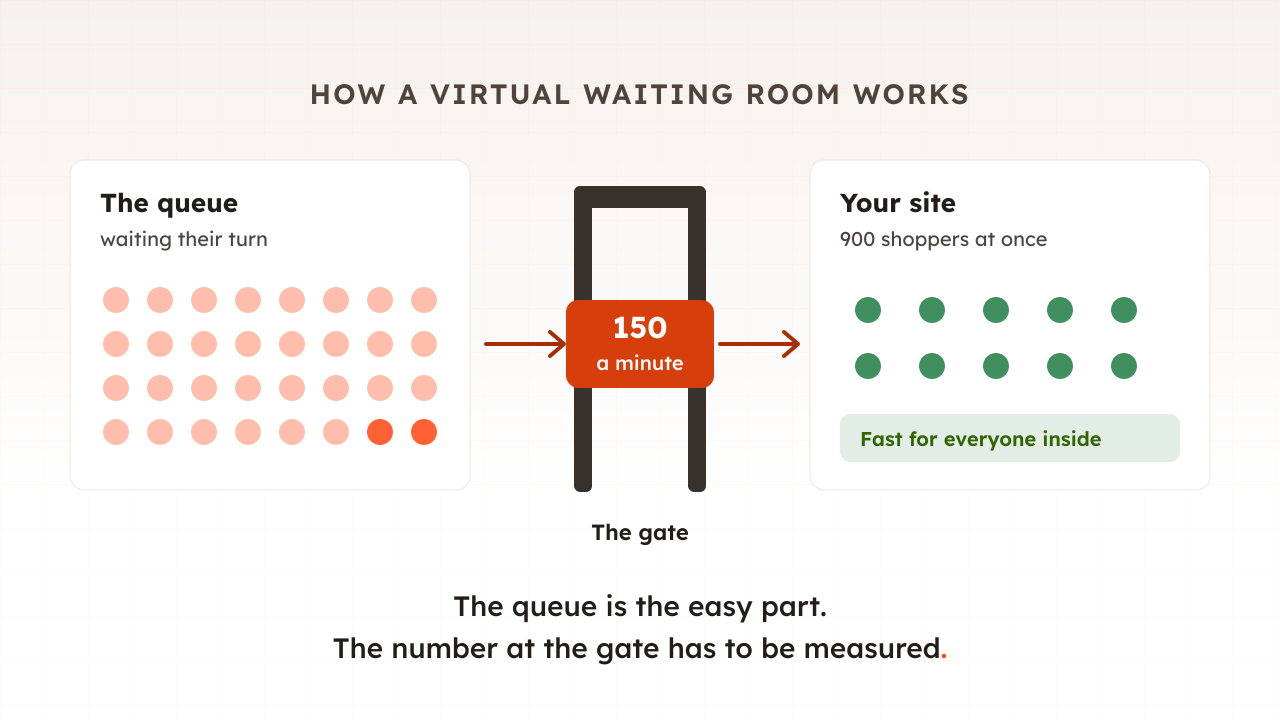
If the test fails, the result is still useful: you know the concurrency at which the site broke. That number is the rate a virtual waiting room should admit shoppers at, if the crowd on the day will be larger.
Common problems and fixes
These are the failures flash sale tests find most often, with the usual cause and fix.
| Symptom in the test | Likely cause | Fix |
|---|---|---|
| Errors in the first two minutes, then the site recovers | Capacity added too late by reactive scaling | Scale on a schedule before the start; pre-warm what your provider supports |
| Sale page slow while other pages are fine | Unique campaign links missing the cache | Ignore tracking parameters in the cache key; warm the sale page before launch |
| Add to basket slows sharply as load climbs | Stock records for the hot products contended | Review how stock is reserved; test with the real product mix |
| Log-ins fail while browsing works | Session or authentication service limits | Test logged-in journeys; raise or pre-scale those limits |
| Checkout slow, servers quiet | A payment, address or tax service slowing down | Check each third party’s timings in the network log; agree limits with the provider |
| Test blocked after a few minutes | Bot protection or rate limiting treating the test as an attack | Agree the test window with the CDN and firewall owners |
How Evaluat runs a flash sale rehearsal
Evaluat Performance Testing rehearses a flash sale in real browsers. Every virtual user is a real browser, isolated from the others, so each one runs the sale page’s scripts, banners and third-party tags the way a shopper’s browser does, and records its own Core Web Vitals. You build each journey once in the scenario editor, feed each user its own log-in and basket from a dataset, and let popup handlers dismiss the cookie notice and sale pop-ups.
The load plan matches step 4: a target concurrency with a separate ramp-up, steady state and ramp-down, run from the region closest to your customers, now or at a time you schedule. Runs ramp up rather than arrive in a single instant, and we size the run to your forecast peak with you. For a crowd that will arrive faster than any site can admit, the answer is a waiting room set to the rate the test proves, not a bigger test.
When the launch minutes go wrong, the report shows when and where: failed sessions, error rates and Core Web Vitals per URL over time. A failure at peak isn’t a percentile. It’s a session. Open the one that failed at add to basket, watch the video, and read its network log to see which request stalled.
A flash sale gives you something most traffic spikes do not: the date. Measure how fast your crowd arrives, rehearse the launch minutes on the journeys that sell, fix what breaks, and run it again before the email goes out.
Test in real browsers. Debug in real sessions.
Book a demo to rehearse your next sale before your shoppers arrive.