Can Playwright do performance testing?
Yes for one thing and no for another. Playwright can measure performance: because it drives a real browser, every run records what a user actually experiences, including Core Web Vitals. What it cannot do on its own is generate load. Playwright has no concept of a virtual user, so simulating concurrent traffic takes extra tooling.
Start with the tool itself. Playwright is an open-source framework from Microsoft for driving a browser programmatically. Its own documentation calls it “an end-to-end test framework for modern web apps”: you write a script, and Playwright opens Chromium, Firefox, or WebKit and clicks, types, and navigates the way a person would. The documentation never mentions load testing or virtual users, because that was never its job.
Two terms are worth pinning down. Performance testing is the umbrella for measuring how fast a system responds. Load testing is one kind of performance test: you apply concurrent traffic and watch what happens to speed and stability as it climbs. The traffic in a load test is made of virtual users, each one a simulated visitor the tool controls.
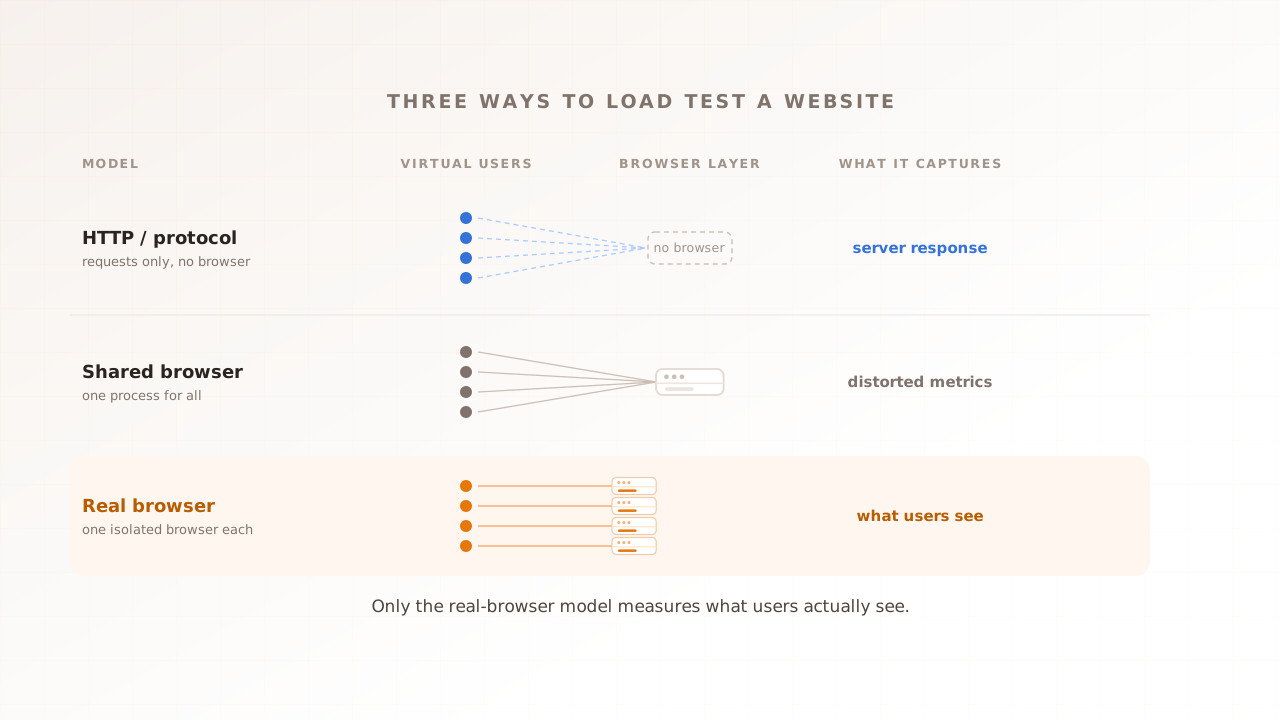
Virtual users come in two kinds, and the difference decides what Playwright can and cannot do. A protocol virtual user fires HTTP requests straight at the server and measures the reply. A real-browser virtual user runs an actual browser and measures what renders. That distinction is the whole subject of real-browser load testing; here it is enough to know that Playwright, by driving a real browser, sits firmly on the real-browser side.
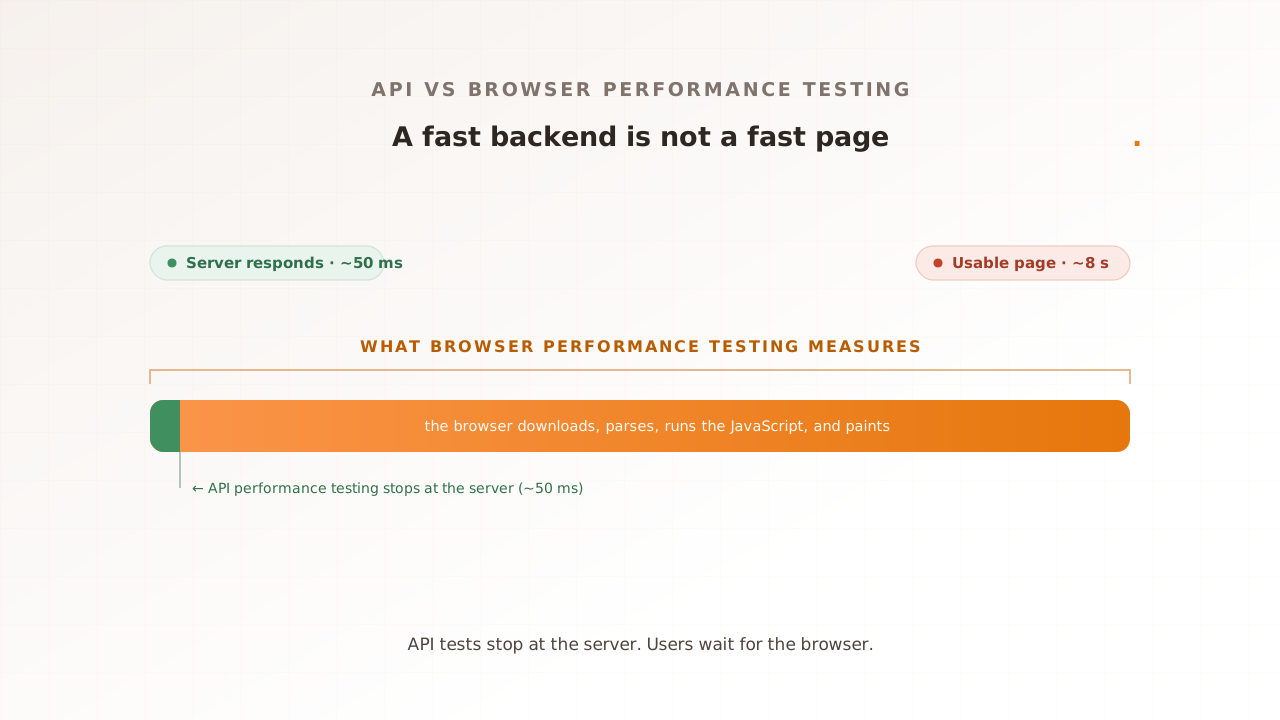
That is also what makes it useful for performance work. Point Playwright at a page and it reads the same metrics the browser exposes to any user: Core Web Vitals like Largest Contentful Paint and Interaction to Next Paint, navigation timing, and every network request and console message. That is real performance data from a real rendering engine, which a request-only tool cannot produce.
Why can’t you run ten thousand Playwright browsers?
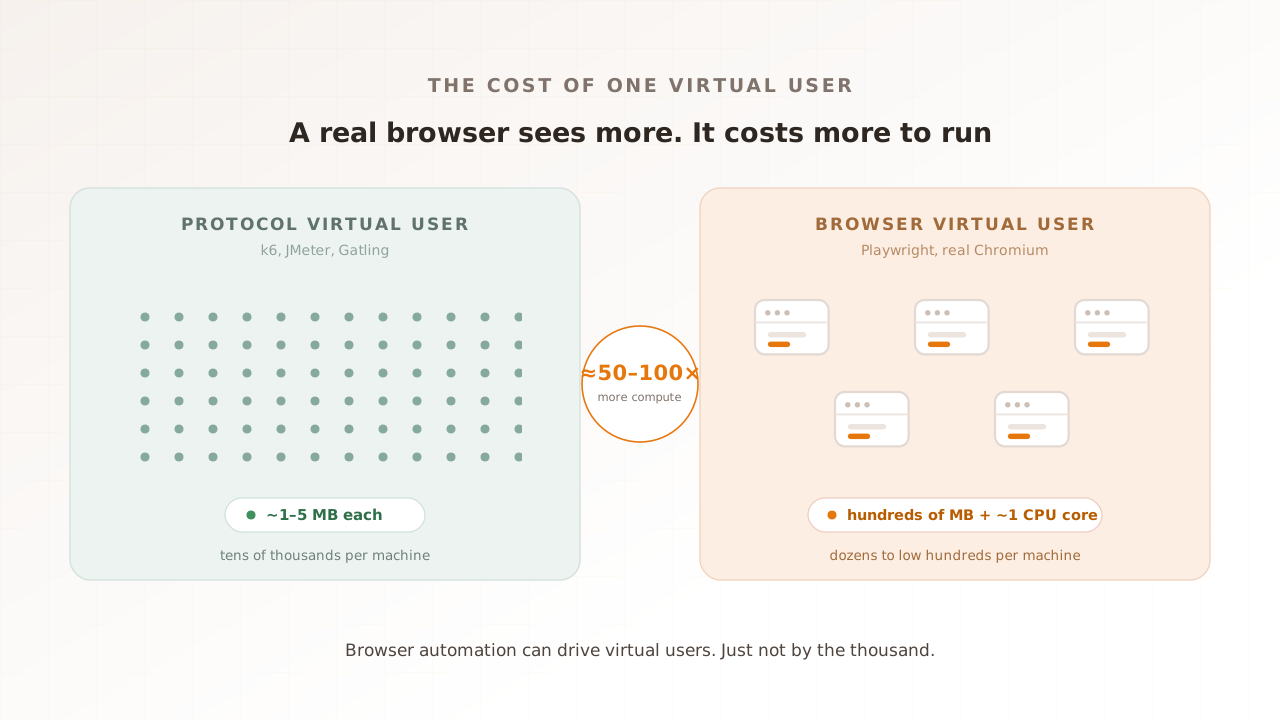
Because each Playwright virtual user is a whole browser, and a browser is heavy. A protocol load user is a lightweight HTTP client; a real browser parses, executes, lays out, and paints a page. The same machine therefore runs far fewer browser users, but the exact ratio depends on the page and configuration.
Put numbers on the cheap side first. Grafana’s k6, a popular protocol load tool, reports that, as of 2026, a single instance can drive 30,000 to 40,000 virtual users and up to 300,000 requests per second, because a simple protocol virtual user costs only about 1 to 5MB of memory. At that price you can hold tens of thousands of them in RAM on one box.
A real browser is a different order of cost. Independent measurements put a headless Chromium instance at roughly 50 to 150MB before it loads a page, climbing into the hundreds of megabytes once it renders. On top of memory it needs CPU to parse HTML, execute JavaScript, and paint. LoadView’s guidance uses about one CPU core per concurrent browser as a starting rule of thumb. Validate CPU, memory, and metric stability against your own page.
The strain shows up fast in practice. In one reported case on Grafana’s forum, a k6 browser test ran cleanly at 5 virtual users but began throwing errors past 20 on an 8-core, 64GB machine, with the browsers alone consuming over 3GB of memory and pinning the CPU. That is the wall every browser-based load test eventually meets: not a licensing limit, a hardware one.
Do the division and the ceiling is clear. A generator that holds tens of thousands of protocol users holds dozens to low hundreds of real browsers, and the people who build browser-based load tests agree: a pool of 50 to 100 concurrent sessions is usually enough to characterize the experience. Run more than the machine can feed and the browsers starve, which distorts the very metrics you came to measure.
| Protocol virtual user | Real-browser virtual user | |
|---|---|---|
| What it is | An HTTP client firing requests | A full browser (Chromium, Firefox, WebKit) |
| Memory per user | ~1-5MB | Hundreds of MB |
| CPU per user | A fraction of a core | Workload-dependent; often sized near one core as a starting point |
| Users per generator | Tens of thousands | Dozens to low hundreds |
| What it measures | Server response | What the page renders |
How do you load test with Playwright in practice?
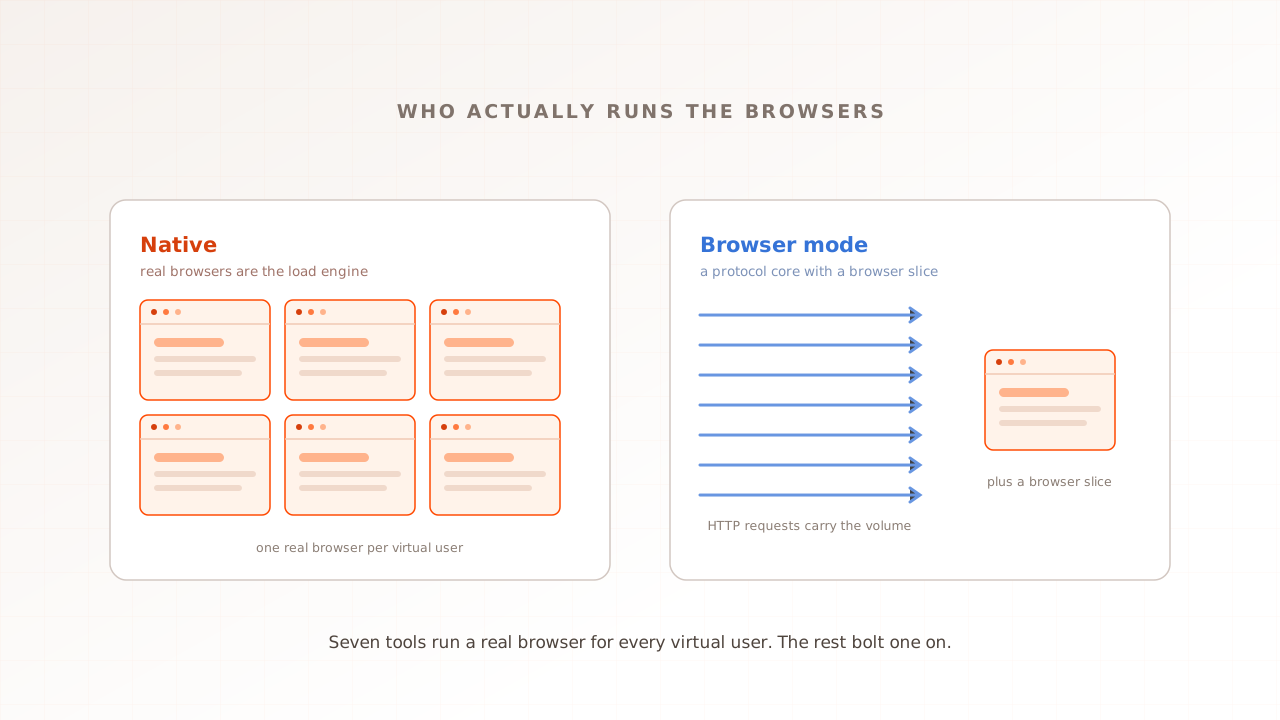
You pair Playwright with an orchestrator that turns one script into many concurrent virtual users. Artillery is the common choice: its Playwright engine spawns the browsers, ramps the traffic, and aggregates the results. Grafana k6 ships a similar browser mode. For more load than one machine holds, you run the same test across a fleet of cloud workers.
Artillery and Playwright
Playwright on its own has no virtual users, no ramp, and no aggregated report; it runs one script in one browser. Artillery, an open-source load testing toolkit, fills that gap with a Playwright engine that, in its own words, “takes care of setting up headless browsers, running your Playwright test code, and collecting and emitting performance metrics.” You define traffic phases, for example ramp from 0 to 100 virtual users over five minutes, and Artillery launches a browser per virtual user, replays your Playwright steps in each, and reports Web Vitals (LCP, CLS, INP, TTFB, FCP, FID) as min, max, mean, p95, and p99.
There is a fidelity trade in how it does that. By default, as of 2026, Artillery gives each virtual user its own browser context rather than a separate browser. A context is an isolated session (its own cookies, cache, and storage) inside a shared browser process, so it is cheaper than a full browser but not as independent: many contexts share one process and its CPU. Artillery warns that a full browser per user “will require a lot more CPU and memory and is not recommended for most tests,” and it records traces for only five virtual users at a time by default. Those defaults exist precisely because real browsers are expensive.
k6 browser mode
Grafana’s k6 reaches the same place from the protocol side. Its browser module drives a real Chromium-based browser from a k6 script and reports Core Web Vitals such as LCP, CLS, FCP, and TTFB per page. It is not Playwright, but it is the same idea: a real rendering engine standing in for a user. If your team already runs k6 for API load, its browser mode adds a browser layer without a second tool.
Scaling the browser fleet
One generator caps out at dozens to low hundreds of browsers, so larger browser-based tests run horizontally: the same script on many workers, often on cloud container services, with the results merged. This is how a browser-based test reaches thousands of concurrent users. It works, but you are now operating a distributed browser fleet, with all the pooling, scheduling, and log collection that implies.
A concrete shape makes the sizing real. Say you want to know whether checkout stays fast at 100 concurrent users. You write the journey in Playwright (open the product page, add to cart, check out), wrap it in an Artillery config that ramps to 100 virtual users over 10 minutes, and read the p95 Largest Contentful Paint and INP per step. At roughly one core per browser, 100 browsers is well past what an 8-core machine feeds comfortably, so in practice you size the generator up or split the run across workers. That math is the part teams underestimate.
Playwright, protocol tools, or a real-browser platform: which fits?
Match the tool to the question. For functional checks (does the flow work?), use Playwright by itself. For raw volume against an API, use a protocol tool like k6 or JMeter. For how the page feels under load, use real browsers as virtual users. Most teams need a mix, weighted toward protocol traffic.
| Playwright alone | Protocol load tool (k6, JMeter) | Real-browser platform | |
|---|---|---|---|
| Drives | One real browser | HTTP and protocol requests | One isolated browser per virtual user |
| Measures | One session’s experience | Server response, throughput, errors | Experience under load, per session |
| Virtual users | None built in | Tens of thousands per machine | Dozens to low hundreds, scaled out |
| Per-session forensics | Manual traces you wire up | None | Built in (video, network, console) |
| Setup cost | Low (it is one script) | Low to moderate | Managed |
| Best for | Functional end-to-end tests | API and protocol volume | User-facing journeys at load |
Grafana’s k6 docs recommend, as of 2026, a hybrid where browser virtual users are 10% or less of the load and protocol virtual users carry the other 90%. That is k6’s published recommendation, not a universal ratio. Size the browser cohort around the journeys and evidence you need.
Where does Playwright land in that picture? On its own it is a functional testing tool, and a good one. Bolted to an orchestrator it becomes the browser slice of a hybrid load test. And if that browser slice is the part you care about most, a platform built for it can be less work than assembling Playwright, an orchestrator, tracing, and a reporting pipeline yourself. For a protocol tool set beside the real-browser model, see Evaluat vs JMeter.
Common mistakes when load testing with Playwright
The recurring error is treating Playwright as a volume generator. It is a precision instrument for browser experience, not a firehose. The mistakes below come from pushing it past that role or from mis-sizing the rig, and each one quietly corrupts the numbers you are trying to trust.
- Using it for raw concurrency. Playwright shines at a few hundred realistic sessions, not at tens of thousands of hits. If you need volume, generate it with a protocol tool and keep Playwright for the experience layer.
- Packing too many sessions into one browser. Running many contexts or tabs in a single browser process is cheaper, but they share one CPU and one crash domain, so the contention stops resembling independent users. The Vitals you measure drift away from what real, separate browsers would record.
- Reusing the same data for every user. If every virtual user logs in as the same account and searches the same term, your server caches the result and the test flatters itself. Give each user unique data so the load hits cold paths the way real traffic does.
- Under-provisioning the generator. At roughly one core per browser, a handful of cores cannot feed a hundred browsers. An overloaded rig slows the browsers themselves, and you end up measuring your test machine instead of your site.
- Reading only the server’s numbers. The reason to drive a real browser is to see what the server cannot report. If you then judge the test by response time alone, you have paid for browsers and thrown away what they captured.
Where Evaluat fits
Evaluat is a real-browser performance testing platform built for managed browser concurrency. It runs each virtual user in its own isolated browser and captures Core Web Vitals under load, keeping the evidence for every user. The numbers are what those controlled browsers recorded under the selected conditions, not a replacement for field data across customer devices.
In practice you build a journey once in a visual scenario editor, with no Playwright script to maintain, then run it at the concurrency you expect, from the region closest to your users. Each run reports LCP, INP, CLS, and First Contentful Paint per session and per URL, scored with Apdex, and keeps a video of every session, a network log of every request, and a console log of every message. When a session stalls at peak, you open it and watch the session that broke, instead of inferring it from a percentile.
The scoping here is the same line this article has drawn throughout. For raw API and protocol volume, a tool like k6 or JMeter is the right and cheaper instrument, and a hybrid that pairs it with real browsers is often the strongest test of all. For purely functional end-to-end checks, Playwright by itself is the right tool. Evaluat is for the question in between: what real browsers experience when the traffic is real.
So, can a browser automation tool drive virtual users? Yes, a real and useful handful of them, enough to measure what your pages feel like under load, as long as a protocol tool carries the volume and you size the rig for the browsers you run. Decide how much of each layer your question needs, and put a real browser on the journey that carries your revenue.
Test in real browsers. Debug in real sessions. Book a demo.