What is Largest Contentful Paint?
Largest Contentful Paint (LCP) is the time, measured from when navigation starts, until the largest content element visible in the viewport finishes rendering. It is one of Google’s three Core Web Vitals, the metrics that score page experience. A good LCP is 2.5 seconds or less at the 75th percentile of real page loads; above 4 seconds is poor.
The idea is that one element on the page is the thing the user is really waiting for: the hero image, the headline, the product photo, the video still. LCP marks the moment that element is on screen. It is a usable proxy for “the page loaded,” which is otherwise hard to measure directly.
The browser tracks LCP for you. As it paints, it keeps a running “largest candidate” and updates it whenever a bigger element appears. It stops reporting new candidates the moment you interact with the page (a tap, scroll, or keypress), because once you have engaged, later paints no longer reflect the initial load. The last candidate recorded before that interaction is the page’s LCP.
That 75th-percentile threshold is doing real work. It means a page counts as “good” only if at least three of every four visits render the LCP element within 2.5 seconds. A flattering average can still hide a slow quarter, and that quarter is usually the one on weak devices or hitting your server at peak. In 2024, 59% of mobile pages had a good LCP, so a large share of the web is over the line.
What counts as the LCP element?
Only a constrained set of elements can be the LCP element. The browser considers images, the image inside an SVG, a video poster or first frame, any element with a CSS background image set via url(), and block-level elements with text. It tracks the largest one and ignores the rest. On most pages, that element is an image.
A few rules decide what qualifies. Size is the element’s visible area in the viewport, and for an image scaled down from a larger original, the browser uses the smaller of the visible or intrinsic size, so you cannot win by shipping a giant image into a small box. Some elements are deliberately excluded: anything at opacity: 0, elements that cover the whole viewport (treated as a background), and low-entropy placeholder images. Across the web, 73% of mobile pages have an image as their LCP element, so image delivery is where most LCP work lands.
This is why the first step is always to find the LCP element, not guess it. On a marketing page it is usually the hero image. On a text-heavy article with no hero, it can be a paragraph. On a product page, the product photo. Chrome DevTools names it for you: open the Performance panel, record a load, and the LCP entry points at the exact node. Optimizing the wrong element is wasted work.
The four phases of LCP
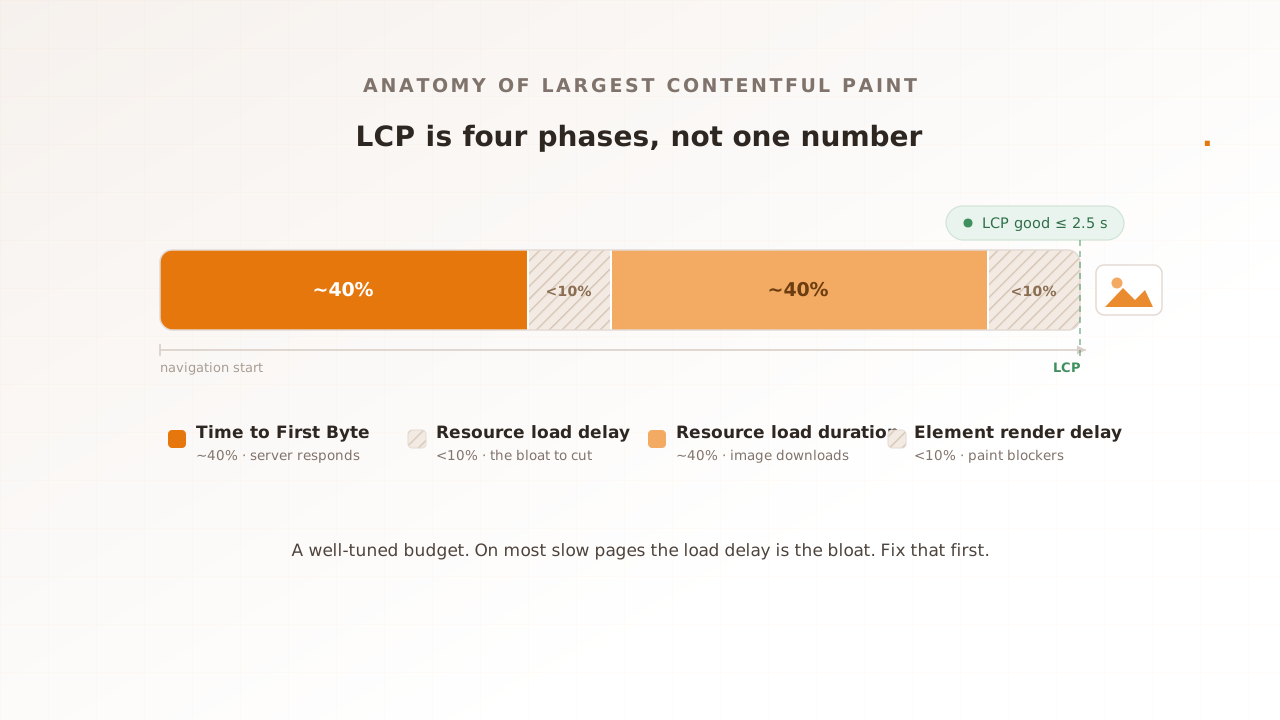
LCP is not one number but a sum of four sequential phases: Time to First Byte, resource load delay, resource load duration, and element render delay. Splitting your LCP into these phases tells you which part to fix, because each phase has different causes and different fixes.
The table lays out the four phases, the share of LCP each should ideally take, and what inflates it.
| Phase | What it is | Ideal share | What inflates it |
|---|---|---|---|
| Time to First Byte (TTFB) | Navigation start until the first byte of HTML arrives | ~40% | Slow server, no caching, distant origin, contention under load |
| Resource load delay | TTFB until the browser starts loading the LCP resource | <10% | LCP image not discoverable in the HTML, lazy-loaded, or low priority |
| Resource load duration | How long the LCP resource takes to download | ~40% | Large or uncompressed image, slow CDN, no modern format |
| Element render delay | Download finished until the element actually paints | <10% | Render-blocking CSS or JavaScript, fonts that swap mid-paint |
web.dev describes that ideal split as roughly 40% Time to First Byte, under 10% load delay, about 40% load duration, and under 10% render delay, and notes the shares are only meaningful relative to each other, not absolute time targets.
Two facts about these phases look contradictory until you line them up. The ideal split puts about 40% of LCP on downloading the image, yet web.dev reports that origins with poor LCP spend less than 10% of their LCP time downloading it, with the image’s load instead delayed on the client by about 1,290 milliseconds at the 75th percentile. There is no contradiction. The ideal 40% is a slice of a small, well-tuned LCP; on a struggling page the LCP is bloated by load delay, so a quick download is a thin slice of a much larger number. The lesson for engineers is blunt: on most slow pages the problem is not how fast the image downloads, it is how late the browser starts fetching it. 35% of LCP images were not discoverable in the initial HTML response, and only 15% of eligible pages used the fetchpriority attribute to fetch them sooner.
Here is what that looks like on a real page. Say a product page reports a 4.2-second LCP, well into poor territory. You open DevTools and split it: Time to First Byte 1.1 seconds, resource load delay 1.9 seconds, resource load duration 0.9 seconds, element render delay 0.3 seconds. The download is not the problem; the 1.9-second load delay is. The LCP image is lazy-loaded and only referenced by a script that runs late, so the browser does not start fetching it until almost two seconds in. Mark it eager, reference it in the initial HTML, add fetchpriority="high", and that 1.9 seconds collapses toward zero, dragging LCP under 2.5 with no change to the image itself.
Lab vs field: why your two LCP numbers disagree
You will see two LCP numbers, and they will disagree. Field data is what real users recorded, reported by the Chrome User Experience Report (CrUX) at the 75th percentile over a trailing 28 days. Lab data is a synthetic measurement under fixed conditions, from Lighthouse, DevTools, or WebPageTest. Field is the ground truth; lab is the repeatable test bench.
They diverge because they sample different worlds. A lab run loads one page, once, on a chosen network and device, against a server with nothing else to do. Real users arrive on a range of devices and networks, with cached and uncached visits, and they hit a server already serving everyone else. Field data captures that; your own real user monitoring (RUM) gives you the same kind of signal per session. Lab LCP is usually the optimistic one. For a quick lab reading of your own page, a free page speed test does the job: Evaluat Pulse loads the page once in a real browser, reports LCP alongside FCP, CLS, and TTFB, and records a video of the load, so you can watch the moment the LCP element painted.
To read field LCP in your own code, use Google’s web-vitals library, which wraps the browser’s Largest Contentful Paint PerformanceObserver entry:
import { onLCP } from 'web-vitals';

onLCP((metric) => {
  console.log(metric.value, metric.rating); // e.g. 2480, "good"
});
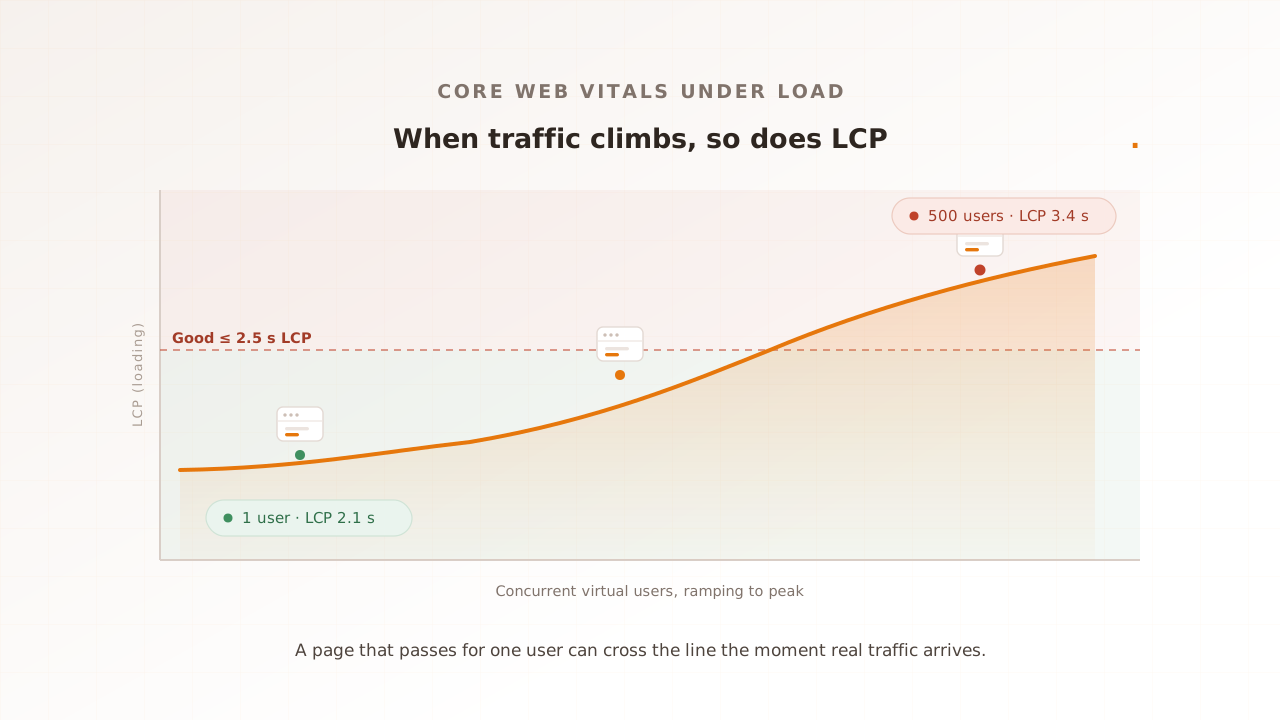
It reports the final LCP value and its rating; the library’s attribution build also exposes which element produced it, so you can send both to your analytics backend. The one dimension lab tools cannot reproduce on their own is concurrency: LCP under real load is worse than LCP for one idle user, because TTFB swells as the server queues requests. That gap is the subject of measuring Core Web Vitals at load.
How do you improve LCP?
Improve LCP by attacking the phase that owns the most time. Find the LCP element, break its time into the four phases, then fix the biggest phase first. For most sites the largest wins are in the first half of the timeline: a faster first byte and an earlier start on the LCP image, not a smaller image file. For the step-by-step version of each fix, with the code and framework specifics, see how to improve LCP.
Cut Time to First Byte
TTFB is the first phase and often the largest, and it is the one that gets worse under load. Cache HTML and API responses, serve from an origin or CDN edge close to users, and remove slow synchronous work from the request path. Nothing downstream can start until the first byte arrives, so this phase gates the other three.
Remove the load delay
This is the cheapest, highest-leverage fix and the one most sites miss. Make sure the LCP image is requested as early as possible. Do not put loading="lazy" on it; 16% of mobile sites lazy-load their LCP image, which guarantees a late start. Reference the image directly in the initial HTML so the browser’s preload scanner finds it, and add fetchpriority="high" (or a <link rel="preload">) to push it to the front of the request queue.
Shrink the load duration
Once the request starts on time, make the download quick: compress the image, serve a modern format such as AVIF or WebP, size it responsively with srcset so phones do not download desktop pixels, and serve it from a CDN. This is the classic “optimize your images” advice. It matters, but only after the load delay is gone.
Trim the render delay
The element has arrived but has not painted. The usual blockers are render-blocking CSS and JavaScript in the <head>, and web fonts that reflow text mid-paint. Defer non-critical scripts, inline the critical CSS, and use font-display: swap so text paints immediately.
The payoff is real. In a 2021 A/B test, Vodafone improved its LCP by 31% and saw an 8% increase in sales, with a 15% uplift in lead-to-visit rate and 11% in cart-to-visit rate.
Common mistakes with LCP
- Optimizing the wrong element. Confirm the LCP node in DevTools before you touch anything. Swapping the hero image does nothing if the LCP is a heading.
- Lazy-loading the LCP image.
loading="lazy"on the element that should paint first is a self-inflicted regression. Lazy-load below the fold, never the LCP. - Measuring only in the lab. A 1.8-second Lighthouse LCP says little about the 4-second LCP your users get at peak. Lab has no concurrency.
- Reporting the mean. The published threshold is the 75th percentile. An average hides the slow tail, which is where churn lives.
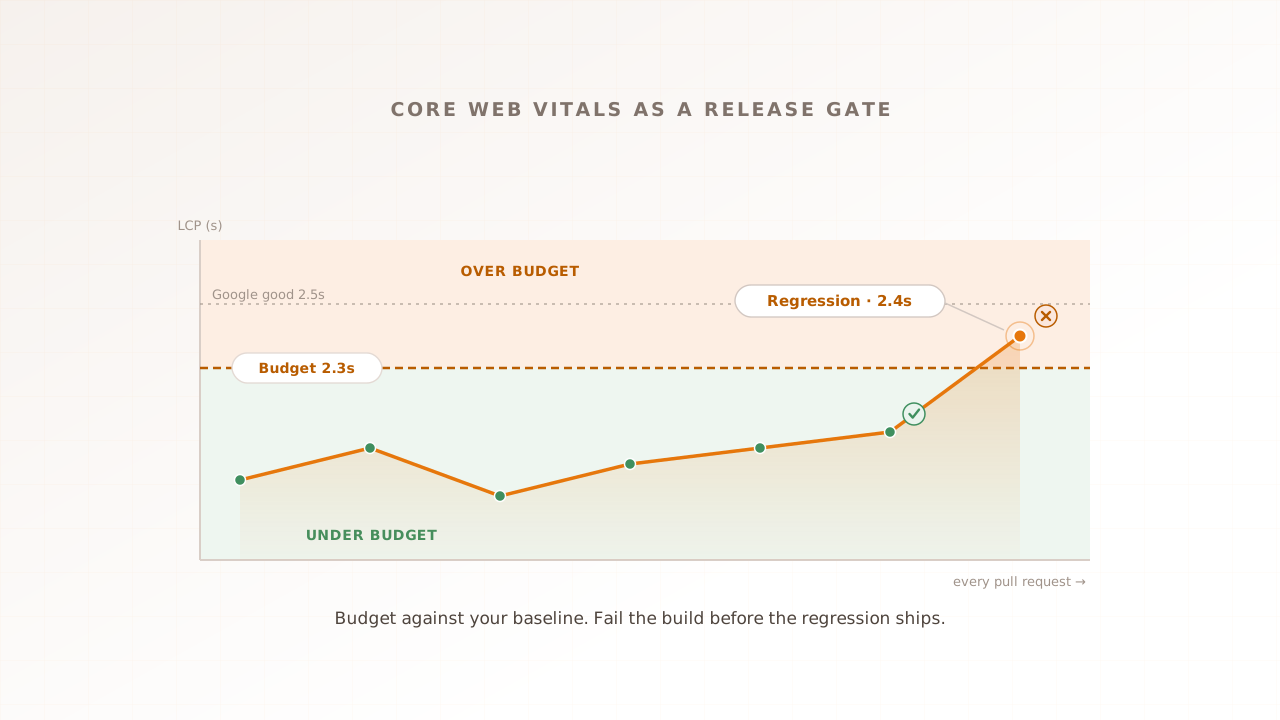
- Treating LCP as a one-time audit. A third-party tag, a CDN change, or a new font added weeks ago can push LCP up with no other code change. Vitals drift.
How Evaluat measures LCP under load
Evaluat is a real-browser performance testing platform: each virtual user runs in its own isolated browser, so the LCP it records is the browser’s native value under those test conditions, captured while many virtual users hit the site at once. Alongside LCP, every session captures Time to First Byte (LCP’s first phase) and page load time, per virtual user.
When LCP rises under load, the per-session evidence shows why. The network log for a session records exactly when the LCP image was requested and how long it took, so a late start (load delay) and a slow download read as two different problems, and the session video shows the moment the element painted. Reports break LCP down per URL and across the load curve, with percentile views, so the page that crosses 2.5 seconds at peak is the one you see.
Use the right tool for the question. If you only need a single-page lab audit, Lighthouse or DebugBear can give you an LCP phase breakdown, and for a pure API a protocol tool like k6 is the lighter choice. Evaluat records LCP from controlled browsers while shared services are under concurrency; it does not replace field data across customer devices. For the other Vitals, see Interaction to Next Paint and how to improve CLS.
LCP is the clearest single number for how fast your page feels: find the element, split it into four phases, and fix the earliest, largest one first. Then measure it where it actually degrades, under the load your users bring, not on an idle test bench. The number you get is the one a real browser recorded.
Test in real browsers. Debug in real sessions. Book a demo.