API vs browser performance testing at a glance
API performance testing and browser performance testing sit at different layers of the same stack. One measures how fast your servers answer requests under load; the other measures how fast the rendered page feels to a real user. They catch different failures, run with different tools, and a complete QA strategy uses both. Here they are side by side.
| Dimension | API performance testing | Browser performance testing |
|---|---|---|
| Layer of the stack | Backend: servers, APIs, databases | Front end: the rendered page in a browser |
| What it measures | Response time, throughput, error rate, scalability | Load time, Core Web Vitals, interactivity, asset cost |
| Typical metrics | p95 latency, requests per second, error rate | LCP, INP, CLS, page load time |
| Example tools | k6, JMeter, Gatling, Locust, Postman | Lighthouse, WebPageTest, Playwright, real-browser platforms |
| Runs a real browser | No | Yes |
| Cheap to run in CI | Yes, tens of thousands of virtual users per machine | Light for one page, heavier under load |
| What only it sees | Backend scalability ceiling, database saturation under load | Rendering, JavaScript cost, third-party tags, the felt wait |
| Blind to | Anything the browser does after the response | Anything below the page: API limits, services with no UI |
What is API performance testing?
API performance testing measures how your backend behaves under load: how fast it responds, how many requests per second it can serve, and where it breaks. It drives traffic at your servers, APIs, and databases directly, without a browser, and reports latency, throughput, and error rates as concurrency climbs. It is the test of whether the engine holds up.
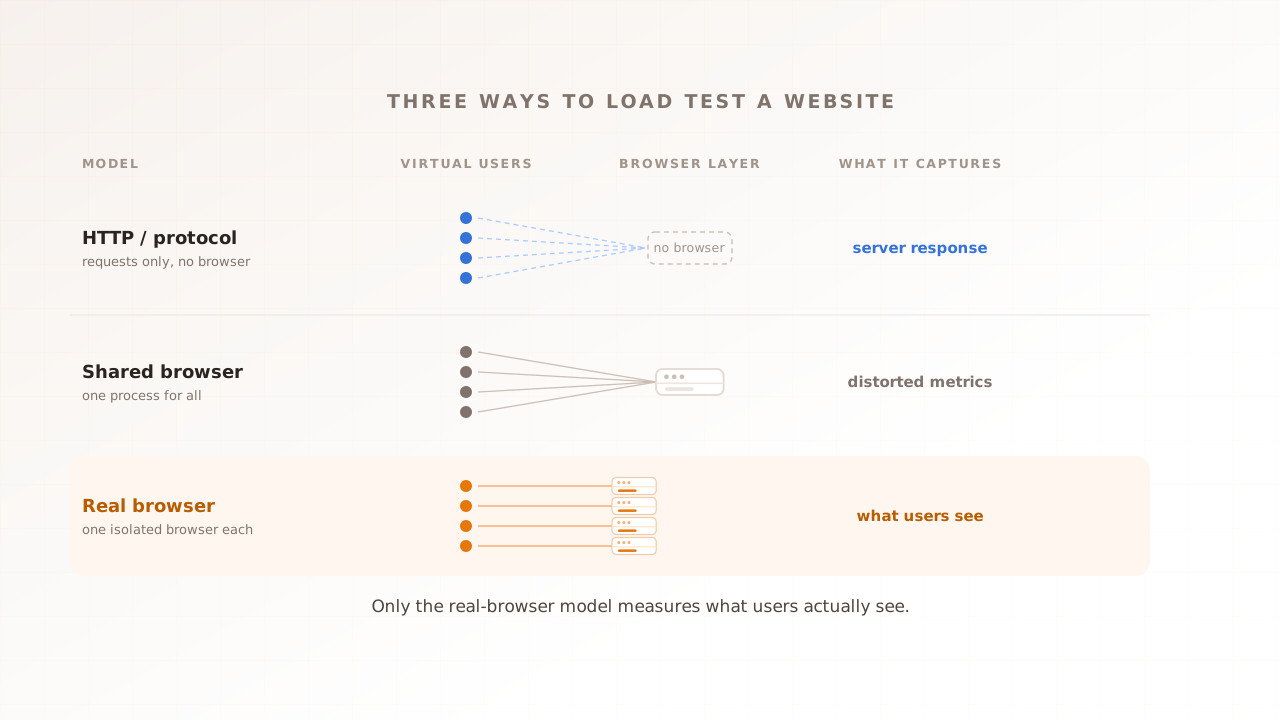
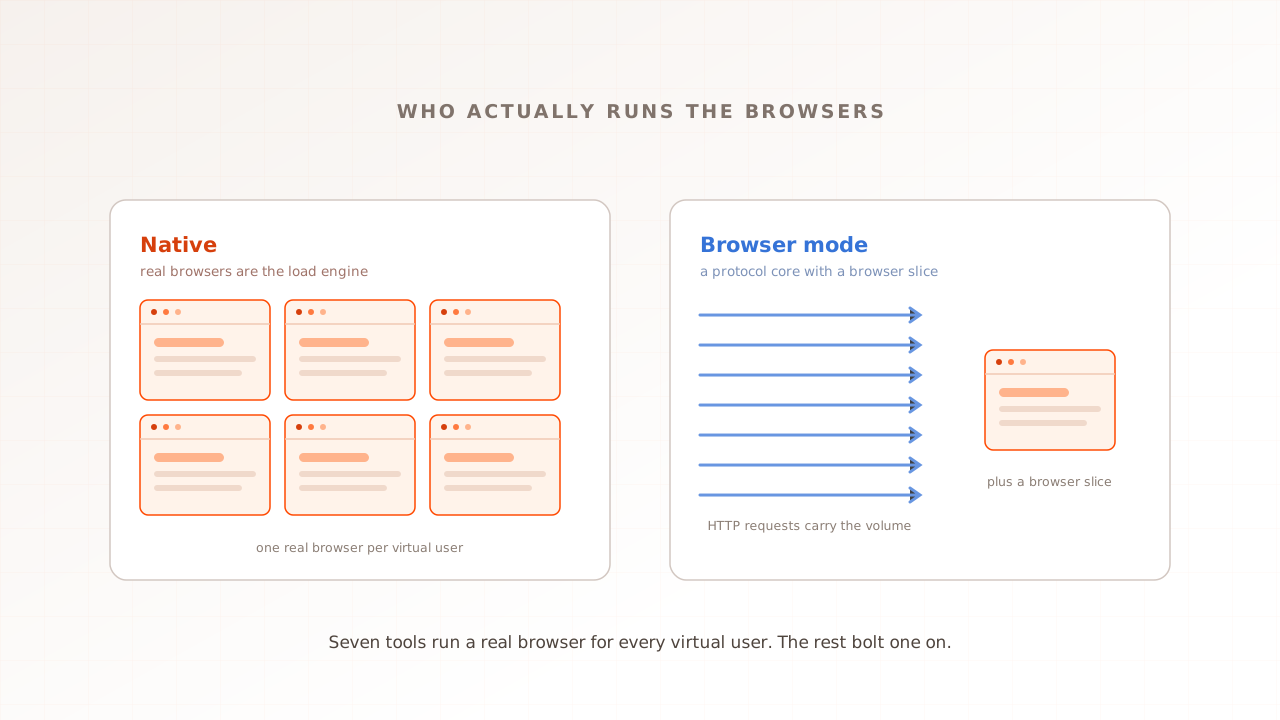
The metrics are server-side. Response time is reported at the median and, more tellingly, at the tail: p95 latency is the figure 95% of requests come in under, the number that exposes the slow responses an average would bury. Add throughput (requests served per second) and the error rate as load climbs, and you have the shape of the backend under pressure. The tools are protocol-level load generators: k6, JMeter, Gatling, Locust, and API clients like Postman. In protocol mode they speak HTTP, gRPC, or WebSocket straight to the endpoint, which makes them much lighter than browser users. Some, including k6, also offer a separate browser mode.
This layer is not a junior partner to the front end. APIs make up 57% of all internet traffic, much of it machine-to-machine calls with no user interface to render at all. In Postman’s 2025 State of the API report, performance ranks among the top factors developers weigh when they depend on someone else’s API. A mobile app, a partner integration, or a payment webhook never loads a page; for them, the API response time is the entire experience.
API performance testing also sees failures a browser test never will. It finds the scalability ceiling, the concurrency where p95 latency turns the corner and climbs, say from 80 milliseconds at 500 users to three seconds at 5,000. It surfaces error rates that appear only under load, when a connection pool exhausts or a database hits its limit. It validates per-service SLAs across a microservice architecture. These are backend failure modes, and the cheapest place to catch them is a protocol test that hits the endpoint directly.
What is browser performance testing?
Browser performance testing measures what a real user experiences when the page loads: how long until content paints, how fast it responds to a tap, how much it shifts. It runs a real browser, so it captures the rendering, JavaScript, and third-party tags that decide a page’s felt speed. It is the test of whether the experience holds up.
Browser performance testing comes in two forms. A single-user lab audit (Lighthouse, WebPageTest, PageSpeed Insights) loads the page once on a clean machine and scores it. A load-based browser test runs many real browsers at once, using Playwright wired into a load harness or a managed real-browser platform, so it captures what those controlled browsers saw while shared backends, CDNs, and third parties were under concurrent load. Independent visitor devices do not share a CPU. A page can score well in Lighthouse and still slow at peak when shared services queue work or hydration finishes later after a slower response.
Evaluat Pulse sits in that first, single-user category: a free website speed test that loads your page once in a real browser, returns LCP, CLS, FCP, and TTFB with Evaluat’s A to F composite grade, and records a video of the load. A single cold load does not produce a representative INP. It answers a controlled quiet-page question; the busy-page question still takes browsers at concurrency.
The headline metrics are Core Web Vitals: Largest Contentful Paint for loading (good is within 2.5 seconds), Interaction to Next Paint for responsiveness (within 200 milliseconds), and Cumulative Layout Shift for visual stability (under 0.1). All three are produced on the critical rendering path, the sequence that runs after the response arrives: the browser downloads the CSS and JavaScript, executes the scripts that can block rendering, then lays out and paints the page. A heavy bundle or a slow third-party tag adds seconds there that no server log records. They are hard to pass. In the 2025 Web Almanac, only 48% of mobile origins cleared all three, with Largest Contentful Paint the most common failure. Almost all of that is decided in the browser, after the server has already replied.
Why a fast API doesn’t mean a fast page
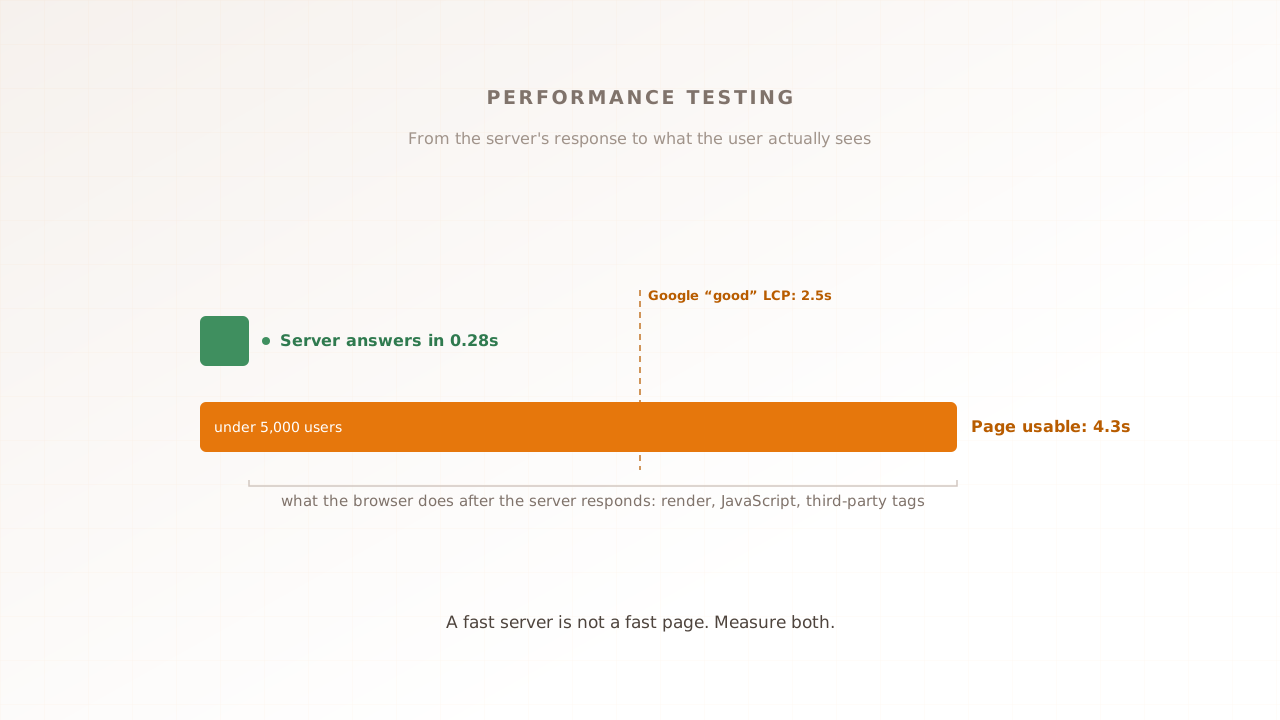
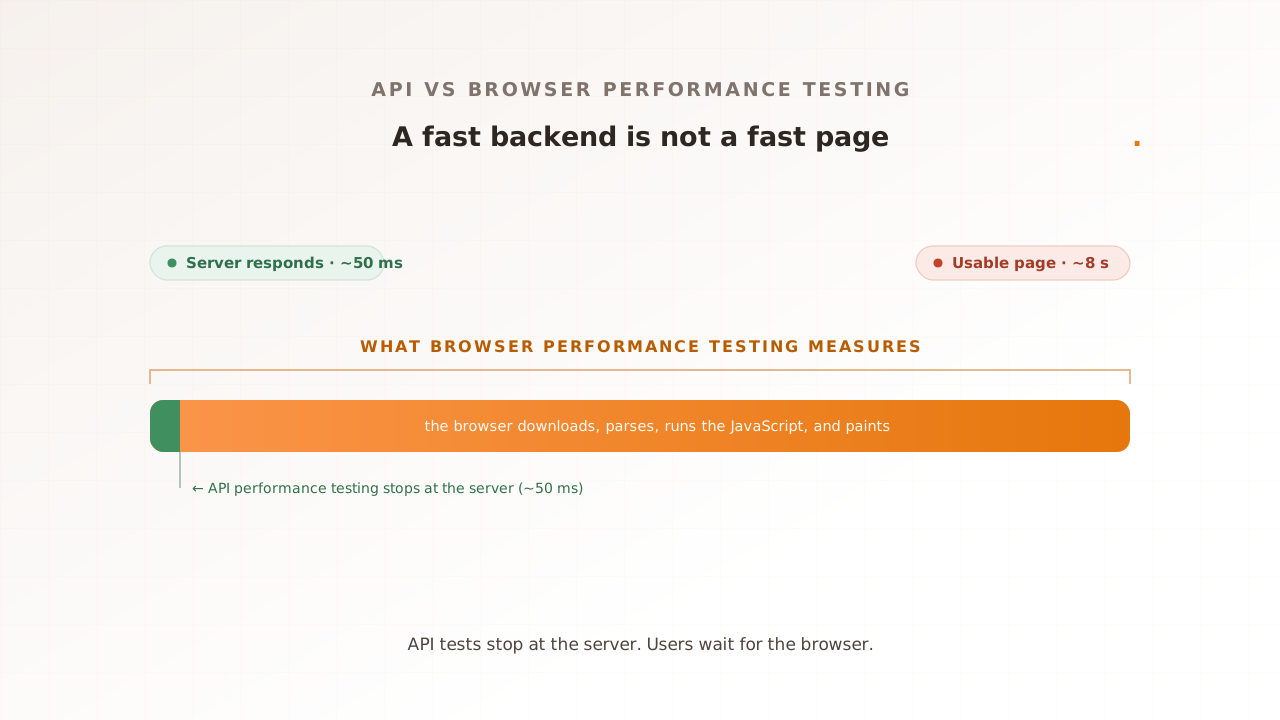
Because the server’s reply is only the first slice of what the user waits for. After the response arrives, the browser still has to download the assets, parse the HTML, execute the JavaScript, and paint the result. A backend can be fast and the page slow, which is exactly why testing one layer tells you nothing reliable about the other.
The numbers make the gap concrete. In Catchpoint’s 2025 SaaS performance benchmark, one application had the fastest backend of every competitor measured, a server that replied in 52 milliseconds, and the slowest experience of the group: users waited roughly eight seconds for a usable page, because 144 requests and 115 JavaScript files had to download and run first. An API performance test pointed at that server would have reported a clean, fast result. The users were still waiting.
And the wait costs you. A 2017 Google study of more than 900,000 mobile pages found the probability of a bounce rises 32% as load time grows from one second to three, and 90% from one to five. That damage happens in the browser, on the part of the timeline an API test never sees.
Picture a single page load as a timeline. The server response is the first sliver of it. Everything after, often the large majority of the wait, is the browser doing its work: fetching dozens of resources, running framework code, applying styles, and painting. API performance testing measures that first sliver with precision, then stops. Browser performance testing measures the whole timeline. When the two disagree, the browser is the one the user actually lives in.
The specific culprits are usually the same few. Render-blocking JavaScript the browser must download and run before it can show anything. Third-party tags, the analytics, consent, and chat scripts that load from someone else’s server and execute on the user’s main thread. Client-side rendering that ships an empty shell and assembles the page in the browser. Every one of those runs after the server has replied, which is exactly why a test that stops at the response cannot see them.
Verdict for backend questions: if you need to know whether the servers hold up at 10,000 requests per second, API performance testing is the right and cheaper instrument. Verdict for experience questions: if you need to know what a browser renders under your selected peak conditions, only a browser test answers it. Field data remains the source for the full spread of customer devices and networks.
What each one misses
Each layer is blind to the other’s failures. An API test never runs the front-end code, so it cannot see a render-blocking script or a layout shift. A browser test, especially a single-user one, never pushes the backend hard enough to find its ceiling. The misses are not gaps in the tools; they are properties of what each layer measures.
What API performance testing cannot catch:
- A render-blocking script or a slow third-party tag that delays the visible page. The request succeeded; the screen stayed blank.
- A JavaScript error that breaks a button after the page loads. The API returned 200; the user still cannot check out. Codoid catalogues these rendering and interactivity blind spots.
- Core Web Vitals. There is no browser, so Largest Contentful Paint, Interaction to Next Paint, and Cumulative Layout Shift are simply unmeasured.
What a browser test, run single-user, cannot catch:
- The backend scalability ceiling. One browser on a quiet system never creates the concurrency that exposes it.
- Error rates and timeouts that appear only when a connection pool or a database saturates under load.
- The protocol and service layers with no UI at all, which a browser cannot reach.
Neither blindness is a setting you can switch off. An API test has no browser, so it has nothing to render and nothing to measure about rendering. A single-user browser test has no crowd, so it has no contention to expose. The only way to see both sets of failures is to run both kinds of test.
Which does your QA strategy need?
Both, but in a deliberate order. API performance testing is the cheap foundation: fast, scriptable, and easy to run on every change in CI, so it catches backend regressions early. Browser performance testing is the experience gate: slower to run at scale, but the only layer that measures what users actually feel. Sequence them by where your risk lives.
- Lead with API performance testing if your product is API-first or backend-heavy: a public API, a mobile backend, a payments or data service where most traffic never renders a page. The endpoint response time is the product.
- Prioritize browser performance testing if your product is a user-facing web app where the front end is heavy: a marketing site, an e-commerce store, a SaaS dashboard with a large JavaScript bundle. The felt speed is the product, and it is decided in the browser.
- Run both, in sequence, when you have a real user journey on top of real services, which is most teams. Gate every pull request with fast API checks, then run a browser test before release to confirm the experience survived the change.
A concrete shape: on every pull request, a k6 script asserts the orders endpoint keeps p95 latency under 400 milliseconds at 2,000 requests per second; then, before release, a browser test runs a few hundred real users through the full checkout and asserts that Largest Contentful Paint stays under 2.5 seconds with no failed sessions. The first guards the engine, the second guards the experience. One commonly cited heuristic puts functional coverage at roughly 70% API and 30% UI, keeping most checks at the cheaper layer; performance testing follows the same shape, with browser budget spent on the journeys that carry revenue.
Teams usually grow into the two layers in the same order. The first move is a fast API performance check in continuous integration, run on every change so a backend regression fails the build the day it lands; performance regression testing covers how to set those gates with existing tools. A single-user Lighthouse budget comes next, to catch front-end bloat before it ships. A browser test under realistic concurrency before release covers the next gap. Evaluat’s Testing Suite and managed CI gates are planned, not currently live.
Common mistakes when testing one layer
Most performance blind spots come from trusting one layer to speak for the other. These are the patterns that let a slow experience ship behind green dashboards.
- Reading a green API dashboard as proof the site is fast. The API report says the server replied quickly. It says nothing about the seconds the browser then spends rendering, so a fast backend reads as a fast product when it is not.
- Warming the cache or CDN before a staged test. A run against warm caches and a quiet database flatters itself. Real peak traffic hits cold paths and contended resources, so a test that skips them measures a system your users never meet.
- Alerting on backend latency but not on Core Web Vitals. Many teams page someone the moment an API slows, yet nothing watches the metric users actually feel, so a front-end regression can ship and degrade every visit in silence.
- Leaving front-end performance without an owner. The backend has a team accountable for its latency. Page experience often falls between the backend and the design teams, and a number no one owns is a number that drifts.
- Testing the two under mismatched conditions. An API test from a fast data-center region and a browser test from a developer’s laptop measure different worlds. Match the regions, devices, and network profiles, or the two sets of numbers will never reconcile.
Where Evaluat fits
Most teams cover the API layer well and the single-user browser audit well, then skip the layer between them: browser performance under load. That is the gap Evaluat is built for. It runs each virtual user in its own real, isolated browser and captures Core Web Vitals while the system is under concurrent load. The results are what those controlled browsers recorded under the selected conditions, not a server-side stand-in or a promise that every customer device will match.
Because it drives real browsers, a run also puts real traffic through your backend, but the reason to reach for it is the front end: LCP, INP, CLS, and First Contentful Paint, per session and per URL, scored with Apdex (a single 0-to-1 score that blends satisfied and tolerable sessions against your latency thresholds), with a video of every session, a network log of every request, and a console log of every message. When the page slows at concurrency, you open the worst session and watch what happened instead of guessing from an aggregate. The methodology lives in real-browser load testing and Core Web Vitals at load.
The boundary is honest, and it is the spine of this article. For the backend layer, a protocol tool like k6 or JMeter is the right and cheaper instrument. For a quick single-page check, Lighthouse is enough. Evaluat is for the third thing: the real user experience, measured at the load you actually expect. Most mature strategies run all three.
API performance testing and browser performance testing are not a choice between two tools. They are two questions about two layers: does the backend hold up, and does the page stay fast for the people using it. A fast API is necessary and never sufficient. Test the engine with a protocol tool, test the experience in a real browser, and run that experience test at the load you expect, so the answer still holds when the traffic arrives.
Book a demo to test a revenue-critical browser journey under load.