What is performance testing?
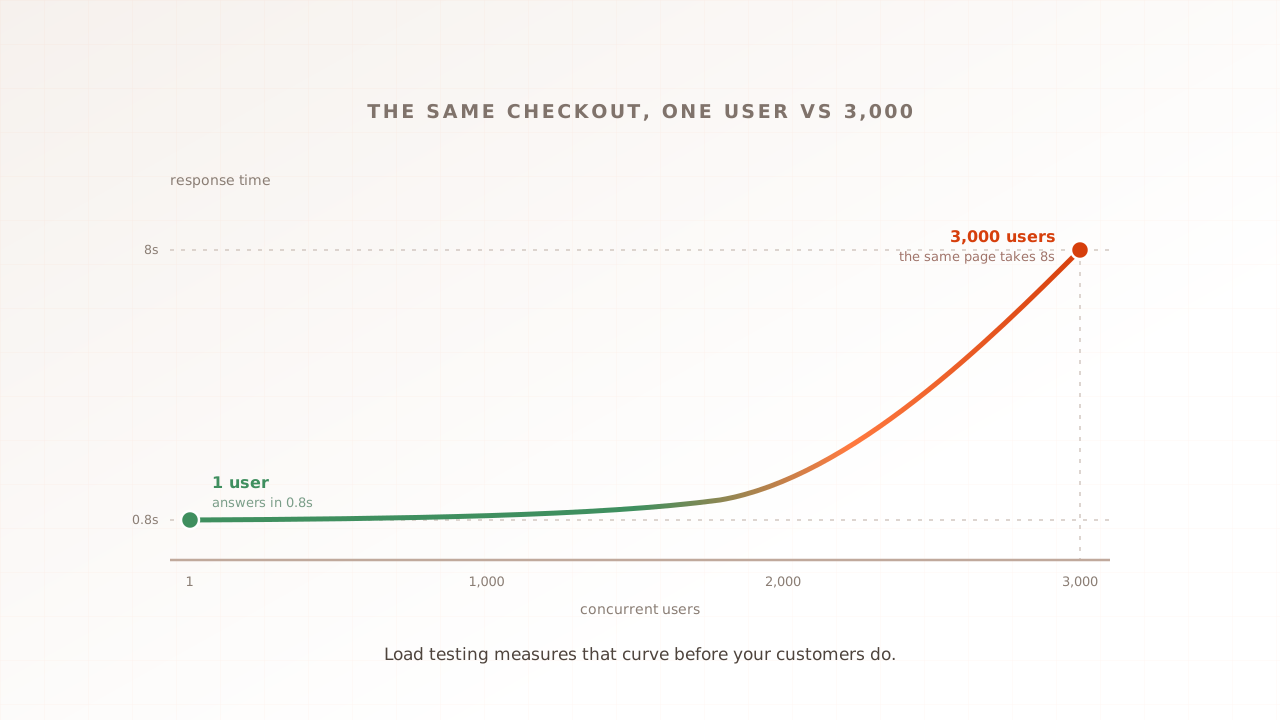
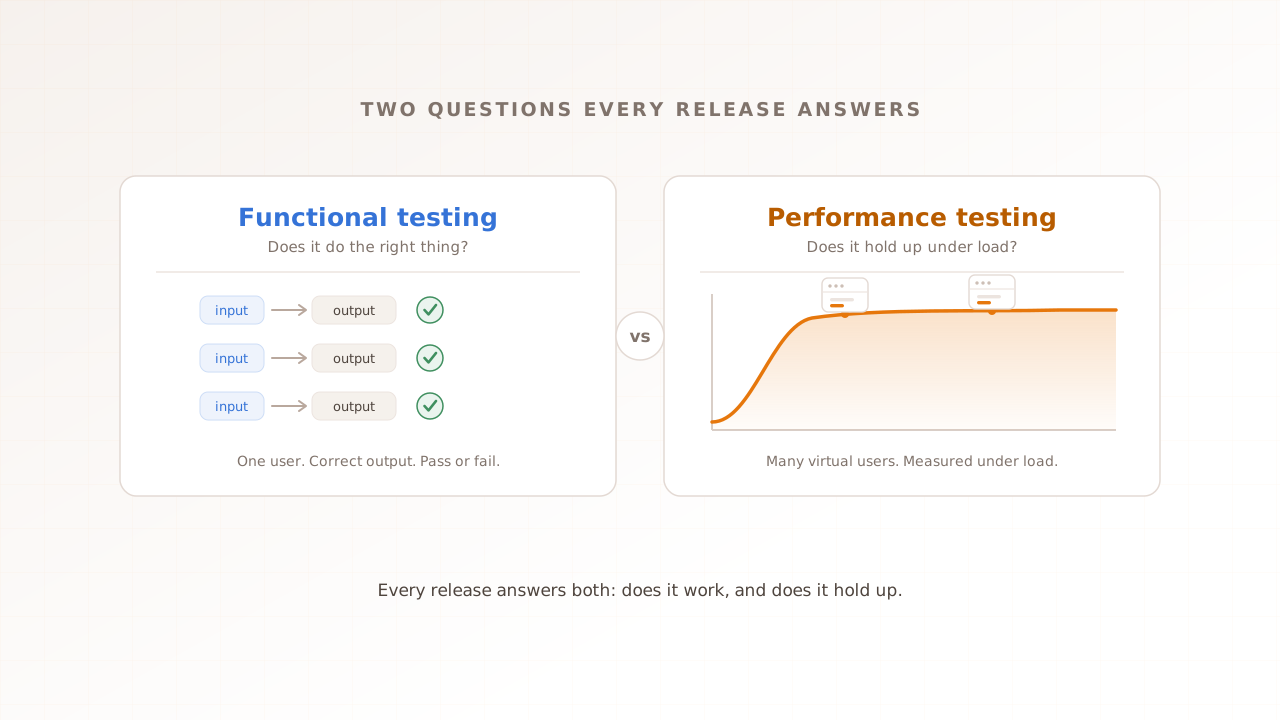
Performance testing is the practice of measuring how a software system behaves under demand: how fast it responds, how stable it stays, and how well it scales as traffic grows. Where functional testing asks whether a feature works, performance testing asks whether it stays fast and reliable when real load arrives.
It is an umbrella, not a single test. Load testing, stress testing, soak testing, and spike testing are all kinds of performance testing, each pushing a different limit. And it spans two layers that most guides treat separately: the server, meaning how quickly the backend answers a request, and the browser, meaning how quickly the page actually renders and becomes usable for a person. A system can be excellent at one and poor at the other.
The demand usually comes from virtual users: simulated sessions that stand in for visitors moving through your app. A tool runs them concurrently against an environment you control, so you can observe limits deliberately instead of waiting for production traffic to expose them.
This guide maps the whole discipline: why it matters, the types, the metrics, the process, the tools, and where it fits in a modern release cycle. If you are new to the subject, start with the test types, then follow the testing process. Each section also links to a focused article when you need more depth, and if you would rather learn it in order, the beginner’s guide series publishes two parts a week from first principles.
Why performance testing matters
Performance is revenue, retention, and reliability. Slow pages lose sales and drive users away, and the failures that only surface under load are the ones that take a site down at its busiest moment. Performance testing is how you find those problems before your customers do.
The revenue link is well documented. A 2020 Deloitte and Google study of 37 sites and more than 30 million sessions found that a 0.1-second improvement in mobile load time lifted retail conversions by 8.4% and travel conversions by 10.1%. (The study moved several timing metrics together, so read it as a strong correlation between speed and revenue, not a single dial you turn.) The effect shows up per company too: when Vodafone improved its Largest Contentful Paint by 31%, it recorded an 8% increase in sales.
The problem is widespread. According to the 2025 Web Almanac, only 48% of mobile sites and 56% of desktop sites pass Core Web Vitals on real-world traffic, which means close to half the web ships an experience Google rates as needing improvement or worse. That gap is widest on mobile, where weaker CPUs and slower networks magnify every extra script and image, and where most web traffic now lands.
And catching performance problems late is expensive. The long-standing finding in software engineering is that defects found downstream cost far more to fix than the same defects caught early; a widely cited 2002 study by the US National Institute of Standards and Technology put the annual cost of an inadequate software-testing infrastructure at $59.5 billion, with around $22.2 billion of it avoidable through better, earlier testing. At the extreme end, when performance fails completely, the cost is an outage: in ITIC’s 2024 survey, 90% of enterprises said a single hour of downtime now costs them more than $300,000, and 41% put it between $1 million and over $5 million. Slowness is the same problem before it becomes total.
The types of performance testing
Performance testing is an umbrella term for several test types, each shaped by a different traffic pattern and answering a different question. The differences come down to the shape and size of the load you apply, not separate pieces of software.
| Test type | The question it answers | Traffic shape | What it reveals |
|---|---|---|---|
| Load testing | Does it hold up at expected peak? | Ramp to target concurrency, then hold | Bottlenecks and headroom at normal peak traffic |
| Stress testing | Where does it break? | Ramp past the limit until it fails | The breaking point, and whether it fails gracefully |
| Spike testing | Can it survive a sudden surge? | Jump to high load almost instantly | Resilience to flash traffic, like a sale or a launch |
| Soak / endurance testing | Does it degrade over time? | Moderate load held for hours | Memory leaks, resource exhaustion, slow drift |
| Scalability testing | How does it scale as load grows? | Step the load up in stages | Whether performance degrades smoothly or cliffs |
Two more are worth naming. A smoke test is a quick, light run that confirms a build is healthy enough to test properly before you spend money on a heavy run; it is not itself a performance test, a distinction covered in smoke testing vs performance testing. Volume testing focuses on large data sets rather than concurrent users.
The three people confuse most are load, stress, and the umbrella term itself; load vs stress vs performance testing draws the lines, and stress testing a website walks through finding a breaking point in practice. The practical point is that these are settings on one test. You pick the journey, set the ramp and the duration, and the same run becomes a load test or a stress test depending on how hard you push.
What performance testing measures
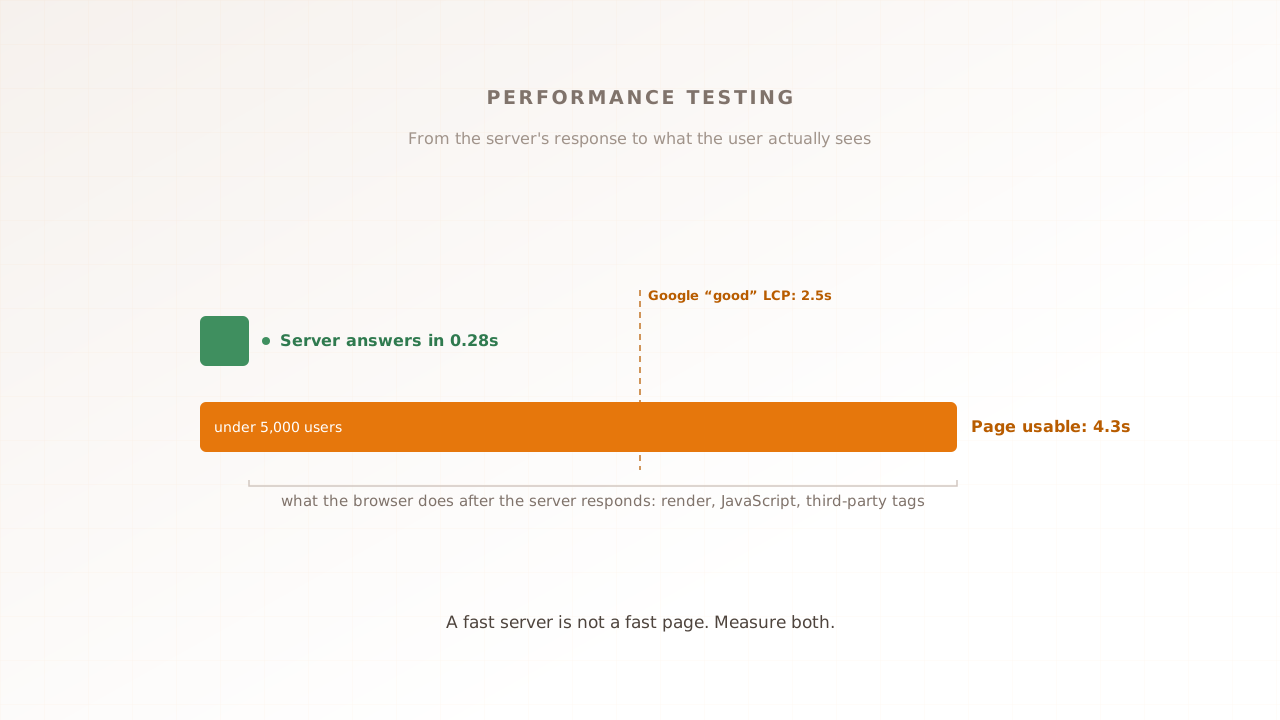
Two layers of metrics matter, and most guides only cover one. Server-side metrics tell you how the backend held up. Experience metrics describe what the browser rendered under the test conditions. You need both, because a fast server does not guarantee a fast page.
A concrete example makes the split clear. Picture a storefront expecting 5,000 shoppers at a sale. A load test ramps virtual users to 5,000 and holds; server response time stays a healthy 280 milliseconds throughout, so the backend looks fine. But on the product page, Largest Contentful Paint drifts from 2.1 seconds at low load to 4.3 seconds at peak because key resources arrive later while that page’s scripts and rendering work delay the final paint. The server passed. The browser-rendered experience failed its budget. Only a metric measured in the browser caught it.
On the server side, the headline number is response time, and it is read as percentiles rather than an average, because the average hides the slow tail. The p95 response time is the value that 95% of requests come in under, so only the slowest 1 in 20 are worse; the p99 catches the worst 1 in 100. Those tail numbers are what your least lucky users actually experience. Alongside response time sit throughput (requests or transactions per second the system sustains), error rate (the share of requests that fail, which tends to climb as load rises), and time to first byte (how long the server takes to start responding).
On the experience side are the Core Web Vitals, the metrics Google uses to score real page experience. Largest Contentful Paint (LCP) measures loading, Interaction to Next Paint (INP) measures responsiveness, and Cumulative Layout Shift (CLS) measures visual stability. First Contentful Paint (FCP) is a separate supporting metric that marks when the first content appears; it is not a Core Web Vital. These describe what the browser does with a response, so they can only be measured in a real browser, not inferred from server timings. They can also move under load in ways a single-user lab check does not capture; Core Web Vitals at load covers why, and the Largest Contentful Paint and Interaction to Next Paint explainers go deep on the two that shift most, with a step-by-step playbook in how to improve LCP. For the full set of numbers a complete run should produce, see the metrics every performance test report should include.
A metric only becomes a test when you attach a budget to it: the line it is not allowed to cross. Budgets come from two places. For Core Web Vitals, Google publishes absolute thresholds, 2.5 seconds for LCP, 200 milliseconds for INP, and 0.1 for CLS. For everything else, the honest budget is your own baseline plus a small tolerance, so normal noise passes and a real slowdown fails. A budget is what lets a test return a clear pass or fail instead of a number someone still has to interpret.
How performance testing works: the process
A performance test is a loop, not a one-off. You define what fast enough means, build a realistic scenario, run it, find the bottleneck, fix it, and run it again. The discipline is in doing it on purpose, against numbers agreed in advance, rather than eyeballing a page and calling it quick.
A workable process for a team new to this:
- Set objectives and budgets. Decide what to measure and the threshold that counts as a pass, for example LCP under 2.5 seconds at expected peak, error rate under 1%. Tie it to something the business cares about, like checkout conversion.
- Build a realistic scenario. Model the journey that matters (browse to cart to checkout, search to results, log in to dashboard), with realistic data and pauses, not a single URL hammered in a loop.
- Choose the approach and tools. Decide whether you are testing the server, the browser, or both, and at what concurrency and from which region. The next section covers that choice.
- Run it. Start with a small smoke run to confirm the setup, then ramp to your target load and hold it long enough to be meaningful.
- Analyze and find the bottleneck. Compare against your baseline, read the percentiles, and isolate the slow component: the server, the database, the network, or the browser and its JavaScript.
- Fix and re-test. Make one change, run the same test, and confirm the number actually moved. Without a baseline you cannot tell a fix from noise.
- Keep it running. Schedule the test and wire the cheap parts into your pipeline so a regression is caught on the next change, not the next incident.
Finding the bottleneck is the step that turns a number into a fix. A useful first cut is to compare the server response time against the total time the page took. If the server answered quickly but the page was still slow, the problem lives in the browser layer, in render-blocking scripts, heavy third-party tags, or layout work, not the backend. If the server itself slowed under load, the trail usually leads to a database query, a connection pool, or a downstream service. Real-browser tests help here because they capture both halves, the request and what the browser did with it, in one run.
Is performance testing manual or automated?
Performance testing is mostly automated, and at any real scale it has to be. No one manually drives 5,000 browsers, so a tool generates the load, applies the traffic pattern, and captures the metrics. In modern pipelines the run is triggered automatically too, on a commit or a schedule, and can fail a build when a budget breaks.
What stays human is the judgement around the test: deciding which journeys to measure, setting the budgets, designing a realistic scenario, and reading the results to work out why a number moved. The tool produces the evidence; a person decides what it means and what to do. Tools that need no scripting, like a visual scenario editor, shift more of the effort away from writing and maintaining test code toward that judgement, which is where it adds the most value.
Protocol-level vs real-browser performance testing
Performance testing tools split into two families, and the split decides what you can measure. Both are legitimate; they answer different questions.
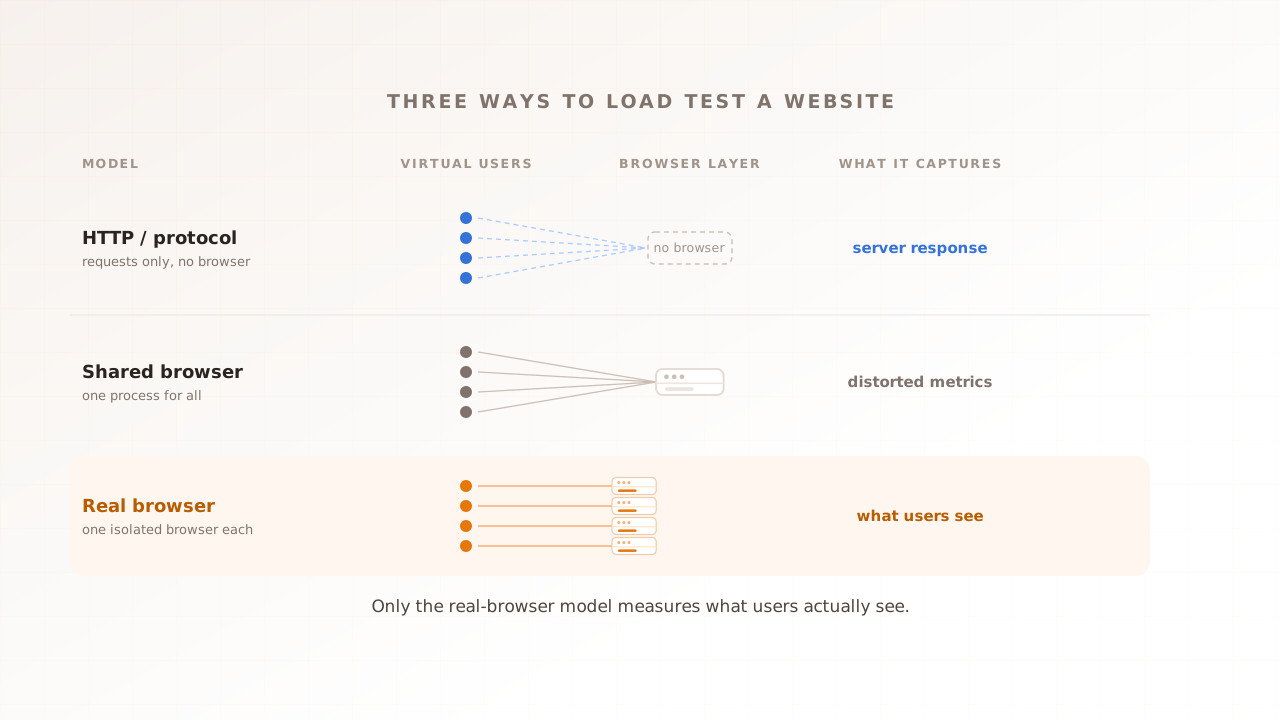
Protocol-level tools such as k6, JMeter, Gatling, and Locust send requests directly at the protocol layer and measure how fast the server responds. They are efficient and scale to tens of thousands of virtual users on modest hardware, which makes them the right, cheaper choice for API load tests, microservices, and raw throughput at high concurrency. As HTTP-level tools they do not render the page by default, so they do not capture what the browser then does with the response: the JavaScript, the rendering, the third-party tags. Some have added browser modes (k6, for instance, ships a browser module that drives a real Chromium instance to capture Web Vitals), but that is not what protocol tools are built around, and using it trades away the concurrency advantage that is their main strength. The deeper trade-off between the two layers is laid out in API vs browser performance testing.
Real-browser performance testing runs each virtual user in an actual browser, so it measures the rendered experience: Core Web Vitals, JavaScript execution, layout shifts, and the cost of third-party tags under load. This is a category with several options rather than a single product, and you can also build it yourself by driving a tool like Playwright from a load generator. Real-browser load testing compares the three architectures (HTTP scripts, one shared browser, and one isolated browser per user) and when each fits.
The decision is not which family is better, but which question you have. A fast server is not a fast page. If you are load-testing an API or chasing maximum throughput, reach for a protocol tool. If you need to measure the browser-rendered experience under controlled load, you need a real browser in the loop.
In practice the choice comes down to a few questions. Are you measuring the server, or what the user sees? How much concurrency do you need, and what is the budget for it? Do you need the result to fail a build in CI, or to explain one user’s bad session? High concurrency on a tight budget points to protocol tools; fidelity to the real experience points to a real browser. Plenty of teams run both: a protocol tool for API and capacity work, a real-browser tool for the customer-facing journeys.
Where performance testing fits in the release cycle
Performance testing is not a phase you run once before launch. In teams that ship continuously it runs at several points: cheap checks during development, a heavier real-browser load test before release, and monitoring once the code is live.
The principle is to match the weight of the test to the stage. Fast, lightweight checks (a micro-benchmark, a single-page lab audit) run on every commit or pull request, often with a performance budget that fails the build on a regression; performance regression testing shows how to wire that gate into CI/CD. The single-page audit is also the cheapest way to get a first baseline: you can test your website speed for free with Evaluat Pulse, which runs your page through a real browser, measures LCP and CLS plus FCP and TTFB, grades the result A to F, and asks for no signup. A single cold load does not produce a representative INP. A full real-browser load test at realistic concurrency runs before a release or on a schedule, because it costs more to run. Where performance testing fits in an agile release cycle maps the whole sequence stage by stage.
One distinction underpins all of it: lab versus field. Lab (synthetic) tests are repeatable and run before release, so they catch regressions early. Field data, gathered by real user monitoring once people are on the site, is the ground truth, but it arrives after the fact. The two are complementary, not rivals: gate on lab, confirm on field. Core Web Vitals: lab vs field data explains why a lab score and a field score disagree, and which to trust for what.
Common performance testing mistakes
The same handful of mistakes catch most teams new to this. Each has a straightforward fix.
- Treating load testing as all of performance testing. Load is one type. Skipping stress, soak, and spike means you never learn where the system breaks or whether it leaks over time. Fix: run the type that matches the risk you actually face.
- Testing only the server, never the browser. A green server response time says nothing about a page that takes eight seconds to become interactive because of render-blocking scripts. Fix: measure Core Web Vitals in a real browser, not just TTFB.
- No baseline, no budgets. Without a known-good number, you cannot tell a regression from normal noise. Fix: capture a baseline and set thresholds before you start gating.
- Reading averages instead of percentiles. The average response time hides the slow tail where real frustration lives. Fix: track p95 and p99, not the mean.
- Testing one happy path from one location. Real traffic is a mix of journeys, devices, regions, and concurrency. Fix: model the journeys that carry value and run them at realistic load from the regions your users are in.
- Treating it as a one-off pre-launch task. Speed regresses as features ship. Fix: run performance checks continuously, not once.
Where Evaluat fits
Evaluat is one of the real-browser options in that tool split. It runs each virtual user in its own isolated browser, so it captures the Core Web Vitals (LCP, INP, and CLS) plus FCP for every user under load, alongside response time, throughput, error rates, and percentile views. Each user is a full browser, so the numbers include rendering, JavaScript, and third-party tags under controlled test conditions, not just the server response. When a run busts a budget, the per-session video, network log, and console log for the user that hit the wall turn a failed number into something you can debug. The aggregate flags the problem; the saved session is where you fix it.
You build a scenario once in a visual step editor, set its load shape (ramp-up, steady state and ramp-down), and run it from the region closest to your customers, on a schedule or before a release, with an Apdex score per report against thresholds you set. How it works covers the architecture, and the performance testing product page shows what a run produces.
There is one thing this is not built for. For pure API load tests or extreme-concurrency throughput, a protocol tool like k6 or JMeter is the better and cheaper fit, and our comparison pages say so plainly. Evaluat is built for the part those tools are not designed to see: what an isolated browser does under controlled load.
Performance testing is a discipline, not a one-off
Performance testing is not a single test or a single tool. It is the practice of measuring how your system behaves under demand, across both the server and the browser, and matching the test to the question you need answered. Set a budget on the journey that matters most, measure what your users actually experience rather than only what the backend returns, and keep measuring as you ship.
Test in real browsers. Debug in real sessions. Book a demo.