What are p95 and p99 response times?
The p95 response time is the value 95% of your requests come in under, so only the slowest 5% were worse. The p99 is the same line drawn at 99%. Reading p95 and p99 response time, instead of the average, is the gap between a dashboard that looks calm and one that tells the truth.
A percentile is just a ranking. Line up every request from fastest to slowest, and the 95th percentile is the one standing at the 95% mark: 95 in a hundred were at least that quick, and the worst five were slower. The p50, or median, is the request in the middle, so it describes the typical visit. The mean, the arithmetic average, adds every response time and divides by the count. It feels like the obvious summary, and it is the one that hides the most.
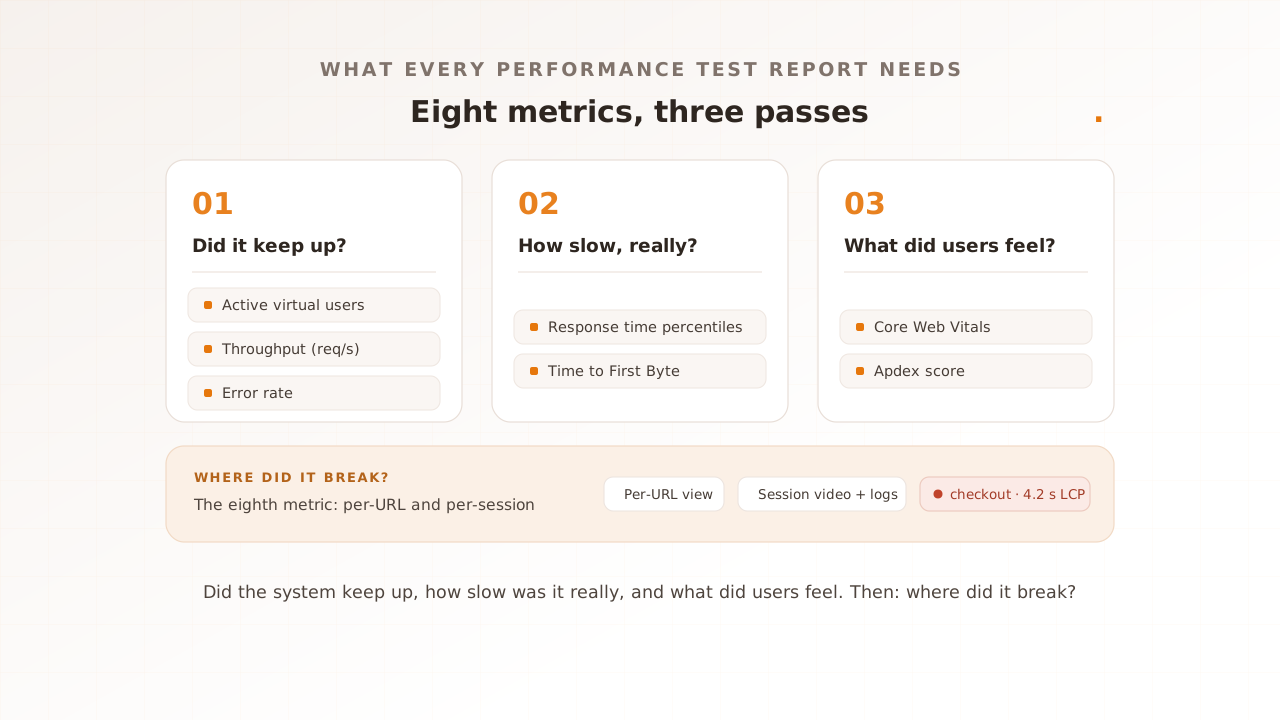
The distinction is not academic. p95 and p99 are where regressions and lost conversions live, because they describe the experience of your unluckiest users rather than an imagined average one. For where these percentiles sit among the other numbers a run produces, see the eight metrics every report should include, part of our complete guide to performance testing. This guide is about one of them, and why it is the metric beginners most often misread.
Why does the average response time mislead you?
The average misleads because a handful of slow requests barely move it, while a single huge outlier can drag it past the typical experience. The mean is a blend of fast and slow that matches no actual user. It can understate your worst sessions and overstate your normal ones, sometimes in the same report, and the number alone never tells you which.
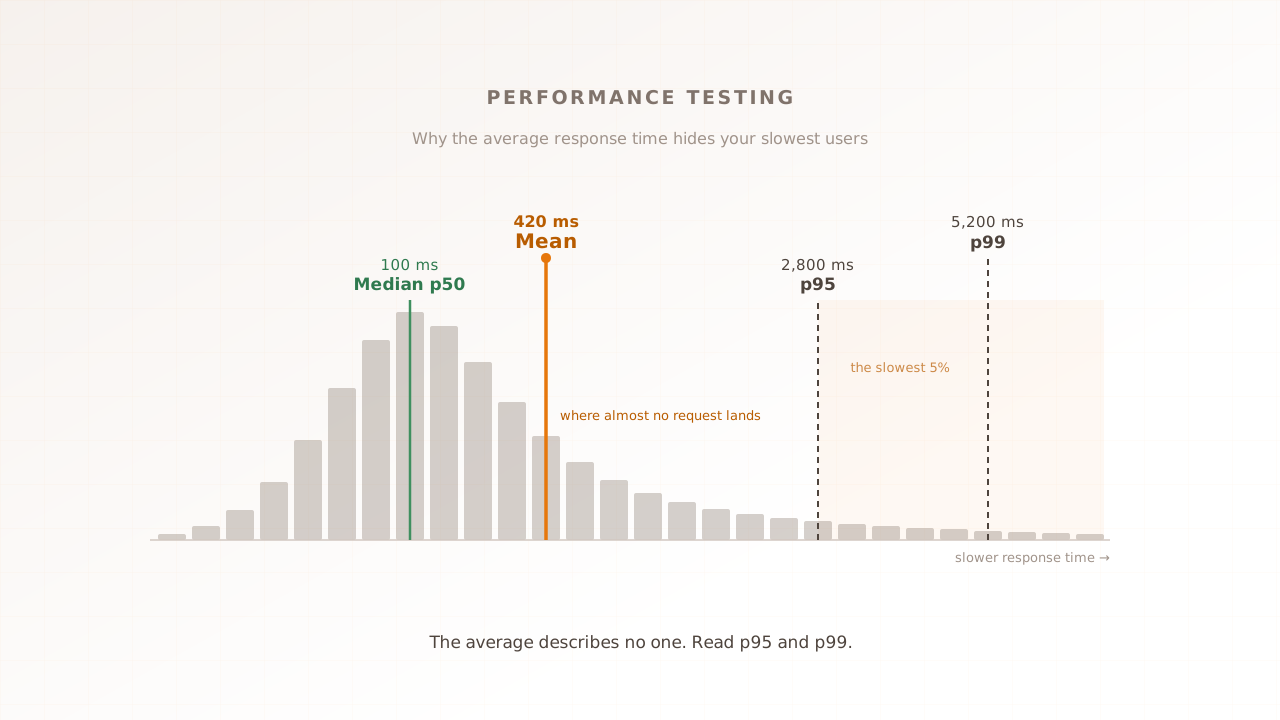
Picture 100 requests. Ninety return in 100 milliseconds. The other ten are slow: 1,500, 1,800, 2,000, 2,400, 2,800, 3,200, 3,800, 4,500, 5,200, and 6,000 milliseconds. The median is 100 milliseconds, because the middle request sits squarely in the fast group. The mean works out to about 420 milliseconds. The p95 is 2,800 milliseconds, and the p99 is 5,200 milliseconds.
Read those four numbers side by side. The median says the typical visit is quick. The average, at 420 milliseconds, sounds slightly slow but survivable, and it describes none of the hundred requests: nobody actually waited 420 milliseconds. One visitor in twenty waited almost three seconds. One in a hundred waited over five. The average smoothed a real, painful tail into a figure that looks fine on a slide.
The mean can mislead the other way too. Take ninety-nine requests at 10 milliseconds and one that hangs for 100 seconds. The mean is over a second, yet ninety-nine percent of requests were effectively instant. Now the average makes a healthy system look broken. The lesson is not that the mean is always optimistic or always pessimistic. It is that the mean is unpredictable, because a few values can pull it anywhere.
The median is a safer default than the mean, but it has the opposite blind spot: it tells you the typical visit and nothing about the tail. That is why you read the median alongside p95 and p99, not instead of them.
That tail is where the money leaves. Akamai and SOASTA’s 2017 State of Online Retail Performance report found that a 100-millisecond delay in load time cut conversion rates by 7%, a two-second delay raised bounce rates by 103%, and 53% of mobile visitors abandoned a page that took longer than three seconds. The requests that breach those thresholds are exactly the ones sitting in your p95 and p99, and exactly the ones the average buries.
How percentiles read the tail, and why the tail grows at scale
Percentiles read the tail by ranking requests, not averaging them, so the slowest responses keep their own line instead of dissolving into a mean. To find the p95, you sort every response time and take the value at the 95% position. At scale, that tail matters far more than its size suggests.
There is no averaging involved, which is the entire point. A typical latency distribution is right-skewed: a tall cluster of fast responses near the left, and a long thin tail of slow ones stretching to the right. The mean gets pulled toward that tail and lands somewhere on the sparse downslope, where almost no requests actually are. The median stays at the dense peak, and p95 and p99 stay anchored to real requests out in the tail. Each percentile points at an experience a real user had.
Percentiles also need enough data to be trustworthy. Measure only twenty requests and your p99 is effectively a single sample that one fluke can move. Collect thousands of measurements before you read the far tail, and keep the raw timings, because a percentile cannot be recovered from an average after the fact.
The tail at scale
Here is the part that surprises people new to performance testing: a slow tail does not stay a small problem, it compounds with scale. In their 2013 paper The Tail at Scale, Google’s Jeffrey Dean and Luiz André Barroso give the canonical example. Suppose one server responds in 10 milliseconds most of the time, but its 99th-percentile latency is one second, so one request in a hundred takes a full second. That sounds harmless.
Now suppose rendering a single page requires calling 100 such servers in parallel and waiting for all of them. The chance that all 100 come back fast is 0.99 to the 100th power, about 37%. Which means roughly 63% of your page loads wait a full second on at least one straggler. A one-in-a-hundred event at the server became a nearly two-in-three event for the user.
Modern pages fan out like this constantly: microservices, ad calls, third-party tags, database shards. The more pieces a request touches, the more the slow tail of each piece becomes the common experience of the whole. That is why a 1% tail is never a rounding error, and why teams that run reliable systems watch p99, not the average.
Should you target p95 or p99?
Target the percentile that matches the cost of a slow request. For most user-facing pages, p95 is the working number: it covers everyone except your unluckiest one in twenty. Reach for p99 or higher when a single slow request is expensive, as in payments or checkout, where one timeout is a lost sale. Read them together, never one in isolation.
| Percentile | What it tells you | When to lead with it |
|---|---|---|
| p50 (median) | The typical visit | Sanity-checking the normal case |
| p95 | The common bad case, one in twenty | Most user-facing budgets and SLOs |
| p99 | The rare bad case, one in a hundred | Checkout, payments, anything where one slow request loses a sale |
| p99.9 | The extreme tail, one in a thousand | Only at high scale or on critical paths, where it is costly to chase |
A fast way to read these together is the gap between them. When p99 sits close to the median, the system is consistent and the average is roughly honest. When p99 is five or ten times the median, you have a tail problem: most users are fine and a meaningful minority is not, and the average is hiding them. The ratio, not the raw number, is often the quickest signal that something is wrong.
Two cautions sit alongside the table. First, you cannot average percentiles. The p95 of two servers is not the average of their two p95 values, because a percentile is a position in a distribution, not a quantity you can add up. Combine the raw measurements, then compute the percentile once. Second, picking a target is a service-level decision: Google’s site reliability practice frames it as choosing an objective on the distribution, such as 99% of requests under 300 milliseconds, then tracking how much of your error budget the slow tail spends.
It is worth keeping response-time percentiles separate from one number they are often confused with. The 75th percentile you see quoted for Core Web Vitals is a field experience metric judged across real visits, not the p95 or p99 of request latency. They are different measurements. The shared idea is the one to hold onto: the industry grades performance at a percentile, not a mean. In 2025 only 48% of mobile sites passed Core Web Vitals, and the threshold that decides it is a percentile, assessed at the 75th of real visits.
Common mistakes when reading p95 and p99
Most percentile mistakes come from trusting a number without checking how it was made. The average slips back into reports, percentiles get averaged together, and load tests quietly understate the very tail they were run to find. Four come up often enough to name, and each has a fix.
- Reporting the mean anyway. A single average is a figure a few requests can drag either way, and it hides the slow tail where users suffer. Read p50, p95, and p99 together against your target, and set thresholds at p95 or p99.
- Trusting your load test’s p99. This is the subtle one. Many load generators suffer from coordinated omission, a measurement flaw named by Gil Tene and explained well by ScyllaDB. When the system under test stalls, the tool waits on its in-flight request and stops sending new ones, so the requests that would have been slowest are never issued. They vanish from the distribution, and your p99 looks healthy. In one documented benchmark, a load test reported a p99 of 47 milliseconds while the same release in production showed 1.8 seconds, a 38-fold gap the test had called nothing. Use a tool that corrects for it, and validate against what a real user actually experienced.
- Averaging percentiles. Rolling up the p95 of ten servers into one mean produces a number that means nothing. Aggregate the raw data, then take the percentile once.
- Chasing p99.9 before p95 is healthy. The far tail is expensive to chase. If your p95 is still red, optimizing the one-in-a-thousand request is effort in the wrong place. Fix the common bad case first, then decide how far into the tail your product needs to go.
There is a fifth mistake that the others lead to: treating the percentile as the diagnosis. A percentile tells you that the tail is slow and roughly how slow. It does not tell you which user, which request, or why. That is a different job, and it is where a number stops being enough.
How Evaluat reads the tail
Evaluat is a real-browser performance testing platform that reports the full distribution, p50 through p99, alongside a configurable Apdex score, so you never have to read the tail through an average. What it adds is the step after the percentile: the session behind it.
Every virtual user is a real browser, and every session is recorded. So when your p99 spikes, you do not stop at the number. You open the specific slow session and watch what happened: the network waterfall, the console errors, the video of the page stalling. The percentile tells you the tail is bad; the session tells you why. A failure at peak isn’t a percentile. It’s a session.
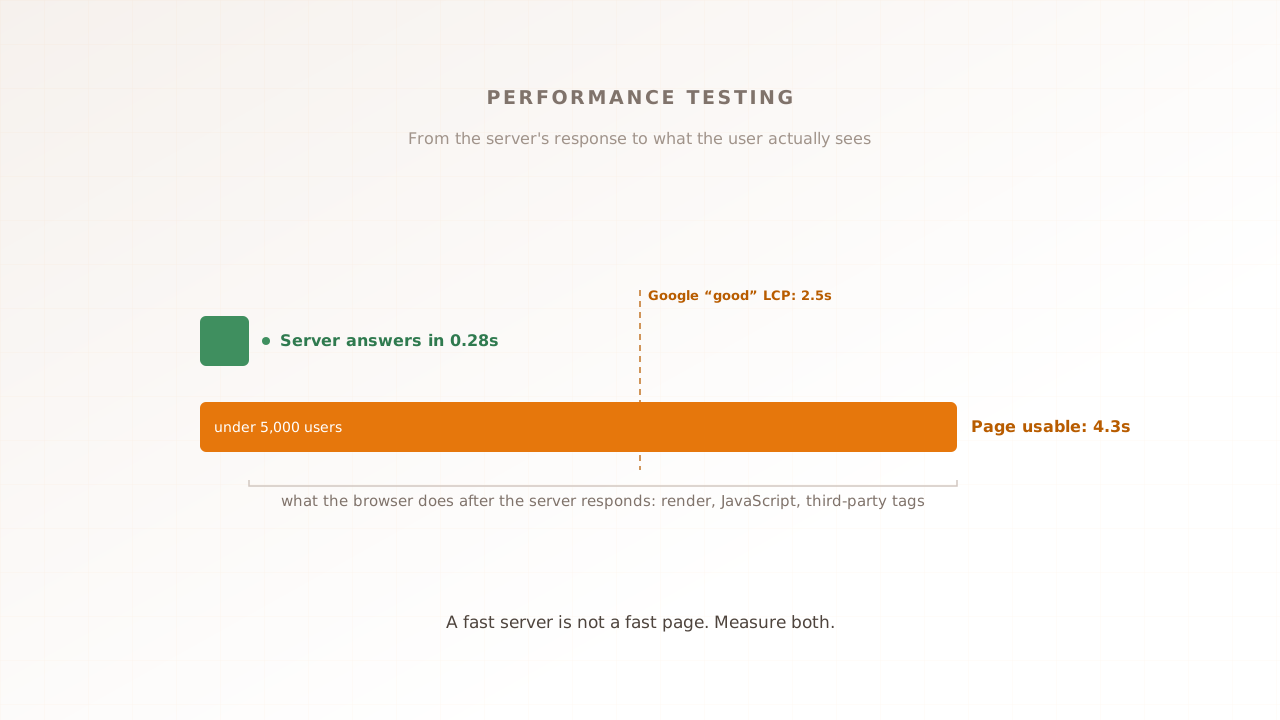
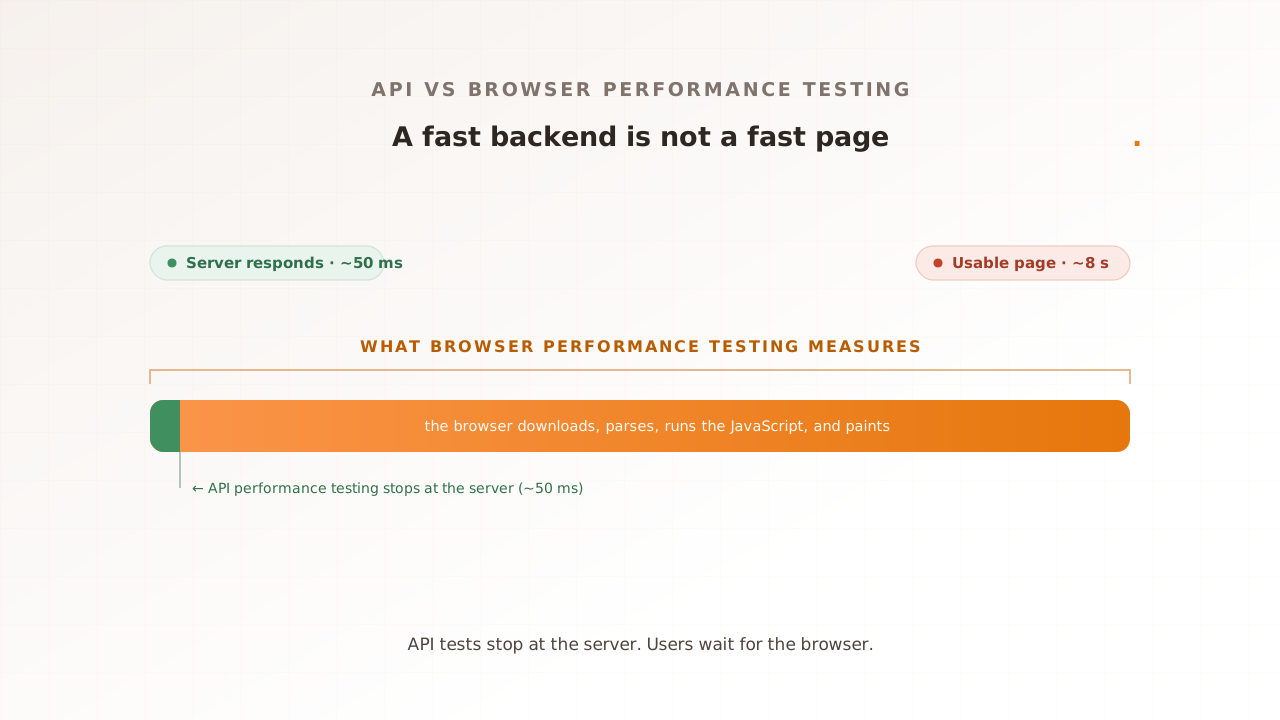
This is a deliberate boundary. Running a real browser for every virtual user is heavier than pacing raw HTTP requests, so for a pure API load test or an extreme requests-per-second target, a protocol-level tool like k6 or JMeter is the lighter fit, and they report p95 latency perfectly well. What they cannot show is the rendered experience, or the session behind the slow request. When the question is what your users actually felt at peak, that takes a real browser.
Read the percentile, then open the session
Reading p95 and p99 response time is how you stop the average from lying to you. The mean describes no one. The median tells you the typical visit, and the tail tells you who is suffering and by how much. Read the percentiles together, set a target that matches the cost of a slow request, check that your measurement is not quietly omitting the tail, and when a percentile turns red, open the session behind it. The number tells you where to look. The session tells you what to fix.
Test in real browsers. Debug in real sessions. Book a demo.