What is the difference between lab data and field data?
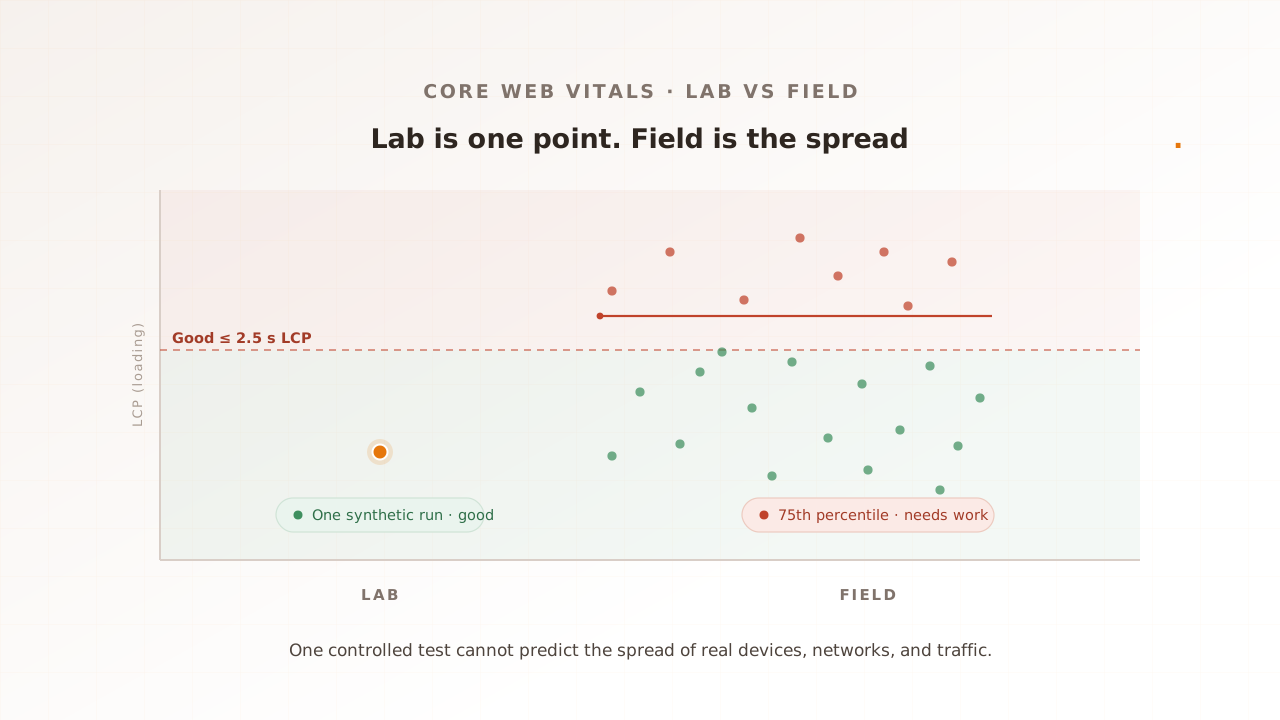
Lab data is a single performance measurement taken in a controlled test: one page load, on one device, over one network, with no other traffic. Field data is the spread of measurements from real visitors’ browsers, reported at the 75th percentile. Lab gives you a fixed point. Field gives you a distribution. They rarely match, and they are not meant to.
The lab number is what a tool like Lighthouse or the lab section of PageSpeed Insights produces. It loads your page once in a fixed environment and reports the result, which makes it fast and repeatable. The field number is Real User Monitoring (RUM): the metrics that actual Chrome users recorded, collected in the Chrome User Experience Report (CrUX) over a rolling 28-day window. PageSpeed Insights shows both side by side, which is why the two scores so often appear to disagree on the same page.
Core Web Vitals are Google’s three page-experience metrics: Largest Contentful Paint (LCP) for loading, Interaction to Next Paint (INP) for responsiveness, and Cumulative Layout Shift (CLS) for visual stability. Each is scored at the 75th percentile of real visits, meaning three of every four visits are at least that good. That percentile is the heart of the difference. A lab run is one visit under one set of conditions; the field score is the conditions of your whole audience, sorted, with the slower quarter still counted.
Google is explicit that the two will diverge. Its own guidance on the difference between lab and field data lists the reasons: different devices, networks, and locations; cache state; pages restored from memory; and user interactions a lab cannot predict. Lab and field are not a right answer and a wrong answer. They are two different questions.
Why does the gap between lab and field matter?
The gap matters because the field number is the one your users live with and the one Google Search ranks on, while the lab number is the one you watch during development. When they disagree, a page that looks healthy in testing can reach real visitors as a poor experience, and a slower experience measurably costs conversions and revenue.
A failing field result is more common than a green lab score suggests, and device averages hide it. In the 2024 Web Almanac, INP passed on 97% of desktop sites but only 74% of mobile ones in CrUX field data. That split is the problem in one statistic: test on a fast laptop and you measure the desktop 97%, not the mobile experience most of your visitors actually get. Mobile field data folds in slower devices, weaker networks, and real interactions, and almost none of that surfaces in a single synthetic run.
The cost of getting it wrong is not abstract. A 2020 Deloitte study commissioned by Google, Milliseconds Make Millions, found that a 0.1 second improvement in mobile site speed raised retail conversions by 8.4% and travel conversions by 10.1%. Speed that only exists in the lab does not move those numbers; the speed real users get does. That is the gap between a lab score and a field score, priced in revenue. Closing it starts with measuring what users actually experience, which is what performance testing is for.
Why do lab scores differ from real-user traffic?
Lab scores differ because a lab run fixes everything real users vary. It picks one device, one network, one location, and one cold page load, performs no interactions, and reports a single result. Real traffic is thousands of different devices, connections, and cache states, with real clicks, arriving in volume. Four differences do most of the damage.
Lab is a single sample; the field is a distribution
A lab test is one measurement; the field score is the 75th percentile of many. That alone produces a gap. Take a product page that renders its LCP image in 2.0 seconds in the lab. In the field, visits on fast devices come in around 1.6 seconds, but the slowest quarter, on older phones over mobile data, sit at 3.1 seconds. The 75th percentile is 3.1 seconds, past the 2.5 second good threshold, even though the lab said 2.0 and most visits beat it. Google’s lab-and-field guidance makes the point plainly: one lab run cannot represent the range of conditions a metric is scored across. A green number says nothing about the shape of the distribution behind it.
Lab fixes one device and one network; real users vary
By default, Lighthouse throttles to a Slow 4G profile: 1.6 Mbps download and 150 ms latency, with a constant 4x CPU slowdown, the documented default as of 2026. The documentation notes those settings represent “roughly the bottom 25% of 4G connections.” This is where the common belief that lab is always rosier than field breaks down. The lab network is deliberately slow, and the CPU penalty approximates a mid-tier phone, so for a site whose real audience is on fast connections and recent devices, the lab LCP can be worse than what most users see. For a site whose audience is mostly budget Android phones on patchy networks, the lab can be optimistic. Lab is not a best case or a worst case. It is one fixed operating point, and your field distribution sits around it in a position you cannot read off the lab number alone.
Lab loads the page once, cold, and never clicks
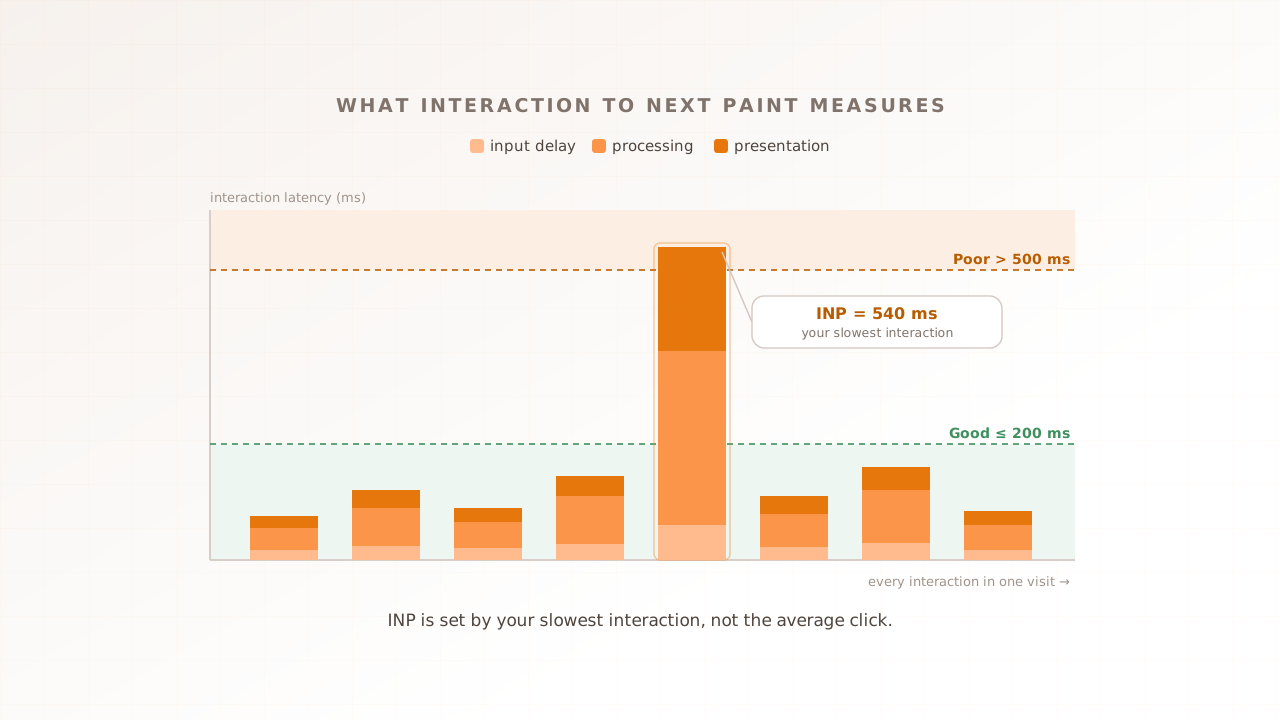
A lab run fetches the page fresh, with an empty cache, then stops. Real users arrive with warm caches, hit pages restored instantly from the back/forward cache (bfcache), and, most importantly, interact. INP measures the delay between a user action and the next frame the browser paints, so it needs a real click, tap, or keypress to exist. A cold lab load performs none, so Lighthouse falls back to a proxy, Total Blocking Time, and estimates. The proxy and the real metric do not always agree. When Google replaced First Input Delay with INP as the responsiveness Vital in March 2024, more sites fell short, because INP captures the full interaction rather than just the first input’s delay. Third parties widen the gap further: in the 2024 Web Almanac, third-party code for ads, analytics, consent, and more appeared on 92% of pages, and it behaves differently for every real user, while a lab run sees one deterministic pass.
Real traffic arrives under load; the lab server is idle
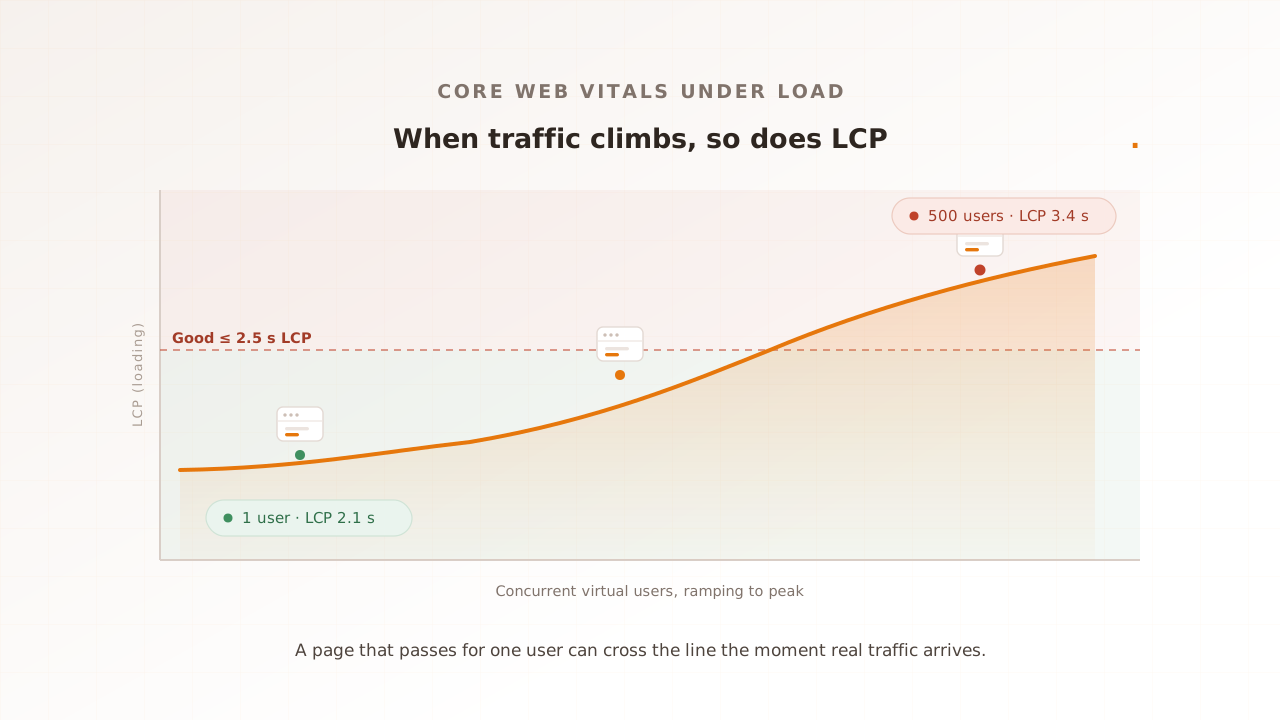
The other three differences are conditions a lab approximates badly. Load is the one it does not model at all. A lab audit runs against a server with no other traffic, so it never sees what happens when thousands of users hit the same backend at once: requests queue, the server’s first byte takes longer, and interactions that wait on it inherit the delay. A page can score 96 in Lighthouse on an idle server and still ship a failing field LCP once real traffic and real devices are both in play. This is the cause that needs concurrency to reproduce, and it is covered in depth in Core Web Vitals at load. The short version: the only way to see load-driven movement before release is to generate the load yourself.
Lab vs field: which should you trust?
Trust both, for different jobs. Field data is the ground truth for what users actually get and what Search ranks on, but it arrives after the fact. Lab data is repeatable and immediate, so it catches regressions before release, but it sees only one synthetic case. A load test adds a third view: synthetic, so it runs before release, and concurrent, so it sees what a single-user lab run cannot.
The three are not competitors. They cover for each other’s blind spots.
| View | What it measures | Best for | Blind spot |
|---|---|---|---|
| Lab (synthetic) | One controlled page load on a fixed device and network | Catching regressions before release, comparing one build to the last | Concurrency, the real-device spread, real interactions |
| Field (RUM, from CrUX) | Real visits at the 75th percentile over a 28-day window | The ground truth for user experience and Search ranking | Arrives after the fact, Chrome only, no pre-release signal |
| Real-browser load test | Core Web Vitals across real browsers at target concurrency | Seeing the experience at peak before launch | Not a substitute for steady-state field truth |
Knowing where each number lives stops a lot of false alarms. PageSpeed Insights shows the Lighthouse lab run and the CrUX field data for a URL together, which is exactly why they so often appear to disagree on one page. The Search Console Core Web Vitals report tracks field status across your site over time. A load test is the one you run yourself, against a staging or production target, when you need an answer before the field has one.
In practice the workflow is straightforward: watch lab in development, field for the real-user distribution, and run a real-browser load test before a release or known spike. Evaluat Pulse returns LCP, CLS, FCP, and TTFB from one real-browser load with Evaluat’s A to F composite grade and a video. A single cold load does not produce a representative INP. It is one controlled lab result, not a preview of every customer’s device.
Common mistakes reading lab and field data
The mistakes below all come from treating one number as the whole truth. Each has a fix that takes the other view into account.
- Treating a single lab score as a prediction of real-user experience. A green Lighthouse run on an idle server is a code-quality check, not a forecast of your field data. Fix: confirm the result against CrUX and a concurrent test before you trust it.
- Optimising the lab proxy instead of the field metric. Chasing a better Total Blocking Time is not the same as improving INP, which only real interactions produce. Fix: optimise against the field metric and verify with a test that performs the interaction.
- Comparing a cold lab run to warm-cache field data and panicking. They start from different cache states, so a slower lab number can be expected rather than a regression. Fix: compare like with like, lab against lab and field against field.
- Forgetting the field reporting lag. CrUX reflects a rolling 28-day window, so a fix can look like it did nothing for weeks. Fix: verify the fix in the lab and under load immediately, then wait for the field to catch up.
- Never testing under concurrency. If you only ever measure one user, the load-driven gap stays invisible until peak traffic exposes it in production. Fix: include a real-browser load test in the release process.
How Evaluat measures controlled browser experience
Evaluat is a real-browser performance testing platform that runs each virtual user in its own isolated browser and captures the three Core Web Vitals (LCP, INP, and CLS), plus FCP, under load. These are what the controlled browsers recorded under the selected conditions, not a server-side estimate or a claim that field CrUX will match.
A virtual user is one simulated visitor the test drives through your page. Evaluat gives each one a real, isolated browser, so the numbers include rendering, JavaScript, and third-party tags while you control the region, concurrency, and journey. That is the view between lab and field: synthetic and repeatable, but concurrent and browser-based. It is not a substitute for the device and network distribution in field data.
When a page misses its target at peak, the report ties the number to evidence. Every virtual user has a session you can open: its Core Web Vitals, plus video, a network log, and a console log, broken down per URL and across the load curve, with percentile views and an Apdex score. A 3.4 second LCP at peak is not a bare statistic; you can watch the session where it happened.
There is a clean dividing line here. If you are testing a pure API, a non-HTTP protocol, or chasing extreme requests per second, a protocol-level tool like k6 or JMeter is the better fit; those tools measure server response, which is necessary but not the same as page experience. And field data stays the ground truth for steady-state user experience. Evaluat’s job is the gap the lab and the field both leave open: what real traffic does to the experience, before your users meet it. For the metrics themselves, see Interaction to Next Paint.
Lab and field are not in conflict. They answer different questions, and the experience neither one shows on its own is what happens under real traffic. Measure all three, and you catch the regression while it is still a test result instead of a support ticket.
Test in real browsers. Debug in real sessions. Book a demo.