What is an Apdex score?
An Apdex score (Application Performance Index) is a single number between 0 and 1 that summarizes how satisfied users were with response time. You set a target time, called T. The score counts how many requests came back fast enough to satisfy users, gives half credit to the ones users merely tolerated, and none to the rest.
A score of 1 means everyone was satisfied, and 0 means no one was. Think of it as a pass rate with partial credit: instead of listing every individual response time, or even a handful of percentiles, Apdex reports one figure, the share of requests that kept users happy, with the near misses counted at half. A product manager, an SRE, and an executive can all read 0.92 and agree on what it means.
Apdex is an open standard, not a vendor metric. It was defined by the Apdex Alliance, a group formed in 2004 by Peter Sevcik of NetForecast, and it is published as a free technical specification. That is why the same score turns up across monitoring and testing tools that otherwise share nothing: they are all computing the one formula.
The thing being measured is response time, the gap from a request being made to the response arriving. Apdex does not care whether that request is an API call, a page load, or a checkout step. You decide what to measure and what target to hold it to, and the formula does the rest.
Why measure user satisfaction with one number?
Because a distribution of response times is hard for a team to act on, and because response time maps to satisfaction in fairly predictable steps. A latency histogram means a lot to an engineer and little to a product owner. Apdex compresses it into one figure the whole team can track from release to release.
The “satisfaction” part is not marketing. Decades of usability research, summarized by the Nielsen Norman Group (1993, updated 2014), put firm limits on how long people will wait before a delay changes their behavior. About one second is the limit for a user’s flow of thought to stay uninterrupted. About ten seconds is the limit for keeping their attention on the task at all. Below a tenth of a second, an action feels instant. Those thresholds are why a target time means anything: cross them and satisfaction does not fade gently, it drops in ways users feel and act on.
That behavior has a price. Slower pages bounce more visitors and convert fewer of them, an effect documented across retail and B2B studies, and the post on eight metrics every report should include covers the revenue side in detail. Apdex is the metric that turns “the page got slower” into “user satisfaction dropped from 0.95 to 0.88 this release,” which is a sentence the whole organization can act on.
How is an Apdex score calculated?
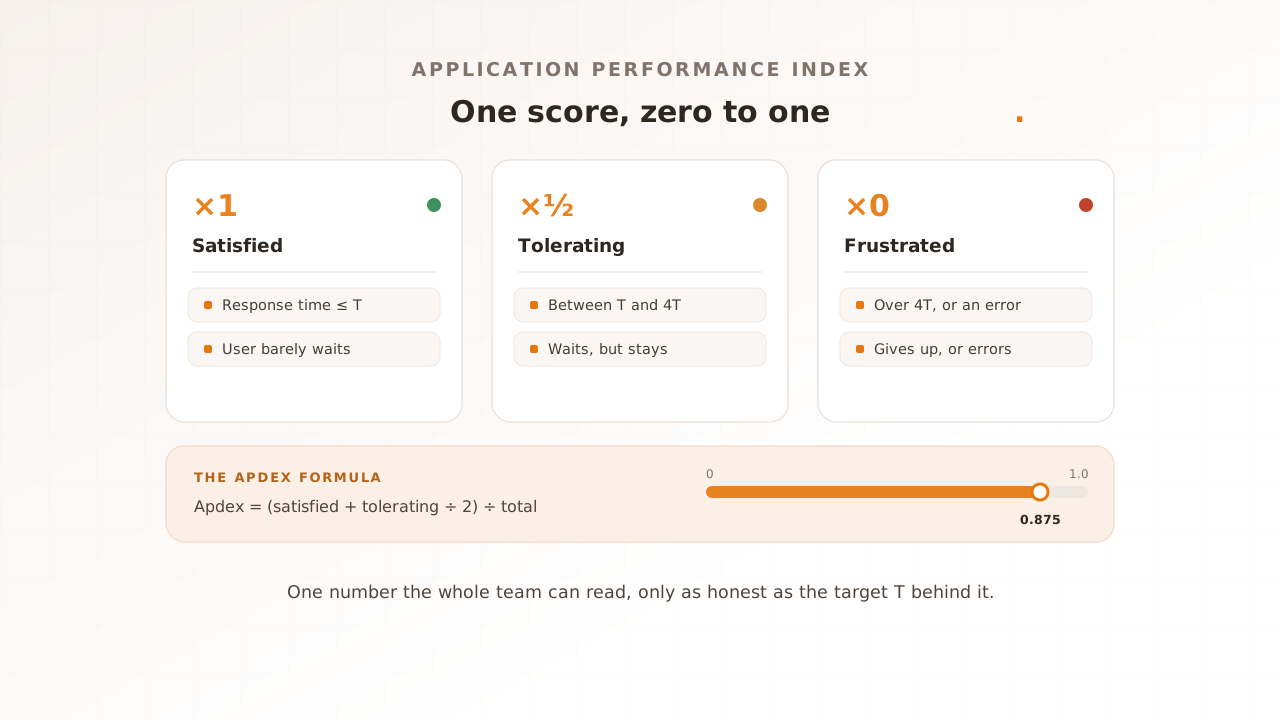
Apdex sorts every measured request into three buckets against your target time T, weights them, and divides by the total. Satisfied requests count fully, tolerating requests count half, and frustrated requests count zero. The result always lands between 0 and 1, and it rises as more requests fall into the satisfied bucket.
The formula
The formula is:
Apdex = (satisfied count + (tolerating count / 2)) / total samples
Half credit for tolerating requests is the whole idea. A user who waited a little longer than ideal but stayed is not as happy as one served instantly, and not as unhappy as one who gave up. Counting them at one half puts the score between those two extremes.
Satisfied, tolerating, frustrated
The three buckets are defined by T and by four times T:
- Satisfied: response time at or under T.
- Tolerating: response time over T, up to and including 4T.
- Frustrated: response time over 4T.
Many implementations also count a request that errored as frustrated, regardless of how fast it failed; New Relic, for example, treats any server-side error this way. Others keep errors out of the score and report the error rate separately. A fast error still leaves the user stuck, so whichever convention your tool follows, read the error rate beside the score.
Here is a worked example. Suppose a checkout step is measured 1,000 times during a load test, with T set to 1 second. 800 responses came back at or under 1 second (satisfied), 150 came back between 1 and 4 seconds (tolerating), and 50 took over 4 seconds or errored (frustrated). The score is (800 + 150 / 2) divided by 1,000, which is (800 + 75) divided by 1,000, or 0.875.
Why 4T?
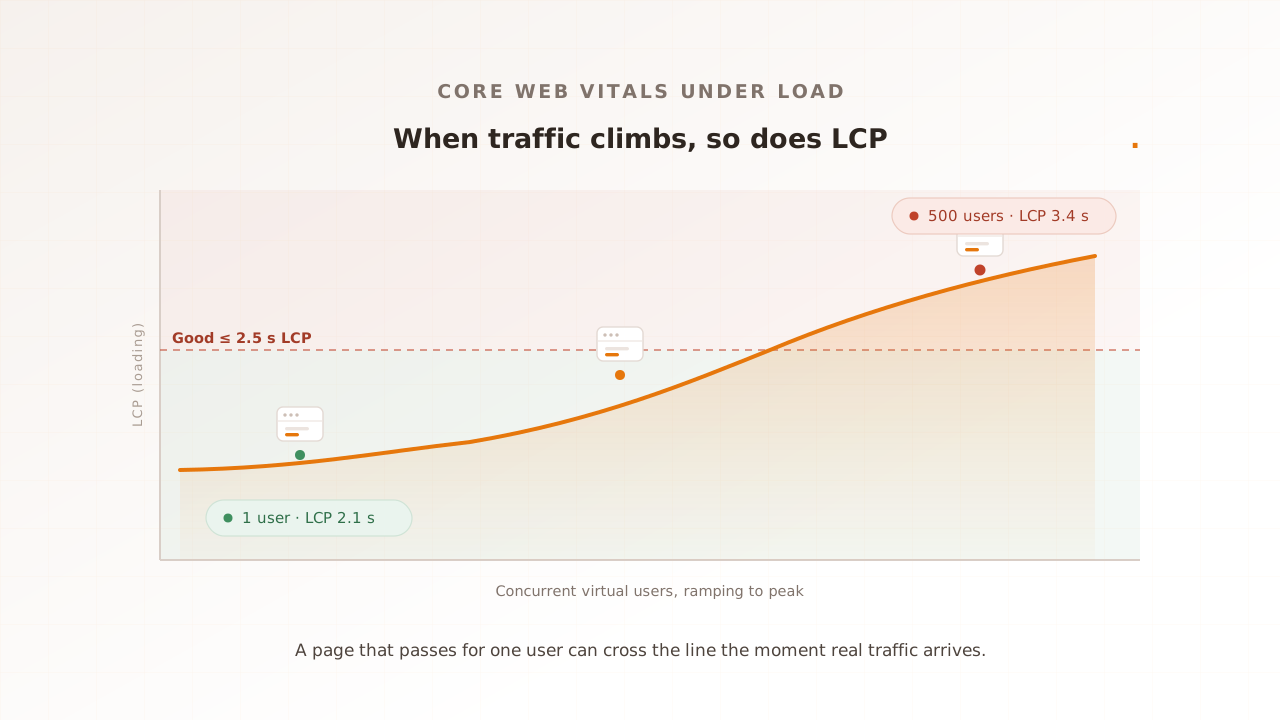
The standard fixes the frustration boundary at four times the satisfied threshold. It is a single multiplier meant to approximate the point where waiting tips into abandonment, so you only have to choose one number, T, and the other follows. It is a convention, not a measurement of your own users, and for an interaction that should feel instant, real frustration often arrives well before 4T. Many modern implementations therefore set the frustration boundary independently instead of multiplying. Google’s web.dev thresholds work this way: a Largest Contentful Paint within 2.5 seconds is good and anything over 4 seconds is poor, a boundary the 4T rule would have placed at 10 seconds. Treat 4T as a sensible default, and revisit it if your action’s tolerance is genuinely tighter.
How do you choose the Apdex T threshold?
Set T to the response time at which users stop feeling an action is fast, for that specific action, then keep it fixed. T is the one input you control, so the score is only as meaningful as the target behind it. The same application can look excellent or poor depending solely on where you draw the line.
Anchor T in what the action is. A tap or a type-ahead that should feel immediate deserves a sub-second T, near the one-second flow-of-thought limit or below it. A heavy report that everyone expects to grind for a moment can carry a T of a few seconds. One global T for every interaction is the most common way to make the score lie. New Relic defaults its Apdex T to 0.5 seconds for application servers, a reasonable starting point for a backend, but a default is a starting point, not an answer.
The rule that matters most is the simplest: keep T fixed across runs. If you tighten or loosen T between builds, a change in the score tells you nothing about the application, only about your bookkeeping. Set T once per action, write it down, and hold it, so that a falling Apdex always means the same thing: it got slower for users.
What is a good Apdex score?
As a rule of thumb, 0.94 and above is treated as excellent and anything below about 0.5 as unacceptable, but a score only means something against a stated T. A 0.95 measured with a generous 10-second target can describe a slower experience than a 0.85 measured with a strict 1-second target. Read the score and its T together, always.
The Apdex standard itself defines only the 0-to-1 index. The familiar five-tier rating scale is a convention popularized by monitoring vendors. The classic version draws its lines at 0.50, 0.70, 0.85, and 0.94, with a score that lands exactly on a boundary rating into the upper band:
| Apdex score | Common rating |
|---|---|
| 0.94 to 1.00 | Excellent |
| 0.85 to 0.94 | Good |
| 0.70 to 0.85 | Fair |
| 0.50 to 0.70 | Poor |
| below 0.50 | Unacceptable |
Exact boundaries vary slightly between vendors; Dynatrace, for example, places the poor-to-unacceptable break at 0.49 rather than 0.50. The labels are useful shorthand, but do not let them stand in for a target you set deliberately. “Good” against a lazy T is not good.
Apdex vs response time percentiles
Apdex and response time percentiles answer different questions, and a good report carries both. Apdex gives you one satisfaction number for the whole run, easy to track and to report upward. Percentiles describe the shape of the distribution behind it, including the slow tail where regressions live.
A percentile is the value a given share of requests came in under: p95 is the time 95% of requests beat, and only the slowest 5% were worse.
| Apdex score | Response time percentiles | |
|---|---|---|
| Answers | How satisfied were users overall? | How slow was it, across the distribution? |
| Output | One number from 0 to 1 | A value per percentile (p50, p95, p99) |
| Best for | A headline the whole team can track | Finding and diagnosing the slow tail |
| Blind spot | Two different distributions can score the same | No single number to rally around |
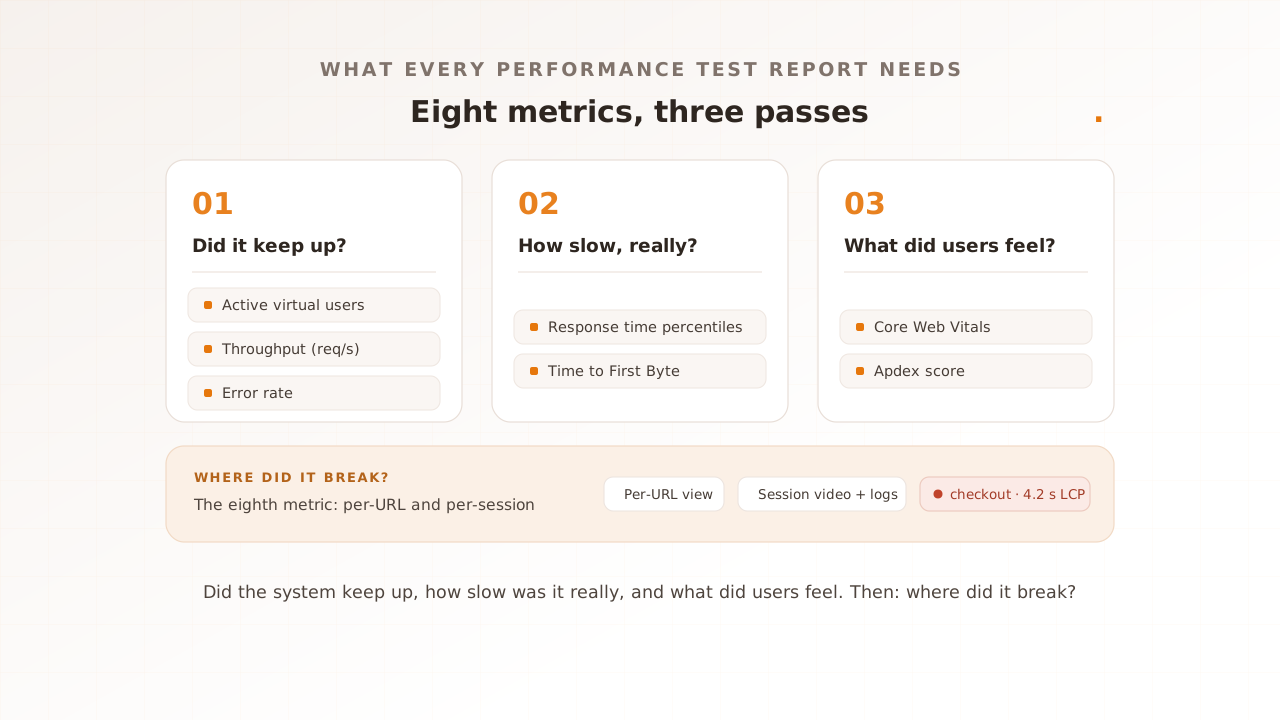
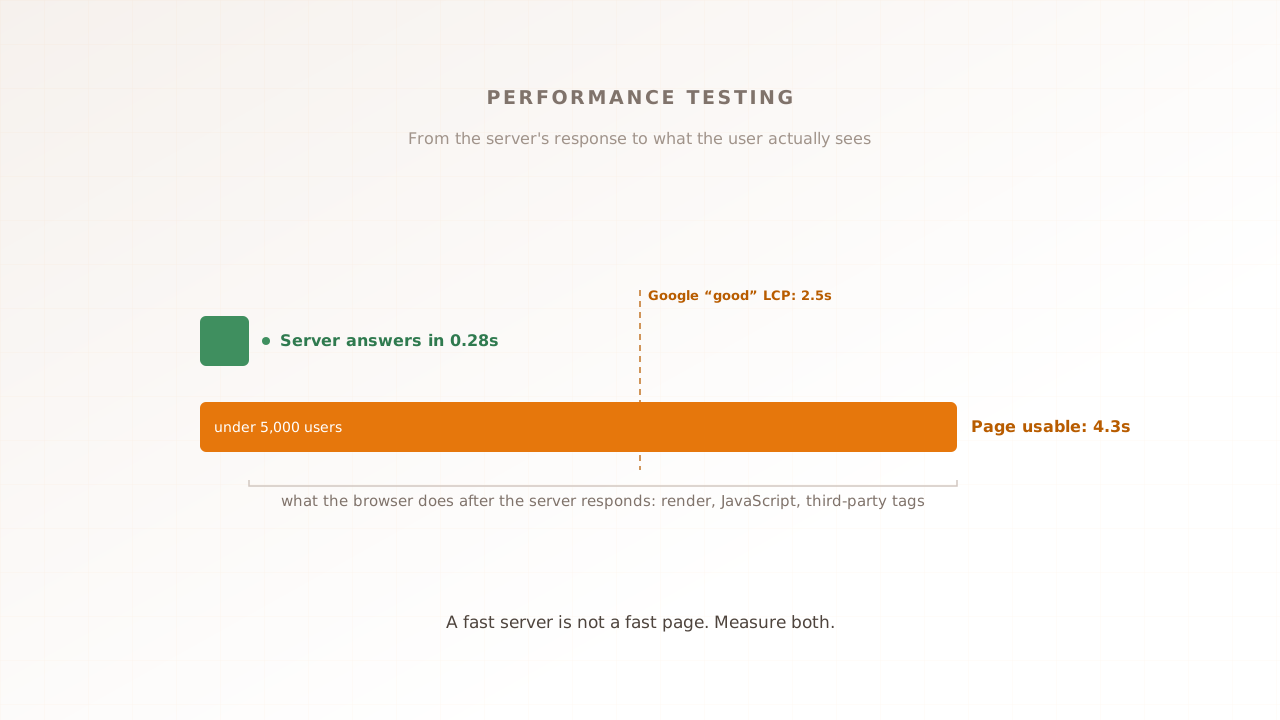
Apdex is the headline; percentiles are the diagnosis. Core Web Vitals are not a rival to either, because they sit at a different layer. Apdex is a scoring method: it can summarize any response-time-like measurement against a threshold. Core Web Vitals are measurements: Google’s fixed-threshold metrics for what the page actually did in the browser. The two compose rather than compete, and a real-browser testing tool can apply the Apdex method directly to web-vital measurements, scoring what users saw rather than what the server sent.
Common mistakes with Apdex scores
Most Apdex mistakes come from trusting the single number without the context that produced it. Five recur often enough to name.
- Moving T between runs. Change the target and the score moves for reasons that have nothing to do with the application. Set T once per action and keep it fixed, or the trend is meaningless.
- Trusting one number. Two very different distributions can produce the same Apdex, so the score can hold steady while the experience changes underneath it. Keep the percentiles, and the individual sessions, behind it.
- Ignoring errors. A run full of fast failures can still post a healthy average response time. Implementations differ on whether errors count as frustrated; New Relic folds them in, while other tools report them separately. Know which your tool does, and read the error rate beside the score either way.
- Treating 4T as gospel. The four-times multiplier is a default, not a fact about your users. For interactions that should feel instant, frustration arrives long before 4T, a known limitation of a fixed threshold.
- Reading one site-wide score. A healthy overall Apdex can hide a single revenue-critical page sitting in the frustrated bucket. Score per URL and per transaction, not just per site.
Read with these caveats, one honest number is genuinely useful, which is why Apdex is still in active use as of 2025. It is now best treated as the summary of a fuller report rather than the whole story.
How Evaluat reports Apdex
Evaluat is a real-browser performance testing platform, and its reports include an Apdex score as a summary alongside browser timings. Read the score against the thresholds shown in the report, then use percentiles, per-URL detail, and individual sessions to diagnose why it moved. The result describes the selected test conditions; it is not a Google score or a substitute for field data.
The score is useful only with its thresholds visible. Core Web Vitals keep their published Google thresholds, while Apdex remains a separate summary method; do not describe either one as Google’s grade.
The score sits on top. What makes it trustworthy is everything the report keeps underneath it: response time percentiles from p50 to p99, a per-URL and per-transaction breakdown, Core Web Vitals (Largest Contentful Paint, Interaction to Next Paint, Cumulative Layout Shift), and the evidence behind every number, namely session video, a network log, and a console log for each virtual user. When the Apdex on a page falls between builds, you do not just watch the number move. You open the slowest sessions and see what slowed. Forensic detail beats aggregate percentiles.
Apdex is a summary, not a diagnosis; it earns its place above the distribution and the sessions, never instead of them. And if you are load-testing a pure API or chasing high request volume with no page to render, a protocol-level tool like k6 or JMeter is the right instrument, and it can score Apdex on server response time. When the question is what controlled browsers recorded under load, use a real-browser test and keep field data for the full user population.
An Apdex score is the one number that tells a whole team whether users were satisfied, as long as you set an honest target and hold it fixed. Read it as the headline of a report, with the percentiles and the sessions behind it to explain why it moved, and a dropping score becomes a fix instead of a mystery.
Test in real browsers. Debug in real sessions. Book a demo.